In This Blog
Everything is lost weekly from your front desk because of scheduling manually, and how a specific software feature plugs that drain:
- The 19.5 hours per week your receptionists are secretly losing
- The 24/7 self-service booking system that will eliminate your largest daily phone call issue
- Why automated reminders always beat manual no-show chasers dollar-for-dollar
- One click of reschedule links and goodbye to the old-fashioned domino calendar syndrome forever
- Intake digitalization and EHR integration: Your final paper process is doomed
Your front desk person did not join your company to spend half their shift on the telephone. But in most medical practices, this is precisely the case. Rescheduling one appointment disrupts three more. No-show follow-up calls interrupt lunch breaks. All of it costs you money, but none of it comes as a charge on your bill. This blog explains hours lost to manual booking and the software features that recover them.
How Clinic Appointment Booking Software Stops Your 19.5-Hour Workweek Leak
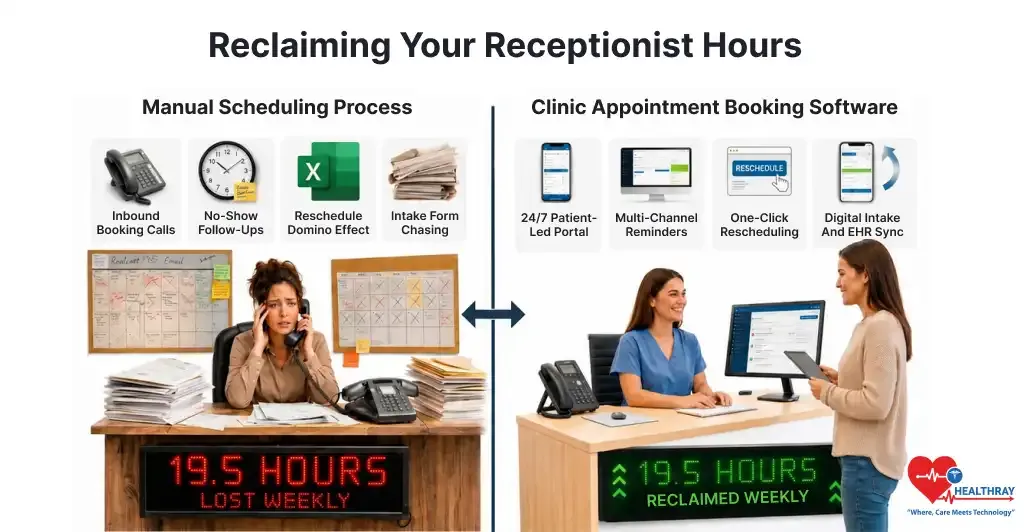
Before investing in any solutions, including clinic management software, it’s important to understand the underlying issues. While manual scheduling may only seem to generate unnecessary work, it is actually causing the loss of valuable employee hours every week. The following calculations reveal the approximate number of receptionist hours wasted per week when receptionists manually manage appointments using an Excel sheet.
Inbound Booking Calls
30 calls per day × 4 minutes average handle time spent checking availability, confirming patient details, booking appointments, and answering scheduling questions × 5 days = 10 hours per week.
This is the baseline cost of running a clinic that relies primarily on phone bookings. While some practices consider using an appointment setting agency to reduce call volume, automated online scheduling provides a more scalable long-term solution. Each phone call interrupts receptionists as they check the Excel sheet, verify insurance, and update appointments manually. Four minutes per call seems conservative.
No-Show Follow-Ups
5 ghosted patients per day × 6 minutes spent identifying missed appointments, calling patients, leaving voicemails, documenting outcomes, and updating the schedule = 2.5 hours per week.
The average percentage of no-shows is about 18%. If a health center operates 30 patients daily, then there will be five to six who won’t attend. One must determine who doesn’t show up, try contacting the patient, record what happened, and consider rescheduling the appointment slot. It’s about six minutes per patient, five times a week.
Reschedule Domino Effect
8 schedule shifts per day × 5 minutes spent updating appointments, checking provider availability, notifying patients, confirming new time slots, and revising the clinic calendar = 3.3 hours per week.
One reschedule is never simply one reschedule, as receptionists must also update the Excel sheet and adjust multiple appointment entries manually. It creates space for a wait-list patient who then has to be contacted and scheduled. In case the patient rejects the appointment, the cycle continues. The point here is that each time you reschedule, it becomes a cycle all by itself.
Intake Form Chasing
15 patients per day × 3 minutes spent printing intake forms, scanning paperwork, entering patient information into the system, and chasing incomplete or missing documents = 3.7 hours per week.
Hand-out forms from the entrance are data entry work on the backend, requiring receptionists to record patient information in an Excel sheet before updating clinic records. The forms submitted via fax or email must be retrieved, associated with the correct patient account, and re-entered manually. Therefore, almost four hours a week are spent entering and processing paperwork that shouldn’t even exist.
Weekly Time Breakdown
All four task categories form what we call the Front Desk Hour Drain (FDHD): the total weekly hours a clinic loses when appointment booking, no-show management, rescheduling, and intake processing run on manual effort instead of software. FDHD is measurable, task-specific, and fully recoverable. Here is the complete breakdown:
| MANUAL TASK | WEEKLY HOURS LOST |
| Inbound Booking Calls | 10.0 hours |
| No-Show Follow-Ups | 2.5 hours |
| Reschedule The Domino Effect | 3.3 hours |
| Intake Form Chasing | 3.7 hours |
| TOTAL WEEKLY DRAIN | 19.5 HOURS |
This comes to be about half the work schedule of a full-time employee. This is because the time lost will never really be noticed by any individual, and the leadership will not get to know the total impact. Each of these hours can actually be recovered with the right clinic scheduling software. How this is done follows.
Reclaiming Your 10-Hour Inbound Call Drain With A 24/7 Patient-Led Portal
The solution to managing inbound calls is not hiring a faster receptionist. It is letting patients book appointments online through your website, reducing the need for phone calls and manual scheduling.
Why Self-Booking Changes Everything
Today’s modern patient scheduling systems connect with your real-time calendar system and allow patients to make an appointment themselves, from wherever and whenever, all online, eliminating the need to call at any time. A patient at 11 pm will be able to make a Wednesday appointment without any intervention on the part of any employee. By 2024, 89% of patients considered patient self-scheduling through their mobile phones to be very important.
The concept of availability can also be understood in terms of availability at the point of time, taking into account the filters of provider, type of appointment, and location. Appointments can then be made in the calendar system that your company employs, making sure there are no mistakes due to duplicate entries. The Clinic software usability testing will make sure that appointments can be made efficiently. However, what really changes is how your receptionist utilizes their mornings; freed from all the hassle of phone calls, they have to attend to more personal stuff.
Hours Reclaimed: Up To 10 Per Week
 PRO TIP
Reclaiming Your 2.5-Hour No-Show Chase With Automated Multi-Channel Reminders
The 2.5 hours per week that your staff members waste trying to catch up with no-shows are completely avoidable. People miss their scheduled time not because they don’t care; they simply forgot or never received a reminder.
How Automation Replaces The Chase
With the clinic appointment booking software, SMS notifications will be sent 48 hours before, while email notifications will be sent 24 hours before, along with the confirmation of appointments that can be responded to using just a click. If there is ever a cancellation by a patient, the software will automatically free up the allocated appointment time slot.
In addition, research conducted at a U.S. children’s clinic found that automated reminders reduced no-show rates from 38.1% to 23.5%, a 14.6% point reduction. Moreover, the research carried out at Duke Medicine showed a 2.0% decline in the monthly rate of no-shows among those patients receiving three-channel reminders.
Hours Reclaimed: 2.5 Per Week
 NOTE
NOTE
Reclaiming Your 3.3 Hours Lost To The Rescheduling Domino Effect With One-Click Links
The reschedule dilemma is essentially one of communication. The patient must reschedule the appointment. This is where the distinction between clinic software vs hospital software becomes important, as clinics need simple, patient-friendly rescheduling rather than complex scheduling workflows. It may be done by calling and setting off the inbound call flow, or simply by not turning up and starting the no-show chasing process. Neither solution will work for your practice.
Cutting The Telephone Tag Completely
Moreover, clinic appointment booking software solves this problem by including a one-click rescheduling option in the original confirmation message, eliminating the need for patients to call the clinic or staff to manually update schedules in Excel sheets. If patients need to change their plans, they simply click the link, choose a new time slot, and confirm the appointment without making a phone call.
Each manual reschedule pulls three to five minutes away from patient-facing work. Multiply that by eight shifts a day, five days a week. The savings add up fast. In addition, open access scheduling studies by AHRQ prove that patient-managed digital appointment booking needs less staff involvement in scheduling backlog and no-shows.
Hours Reclaimed: 3.3 Per Week
Reclaiming Your 3.7-Hour Intake Form Chase With Digital Intake And EHR Sync
Intake form processing does not typically show up on a productivity report. But the time involved is very real, and it accumulates fast every week, as employees print out forms and enter data into patients’ charts.
From Paper Trail To Zero-Touch Process
As soon as a patient books, the intake process starts automatically. Patients fill out their forms on their phones before arriving. That information syncs directly to their EHR. No manual entry required.
Printing, copying and pasting, scanning, and data entry are not necessary. Patients complete and submit their information before they even set foot in the office, saving everyone a lot of trouble. Check-in is quick, data is accurate straight away, and with reliable cloud infrastructure that minimizes cloud clinic software downtime risk, clinicians have everything they need ready to go. We can now handle what used to take four hours a week without any intervention whatsoever.
Hours Reclaimed: 3.7 Per Week
Learn more: Cloud Clinic Software Security Threats and the Audit Questions Every Clinic Should Ask to learn how cloud clinic systems protect patient data and meet compliance requirements.
Final Verdict: Give Your Front Desk The 19.5 Hours Back Every Single Week
The bottleneck at the front desk is not a people issue. It is not because your receptionists are slow or inefficient. The problem is that they must perform tasks that a process owns.
Your front desk team spends 19.5 hours every week handling phone calls, chasing no-shows, and completing scheduling and intake tasks. However, these administrative duties add little value to clinical work or the patient experience.
When you compare the cost of an employee’s salary to those lost hours, the value of appointment scheduling software becomes clear. It becomes a question of whether or not your practice can continue operating like this. And most practices simply can’t. They have just never measured it.
Practices don’t invest in clinic scheduling and appointment management software simply for a general efficiency boost. No, it gives you hours from specific tasks. You get those hours of your week back for your staff. You give your patients back a receptionist who is actually there. And your practice finally gets a functioning front desk.
And that is what clinic appointment booking software really gives you. No features, no demonstration. It gives you 19.5 hours every week.