

In This Blog
Everything you need to score vendor demos objectively instead of being impressed by them:
- A scripted demo shows the software’s best 10%. However, the 12 tasks below test the 90% of your staff who will live daily.
- Score every task 0-2. Below 16 of 24, do not shortlist the vendor.
- Count clicks out loud. Research recorded ED physicians making nearly 4,000 clicks per 10-hour shift in their EMR.
- Vendors dodge three tasks most: billing-error reversal, duplicate-record merge, and internet-outage behaviour.
Clinic software usability testing means making the vendor perform your real daily tasks live in the demo. You score each task on clicks, time, and recovery from mistakes. The 12 tasks below take about 45 minutes and produce a 24-point score – enough to expose the workflow gaps a rehearsed demo hides.
Why Do Polished Demos Hide Usability Problems?
This is because a demo is a performance, not a test. The presenter has rehearsed the same script numerous times on a cleaned-up database that does not contain any duplicates, partial records, or slow Internet connections. All the clicks appear to be done effortlessly, because no interruptions are permitted. And this is exactly the reason why buying a clinic management software based on its demo quality is the most frequent error.
A clinic operates using the flow of walk-in patients during busy OPD hours, a receptionist on two calls, and a physician spending only 4 minutes on each consultation. The gap is precisely evaluated in peer-reviewed literature. A usability and safety analysis published in JAMIA scored health record systems on task duration, click count, and error rate, not on how smooth a presentation feels.
 NOTE
NOTE
How Does The Demo Scoring System Work?
First, confirm you are demoing the right product tier. A single-doctor OPD and a multi-department facility need different systems. Therefore, settle the clinic software vs hospital software question before any demo.
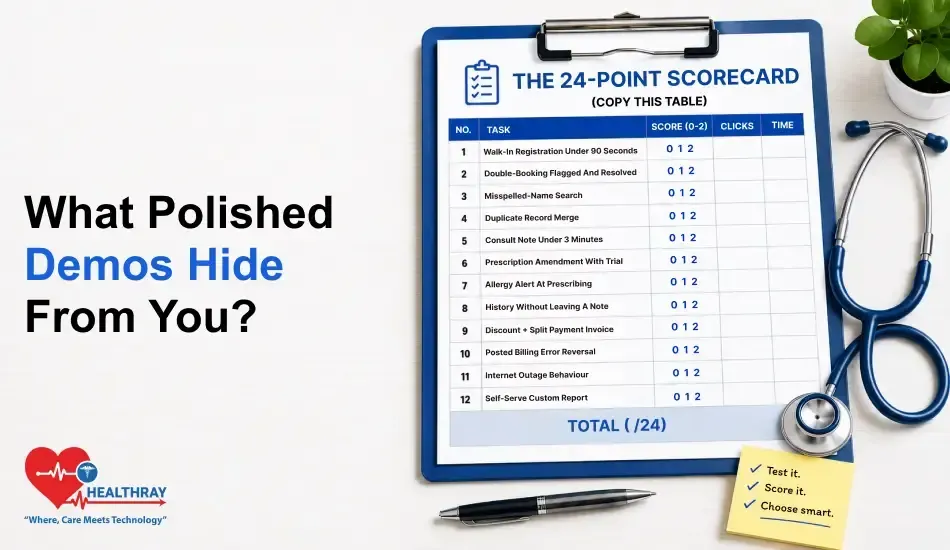
The 24-Point Scorecard (Copy This Table)
| NO. | TASK | SCORE (0-2) | CLICKS | TIME |
| 1 | Walk-in registration under 90 seconds | |||
| 2 | Double-booking flagged and resolved | |||
| 3 | Misspelled-name search | |||
| 4 | Duplicate record merge | |||
| 5 | Consult note under 3 minutes | |||
| 6 | Prescription amendment with trial | |||
| 7 | Allergy alert at prescribing | |||
| 8 | History without leaving a note | |||
| 9 | Discount + split payment invoice | |||
| 10 | Posted billing error reversal | |||
| 11 | Internet outage behaviour | |||
| 12 | Self-serve custom report | |||
| TOTAL ( /24) |
Then score each task from 0 to 2, live, while the vendor performs it:
| SCORE | MEANING |
| 2 | Completed cleanly: few clicks, no detours, easy to repeat |
| 1 | Completed with friction: menu-hunting or “you’d configure this later” |
| 0 | Failed, dodged, or deferred to “onboarding” |
| TOTAL ( /24) | VERDICT |
| 20-24 | Shortlist – proceed to trial with your own data |
| 16-19 | Acceptable – however, re-test the 0-scored tasks first |
| Below 16 | Do not shortlist, regardless of price |
The three principles that prevent cheating in this context include naming the tasks by sending them 24 hours in advance, counting the clicks aloud as one person counts only once, and requesting the task that caused the problem, not the task itself. A systematic review of EHR usability studies revealed that a rigorous testing measure considers error recovery and its severity.
The 12 Clinic Software Usability Testing Tasks
Front Desk Tasks: Registration, Scheduling, And Search
Task 1 – Register A Walk-In In Under 90 Seconds
Say: “Walk in at the counter, and the phone’s ringing. Register them now – minimum fields only.” Award 0 if registration requires insurance information or documentation that most walk-ins won’t have.
Task 2 – Double-Book A Slot, Then Resolve It
Say: “These two patients are both booked for the same 10:30 appointment. Demonstrate the process of recognizing and correcting the error.” Also, check if rescheduling notifies the patient automatically – one component of omnichannel patient experience. Score 0 if double booking goes unnoticed.
Task 3 – Find A Patient With A Misspelled Name
Say: “Search for ‘Katherine’ – except use ‘Catherine” Check for fuzzy matching capabilities, as well as the ability to look up by phone number. Score 0 if searching requires exact name spelling.
Task 4 – Merge Two Duplicate Patient Records
Say: “We have two records of the same patient. Merge those records so nothing gets lost.” Ask to see exactly which data survives and provide an audit trail. Score 0 if the response is “log a help desk ticket” – vendors do that all the time with this one.
Clinical Tasks: Notes, Prescriptions, And History
Task 5 – Complete A Routine Consult Note In Under 3 Minutes
Say: “Record a follow-up: complaint, vital signs, diagnosis, two medications, next visit.” Time your clicks. According to a widely quoted study in the American Journal of Emergency Medicine, ED physicians made nearly 4,000 mouse clicks in a typical 10-hour shift by spending 44% of their time on data entry. Your current note should require only a small portion of it!
Task 6 – Modify A Saved Prescription
Say: “Update the prescription that you just wrote; give me the audit trail.” Score 0 if the system demands deletion of the prescription and recreation – a clinical-safety failure, not just a UX flaw.
Task 7 – Surface A Drug Allergy While Prescribing
Say: “This record lists a penicillin allergy. Prescribe amoxicillin.” If there is no alert, score 0. But score 1 if the presenter skips through any of these alerts without stopping and halting – alert fatigue is a failure of usability too!
Task 8 – Pull Up The Last 3 Visits Mid-Consult
Say: “Provide me with the past visits’ summaries, lab results, and medication list while documenting the note.” Score 0 if the doctor needs to open the currently open note to see the history.
Billing Tasks: Invoicing And Error Correction
Task 9 – Itemized Invoice With Discount And Split Payment
Say: “10% discount on one of the two services, half invoice, half in cash.” If the software is using only invoice-level discounts or tricks to split payments, give a zero score.
Task 10 – Correct A Posted Billing Error
Say: “The clerk made a mistake yesterday, and the customer paid. Unpublish and correct.” Give a 0 score if an invoice is edited without logging the edit. Actually, vendors avoid doing this more than any other, and it’s the type of hidden time cost that ought to be added into your clinic software ROI calculations before you sign a thing.
Resilience Tasks: Outages And Reporting
Task 11 – Show What Works When The Internet Goes Down
Say: “At mid-OPD, you have lost connection for 20 minutes. In this situation, what do your employees have to do?” Be sure to pay close attention to the offline features and auto-syncing. What score would you give to the statement “our uptime is 99.9%”? An SLA will not save you if you lose a connection.
Learn more: Internet failures are predictable; losing your front desk to one isn’t. Cloud Clinic Software Downtime Risk: What Breaks and How to Prevent It maps which workflows collapse first and what keeps patients moving until you’re back online.
Task 12 – Build One Custom Report Without Support
Say: “Revenue by doctor, by service, starting from scratch, please.” If all the custom reports are supported or have to pay fees, rate zero points.
Repeat the same protocol for each vendor’s tasks and the order of tasks. But the comparison turns from impressionistic to objective, or the whole point of clinic software usability testing is before purchase, not after.
 PRO TIP
What We See In Healthray’s Own Demo Room
The two most common tasks that prospects ask about nervously are the duplicate merge (Task 4) and the posted-invoice reversal (Task 10). They also tell us that previous vendors bowed down to “onboarding”. Both are included as standard demo items in Healthray. The merge previews, which visit history, survive before anything commits, and a reversal produces a visit who-did-what trail, a credit note. We are running it both live and on request, every time. So should the other vendors you’re dealing with, and we are.
What Demo Testing Can’t Tell You
- Real data volume. A 5% speed penalty for 500 demo records can translate to a 80% speed penalty when handling 80,000 patients. Load historical data during your free trial, before signing.
- The learning curve. It’s not a secure indication of the new receptionist if they’re finished in 6 clicks. Check the repeatability of the trial.
- Support quality. Score that independently via SLAs and references from 2 clinics of your size.
- The full decision. Usability is one of the four legs of your stool when selecting clinic software, along with cost, scalability, and compliance.
To Sum Up
A well-done demo is a demo of the vendor’s presenter, and a scored demo measures the software. Send a day early and include staff who will use each module, click out loud, and have faith in the 24 count over any feature list. Lastly, think of resistance as information: a vendor who says they don’t have the ability to run your tasks live has already responded to your question.
