

In This Blog,
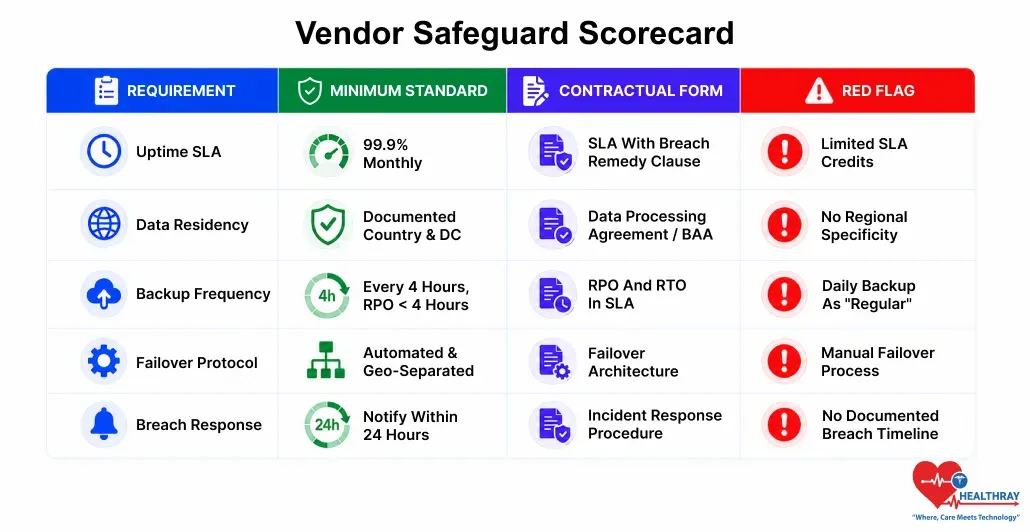
To prevent cloud clinic software downtime risk, five reliability requirements distinguish a vendor responsible under contract from a vendor responsible for marketers’ language. These are what to be sure to require before agreeing:
- Uptime SLA: The contractual commitment to uptime, usually specified in the number of hours of permitted downtime.
- Data residency: The physical locations of patient data and the effects on compliance and recovery.
- Backup frequency: The intervals at which backups are made and the speed of data restoration.
- Failover protocol: The actions that take place automatically when the main infrastructure is out of service.
- Breach response time: The speed with which the vendor detects, contains, and informs you about a breach.
When the cloud clinic software is down, clinics face a real problem since they cannot book appointments, check patients, prescribe, or even bill. Downtime is a real risk, but it is very much preventable, largely if you get the right safeguards in place by negotiating with the vendor before signing the contract. This blog offers a description of five vital vendor requirements, and the proof that you should request for each: uptime SLA, data residency, backup frequency, failover protocol, and breach response time.
Why Cloud Clinic Software Downtime Is a Clinical Risk, Not Just an IT Issue
While considering any clinic management software, reliability usually goes in as a taken-for-granted factor. Still, cloud technology can fail, and in such situations, the result for a clinic’s operation is not recoverable from today’s backup. If a patient is waiting, he/she won’t wait for the vendor’s engineering team.
The difference between managed and catastrophic downtime risk usually comes down to what you negotiate before signing. Those vendors who cannot clearly specify their reliability features in the contract have probably not invested in it, and that lack will become evident when the system is under stress. For clinics, having reliable safeguards is an essential part of business continuity planning, as it ensures that patient care and daily operations can continue even during unforeseen disruptions.
The clinic software functions that break during an outage depend on whether any functions were designed to work offline or in a degraded state. For most clinics that haven’t asked this question:
- The patient check-in process will be halted as there’s no way to get the list of confirmed appointments or patient details.
- Prescription preparation is impossible as one cannot look up a patient’s medication history or write e-prescriptions.
- Billing comes to a standstill since there will be no way to raise invoices, file insurance claims, or process payments.
The omnichannel patient experience relies on cloud infrastructure staying available, so a peak-hour outage disrupts every touchpoint at once.
 NOTE
NOTE
The 5 Vendor Safeguard Requirements: What to Demand and What Evidence to Accept
Every requirement listed has a base level and a form of contract. Spoken commitments made during sales conversations do not count as proof. The proof consists of documents like SLA clauses, system design charts, audit findings, and incident handling methods that are shared before the contract is closed.
1. Uptime SLA: The Number and What It Actually Means
99.9% uptime sounds reassuring, but it still allows 8.7 hours of downtime per year. For a clinic open 6 days a week, that is roughly a full clinic day offline. At 99.95%, you still allow 4.4 hours; at 99.99%, 52 minutes. Always read the SLA percentage together with how downtime is defined and what remedies you receive if the SLA is breached.
- Minimum standard: 99.9% uptime, measured monthly, with remediation credits.
- What to demand: written SLA, clear downtime definition, and credit terms.
- Red flag: annual SLA, or credits capped at one month’s fee.
- Technical evidence: historical uptime from a public status page, not a vendor summary.
2. Data Residency: Where Your Patient Data Lives
Data residency essentially means the exact place where your clinic’s patient data is kept, including the country and data centre. For example, if you are looking for HIPAA-compliant clinic software, the data is only allowed to be stored on infrastructure platforms. For Indian clinics covered under the Digital Personal Data Protection Act (DPDP Act), the obligations to handle and protect patient data rest with the Act. Those clinics that operate in different parts of the world might face legal requirements to keep patient data within the country.
- Minimum standard: written data residency naming the country and data centre provider.
- What to demand: data processing agreement or BAA that states the residency location.
- Red flag: “stored securely in the cloud” with no region.
- Technical evidence: ISO 27001 or SOC 2 Type II for that data centre.
3. Backup Frequency: How Often and How Fast
Backup frequency determines how effective your clinic’s data backup and recovery are, including how far back you can recover. With daily backups, a full restore can lose up to 24 hours of data; with hourly backups, up to one hour. For a clinic handling 100 appointments a day, one hour of data loss is manageable, while 24 hours is operationally catastrophic.
- Minimum standard: backups at least every 4 hours, with RPO under 4 hours.
- What to demand: RPO and RTO written into the SLA.
- Red flag: A backup frequency is declared daily or “regular”, but no RPO is stated.
- Technical evidence: sample restore test, with date of last full test and its RTO.
4. Failover Protocol: What the System Does Automatically
Failover is the system’s automatic way of handling a failure in the primary infrastructure by switching to a backup server, region, or configuration without any human intervention. In the absence of an automated failover, the vendor’s engineers have to manually redirect traffic, which is time-consuming and results in the clinic being offline.
- Minimum standard: documented automated failover to a separate region.
- What to demand: written failover design with primary and standby locations and switch time.
- Red flag: failover run manually by the team, not automated.
- Technical evidence: architecture diagram with primary/standby regions and switch time from the last test.
5. Breach Response Time: How Fast the Vendor Acts
System data breach in a clinic is more than just a technical problem. It is a violation of laws which impose stiff deadlines for the release of notifications. Per HIPAA, clinics are obliged to inform the individuals affected by the breach within no more than 60 days after the breach has been discovered. Following India’s DPDPA, the regulator is the one who decides the deadlines. In case a vendor delays notifying the clinic for 72 hours after getting the breach, this would be a compliance risk that the clinic is powerless to handle.
- Minimum standard: vendor detects a breach and notifies your clinic within 24 hours.
- What to demand: written breach response procedure with timelines, escalation steps, and clinic notification.
- Red flag: only claims like “we take security seriously” with no breach timeline.
- Technical evidence: latest SOC 2 Type II report, focusing on security incident management.
 PRO TIP
How to Use This Scorecard in Your Vendor Evaluation
A scorecard like this can be a kind of filter before making a contract. Hold contract talks only with suppliers who can provide written proof for all five requirements. If a supplier just promises verbally, they have not satisfied the bare minimum requirement. As their clinic software is the one that patients’ continuous care depends on.
1. Request Documentation Before the Demo, Not After
Most evaluations are demo first, trial second, negotiation third, and contract last. Hold the safeguard scorecard right at the start- that is, before the demo. This is actually the best idea. Asking for the SLA, the data residency reporting, and the SOC 2 report at the start enables you to weed out those vendors who are not at the bare minimum.
2. Distinguish Contractual Commitments From Marketing Claims
These 5 mean nothing if they are not part of the written contractual commitments in the SLA or data processing agreement. An oral uptime guarantee given in a sales call without an SLA with a remedy is just marketing, not a commitment. When it comes to clinic software that complies with HIPAA, it is the contract wording that establishes legal accountability.
3. Verify With Independent Evidence
SOC 2 Type II is an independent evaluation of security, availability, and confidentiality controls during a period of time. Having a current SOC 2 Type II report means that a vendor has allowed their infrastructure to be externally verified. Then again, a vendor that does not have this report is simply asking you to take their self-assessment at face value.
Besides technical security measures, clinics are encouraged to equip the staff with knowledge of the procedures and security duties. A healthcare LMS can be a helpful tool in providing standardized training on the downtime protocols.
Learn more: Once you’ve validated a vendor’s reliability safeguards, the next question is whether the platform is the right fit for your practice type. Clinic Software vs Hospital Software: Key Differences & Which One Fits Your Practice? This guide maps the differences that matter.
Conclusion
Cloud clinic software downtime risk is not a justification for staying away from cloud software. Rather, it’s a reason to thoroughly assess it. The five criteria in this scorecard distinguish vendors that have incorporated reliability in their architecture from those that haven’t. Obtain them in writing before signing, corroborate them with independent proof, and consider any vendor who is unable to provide both as one whose reliability you cannot count on.
