


What These Examples Will Show You,
Don’t judge a doctor consultation booking system by its feature list. Instead, walk through 5 real clinic situations to show how it works in real life, where manual booking breaks, and how a good system fixes it, and here’s what that means for you:
- A doctor consultation booking system is best understood by how it works in real life, not by its feature list.
- The blog explains 5 real clinic situations to show how the system behaves.
- Each situation has a different type of patient, booking method, and common problems.
- These examples show where manual booking fails and where a good system fixes the issues.
- Clear workflows help clinics choose the right software more than long lists of features do.
Why Scenarios Explain a Doctor Consultation Booking System Better Than Features Do
Every vendor of a booking system will show off their feature list first. However, what they don’t share is how those features will behave when actual patients, their schedules, and last-minute changes are involved. Only scenarios are able to do this.
1. What a Feature List Can’t Tell You
If you only rely on a feature list, you can see the components of a system but not the logic built into it. Both of two systems can claim that they have ‘automated reminders’. But, one of the systems just sends a plain SMS 24 hours before the appointment, always, while the other is capable of not only sending a personalized message twice, at 72 and 24 hours before, but it is also able to change the time of the message automatically if the doctor’s schedule changes, and it even sends a waitlist offer to the patients if they cancel. So, it is the same feature but completely different behaviour.
The discrepancy between what a doctor appointment system boasts of and what it actually delivers is evident in the way it handles each step of a real-world workflow.
2. The 5 Scenarios This Blog Walks Through
Every single one of the scenarios that we discuss in this blog is based on a one-to-one clinic workflow – common enough that most clinics would be able to relate to them, yet specific enough that the system’s reaction really matters:
- Scenario 1 – At 11 PM, a first-time patient makes an online appointment
- Scenario 2 – A familiar patient reschedules after a cancellation
- Scenario 3 – A walk-in patient arrives during the busiest hour of the schedule
- Scenario 4 – A patient has to change doctors while booking
- Scenario 5 – Recovery from no-show and automatic waitlist fill
3. What to Look for as You Read Each One
While going through each scenario, you should keep two things in mind:
- Where the system gets the work done on its own and
- The places where it would be failing if the automation weren’t there.
5 Real Clinic Scenarios And How the System Handles Each One
These 5 real clinic scenarios show how a doctor consultation booking system manages real-life booking challenges. From walk-ins and cancellations to reschedules and no-shows, each scenario depicts how the system responds in real time.
Scenario 1: A First-Time Patient Books Online at 11 PM
That initial patient and subsequent patient scenarios cover the two most frequent interactions any doctors appointment systems comes across on a daily basis. Learning how a system handles these gives a good indication of the quality of its fundamental program.
Here is what a good system does next, without any staff involvement:
- Instantly confirms the slot and blocks it from other patients in real time.
- Captures Priya’s name, contact number, and reason for visit.
Scenario 2: A Regular Patient Reschedules After a Cancellation
Arjun has a Friday 9:30 AM follow-up he needs to reschedule. He opens the patient appointment booking app, picks Monday at 11 AM. The system handles automatically:
After that, He picks Monday at 11 AM. Here is what the system handles automatically:
- Releases the Friday 9:30 AM slot back into the available pool immediately.
- Checks the waitlist for any patient waiting for a Friday morning slot with Dr. Sharma.
 NOTE
NOTE
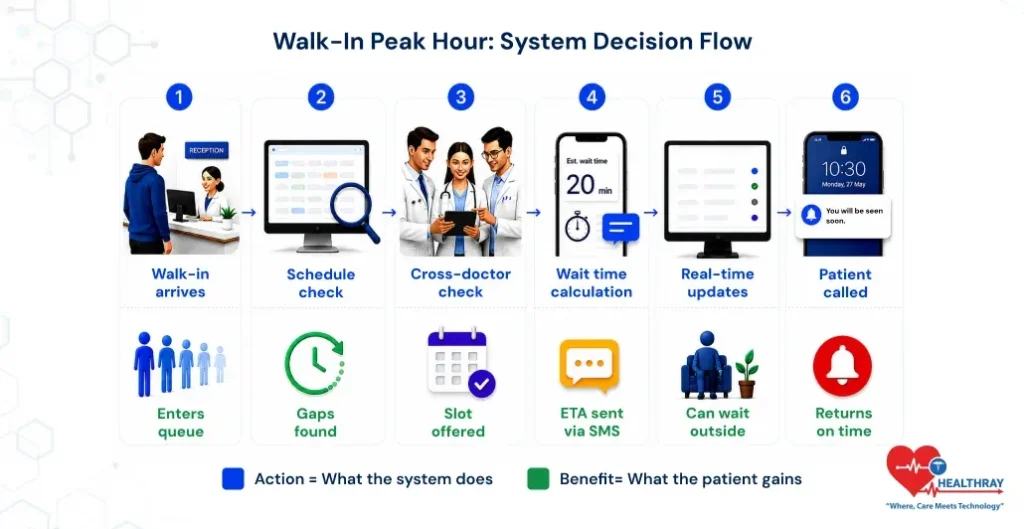
Scenario 3: A Walk-In Arrives During a Fully Booked Peak Hour
It’s 9:45 AM. Dr. Patel’s clinic is completely booked until 1 PM. Ramesh arrives without booking. The waiting room is quite packed already. In this situation, here’s how the system deals with the situation:
- Register Ramesh as a walk-in and give a digital token to him, skipping the paper slip.
- Work out his waiting time given the length of the queue and the average consultation time.
- Send Ramesh a text informing him about his waiting time and position in the queue, so he can wait anywhere he likes.
Scenario 4: A Patient Wants to Change Doctor During the Booking
Sunita wants to see Dr. Kapoor. She notes on the pre-visit form that she has chest pain. The system picks up on this and offers her a cardiology referral. She agrees. Here’s what the system does:
- It reallocates Dr. Kapoor’s appointment slot to the pool of available slots immediately without any delay.
- Shows Sunita the list of available cardiology appointment slots either on the same day or on the next day.
 PRO TIP
Scenario 5: A Patient No-Shows 2 Hours Before Their Slot
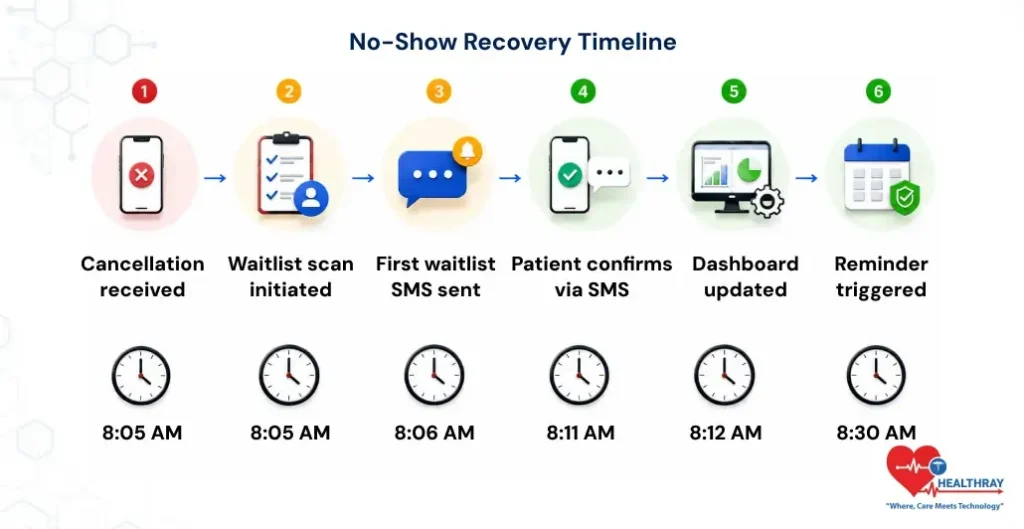
Now it is 8 AM. Vikram, who was scheduled for 10 AM, calls and cancels the appointment. The slot is free. Yet, the time of two hours is only enough to fill the slot if the no-show recovery starts straight away and proceeds automatically.
What the System Does Step by Step
- 8:05 AM: Cancellation is registered. The slot status changes to ‘Available’ immediately across all booking channels.
- 8:05 AM: System checks the waitlist of patients who had asked for an earlier slot with Dr. Singh or in the same specialty.
- 8:06 AM: Candidate from the waitlist receives an automated SMS first: ‘A slot has come up at 10 AM with Dr. Singh today. Reply YES if you want it. ‘
- 8:11 AM: Patient says YES. The slot is instantly taken and confirmed.
- 8:11 AM: New patient gets a text with their appointment info.
- 8:12 AM: Front desk monitor refreshes on its own. No human operation needed.
- 8:30 AM: 90-minute alert goes out to the new patient.
Learn more: These scheduling scenarios explain how bookings behave in real time, but daily clinic performance depends on how the entire appointment system supports operations throughout the day. Clinic Appointment System: The Secret Engine of High-Performing Clinics breaks down how strong scheduling systems keep clinics stable from morning rush to end-of-day reconciliation.
What These 5 Scenarios Tell You About Choosing the Right System
Each scenario was designed to reveal certain requirements. A system that is able to efficiently handle all five scenarios is very different in its core from one that can only handle two scenarios adequately.
1. The Questions Each Scenario Should Make You Ask Your Vendor
- Scenario 1: Is it possible for patients to book their appointments outside of clinic hours and, at the same time, get instant confirmation that their file will be prepared automatically?
- Scenario 2: In case a patient changes his/her appointment, does the freed time slot automatically generate a waitlist notification?
- Scenario 3: Does the system only work with walk-ins or pre-booked patients or can it actually manage both in one live queue at the same time?
- Scenario 4: Is the system able to reassign a patient to another doctor during the booking process and at the same time transfer the patient’s records?
- Scenario 5: How fast can your system fill a cancellation from the waitlist and what level of staff intervention is required?
2. Red Flags: Where Most Systems Break Down in Real Scenarios
Most doctors appointment systems handle Scenario 1 quite well. Online booking is the minimum requirement, really. Deficiencies become evident in Scenarios 3, 4, and 5. Here are the telltale signs to look out for:
- The vendor can showcase the functionality of online booking quite efficiently, but seems to be uncomfortable or changes the subject when questioned about walk-in queue management.
- Waitlist management can only be achieved if staff check patients manually and make calls. This procedure is not automated.
- Patients will have to start the booking process all over again if a doctor changes during the booking flow.
- Recovering no-shows depends on staff members’ recognizing a cancellation and taking action; there is no automated system prompt.
- Since the live demonstration involves a neat and well-prepared case, you might want to request the vendor to show a disordered one.
3. The Difference Between a System That Handles Edge Cases and One That Doesn’t
The five scenarios mark the distinction between software made for perfect conditions and software designed for actual clinic operations. Scenario 1 depicts an ideal case. Scenarios 3 and 5 depict reality. Don’t evaluate merely the easiest day; consider the hardest one.
Conclusion
A doctor consultation booking system should do more than just take appointments. It must handle real-life situations like late-night bookings, reschedules, walk-ins, doctor changes, and no-shows smoothly and on its own. When you compare systems, focus on how well they manage these real scenarios, not just the feature list.
