In This Blog
Everything your clinic needs to avoid failing in any phase of implementation:
- What breaks in each implementation phase of clinic software, and why
- The IPRS model: A risk stack per phase designed for clinics
- Things you can do to prevent problems before starting to roll out your clinic software
- A role-based training gap checklist is provided where it is most needed
- The single go-live mistake that causes weeks of scheduling problems
Clinics fail with software implementations not because of the wrong choice but due to the lack of preparation for failure. Every clinic software implementation phase has its failure point. This checklist is your failure point registry. Look what happens in every phase. Discover why it happens. And prevent failure from ruining your patient list, your staff morale, and your business reputation.
Why One Wrong Clinic Software Implementation Phase Can Throw Your Entire Rollout Off Track
Every mistake made during any phase of the implementation process in a clinic management software system leads to an ongoing chain of events. The result is staff exhaustion, then the failure of processes, followed by the effect on patients, and finally, the quiet erosion of your investment.
In this guide, we’ll walk through each phase in turn, first identifying what breaks during the process, explaining why, and providing a way to prevent the problem. By planning, you will protect your clinic right from the start.
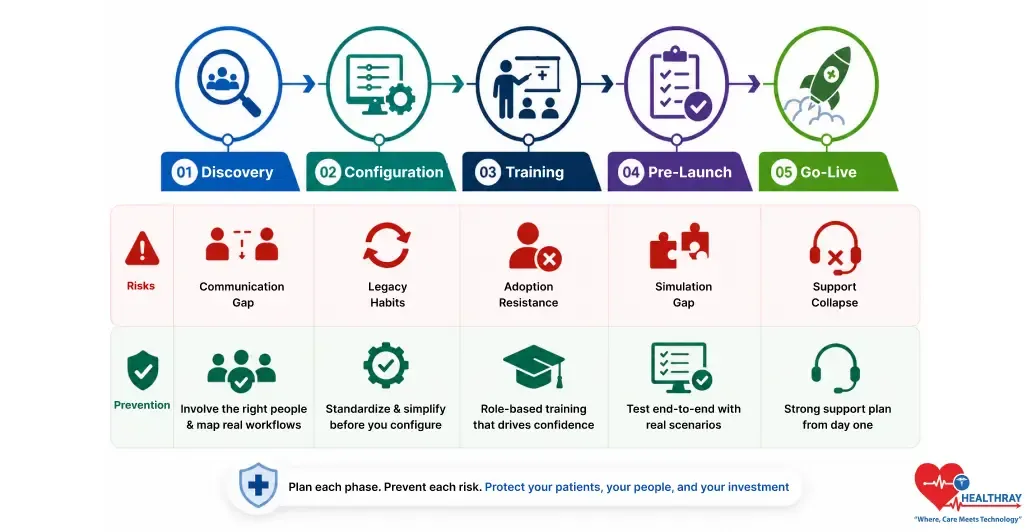
The five phases where implementation fails are discovery, configuration, training, pre-launch, and go-live. There is a specific risk in each phase, and a prevention tool for each. That is the guiding idea of IPRS.
Meet IPRS: The Framework That Maps Every Phase Risk Before It Hits
IPRS means Implementation Phase Risk Stack. It identifies for each phase what is the most probable risk associated with it. Moreover, each phase has what is its most effective corrective measure. This will ensure that you know what to do at all times.
One approach. Five phases. Each phase has its own risk. Each phase also has its own prevention lever.
- Discovery faces a risk of a communication gap
- Configuration faces a risk of legacy habits
- Training faces a risk of adoption resistance
- Pre-launch faces a risk of a simulation gap
- Go-live faces a risk of support collapse
Each of the sections that follow has the same format. First, what breaks? Then, why does it break? Lastly, how to avoid it breaking. This is IPRS at work.
Phase 1 Discovery: When The Wrong People Make The Buying Decision
The greatest failure often occurs before anyone even touches the new system. Decision-makers purchase equipment or software without consulting the people who will use it every day. Whether it’s an electronic health record implementation or a clinic inventory module setup, the implementation begins with a critical flaw. Anything built on that weak foundation is likely to expose problems later.
What Typically Breaks
- A disconnect between the executive promises and the daily workings of the clinics.
- Features purchased that the clinic staff either can’t use or don’t need.
- Requirements built on sales demos and not reality.
Why It Breaks
- Leaders purchase products based on sales pitches from vendors. They never consult nurses, secretaries, or billing people.
- There is a huge difference between what the leader sees and what the staff does, which has not been addressed at all. By go-live time, it’s too expensive to solve.
Prevention Steps
- Assemble a multi-disciplinary group, including a member from each clinical department.
- Observe clinical workflow over several shifts before engaging a vendor contract.
- Develop a list of needs versus wants. Next, ensure that clinical personnel approve the purchase.
Clinics incorporating frontline employees in their discovery have lower rates of post-launch corrections. They also experience a more rapid adoption throughout all departments. Why? Because when those who use the system help choose it, the system really does work.
 PRO TIP
Phase 2 Configuration: When You Digitize The Problem Instead Of Fixing It
Discovery process complete. It’s time for system deployment. That’s when the worst mistake in a clinic management software implementation often occurs. Clinics recreate inefficient workflows within the new system. They refer to this as an improvement. During clinic software EMR integration, these workarounds often become embedded into modern software, preserving inefficiencies instead of eliminating them. Only the vehicle has changed.
What Typically Breaks
- Teams hard-code broken manual processes directly into the new digital system.
- They rebuild paper-based approval steps inside software that was supposed to eliminate them.
- Digital duplication of the bottleneck that was there before the implementation began.
Why It Breaks
- The clinical staff develops software that mimics previous paper-based practices. The fear of change is too high.
- Management agrees to setups that are familiar and easy for everyone. And thus, no one wonders about their efficiency.
Prevention Steps
- First, conduct an independent workflow audit before changing any system configuration.
- Second, utilize the native workflows within the software as much as possible.
- Lastly, digitize the patients’ journeys, eliminating any bottlenecks rather than simply relocating them to another screen.
 NOTE
NOTE
All the measures for prevention discussed in this article are based on lessons learned from actual problems occurring in real-life clinic software implementations. This is not advice from vendors; this is not a theory.
Phase 3 Training: When Everyone Gets The Same Training, And Nobody Is Ready
Training is when the staff who have been prepared by the clinic over many months leave their employment. Generic training modules may appear well-designed on paper. However, in reality, they fail to prepare every department adequately for its role. Without using clinic software analytics to identify knowledge gaps and user adoption trends, these shortcomings often go unnoticed until problems emerge. As a result, adoption declines, and patient numbers begin to fall within weeks.
What Typically Breaks
- Low rates of user acceptance and shadow IT systems proliferate quietly.
- Employees complete training but fall back on manual processes under pressure.
- There is no development and testing of role-specific skills before launch.
Why It Breaks
Leadership runs multi-hour vendor video programs. These focus on features, not on the daily functions each staff member actually performs.
Clinicians and Billing Coordinators both go through the same kind of training. Hence, neither of them gets trained to do what they have to do. And here lies the problem that no generic training can ever solve:
| STAFF ROLE | WHAT THEY ACTUALLY NEED | WHAT GENERIC TRAINING DELIVERS |
| Front Desk | Booking and check-in process | Feature video tutorials |
| Billing Coordinator | Claim and invoice process | Software walkthrough videos |
| Prescribing Clinician | Clinical note shortcuts | Basic product demo videos |
Role-specific training decreases resistance to go-live. It focuses on the specific roles of each individual every day. Role-specific training does not spend time explaining those things that people do not use often.
Prevention Steps
- Conduct role-based training sessions based on day-to-day activities. The sessions should be short. Conduct one session for one particular role.
- Moreover, make sure that Super Users are nominated internally within each department. They provide peer support from the floor on a live shift.
- Lastly, gamify the adoption process with minor incentives. People learn quickly with positive reinforcement.
Phase 4 Pre-Launch: When You Skip The Dress Rehearsal And Pay For It On Day One
Every step so far has been preparation. The current stage determines if this preparation will hold up under stress. If everything has to go live together, one small problem will bring it all down. Hence, passing the tests from vendors does not mean we are prepared for the entire process.
What Typically Breaks
- System paralysis and logins are problematic during the first day.
- The billing process breaks down because of actual patient numbers. It was never tested for heavy use.
- Integration points break when multiple departments go live.
Why It Breaks
- The clinic does not run a live simulation as the systems pass all initial tests and create a misconception of preparedness.
- There is no testing of the entire system before the first patient comes into the clinic. That is when everything falls apart.
- An isolated system may break down on a busy clinic day. Such a discovery should not be made with the patient present.
Prevention Steps
- First, conduct a complete dress rehearsal using a handful of actual patients before the scheduled date of go-live.
- Second, perform an end-to-end test on the system while running it at maximum capacity during peak hours to identify any possible bottlenecks.
- Third, prepare a well-defined rollback plan and distribute it to all department heads.
The Health IT Playbook by ONC includes adoption, implementation, and optimization of your EHR workflow. It identifies mock go-lives and system testing as necessary activities. Additionally, failure to do so will put your first day of functioning at risk.
Phase 5 Go-Live: When Support Walks Out, And Your Staff Walk Back To Paper
The go-live is not the endpoint; rather, it marks where the true pressure begins. All previous stages were planned out and managed; this one, however, is live, unfiltered, and ruthless. Without proper support, everything you have prepared will be undone within days.
What Typically Breaks
- The frontline workers get alarmed and desert the system instantly. Scheduling backlogs start appearing in no time.
- The problems remain unsolved shift after shift. Consequently, failures snowball rapidly.
- The staff turns to paperwork again. The new system appears insecure and unstable.
Why It Breaks
- Backup teams leave too soon or are too thin, leaving staff unsupported.
- Training completion does not equal readiness, leading to premature withdrawal of support teams.
- The first week post–go-live is the most critical phase where every decision has an immediate impact.
Prevention Steps
- Decrease patient booking capacity by 25-50% for the first week. This will provide room to breathe.
- Additionally, locate your IT people on the clinic floor. Put them right next to the clinicians.
- Lastly, create a quick bug triaging process. Resolve all problems in the same shift. Never leave them hanging.
However, the failure of clinics that fail during go-live is usually not due to poor software quality. It is simply due to the lack of someone who could assist when things become difficult. The solution here is quite simple.
The funded research assessment of the workflows in clinics before adopting a health information technology system uncovered a single unifying factor. If the resistance arises from staff members, then inadequate workflow integration will always be the culprit. In that case, on-site support within the first week is mandatory.
Learn more: Clinic Software Total Cost of Ownership Before You Sign, because avoiding implementation failure also means planning for the real long-term costs, not just the rollout.
Final Thoughts: Turn Every Implementation Phase Into Long-Term Success
The successful implementation of software is not only dependent on the appropriate solution but also on the effective management of all the clinic software implementation phases.
Identification of possible risks will ensure that adequate preventive measures will be taken for each phase of implementation. This will ensure that there will be fewer disruptions in the process, increased confidence among the staff members, and smooth implementation of the software.
You may use this risk register as a playbook for implementing the software. Each phase comes with its own unique set of problems; however, all of these can be effectively managed with the help of the right strategy.