

In This Blog, You Will Get To Know:
- Why does your roster fall apart when one staff member calls in sick?
- Are you double-booking doctors because your tool cannot spot the clash?
- What does part-time staff availability do to your roster each week?
- Which conflict wastes the most time at multi-location clinics?
Manual rosters do not fail because managers are careless. They fail because six types of conflict pile up faster than any person can fix. The right staff scheduling software for clinics stops each one with a built-in rule, not a smarter calendar. That is the difference.
Why Manual Clinic Rosters Break Before the Week Even Starts
Every roster failure has the same root cause. There is a rule in policy. However, the tool does not apply it. So, the problem is there before anyone can stop it.
A calendar tells you when. However, a scheduling system governs who, when, and why. That’s a significant gap. Patients can be at risk when there is a scheduling error. A billing error can’t.
The results indicate that automated scheduling outperforms manual scheduling in hospitals. That’s why built-in rules are an integral feature of staff scheduling software for clinics. The following wars are attacks on the weaknesses. Each rule resolves a different aspect of the same issue. That is the core idea behind clinic management software.
Conflict #1 – Double-Booking a Practitioner Across Overlapping Appointments
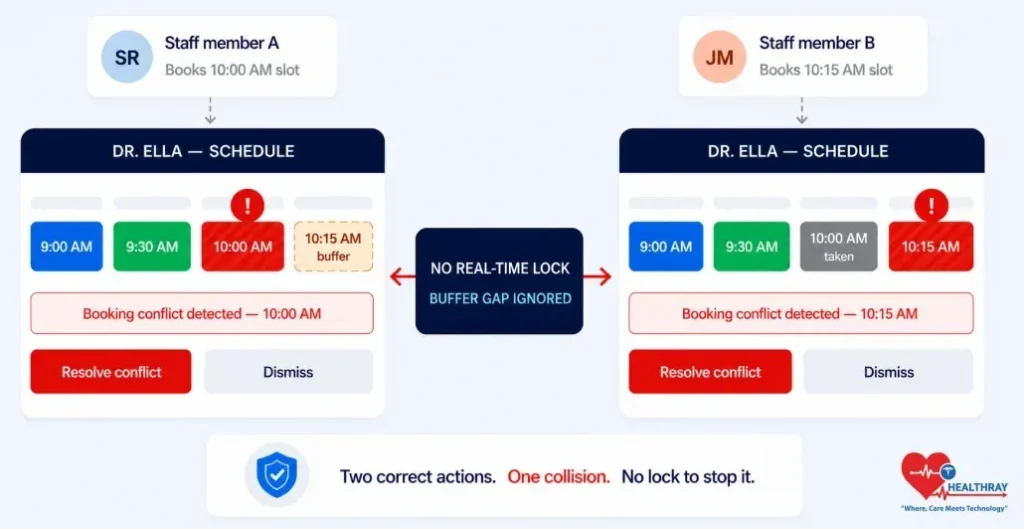
Double booking by practitioners occurs when two practitioners book the same staff member at the same time. There is no lock to stop it. No one is there to see the clash.
Dr Ella is booked at 10:00 AM by a receptionist. She is booked by a second member of staff at 10:15 am. There was a space in the slot. However, the first booking began without any locks firing. There are 2 right actions, and 1 wrong result.
How Does Staff Scheduling Software Prevent Practitioner Double-Booking?
Rule: Slots don’t lock when the booking is saved; they lock when it begins.
- As soon as a booking starts, the system locks the staff member; no one else can book the staff member until they confirm or cancel the booking.
- Booking templates also contain buffer time (30 minutes after a procedure block itself across all screens).
 PRO TIP
Conflict #2 – Leave Overlap That Strips a Specialty From the Clinic Floor
Leave overlap occurs when two employees with the same job are on similar leave on the same day. Each approval goes through a separate process. No one checks if both being off at once causes a problem.
Both physio staff apply for the same Thursday off. Player one is in the penalty box. Two managers say yes. They cannot see one another and accept one another’s approval. The gap shows up at 7:45 AM. There are already 14 patients scheduled. According to a peer-reviewed study of healthcare scheduling, the most avoidable coverage gaps in multi-specialty clinics are due to disconnected approval workflows.
How Does Clinic Software Stop Leave Approvals That Break Specialty Coverage?
Rule: Cover level checking occurs when leave is approved.
- All leave requests will have a real-time check performed on all leave dates requested.
- If saying yes would leave a role understaffed, the system blocks or flags it, and it never lets it through quietly.
- Managers set minimum cover levels per team once; the rule runs on every future request automatically.
 NOTE
NOTE
Conflict #3 – Skill-Gap Cover: Filling a Shift With the Wrong Qualification
Skill-gap cover happens when time pressure forces a manager to fill a shift with someone whose credentials do not match. Its roster is full. The regulator considers it a breach.
A trained anaesthesia nurse calls in sick at 6:30 AM. The manager selects a general ward nurse, whose name is the only one that is free. The roster shows availability. Does not demonstrate qualifications. This is a breach of credentials for CQC, the Joint Commission and AHPRA. That credential enforcement layer remains in place even in the face of time constraints, thanks to role-based access in clinic software.
How Does Clinic Staff Scheduling Software Ensure Only Qualified Staff Fill Clinical Shifts?
Rule: Only staff with the right credentials show up as an option.
- Each shift template lists the required skill set once; staff without that credential do not appear as available even if they are free.
- When a credential lapses, the system removes that person from the eligible list until they renew it.
Conflict #4 – Last-Minute Cancellation With No Automated Cover Chain
Last-minute cancellation occurs when the employee calls in sick too late for the shift. It’s too late to do the manual replacement. One absence turns into a guaranteed gap.
A nurse texts at 6:47 AM that she will not be able to come in. She should report for duty at 8:00 AM. The manager has 73 minutes. She has to send 6 messages consecutively, and at the same time, she has to open the clinic.
How Does Clinic Software Fill an Urgent Shift Vacancy Without the Manager Making Calls?
Rule: All eligible staff are notified simultaneously, and the shift is locked when the first yes is entered.
- It identifies staff who are free, qualified, and will not go over hours, and notifies all staff at once.
- The first player to say yes freezes the shift in place; the others automatically decline.
The same alert logic that powers automated reminders in clinic software also powers urgent cover situations – the same logic works on both sides of the shift.
Conflict #5 – Part-Time Staff Availability Tracked on a Spreadsheet That Is Always Out of Date
Part-time availability conflict arises when a spreadsheet is unable to accommodate fluctuating schedules. Exceptions, days, hours, add up. The roster starts to be filled with data which is no longer accurate.
Four part-time nurses all have different hours, days, and exceptions, all in a tab last updated eleven days ago. This week, it resulted in one no-show and one overtime violation. In Nature Scientific Reports, researchers found that automated availability profiles reduce part-time scheduling errors, which occur when flat grids go stale because they need to be re-entered manually.
How Does Scheduling Software Track Part-Time and Variable-Hour Staff Availability?
Rule: Each staff member schedules their own time in the app, and the system enforces the rule.
- Staff determine their own weekly pattern and exception dates, and the roster engine only books in the pattern, updating it as it happens.
- An hour counter blocks any booking that would push someone over their limit before it saves, not after.
Conflict #6 – Multi-Location Shift Conflicts for Shared and Floating Staff
Multi-location conflict occurs when the same individual shows up in multiple locations. They book them at each site without checking out what the others have set. Two coordinators end up confirming the same person at two different locations at the same time.
The main clinic operates on Tuesdays and a satellite clinic on Wednesdays, both with a senior sonographer. She books a Tuesday without checking the main site, and a satellite coordinator calls her up on that day. She books a Tuesday without checking the main site, and a satellite coordinator calls her up on that day. Now two coordinators have confirmed her at the same time, and neither learns of her confirmation until 7:55 AM. The number of floating staff grows, and this conflict becomes more serious. A unified enforcement layer is possible across all clinic sites by enabling interoperability in clinic systems.
How Does Staff Scheduling Software Prevent Multi-Location Shift Conflicts?
Rule: Every member of staff should have one profile that is visible to all sites, which has a lock that applies across all sites.
- Each staff member only has one profile, not one per site; one record is used per location.
- When one site shifts, it becomes fixed at that time for the rest of the sites.
- An optional gap rule blocks back-to-back bookings at different sites when travel time falls short.
Learn more: Improving Patient Engagement Through Clinic Software Post-Visit the same system that fixes staff conflicts also strengthens what happens after the appointment ends.
To Sum Up – Six Conflicts, Six Rules, Zero Manual Fixes
All of the above conflicts are just the same failure in a different location. There is a rule in policy. The tool does not apply it. Each software rule moves that job from a person’s memory to an automatic system trigger. In practice, automated clinic scheduling does just that.
- Double-booking → slot locks at booking start, not when saved.
- Leave overlap → cover check runs the moment leave gets approved.
- Skill-gap cover → only qualified staff show up as an option.
- Last-minute cancellation → all eligible staff get the alert at once.
- Part-time tracking → staff-set profiles with a hard hours limit at point of booking.
- Multi-location conflict → one shared profile locks time across all sites.
If you did see more than two of the following conflicts this month, the issue isn’t your process. You don’t have a rule layer for your tool. These 6 conflicts will continually reappear until the rules are programmed. Healthray’s staff scheduling software for clinics applies each rule at the time the conflict occurs, preventing double bookings, coverage gaps, skill mismatches, and location clashes before they get to the clinic floor.
