

In This Blog
These days, most clinics are still just sending one reminder the day before the appointment and then hoping that patients will turn up. Here’s what that looks like, and what the data at each variation actually shows:
- First, why one reminder doesn’t work, and second, what the message sequence should be like instead.
- Changes in timing and their effect on no-show rates at every stage of the message sequence.
- Which communication channels, at different points in the process, achieve the best results, whether it’s SMS, email app, or call?
- The impact of message tone on patient reaction; it is much stronger than what most clinics realise.
- The outline of a well-functioning reminder sequence, right from the time of booking through to the appointment day.
Why One Reminder Isn’t a Strategy
Many clinics relying on outdated clinic management software only send one reminder message, normally the day before and in a passive tone, so patients tend to ignore it, as the ones going to forget would have forgotten. That’s not a plan. It’s only one shot at a multi-stage problem.
The assumption behind most automated reminders clinic setups is: if you tell the patient once, they will remember. But if a reminder comes about 20 hours before, patients will hardly have time to change their plans, and the clinic will have little to no indication about who is actually at risk.
1. What No-Shows Truly Cost Besides an Empty Slot
We can only see the empty slot, which is the direct cost here. Other costs, which are indirect, may include a doctor remaining unoccupied, a patient on the waiting list who could have been given an appointment, and a member of staff trying to find a replacement for the empty slot. Over a week, a 15% no-show rate for 100 appointments results in a substantial revenue loss, a loss that the advantages of digital clinic software are More exactly designed to recuperate.
2. The Gap Between Booking Intent and Appointment Day
At the time when a patient books, they are definitely intending to come. The gap arises during the days after; they forget, something happens, they get better. An automated reminders clinic sequence exactly changes these points with communications at different stages that keep the appointment in mind, and also makes rescheduling quite simple when needed.
3. What an Automated Reminder Sequence Actually Is
Automated reminder sequences refer to the messages sent by the system automatically at different stages, each one having an assigned time, communication medium, and personality for that particular stage of the patient’s journey. It is not about sending more messages but about getting the right message, at the right time, by the right channel.
Timing: When You Send the Reminder Matters More Than What It Says
Most automated reminders clinic workflows still rely on sending one reminder a day before the appointment. Yet the data reveals the show rates at each timing offer a better angle.
1. The 72-Hour Reminder: The Planning Window
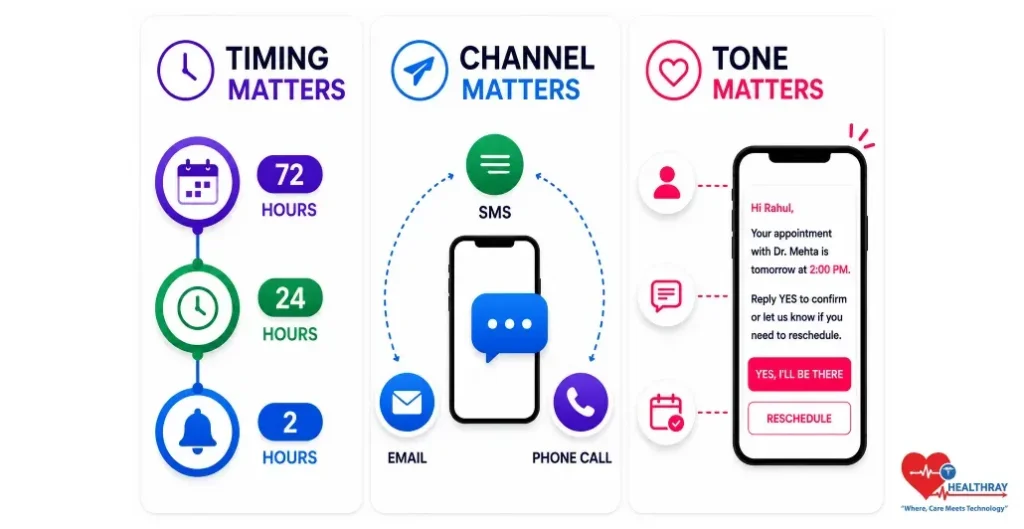
Many clinics that add a casual, 72-hour reminder alongside their usual 24-hour notice find show rates improving by a whopping 10-15 percentage points, mainly for appointments made more than a week in advance. This initial, knowledge-based contact allows the patient to consider or adjust their plans without feeling rushed, so mentally fixing the appointment and A lot lowering the chances of forgetting or dismissing the appointment during the passage of days.
2. The 24-Hour Reminder: The Confirmation Window
The reminder most clinics already send, but generally, it’s merely a passive notification. At the 24-hour mark, a confirmation prompt is the appropriate tone. ‘Reply YES to confirm or let us know if you need to reschedule’ accomplishes much more than ‘Your appointment is tomorrow at 2 PM. ‘ automated reminders clinic management software marks non-responders at this stage for the targeted staff call, not everyone, just the at-risk segment.
3. The 2-Hour Reminder: The Day-Of Nudge
Most clinics fail to send the same-day reminder. Actually, the data that backs up that worry is the opposite: a 2-hour notification on the day of the appointment can almost double the rate of attendance on the same day by simply making it easier to remember one’s commitment. Short and to the point, not a sermon.
 NOTE
NOTE
Channel: Where You Send the Reminder Changes Who Actually Reads It
In an automated reminders clinic strategy, not all communication channels are equally effective in reaching patients. It is possible to completely miss the message if the correct communication channel is used at the wrong stage.
1. SMS: The Highest Open Rate, Best for Action Steps
Among all reminder channels, SMS boasts the highest open rate, and the majority of messages are read within minutes. This makes SMS the perfect medium to send action-oriented reminders like confirmations, rescheduling, and link clicks. It really hits the mark at 24 hours and 2 hours, which are the times when patients can promptly react or check out practical details like an address, parking, or a video link. And, for the patients who are inclined towards using it, the mobile app for clinic software can work hand-in-hand with SMS by delivering in-app notifications. This is mostly handy for the reminders of the follow-up and continuous engagements.
2. Email: The Right Channel for Detail, Not Urgency
Email is most effective when sent approximately 72 hours before the appointment, as patients get enough time to read a more detailed message, check the information, fill out forms, and decide if they want to reschedule. It’s a channel for preparation rather than a nudge. When sending the message within 24 hours or on the same day as the appointment, email falls behind SMS, mainly when one or two days before the visit, as it is when most of the customers realize that a reminder would be valuable.
3. Phone Call: Targeted, Not Blanket
Automated voice calls are not very effective for general reminder purposes. Then again, a personalized phone call from staff to the patients who have not confirmed their appointment after receiving the 24-hour reminder SMS is actually one of the highest-converting actions in the entire sequence. These phone calls are not made to everyone, but only to those at-risk segments who are identified by the clinic management software.
Message Tone: How You Say It Changes Whether Patients Act
In an automated reminders clinic workflow, timing and channel are responsible for delivering the message to patients. Tone is what determines whether they will take action or not. Most of the clinic reminders are composed with the clinic in mind, clinical language, passive notifications, lack of patient perspective.
1. The Confirmation-Seeking Tone vs The Notification Tone
There is a considerable difference between a simple reminder and one that really engages the recipient in a conversation. “Your appointment is tomorrow at 2 PM” merely tells; “Your appointment with Dr. Anand is tomorrow at 2 PM reply YES to confirm or let us know if you need to reschedule” encourages the recipient to take action. By employing this sort of invitation for confirmation about 24 hours before the appointment, healthcare facilities report 20-30% more reschedule requests, effectively changing probable no-shows into available slots.
2. Personalisation: The Difference Between Generic and Specific
Name doctor when, and one simple instruction always beats the template. With clinic management programmes, you can identify the caller and automatically fill in the relevant fields. What could be simpler? Seeing their name in the message and a straightforward next step, readers will find it relevant, be more open to receiving it and eventually recognize that reminder emails are not a waste but important and personalized communication.
3. Rescheduling Invitations Turn Potential No-Shows Into Bookings
One major shift in thinking about reminder design is viewing rescheduling as a positive outcome rather than a failure. If a patient moves their appointment time, they are still involved, they give advance notice, and the spot can be used by someone else. Reminders that are so easy to use for rescheduling, like “Want to change your time? Just tap here”, lead directly to automated recovery: the cancellation activates a scan of the waitlist, the suitable patient is informed, and the appointment is booked without the need for any staff intervention.
 PRO TIP
The Optimised Sequence: What Good Systems Actually Do
Repeating the same message several times is not a good reminder strategy. Each step serves a different purpose: preparation, confirmation, arrival, and follow-up. So, the timing, channel, and tone of the message should be changed as a result even if it is for the telehealth through the telehealth-enabled clinic software.
| STAGE | CHANNEL | PURPOSE |
| At Booking | SMS + Email | Instant confirmation with appointment details and pre-visit instructions |
| 72 Hours Before | Email + SMS | Preparation guidance, directions, and form completion |
| 24 Hours Before | SMS | Confirmation request with a quick reschedule option |
| 2 Hours Before | SMS | Arrival details or telehealth access link |
| Post-Visit | SMS or mobile app notification | Follow-up summary, prescription reminder, and rebooking link |
Learn more: Automated reminders help patients arrive on time, but revenue problems continue if billing mistakes happen after the visit. 6 Billing Mistakes Draining Clinic Revenue and the Software Controls That Stop Them explains how clinics prevent financial leakages using structured billing workflows and automation.
Conclusion
Actually, automated reminders clinic sequences are not features, but strategies. One of the great benefits of digital clinic software is how the number of no-shows has been reduced from 15% to less than 8% after implementing reminder sequences made the right way: clear message, proper timing, using the right channel and tone; this blog gives a sample sequence, but the main benefit will come when you implement it on your patients and see the results data.
