


In This Blog
Everything you need to know about data access control in modern role-based access clinic software before your next decision becomes a security, compliance, or operational headache.
- Exact permission settings for every clinic role from receptionist to owner within every module in order to give you an insight into each data restriction area and the reasons behind it.
- How session-based termination solves the problem that most clinics are unaware of and why no logout policy will help with that.
- The type of click that will make the audit trail legally binding – and the difference between a log that demonstrates accountability and one that just looks like it does
- The break-glass override policy that is crucial to saving lives and maintaining accountability, including emergency access that remains clinically available and permanently documented
- How the owner-doctor dual function compromises most clinic systems and the solution offered by a workspace toggle that doesn’t require logging in twice
The Permission Matrix: Who Gets What, And Why It’s Not Negotiable
Legacy systems have binary permissions; you’re either an “admin” or “staff.” This falls apart when you have more than three employees at your facility, along with more than one kind of protected health information all stored in one system.
Today’s Role-Based Access in clinic management software follows a multi-dimensional approach wherein the parameters of data are defined depending on clinical realities and operational responsibilities – together. Accordingly, this is exactly how it fits into the five key roles and five key modules below.
| ROLE | SCHEDULING | RECORDS | BILLING | ANALYTICS | SETTINGS |
| Receptionist | Full scheduling | Restricted access | Entry-level billing | No access | No access |
| Nurse / Support | Full scheduling | Full clinical view | Billing restricted | No access | No access |
| Provider | Read-only scheduling | Full clinical access | Read-only billing | No access | No access |
| Practice Admin | Full scheduling | No clinical access | Unrestricted billing | Complete analytics | Full configuration |
| Clinic Owner | Limited scheduling | No clinical access | Limited billing view | Full analytics | Configuration access |
In fact, each line represents a specific purpose and reflects clinical risks, liability risks, or processes. The design is not random, and understanding each line makes its necessity clear and non-negotiable.
1. Front Desk / Receptionist
Active Operations: In this role, complete rights are granted for the appointment list, patient demographics, insurance verification, and check-out routes. Receptionists drive the process of patients visiting every day – and that’s what the permissions are all about.
Data Restraints: At the same time, system locks are placed on clinical notes, vital sign records, e-prescriptions, and internal accounting systems. This is not about trust – it’s about liability. If a receptionist views a psychiatric note while verifying insurance, that’s a reportable breach regardless of intent. Whether or not they meant to see anything, if they saw something, it counts as a breach.
Module Map: As a result, Fully Scheduled, Billing Only. EHR Charts, Analytics, and Settings are functionally nonexistent on this login page – no restrictions, not read-only – just gone.
Consequently, taking an additional step into the office will result in a change of permissions from scheduling the service to providing it.
2. Nursing & Clinical Support
Active Operations: Full access to all triage notes, active allergy tracking, vaccinations records, encounter vitals, and internal messages. Nurses have the full clinical responsibilities of patient encounters, and thus receive access accordingly.
Data Restraints: Read-only access to all historical provider notes – sufficient context to ensure quality of continued care, but no capabilities for changing previous diagnoses, accessing billing systems, or altering system configurations in any way. Full write capabilities, however, moving forward only.
Module Map: Complete Scheduling, full EHR charts. No results under Billing, Analytics and Settings – absolutely no visibility to the business layer for this session.
 NOTE
NOTE
On the very top of the clinical chain are the providers, and their permission set fully reflects the responsibility.
3. Providers & Specialists
The permission set for the provider is the broadest among those on the clinical chain but one of the most restricted among those on the business side.
Active Operations: Comprehensive charting, diagnoses changes, EPCS prescription generation, lab orders, and signing capabilities in telehealth-enabled clinic software. Clinical charting belongs to them in its entirety – and the software offers them control over all aspects of it.
Data Restraints: In this context, read-only information about patient balances is available – enough to answer a cost question on the fly without giving access to claims, billing setup, or user provisioning. They work at full clinical efficiency without being involved financially in any way.
Module Map:From a clinical standpoint, complete EHR Charts, read-only Scheduling, and read-only Billing are available. Analytics and Settings are completely not there – the entire purpose of the provider’s session is just clinical work.
The clinical chain ends at the provider. Everything below this line is operations – and the practice administrator owns all of it, without touching a single patient record.
4. Practice Administrator
Admin’s territory, on the other hand, belongs to the business engine. All of those things which the clinical team requires to be set up properly belong to this space.
Active Operations: Full access to billing engines, claims processing, and merchant systems that are core functions of modern clinic billing software along with provider scheduling and employee hiring processes. The Practice Administrator represents the level of operations control, and the platform provides him/her total access to all operations.
Data Restraints: Notably, the really cool architectural aspect about the role of an administrator is the strict line between him and the clinical engine a strict data partition which ensures that no data is accessible to an administrator who does not hold a dual license.
Module Map:Overall, complete scheduling, complete billing, complete analytics, and complete settings are available. Four out of five modules indicate maximized operational potential. One module is intentionally excluded, EHR charts, which acts as the barrier required for this position to be entrusted with the rest.
The owner sees the furthest – and touches the least. Broad financial visibility, zero clinical access. That distance is intentional.
5. Clinic Owner / Executive
Whereas the administrator runs the machinery of the clinic itself, the owner is concerned with the wider picture – monitoring performance and profitability from outside the everyday processes of patient care.
Active Operations: At an executive level, macro analytics, combined financials, practice-wide overhead reporting, and database filtering across multiple locations are available. The owner gets the most comprehensive picture of the business through a single dashboard: revenue flow, personnel expenses, and performance per location.
Data Restraints: No ability to view individual patient encounter notes. Not an issue, but a legal safeguard. The division between corporate governance and clinical notes provides the owners’ level protection from clinical responsibility.
Module Map: From a governance perspective, Full Analytics, read-only Scheduling, and read-only Billing are available. EHR Charts and Settings remain completely inaccessible, allowing the owner to monitor clinic performance without accessing clinical data or system configurations.
6. Owner-Doctor Problem
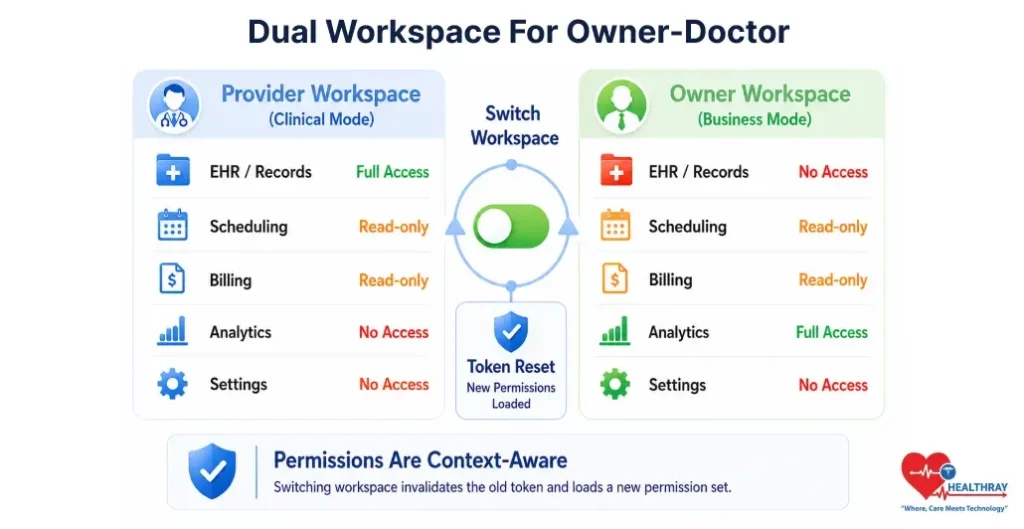
Entry-level systems fail completely in privately owned practices when the clinic owner also serves as the leading practitioner. The system must handle this situation differently.
Active Operations: The user can control patient management, analytics, financial performance, and practice management, but only in the active workspace. Complete clinical control will be in the provider’s workspace, while complete business control will be in the ownership workspace.
Data Restraints: As a result, clinical and business permissions are structurally segregated using context-aware workspace switching. Every time the workspace switches, the current permissions token expires and a new set of permissions is initiated depending on the nature of the task being performed. Permissions for one workspace do not transfer to the other workspace.
Module Map: In practice, Provider Workspace includes full Records access and read-only Scheduling and Billing. Owner Workspace includes full Analytics access and read-only Scheduling and Billing. Single login with separated permission contexts.
The creation of the proper permission matrix is only part of the solution; the other is the reaction time of the system whenever the staff member’s permissions change.
When A Staff Member Leaves, Their Access Should Too – Instantly
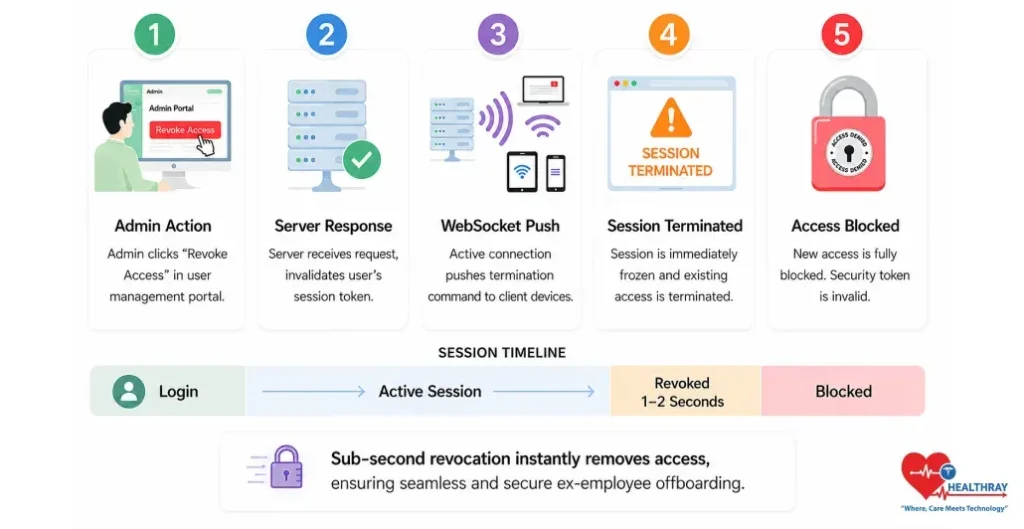
Data boundary definition is the first requirement. However, data boundary becomes a problem when it can no longer be removed precisely at the time a change in staffing is made.
This is the hidden gap most healthcare centers miss: many systems only validate permissions at login, so a terminated employee can leave a session open and still access patient records and financial data with no alerts – while HR has already completed the offboarding.
However, the issue can’t be addressed by increasing logout rigor. A complete overhaul of the design is necessary for a fix. Applications using live web sockets circumvent conventional time-out rules set at the infrastructure level. The instant the admin clicks “Revoke Access,” a WebSocket push invalidates the active session token server-side. The browser window goes dead – typically within 1–2 seconds – regardless of what the user is doing. No page refresh required. No grace period. The connection is severed at the infrastructure level, not the application level.
Closing the second loophole involves Cascade Role Inheritance; once there’s an alteration to a master role template – the “Nurse” role now restricted from accessing a certain module – all nurses in the system receive that update automatically. This way, there’s no need to manually clean up every individual account. There’s no chance some will have the old rights while others will have the new rights.
 PRO TIP
The speed of revocation eliminates people’s risk. But there’s another element of accountability that must be kept under wraps until the time comes for that final log-off.
Append-Only Audit Trails: What Actually Makes A Log Defensible
Permissions are strict, and real-time removal ensures users only access allowed functionality. However, accountability requires an invisible logging process that tracks all user actions in an irreversible manner. Normal systems store logs in modifiable database tables, allowing administrators or attackers to alter or delete them. Such logs are unreliable for audits or legal use.
Role-Based Access Clinic Software runs in a way that involves append-only logs which are permanent log files that are not editable or deletable even by root database admins in their entirety. As defined in CMS’s Interoperability Framework, audit log transparency is considered as a network-level requirement about accessing patient data by whom, when, and for what reasons; and such a requirement can hold true only if underlying logs are immutable. Here is what the click-level triggers are capable of identifying in such an environment:
The View Event: Additionally, the system logs user ID and device IP when a medical or finance tab renders, not when it opens, for accurate investigations.
The Delta Capture: Furthermore, the system logs each edited cell twice, capturing before and after values instead of only a timestamp.
The Export Block: Large downloads of patient or insurance data trigger a block on further exports until an administrator verifies the activity.
Everything is perfect, until there comes a situation in which a member of the medical personnel requires access beyond his usual scope. These scenarios highlight the benefits of digital clinic software, including controlled emergency access, audit trails, and real-time permission enforcement.
Break-Glass Override: When The Patient Can’t Wait For Permission
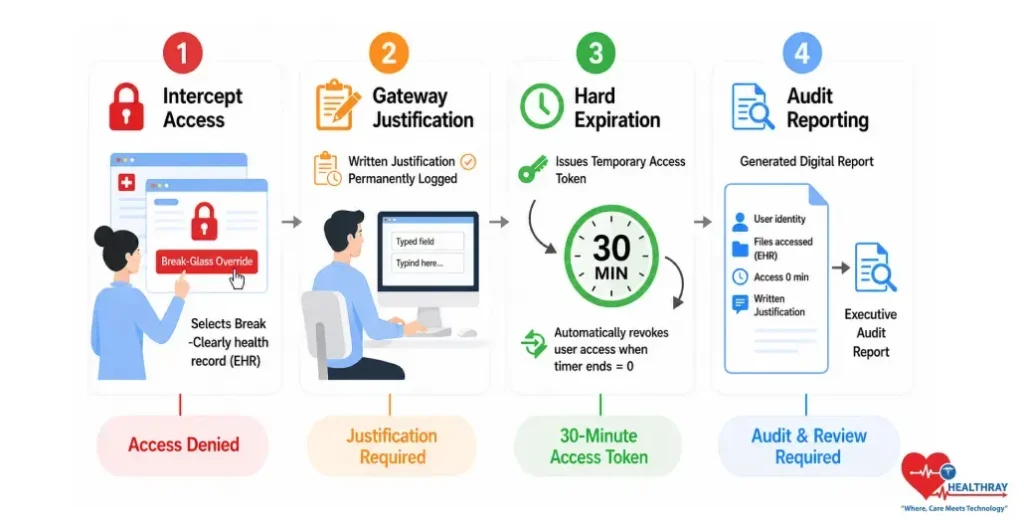
Here is what is going to happen at your clinic someday: Your patient drops while being triaged. You cannot reach her doctor for anything. The nurse on duty needs urgent access to limited records like medications, allergies, and past emergencies. Permissions say no. Reality says no more.
This is what break-glass overrides are for – a core feature of role-based access clinic software often missed in vendor comparisons. The results of a recent HHS Office of Inspector General audit revealed recurring deficiencies within overall information technology controls among Medicare contractors, state Medicaid agencies, and hospitals – those very deficiencies that allow an undocumented emergency access situation to become a liability issue.
This is how the four-stage Gateway process ensures clinical availability and complete accountability for emergency access:
Stage 1 – The Intercept: The unauthorized user faces the locked record screen and uses the “Break-Glass Override” method. This is an explicit gate, not a stealth method or an administrative bypass. It is known by the system.
Stage 2 – Gateway Justification: The user must enter a written reason before the system removes the access restriction. The justification is time stamped, tied to the user, and permanently logged. There is no skip option.
Stage 3 – Hard Expiration Window: The system issues a temporary access token with a 30 minute countdown timer. Once the timer expires, the system revokes elevated access and requires repeating the justification process.
Stage 4 – Post-Incident Routing: The system records the user’s identity, accessed files, access duration, and justification in a high priority incident report for review. Break-glass events are always visible and never treated as routine.
To Sum Up: Get The Permissions Right Or Get Fully Exposed
Review everything discussed in this blog post. The receptionist who can’t even access a clinical record manually because the system prevents the render from opening the clinical document. The nurse who has total write permission except that she cannot edit any diagnosis because she did not create the note in question. The healthcare provider who has total clinical permission except that he does not have access to anything in payroll or billing setup. The administrator who controls the entire practice backend yet has never accessed any encounter. Ultimately, that’s not a permissions grid; that’s an IT solution where architecture itself provides security and prevents abuse of access.
Sub-second session revocation cuts off an ex-employee’s access before they can even close their laptop. Append-only audit logs permanently record every view, edit, and bulk export without allowing any alteration. A break-glass protocol enables emergency access while still preserving full accountability. Most clinics don’t find out their access controls failed during an audit. They find out during a breach, a lawsuit, or an offboarding gone wrong. The architecture described here exists precisely so that moment never arrives. If your current system can’t match it role for role – that’s your answer.
Learn more: How Automated Reminders Improve Clinic Show Rates at Every Stage of the Sequence reflecting how consistent patient communication is just as critical to clinic efficiency as secure internal access control.
