






In This Blog, You Will Get To Know:
- Which clinic management system features are truly non-negotiable for a solo clinic?
- How do feature needs shift when you scale from one provider to ten?
- What separates a growth-stage clinic’s software requirements from an enterprise network’s?
- How do you match the right feature tier to your exact clinic size and workflow?
Most clinics pick software the wrong way. Instead of matching features to clinic size, they compare feature counts. A solo practitioner drowning in enterprise tools loses time, not saves it. Similarly, a group practice running on solo-clinic software hits a wall the moment a second provider joins. In reality, the right clinic management system features depend entirely on who you are and how you operate.
This guide breaks every core feature into three tiers – Must-Have, Growth, and Enterprise, each mapped to a specific clinic size and the workflow problem it solves.
Not Every Clinic Needs the Same Features
A clinic management software choice isn’t based on the most features. It’s more about getting the right ones, really. There is little in common between a 2-provider GP and a 15-location chain of diagnostic providers. However, the majority of software buying guides will give them the same treatment.
That’s a health care cost. For instance, tools with too many features hinder small teams. Other tools, however, that aren’t well developed are vulnerable to the pressures of growth. Put simply, the clinic management system that you require today relies on the variety of providers you have, the number of appointments you supply monthly, and the coordination issues you’re actively battling.
A three-tiered topography. There is a clinic profile, core problem and set of features for each tier. Begin at your tier. Don’t worry about the rest yet.
Must-Have Tier: Clinic Management System Features for Solo Clinics
| CLINIC METRIC | SPECIFICATION |
| Clinic Size | 1-3 providers |
| Monthly Appointments | Under 500 |
| Staff | 0-2 admin |
| Core Problem | Manual coordination overhead that blocks growth |
Poor clinical care is not the reason for solo and small clinics to fail. In fact, they are unsuccessful because one admin is responsible for reminding patients, billing, patient registration, and patient follow-up. All manual tasks vying for the same scarce attention.
According to MGMA, missed appointments cost the healthcare industry over $150 billion annually. As a result, automated reminders alone close most of that gap for small clinics.
Before you add any other features, these are the five clinic management system functions that all solo clinics should include:
- Appointment Scheduling and Automated Reminders: Manual call-based reminders cause no-shows. Instead, a scheduling module automatically reminds the user 24 hours and 2 hours before the appointment via SMS or WhatsApp.
- Digital Patient Registration: Transcription errors and delays at the front desk. Digital registration gathers data such as demographics, consent, etc., before the patient visit.
- Basic Billing, Invoicing and Payment Collection: Disconnected billing equals lost revenue. Specifically, a basic billing module will connect each consultation with an invoice and keep track of outstanding payments in real time.
- Structured Notes and SOAP Templates: Structured notes are a compliance risk and time drain. Therefore, pre-built SOAP templates help decrease the time needed to document with each patient and ensure that records are audit-ready.
- SMS/ WhatsApp Patient Communication: Patients expect fast, direct communication. To this end, there’s already a built-in messaging layer to confirm appointments, remind patients when it’s time for their prescription, and send follow-up nudges, all without the need for a separate tool.
 PRO TIP
Growth Tier: Clinic Management System Features for Multi-Provider Group Practices
| CLINIC METRIC | SPECIFICATION |
| Clinic Size | 3-10 providers |
| Monthly Appointments | 500-3,000 |
| Staff | 3-8 admin |
| Core Problem | Provider coordination breakdown and performance invisibility |
Group practices, don’t miss a chance to schedule. Rather, they are not coordinated. Three different booking systems and two billing spreadsheets with four doctors sharing a clinic make operational chaos the norm. That chaos is eliminated with the growth-tier clinic management system features.
Actually, group practices with multi-provider coordination, but no system takes more time to coordinate the system than to run the clinic. The capabilities of this tier are meant to rectify the issues that are present, just as they are not meant to complicate the situation.
For instance, clinics like Biosystems Healthcare in Lekki, Lagos, a high-volume diagnostic centre serving a diverse patient base, represent exactly the scale where these coordination features become critical to daily operations.
- Multi-Provider Scheduling with Conflict Logic: Double booking a consultation room or specialist costs billable time. When checking for a room conflict, equipment conflict and provider conflict, all three are checked at once, before a slot is confirmed.
- Role-Based Staff Access and Permissions: Not all staff will have access to all records. The result is that role-based permissions limit access to data based on job function, which means there is less chance of error and compliance risk within the team.
- Provider Performance Dashboards and Utilisation Reports: If there is no data, practice managers have to guess which providers are underutilised. Rather, performance dashboards pop up with the numbers of appointments, revenue per provider and chair time.
- Multi-Provider Billing with Revenue Splitting: Without split logic, it is easy to get into an accounting dispute when billing across four providers. To address this, automated revenue attribution assigns revenues appropriately at the time of service.
- Referral Management and Inter Provider Communication: Notes referred in and out are lost. A structured referral module, on the other hand, logs each provider to the provider referral with a log and the status of the referral.
- Patient Recall and Retention Automation: All too many group practices are losing patients between visits only because there isn’t a follow-up. That’s why automatic recall campaigns are based on appointment history and treatment gaps and don’t require admin input.
 NOTE
NOTE
Enterprise Tier: Clinic Management System Features for Multi-Location Clinic Networks
| CLINIC METRIC | SPECIFICATION |
| Clinic Size | 10+ providers / 3+ locations |
| Monthly Appointments | 3,000+ |
| Staff | Centralised ops team + location-level admin |
| Core Problem | Inconsistency across locations, compliance exposure, and integration gaps |
Multi-location clinic networks do not have scheduling issues. Rather, they suffer from governance issues. If 12 locations have different versions of the software, audit logs are incomplete, and billings are inconsistent among branches, the risk is regulatory, not operational.
The features of this clinic management software are designed for a network that, if data integrity or access control is compromised at any point, can be vulnerable at points throughout the network.
- Centralised Multi-Location Dashboard: All appointments, revenue and staff activity are visible in one place on the network level dashboard. Furthermore, it offers drill-down into branch data as required.
- API Integration Layer — HL7 and FHIR Compliance: The most common technical risk for large networks is disconnected EMRs, lab systems, and billing platforms, which must be able to comply with the integration layer. Specifically, data exchange is clean and bidirectional via HL7 and FHIR-compliant API layers, and without any custom workarounds that break on every vendor update.
- Role-Based Access Control and Audit Logging: Enterprise compliance requires a full access trail. Specifically, each login, record view, record edit and record export should be recorded by user, role, time and location, and be audit-ready when called for.
- Single Sign-On and Enterprise Identity Management: 12 locations with 12 staff members managing access credentials leaves security gaps. Rather, SSO works with an existing identity provider and eliminates the need to manage the credentials.
- Custom Reporting and Data Export: You need to export data from your system in a custom format for board-level reporting. Custom report builders and structured data exports provide the finance and operations teams with just what they need without having to wait on vendor support.
- Multi-Entity Billing and Insurance Management: Billing across legal entities, insurance panels and locations is not a typical billing module issue. Consequently, multi-entity billing logic processes claims, reconciliation and panel management, all of which are fully auditable, per location.
- Dedicated Onboarding, SLA-Backed Support, and Change Management: There are also no enterprise deployments that run on self-serve knowledge bases. Hence, a standout feature of the system is a separate implementation team, an established SLA, and a change management procedure.
Clinic Management System Features: Full Tier Comparison Table
Match every key feature of every clinic management system from this list with the tier that it provides real value in terms of operations. The last column gives the break points for each clinic size when the feature is not included.
| FEATURE | MUST-HAVE | GROWTH | ENTERPRISE | WHAT BREAKS WITHOUT IT |
| Appointment Scheduling | ✓ | ✓ | ✓ | Manual booking errors; no-show spikes |
| Automated SMS / WhatsApp Reminders | ✓ | ✓ | ✓ | No-show rate increases; staff time lost on calls |
| Digital Patient Registration | ✓ | ✓ | ✓ | Paper intake errors; slow front-desk flow |
| Basic Billing and Invoicing | ✓ | ✓ | ✓ | Revenue gaps; uncollected payments |
| Clinical Notes / SOAP Templates | ✓ | ✓ | ✓ | Compliance risk; documentation time waste |
| Patient Communication Layer | ✓ | ✓ | ✓ | Missed follow-ups; poor patient retention |
| Multi-Provider Scheduling with Conflict Logic | – | ✓ | ✓ | Double-booking; lost chair time |
| Role-Based Staff Access and Permissions | Partial | ✓ | ✓ | Data breaches; compliance audit failure |
| Provider Performance Dashboards | – | ✓ | ✓ | Invisible underperformance; poor resource allocation |
| Multi-Provider Billing with Revenue Splitting | – | ✓ | ✓ | Accounting disputes; incorrect provider attribution |
| Referral Management | – | ✓ | ✓ | Lost internal referrals; broken care continuity |
| Patient Recall and Retention Automation | – | ✓ | ✓ | Patient attrition; silent revenue loss |
| Centralised Multi-Location Dashboard | – | – | ✓ | Blind spots across branches; delayed decisions |
| API Integration Layer (HL7 / FHIR) | – | Partial | ✓ | Disconnected systems; custom workarounds that break |
| Audit Logging and Access Trails | – | Partial | ✓ | Regulatory non-compliance; failed audits |
| Single Sign-On (SSO) | – | – | ✓ | Credential sprawl; security gaps across locations |
| Custom Reporting and Data Export | – | Partial | ✓ | Inability to report at the board level |
| Multi-Entity Billing and Insurance Management | – | – | ✓ | Billing errors across legal entities; claims disputes |
| Utilisation and Chair Time Reporting | – | ✓ | ✓ | Wasted capacity; unbalanced provider workloads |
| Dedicated Onboarding and SLA Support | – | Partial | ✓ | Failed implementation; staff resistance to adoption |
| Patient Portal Access | Partial | ✓ | ✓ | Increased admin load for routine patient queries |
| Inventory and Pharmacy Integration | – | Partial | ✓ | Stock-outs; manual reconciliation errors |
Clinics managing complex patient populations, including specialised practices such as an ADHD clinic, often find that growth-tier features, particularly referral management and recall automation, become essential earlier than expected. This is due to the high coordination demands of chronic and behavioural health patients.
Choosing the Right Tier Is Choosing the Right Growth Path
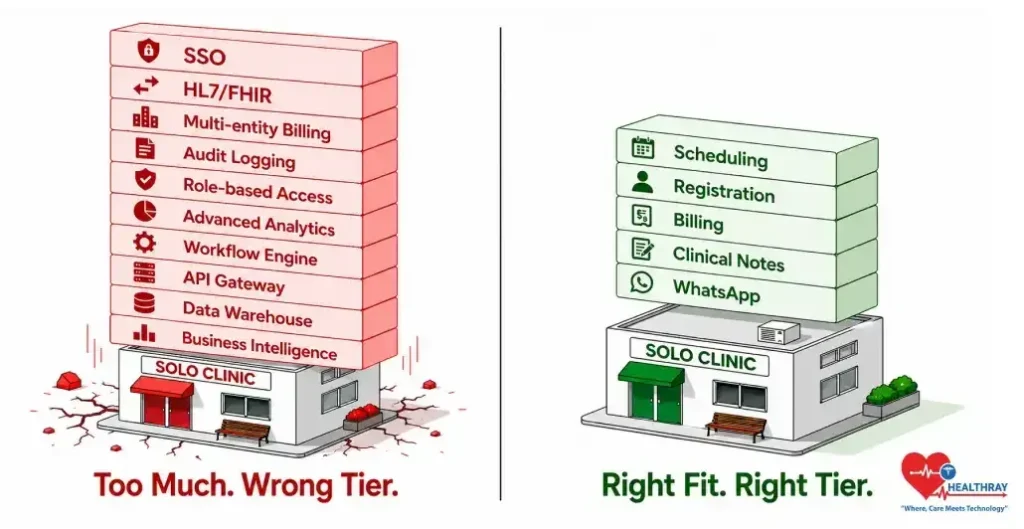
Not the most sophisticated features are the best; they are the best clinic management system features. Rather, it is these that align with where your clinic is practising today and where you want to be in 12 months.
No-shows, revenue losses from billing gaps, and the inability to provide the essentials of solo clinics are the consequences of missing these essentials. Likewise, group practices lacking growth tier coordination tools reach a ceiling when there are more than three providers. Until now, enterprise networks that are not integrated with APIs or audit-logging simply fail at the next compliance audit.
Healthray is designed to match the clinics in every stage. The platform grows with your tier; regardless if you’re a single-room practice or a multi-city diagnostic network, there’s no need to pay for features that your practice size doesn’t yet require.
Ultimately, the best choice is to be honest about your clinic now, not as you wish it to be.
Frequently Asked Questions
A five-tiered system is essential for any solo or 1 – 3 provider clinic to get rid of manual coordination. A growth-tier system, however, brings in multi-provider scheduling, role-based access, performance reporting and retention automation. These features are only needed when the number of providers and appointments grows beyond the capacity of a single clinic.
Yes. The tier framework is specifically created to do that. The first thing a solo clinic should have is scheduling, billing, registration, clinical notes and communication with their patients. Growth-tier features need to be turned on when volume hits 500 monthlies or when a second provider joins.
Compliance is most important for role-based access control and audit logging. Role-based permissions – only people have access to data that they have a right to see. Audit logs are maintained and show the time and user ID when someone accesses, edits or exports. Any clinic, no matter how large or small, is at risk without both in place.

About the Author
Ketan Mangukiya is a healthcare technologist, entrepreneur, and CEO of Healthray. Passionate about AI and digital innovation, he is dedicated to transforming healthcare through advanced technology solutions. As co-founder of Bigscal Technologies and founder of Healthray, Ketan focuses on improving hospital operations, patient experience, and healthcare accessibility through smart, scalable medical technologies.


