

Summary
The hospital frequently chooses medical billing software for hospitals based on criteria that may be inappropriate, emphasizing functional aspects instead of assessing how the solution works in practical settings. This document provides a 10-point framework of a stress test process that will enable organizations to assess hospital medical billing software from a revenue cycle point of view. By following this framework, you will be able to avoid purchasing a system that may seem to work in demo but fail when put into production.
Introduction
Typical hospital purchasing guides do not reveal this. Hospitals lose money in billing offices mainly because they choose systems not designed for that environment, not because of missing functionality.
If a multi-specialty hospital discharging 800+ patients per day chooses its medical billing software for hospitals based on an impressive demonstration and low pricing, the results are bound to follow: denial rates increase, audits become more common, and the IT department receives calls for escalation at 2 AM when closing the books in the final month of the year. An audit by the HHS Office of Inspector General conducted in 2026 revealed that improper Medicare claims totaling over $15 million had been paid due to poor internal billing controls, which could easily have been detected through improved billing software.
We need to change our procurement approach from “What does this software do?” to “How does this software behave when things get tough?” That is precisely what this guide is designed to help you avoid. Here is our thesis: Ensuring that there will be no revenue leakage and/or compliance exposure calls for an examination of the financial and technical vulnerabilities of your environment, not feature comparisons.
Why Hospitals Need A Structured Evaluation Framework
Hospitals run RCM differently from medical office billing in three key respects. Higher operational complexity, larger scale, and greater regulatory exposure drive these differences.
- Volume: Hospital systems handle hundreds to thousands of claims per day across multiple departments such as inpatient, outpatient, emergency, and ancillary services concurrently.
- Payer mix: A single hospital may have to administer claims for Medicare, Medicaid, dozens of commercial insurance providers, and even self-pay patients, each governed by unique regulations and edits.
- Regulatory surface area: HIPAA, CMS Conditions of Participation, Medicaid State Waiver Guidelines, and future requirements around transitioning to ICD-11 represent an extensive compliance framework beyond the capabilities of a clinic-scale solution.
The cost of misalignment is hard to identify in the RFP process stage. Misalignment appears about six months after go-live. It shows up as rising denials, payer contract violations, and increased employee workarounds. Finance, IT, and clinical teams must align under a single measurable framework to prevent it.
10-Step Framework For Medical Billing Software For Hospitals
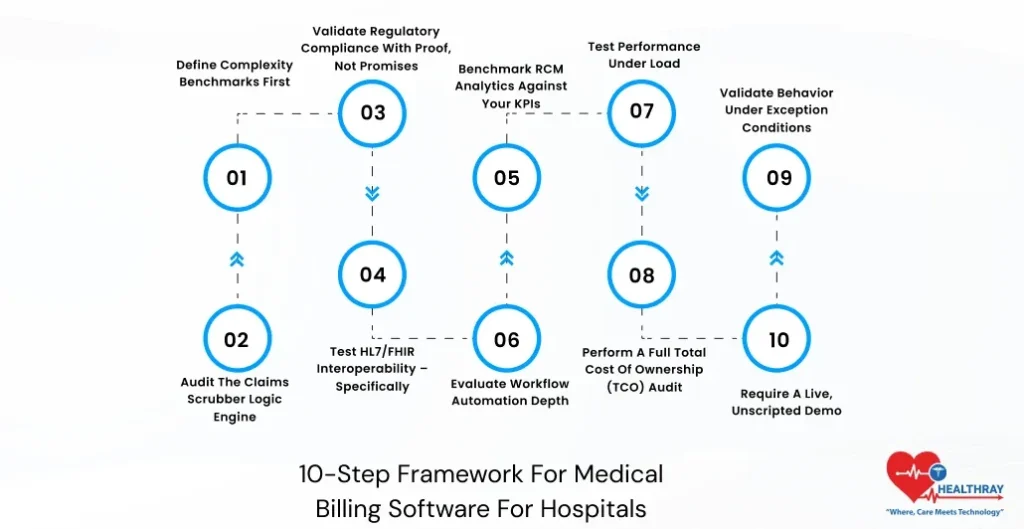
Step 1: Define Complexity Benchmarks First
Start within, not without. Write down your average daily claims, ratio of inpatients to outpatients, number of active payers’ contracts, and types of specialty service lines. These figures form the basis of your assessment, because each provider will be assessed relative to your setting and not what they do for any other customer.
Step 2: Audit The Claims Scrubber Logic Engine
This is where your money either gets secured or goes out the window before anything is submitted to the payer. Have vendors show you what they can do in terms of handling customized edits, unique payer logic, and modifiers. Even more important is how fast they can implement changes to ICD-11 coding within the rules engine. A scrubber that’s working off old code sets is a denial machine.
Step 3: Validate Regulatory Compliance With Proof, Not Promises
A requirement for a SOC 2 Type II Certification is mandatory. Forensic audit logs, which provide an irrefutable and timestamped trail of every alteration that occurs in a claim, are simply essential in any hospital setting undergoing CMS or RAC audits. Payers routinely carry out both automatic and advanced post-payment reviews. Hospitals without complete claim-level documentation risk repaying funds due to improper records.
 NOTE
NOTE
Step 4: Test HL7/FHIR Interoperability – Specifically
The phrase “We Connect to Epic” is true only for the initial phase of the process and does not serve as evidence of integration. From the above explanation, there are applications that still operate on batch processing, meaning that despite entering the charge in the morning, it is not guaranteed to have been processed at that point in time. Test live connectivity in your EHR sandbox. Images or videos do not prove anything.
The report from the Office of National Coordinator on the utilization of APIs by hospitals in 2024 notes that despite the presence of API in nine out of ten hospitals, there are many challenges when it comes to supporting standards in FHIR for administrative and claim transactions. As per ONC, API utilization is common among hospitals. However, some of the hospitals lack connectivity in terms of FHIR in the transaction between administrative and claims processing systems. Pre-condition for negotiation: HL7 FHIR R4 connectivity and ADT feed.
Step 5: Benchmark RCM Analytics Against Your KPIs
Vendors design dashboards for demos, not for use in hospital financial departments. Evaluate the capability of analytics module and healthcare billing dashboard in capturing KPIs like accounts receivable aging by payer grouping, denial trends based on payers’ behaviors, and clean claims ratio by department rather than basing your evaluation on predefined vendor snapshot configuration. In case you miss out vital information, because your finance department sees things from another angle. Please ask for a demo of the configuration process instead of asking for a screenshot of it.
Step 6: Evaluate Workflow Automation Depth
Basic automated secondary claims and follow-up work queues are just table stakes now. Dig a little deeper. Does the software route denied claims into the appropriate work queues based on the denial code logic? Does it also send out payer-specific appeal letters based on predefined templates? There is a definite distinction in terms of productivity in hours per week between basic automation and deep automation.
Step 7: Test Performance Under Load
Ask for performance benchmarks with at least 500 concurrent users at peak submission times and throughout the end-of-month closure process. The latency issue under heavy load is well-known and virtually never surfaces in an on-site demonstration. Define uptime clearly in the contract and ensure an enforceable SLA. Even 99.9% uptime still allows about eight hours of downtime per year.
 PRO TIP
Step 8: Perform A Full Total Cost Of Ownership (TCO) Audit
License fees are the smallest amounts quoted in hospital billing software contracts. Prepare your 3-year Total Cost of Ownership (TCO) analysis before signing on the dotted line. The list below includes categories that most procurement teams ignore when issuing RFPs:
| Cost Category | What to Ask the Vendor |
| Deployment/Go-Live | Are fees fixed/hourly? Who takes responsibility for scope expansion? |
| Data Migration | Per unit rate? Does migration include historical records? |
| Clearinghouse Fees | Per transaction/fixed monthly cost? Which clearinghouses? |
| Interface Construction (HL7/FHIR) | Cost per interface? Who constructs (vendor/IT)? |
| Additional Costs for Analytics/Reporting | Included or additional software module? |
| Training & OnboardingCosts Related to | How many days does the vendor include, and what does remote or on-premises cost? |
| Support Services (Levels/Tier) | Response time? Additional cost for non-working hours? |
| Annual Price Escalation | CPI-linked cap or open-ended vendor discretion? |
Hospital RCM procurement typically underestimates 3-year TCO by 40%–60% at contract signing. This is why evaluation of revenue cycle management software in healthcare should focus on lifecycle cost behavior, not just upfront licensing costs.
Step 9: Validate Behavior Under Exception Conditions
Demo of clean data is easy enough to do. Push your system to its limits by using real data that may be flawed: patients with partial demographic information, double charges, claim lines containing incompatible diagnoses and procedures, and claims rejected in the middle of a cycle. Your billing team deals with the response to bad data far more frequently than to perfect claims.
Step 10: Require A Live, Unscripted Demo
Give the vendor a genuine, anonymized, complex claim from your environment and ask them to work on it immediately in a sandbox without any prep time or predetermined procedure. One such test disqualifies more vendors than any possible RFP question out there. If a vendor is unable to process your claim in a test scenario, they certainly won’t be able to do it in practice.
The Buyer’s Final Vetting: Four Questions That Cannot Be Hedged
Before signing any contract for medical billing software for hospitals, require written answers to the following questions. This is not a means of negotiation; rather, it is a screening process. If a firm cannot answer your questions directly, it becomes clear that their system has some drawbacks.
- Interoperability Check: “Does the solution offer evidence of two-way, real-time data synchronization with our EHR, or is it limited to batch file transfer scheduling?”
- Autonomy Check: “Is the internal billing department able to modify scrubber logic and payer edits without opening a case with the vendor?”
- Forensic Check: “In the event of a CMS audit, can the system produce an unalterable record of all changes to a specific CPT code, including user identity and timestamp?”
- Resiliency Check: “What is the guaranteed RTO for a complete system failure, and is it contractually binding within the SLA?”
A hedging statement on any of these four questions represents an observation rather than a footnote. This indicates that there may be problems with operations in the future. Handling such risks at the stage of evaluation is much simpler and less expensive than handling them at the implementation stage.
Red Flags: Common Evaluation Mistakes To Avoid
- The Price Trap Hidden Cost Risk: This is the single most prevalent and most costly trap to fall into. Choosing a software product from a hospital medical billing software company based only on low licensing fees can be risky. Ignoring total cost of ownership over three years often leads to unexpected implementation costs and renegotiation fees. In many cases, clearinghouse and operational expenses wipe out savings within a year.
- Blind Standard Integration Assumption: Standard integration is another common mistake made. The phrase “standard integration” is only a marketing term and not an actual technical description. This type of integration typically entails the batch transfer of files that result in data lag, charge capture deficiencies, and reconciling issues.
- Clinic Centric Vendor Selection Error: It is more subtle, but no less damaging. An EHR system that works well in physician practices or even in outpatient billing software may not perform as effectively when handling inpatient DRG billing, multi-specialty charge capture, or the volume of claims generated during a single hospital shift.
- Skipping the Unscripted Demo Test: This is where the vendor has been able to demonstrate how well its software can work without any preparation since you did not test the software but only the salespeople.
Every single one of these errors can be prevented. They all cost much more to correct once they have gone live than before they went live.
Conclusion
The introductory section of this manual emphasized one primary lesson: the vast majority of hospitals select billing systems based on capabilities, not performance. The ten steps outlined above are designed to correct this. They shift the evaluation of medical billing software for hospitals away from feature comparisons. Instead, the focus is on a performance-based assessment conducted on your terms.
The best billing system is not the most well-known platform or the one with the most polished sales pitch. The system handles your transaction volume, integrates seamlessly with your EHR, and maintains a forensic audit trail that withstands regulatory scrutiny. It also costs exactly what was agreed upon 36 months after go-live. Evaluate every vendor using this framework before your next selection process. A system that fails evaluation will also fail in operations hospital billing pressure is constant and unforgiving.
