







In This Guide,
Choosing clinic management software is about fit, not features. Use the framework below to turn a complex decision into a confident choice:
- Select software that fits your organization’s style rather than just looking at the number of features.
- A five-point model (EHR matching compliance, financial plan, scalability, and support) effectiveness guide can be used in evaluating software.
- Rate suppliers on these criteria so that you do not purchase too many features.
- Learn about vendor tiers so that your system won’t be too small for you in one year.
- Include hidden implementation and migration expenses in the budget planning from the beginning.
- Concentrate on long-term clinical and operational results when you make a list of potential partners.
Selecting the right clinic management software is more than just buying a tool; it’s about finding a long-term operational partner. This guide will help you systematically assess vendors based on five main pillars, so your choice not only supports your existing workflows but also enables your business to grow.
Why Most Clinics Pick the Wrong Software
It is really stressful to choose the right clinic software when all the vendors are advertising their features instead of the results of using their products. Most of the time, the buyers just compare the feature lists without thinking about whether the platform can support their everyday work efficiently. So many times, the clinics buy the software that is really nice during the demonstration, but which may not work properly in the real-world environment.
Actually, most people get it wrong by focusing on having various features instead of going deep into the few features they really need. For instance, a platform might have 200 features, whereas your clinic might only require 30 of them to be fully efficient. So, the real question is not “what all can this software do? “, but “what will we actually need for the clinic to function smoothly? “
However, many decision-makers never even think about their needs thoroughly. They simply follow what their peers say or the rankings that vendors get without thinking about their own patient volume, specialty needs, or the size of the team. Naturally, this kind of thinking is sure to result in a mismatch, and it will likely be detected only after the software has been deployed.
 NOTE
NOTE
The Five Pillars of Software Selection
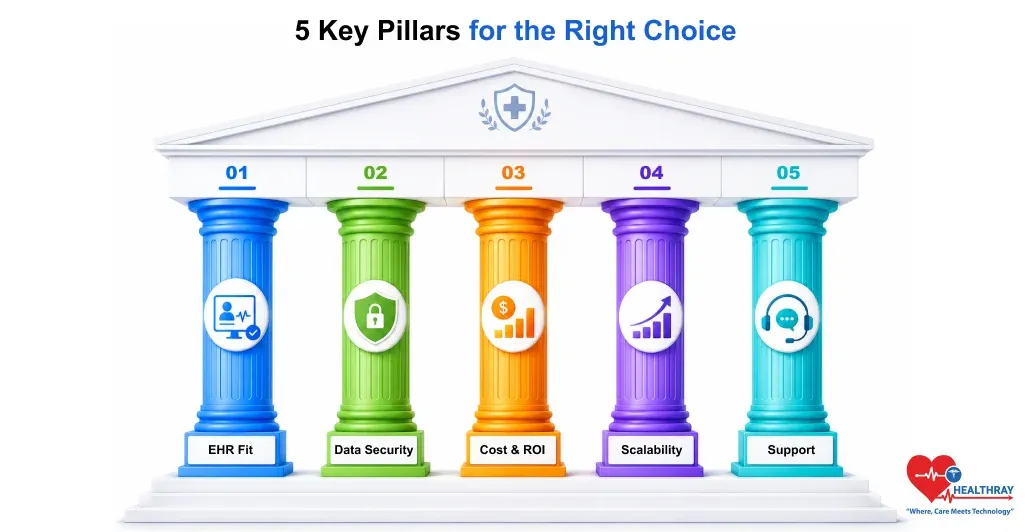
Most clinics pick software based on its appearance rather than on its functionality. Just a few scoring criteria: EHR compatibility, compliance, budget, scalability, and support will make your EHR comparison as objective as possible. How much each factor matters depends on the size of the clinic: smaller practices tend to give more weight to budget and EHR fit, whereas bigger healthcare networks are more concerned with scalability and data security.
1. EHR Fit and Clinical Workflow Integration
Why should clinic management software reflect how providers really work? At the very least, if it takes a system too many mouse clicks for an average SOAP note, or it doesn’t offer specialty-specific templates, the team will just end up ignoring it. So, it’s a good idea to buy software that supports flexible charting and offers natural navigation rather than the stiff, “one-size-fits-all” type of layouts.
Ask these questions during the demo:
- Can providers complete common tasks quickly?
- Does it support your specialty workflows?
- How much customization is available?
- How long is the learning curve?
2. HIPAA Compliant Clinic Software and Data Security
Global buyers must ensure that the platform they choose is fully compliant with the laws of their respective regions. For example, they have to look for HIPAA compliant clinic software if they are based in the US. Look for GDPR-aligned solutions for those in Europe, PIPEDA-ready systems in Canada, and the Privacy Act 1988/My Health Records requirements for Australia, MOHAP-certified platforms in the UAE, etc. Besides merely looking for a compliance seal on a site, it is also important to verify that the platform employs end-to-end encryption, multi-factor authentication, and maintains comprehensive access logs to safeguard confidential patient information from both external threats and internal mistakes.
Verify these before signing a contract:
- What security certifications are provided?
- How is patient data protected?
- Are access permissions configurable?
- How are security incidents handled?
3. Clinic Software Costs and Return on Investment
Do not evaluate clinic management software just by the monthly price. Before you decide how much time you can save, consider all the costs, such as setup, training, integrations, and data migration. Generally, benefits like fewer no-shows, less admin work, and faster billing will more than compensate for the small initial investment or a cheaper plan that has hidden costs or does not facilitate your daily work.
Look beyond the advertised price:
- What are the implementation costs?
- Are integrations charged separately?
- What training expenses apply?
- How quickly can ROI be achieved?
4. Scalability for Future Expansion
Invest in software that will support the development of your clinic at least up to the next five years. Consider a system that can support new healthcare professional additions, new location set-up, and even clinic data migration if you are merging with another practice. If the platform becomes slow or really more expensive when you expand, it will negatively affect your business in the long run.
Consider your next five years:
- Can new locations be added easily?
- Does pricing scale reasonably?
- Will performance remain consistent?
- Can workflows evolve as you grow?
5. Technical Support and Vendor Reliability
It’s possible for any software to fail at some point, or even a user may slip up. That means vendor support is essential for your success. Investigate whether they provide 24/7 support, a dedicated customer success manager, and easy-to-understand training materials. A vendor that charges less but takes days to fix your urgent problems is far less attractive than a team that answers within minutes. The top-performing clinics, on average, select Reputable SaaS Solutions that make investments in globally recognized data security technologies. Therefore, the digitization of all clinic data, including patient medical records too, enables data storage that is safe and secure.
Assess the vendor, not just the software:
- What are the guaranteed response times?
- Is onboarding assistance included?
- How often are updates released?
- Can existing customers provide references?
 PRO TIP
Matching Software to Your Clinic Type
Not every clinic needs the same type of software. A platform that is sufficient for a solo practitioner might be too complicated for a multi-location organization that is expanding. It would be beneficial to categorize your operational needs before assessing vendors.
1. Solo and Small Clinics
Small clinics prefer software that is quick and easy to implement, user-friendly, and very economical. Yet, they mainly need appointment scheduling, patient records, billing, and basic reporting features from the software.
2. Specialty Clinics
The best option for specialty clinics is EMR/EHR software that is not only flexible for workflow but also has specialty-specific templates and integrations to facilitate their unique features.
3. Multi-Provider Clinics
One key factor to consider when the size of the provider team increases is coordination. So, the software being considered should have the features of provider scheduling, role-based permissions, internal communication, and performance reporting.
4. Multi-Location Healthcare Groups
To function across multiple sites, such healthcare groups require centralized reporting, standardized workflows, implementation of advanced security controls, and scalability for future growth opportunities.
Moving From Shortlist to Implementation
Once you have employed the foundational principles to pare down your choices to two or three vendors, your attention should then be on the transition plan. The major threat at this stage is data fragmentation, i. e., the situation where the existing records are not transferred seamlessly into the new system. So, you should ask for your best option for a comprehensive migration roadmap.
Besides that, your clinic will definitely need a super-user if it is to successfully install and use the software. This individual will, in fact, work as the first expert on the system and will also help others to familiarize themselves. An internal champion of the cause will not only relieve the vendor’s support team but also ensure that the software is the best fit to represent your specific clinical details.
Learn more: Selecting the right software is just the start; next is using it to truly engage patients. Omnichannel Patient Experience via Clinic Software: Building the Right Strategy shows how to create a cohesive journey across mobile, web, and in-person visits.
Your Next Step
At this point, selecting clinic management software is less about features and more about finding the right fit. Start with EHR fit and compliance, then evaluate clinic software ROI, scalability, and vendor support before deciding. This way, you have a setup not only to weigh the options but also to make a confident and well-informed decision.
Those clinics that derive maximum value from their software are, in fact, the ones that took time to think through the decision carefully. Get a scoring sheet ready, involve your team, and present vendors with real-life situations to see how they respond. Such initial rigor will not only lead to fewer disturbances but also better adoption and a trustworthy long-term partner.



