

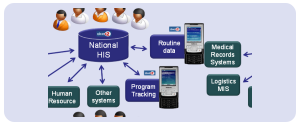


A lab management information system (LIMS) manages the full life cycle of patient samples. If you do not know what this kind of software does, the list of features provided by any LIMS vendor on their websites will not explain how things work in a laboratory after sampling. All stages, including registration, sample collection, testing, validation, reporting, and archiving, take place within a single system. The system unifies all laboratory software modules into one LIMS workflow, allowing every sample to move seamlessly from registration to report delivery. By connecting every stage of the laboratory workflow, a lab management information system reduces pre-analytical errors and shortens turnaround times for hospitals and diagnostic centers.Healthray structures this as the LSFC (Lab Sample Flow Continuity), a framework that tracks one sample across all 8 modules without a single manual hand-off. This guide covers the following topics:
- How a CBC specimen goes through 8 LIMS modules between 7:45 AM and 9:05 AM
- Where are inefficiencies introduced and errors inserted when using paper-based labs
- How the Sysmex XN-1000 automatically submits CBC results without manual entry
- What validation criteria are evaluated before the submission of results to the pathologist
- How a signed report gets delivered to a patient’s WhatsApp in less than 60 seconds
The Sample Begins: Patient Registration In Cases Module
Time: 7:45 AM
Jade comes in for a regular CBC test. Three important aspects have to be sorted out before the test: first, his identity; second, the purpose of the test; and finally, the person who referred him. Any omission at this stage results in an error that accompanies the sample throughout all the modules.
Paper Lab – Before The Needle Even Touches Skin
- The receptionist writes the name on a paper form.
- Copy details into a separate register.
- Hand Jade a handwritten token slip.
Three actions are three possibilities of making mistakes. The greater chance of an error is with each manual entry. In truth, misspelled names, duplicate entries, and wrong tests are all made before any testing starts.
The laboratory information management system at Healthray keeps the registrations on a single screen only. Therefore, no duplication or omission occurs. All the fields filled by the receptionist go directly to the following modules:
What Happens in the Cases Module
- The receptionist opens the Cases module from the dashboard.
- Enter the patient’s name, age, gender, contact details, and referring doctor.
- The system generates a unique case ID and links the CBC order instantly.
No duplication. No duplicate registration is required. Hence, all subsequent modules use this one record. This is how a lab management information system maintains data consistency across departments. Moreover, payment status and doctor commission are captured in this module itself. The module can also integrate with enterprise resource planning systems to synchronize finance, billing, and procurement data.
Phlebotomy Module: How The Sample Gets Collected
Time: 7:50 AM
Jade enters the specimen collection room, and the phlebotomist accesses the Phlebotomy module of the tablet computer. All the details about the specimen collection procedure are automatically displayed on the screen. There is no requirement for a hard copy of the form, nor any instructions from the receptionist. The screen automatically displays the following information during sample collection:
| FIELD | VALUE |
| Patient Name | Jade |
| Case Id | HR-20240312-0047 |
| Test Ordered | CBC |
| Tube Required | EDTA |
| Volume Needed | 3 ML |
This specification comes from the Test Master. It will be shown at the time of specimen collection. So, the phlebotomist does not need to know which tube Jade requires beforehand.
Incorrect specimen collection is the most frequent type of pre-analytical error. This is due to the fact that it depends on the handwritten slip. The Phlebotomy module takes care of this problem right away.
At the end of specimen collection, the phlebotomist labels it as completed. After that, the exact timestamp is generated. The result goes further to the TAT audit trail.
Token Board: Queue Management At Collection Center
Time: 7:52 AM
By 7:52 AM, there are already eight people waiting for various kinds of tests. At this point, a Token Board is essential for queue management; otherwise, things can quickly go wrong. Consequently, every extra minute people spend in queues increases work pressure.
What The Token Board Shows In Real Time
The Token Board gives staff a real-time view of patient flow across the collection center. It helps teams monitor queues, reduce waiting times, and assign resources more efficiently.
- Every active patient and test category.
- Collection status for each patient.
- Current waiting time for patients.
- Home collections separated from walk-ins.
When one collection room gets backed up, supervisors see it immediately. Therefore, they can reassign staff through better HR management, ensuring the next patient is served before a short wait turns into a long one.
TAT for home collections is calculated separately. In this regard, laboratories create their processing priorities for such cases independently of walk-in patients. Thus, no confusion arises in terms of queuing.
Fix The Queue Before It Costs You The Morning
The average lab spends 30 to 45 minutes each morning just on verbal queuing management. Watch your patient flow through all 8 modules in action during a 20 min demo.
Test Master + Accessioning: Sample Logged Into System
Time: 8:00 AM
The EDTA tube of Jade comes to the accessioning desk. The barcode on the form is scanned by the personnel. Then, they ensure that the specimen is physically available. This is the last manual verification point before the sample goes through the automated testing process.
1. What The Test Master Holds
The Test Master acts as the configuration backbone for the Laboratory Management Information System. A lab management information system uses the Test Master to standardize every test configuration. It contains the following five elements for each test available on your menu.
- Reference Ranges – age- and gender adjusted.
- Tube Type and Volume – auto-displayed at collection.
- Processing Method – what the sample needs before analysis.
- TAT Target – expected turnaround per test.
- Critical Value Thresholds – what triggers an urgent flag.
During accessioning, the system verifies all five test parameters when it confirms Jade’s CBC. The workflow also complements inventory management by ensuring the correct collection tube is selected for every test. If the tube type is incorrect, the system immediately flags it. Similarly, it flags the sample if the volume is insufficient. Thus, no error occurs during submission to Sysmex.
2. How Barcoding Removes Handwriting Risk
The barcode label is affixed to the test tube. Consequently, Jade’s specimen will receive an automated label associated with his case number. This will eliminate handwritten labeling of the test tube completely. Furthermore, it eliminates any chance of mislabeling from the collection to the bench.
According to CLSI guidance on laboratory accreditation and inspection readiness, pre-analytical specimen handling and patient sample identification are core requirements that accreditors verify during every inspection. Therefore, the Test Master is where Healthray configures, enforces, and audits that requirement without any separate manual process.
If your center offers both imaging and lab services, then you can apply the same logic to all the modalities available. Notice how an RIS system manages X-rays, USG, CT, and MRI through a single login.
 NOTE
NOTE
Machines Module: Sysmex Pushes CBC Result Automatically
Time: 8:15 AM
First, the technician loads Jade’s sample into the Sysmex XN-1000, which performs a complete blood count (CBC) test. Next, the analyzer measures hemoglobin, white blood cells (WBC), platelets, and the differential count. Then, it completes the test in less than three minutes and automatically transmits the results to the Machines module through HL7. The following table compares what happens at this stage in a paper-based lab and a laboratory management information system (LIMS).
| WHAT HAPPENS | PAPER LAB | LIMS MACHINES MODULE |
| Result Delivery | Sysmex prints a paper slip | Transmits via HL7 automatically |
| Data Entry | Technician types values manually | Zero manual entry |
| Error Risk | Transcription errors in every batch | Eliminated at source |
| Speed | 5 to 10 min per batch | Under 10 seconds |
| Audit Trail | No record kept | Timestamp and machine ID logged |
The Machines component performs analysis by several analyzers at once. For instance, your Sysmex XN-1000 analyzer for CBC, Roche cobas analyzer for biochemistry, and your urine analyzer feed data simultaneously. Each one is connected to the right patient file automatically. A lab management information system links these results to the correct patient file without manual intervention.
 PRO TIP
Validation Rules: Catching Errors Before Sign-Off
Time: 8:30 AM
The CBC test results have been entered into the system. However, there is still one other obstacle left that it has to get through before it proceeds any further. It cannot proceed further until it is processed at the validation rules layer. This is done without any intervention from the staff.
The system applies these validation checks to every result that enters the laboratory system. Before the pathologist reviews the report, it automatically runs all validation rules. At this point, the system performs four tests on the CBC result of Jade:
| CHECK | WHAT IT CATCHES | EXAMPLE |
| Plausibility | Physiologically impossible values | Hb below 2 or above 25 g/dL |
| Delta Check | Sudden change from prior result | WBC jumps from 3,000 to 28,000 |
| Critical Value | Critical result requiring attention | Platelets below 20,000 detected |
| Pattern Check | Signs of a sample mix-up | Male with female-range hormones |
However, if any of these tests indicate a problem, the result will be stored in the system, meaning that the pathologist will get a message stating that “Review required” rather than getting a clear result. The result cannot be processed without a human evaluation; this is why it is an important feature of the lab management information system.
As indicated by research done on the NIH PMC about result review and release requirements for ISO 15189, every lab is required to have a protocol in place specifying who will review the results, when this will be done, and how the results will be released.
CBC of Jade passes all four criteria without raising any red flags. These are WBC 8,200, Hemoglobin 13.8 g/dL, and Platelets 220,000, which all lie within acceptable limits. The system then considers the test result to be ready for signing off.
Reports Module + WhatsApp Dispatch
Time: 9:00 AM
Pathologist signs off. At this point, the system automatically manages the whole process. All subsequent events happen in order without any involvement from the staff member. The report is not queued for printing. It doesn’t depend on the availability of the receptionist behind the counter.
The Sequence – Under 60 Seconds Total
Once the pathologist signs the report, the system automatically completes every remaining step without manual intervention. Within 60 seconds, it generates the report, delivers it to the patient and doctor, and records every action for future reference.
- The Reports module creates an electronic file (PDF) immediately for secure digital sharing.
- The PDF includes the laboratory letterhead, the signature of the pathologist, and reference ranges from Test Master.
- Out-of-range results get flagged automatically within the report.
- The report gets sent to Jade via WhatsApp, using his Cases record contact number.
- The referring doctor receives a copy as well, via the doctor portal.
- The delivery log gets captured in the system against the case record.
The entire delivery runs from sign-off to WhatsApp dispatch without staff printing anything, calling Jade, or emailing the referring doctor. For labs still handing reports over the counter, whether in Tier 2 India or across Kenya, Nigeria, or Ghana, this step changes how patients and doctors experience your lab entirely.
Learn more: Manage X-Ray, USG, CT, and MRI on One Login with a Radiology Information System, and see how hospital labs reduce reporting errors, prevent missed critical values, and build stronger referring doctor trust.
Sample Archival: Long-Term Storage
Time: 9:05 AM
The EDTA tube belonging to Jade will be sent for storage after being dispatched. In the conventional lab setup, it will be labeled manually and put in a rack. The truth of the matter is that most of the labs will not be able to trace back the specimen in three days when the physician contacts them again.
What The Archival Module Records Per Sample
The Sample Archival module captures five elements for each sample. Therefore, your team can locate, confirm, or access any sample within seconds without using manually prepared rack sheets.
- Rack number and storage location.
- Assigned temperature storage zone.
- Collection date and test details.
- Scheduled disposal based on retention policy.
- Sample condition at storage time.
Every single one of them is tied to Jade’s case ID. A lab management information system makes future sample retrieval faster and more accurate. Thus, when a doctor requests the same test for Jade after three days, your employees will be able to identify the very spot where the rack is kept within seconds.
Why This Matters For NABL
NABL insists that some biological samples be stored for at least 2 years. The auditor expects each specimen in that period to have a traceable and searchable history. But a handwritten log of the racks for 24 months can never be considered a satisfactory answer to this. Pages tend to fade, go missing, or simply never be filled out properly. The Sample Archival module, on the other hand, generates an end-to-end record of all samples. And it clears the audit automatically.
The LSFC In Action: What 80 Minutes Looks Like Inside A LIMS
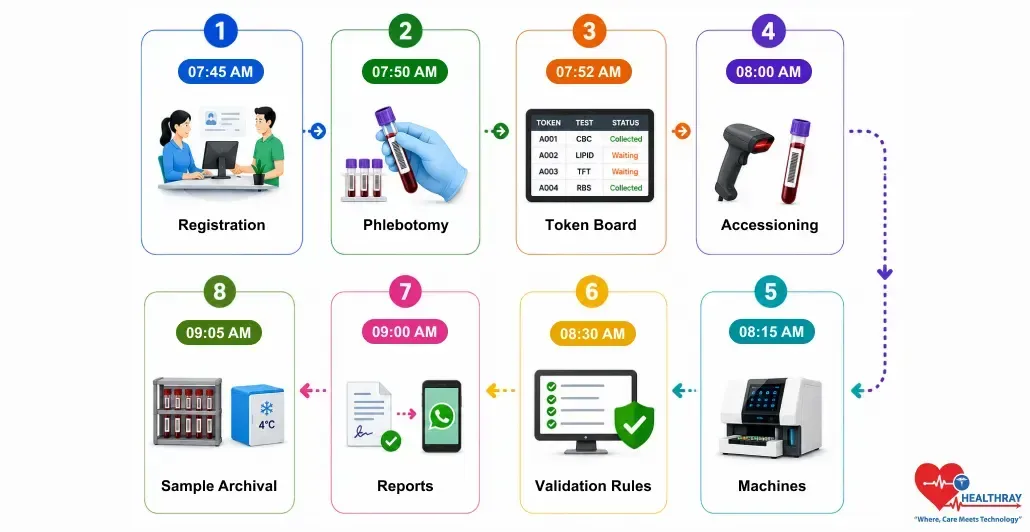
This is how a single CBC sample moves through a lab information management system. From Jade’s arrival at 7:45 AM to WhatsApp report delivery at 9:00 AM, eight modules worked together as one connected workflow with no manual intervention. Finally, the table below summarizes each stage and highlights what paper-based labs typically lose.
| TIME | MODULE | WHAT LIMS DOES | WHAT PAPER LAB LOSES |
| 7:45 AM | Cases | Case ID generated, CBC linked | Duplicate registers, mix-up risk |
| 7:50 AM | Phlebotomy | Correct tube displayed, timestamp logged | Wrong tube errors |
| 7:52 AM | Token Board | Real-time queue across all rooms | Verbal chaos, patient delays |
| 8:00 AM | Test Master + Accessioning | Barcode assigned, 5-point cross-check | Undetected pre-analytical errors |
| 8:15 AM | Machines | Sysmex pushes CBC via HL7, zero typing | Transcription errors in every batch |
| 8:30 AM | Validation Rules | Delta, critical, plausibility checks run | Wrong results are reaching doctors |
| 9:00 AM | Reports | PDF generated, WhatsApp sent in 60 sec | Manual delivery delays |
| 9:05 AM | Sample Archival | Retention tracked, storage logged | NABL audit failures |
The paper-based lab will take 6 to 12 hours for the CBC process. Mostly, it includes data entry, verbal queuing, and physical report delivery. On the other hand, the lab management information system takes only 80 minutes to complete the same LIMS process. The reason is that it eliminates all manual hand-offs from each module. In short, it’s not about how hard your team members work. It’s about the way the system has been designed.
Every single LIMS vendor will claim that their system is fast. You have to ask them to go through the process of 8 modules with a single sample. Then you’ll know whether it is about a connected process or just a list of individual functionalities sharing the same interface.