

In This Blog,
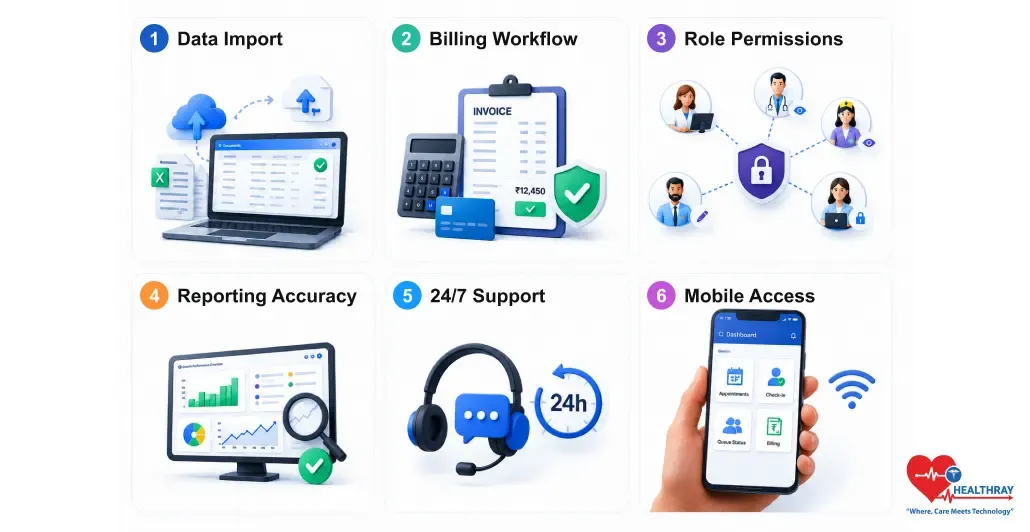
Since you have a trial period, try these six experiments so that you can decide with a clear mind rather than regret:
- Data import – does patient records transfer without errors?
- Billing workflow – does it reflect how your clinic really charges?
- Role permissions – can you precisely decide who can see what?
- Reporting accuracy – do the numbers reflect the reality?
- Support responsiveness – how quick are they to respond to issues?
- Mobile access – is it compatible with devices your staff use?
A clinic software free trial is a very effective way for you to experience how the software really works with your patients, billing, and staff. You can test six basics by using it: data import, billing workflow, role permissions, reporting accuracy, support responsiveness, and mobile access. If it passes, you can sign without any hesitation; if it doesn’t, you can simply drop it or even consider the custom clinic software development option.
Why Most Free Trials Don’t Reveal the Right Things
During a demo, vendors basically control what you see: preloaded data, curated workflows, nothing unexpected. The clinic management software free trial is your first opportunity to access your data, billing setup, and personnel roles. Also, it is the first time the system’s limitations are revealed to you.
1. The Demo Impresses. The Trial Reveals.
Top clinic management software reveals its worth during the test phase, not through well-spoken presentations. Most clinics use the trial period of the system to simply test and set up the schedule of mock appointments. This, at best, only gives you an idea of the system; you are still not sure whether it can handle the load if 80 patients show up on a busy Monday. This gap between a demonstration and a real clinic day is where a lot of the sign-up regret comes from.
2. What Gets Missed When You Don’t Test These Six Things
- Data import testing → staff re-enter patient records manually for weeks post-signing.
- Billing testing → the system can’t handle your fee structure, billing takes longer than before.
- Role permissions → receptionists see clinical notes, or doctors edit billing records.
- Reporting testing → end-of-month revenue doesn’t match what was collected.
- Support testing → a critical issue on day one goes unanswered for 48 hours.
- Mobile testing → the app crashes on the Android phones your front desk team uses.
 NOTE
NOTE
The 6 Criteria: What to Test and What Pass Looks Like
Run each of the tests during the trial period. Most criteria will have a clear passing and failing mark. Two or more failing marks mean the software is not a good fit for your clinic, regardless of how competitive the price is.
1. Data Import
When you take a clinic software free trial, you must ask the vendor to import a true sample of your existing patient records instead of the demo data. Field mapping must be correct, records have to be whole, and the import should be measurable.
✅ Pass: Records import completely, fields map correctly, no data loss, verifiable record by record.
❌ Fail: Fields don’t map correctly, records import partially, or the vendor says ‘migration happens post-signing.’
The custom clinic software development happens frequently at this point. It is when a clinic realizes that the ready-made platform is incapable of handling their specific data structure.
2. Billing Workflow
Set your actual fee structure, including the different fee categories, discount packages, GST co-pays, and do five real billing scenarios from start to invoice. Do not try a simplified version.
✅ Pass: Handles your actual fee structure, generates accurate GST-compliant invoices, and the billing summary matches what was collected.
❌ Fail: Workarounds needed for more than one fee type, GST is manual, or invoice format doesn’t meet requirements.
For clinics in India, e-invoice generation should also be tested. The clinic management software should have this feature as native functionality and not as a paid add-on.
3. Role Permissions
Develop the real roles your clinic operates with: receptionist, doctor, nurse, admin owner, etc., and make sure that every one of them can only view the information relevant to them.
✅ Pass: Each role sees only appropriate data, restrictions apply consistently across all modules, changes take effect immediately.
❌ Fail: Permissions are too broad, too rigid to customise, or don’t apply consistently across billing and clinical modules.
This is at the heart of the clinic: healthcare facilities attract patients with confidence that only clinical staff members have access to their medical data.
4. Reporting Accuracy
Operate your clinic for one to two weeks during the trial period; after that, extract the daily revenue, completed appointments, no-show count, and unpaid bills. Match each one with your manual records.
✅ Pass: Reports match manual records exactly, can be filtered by date/doctor/type, exportable in a usable format.
❌ Fail: Numbers don’t reconcile with what was collected, filters don’t work, or export requires a paid upgrade.
It is because if the revenue figures don’t correspond in the first week of the trial, they won’t match in the sixth month either. The precision of a report is a reflection of the initial data model; it doesn’t get better with time.
5. Support Responsiveness
Intentionally create a genuine support issue, raise a situation that if it happened on a working clinic day, it would actually stop your operations. Then, track how quickly they respond and solve it.
✅ Pass: First response within 2 hours, resolution or clear escalation within 24 hours, named contact available during your clinic hours.
❌ Fail: First response takes over 4 hours, resolution is ‘we’ll look into it,’ or support is ticket-only with no phone or chat.
Getting the support you need during the digital patient experience clinic trial phases is the best indicator of what your support experience will be like after you sign the contract. Companies that are lagging in their response time during the evaluation period would not likely speed up once you have made your commitment.
6. Mobile Access
Test all key workflows: appointment view, patient check-in, queue status, basic billing on the actual devices that your staff will be using. Don’t forget to include the clinic’s lowest-spec Android phone.
✅ Pass: Core workflows run without lag on actual staff devices, including low-end Android models.
❌ Fail: App only works smoothly on newer devices, key features are desktop-only, or mobile is a stripped-down version.
A clinic management software mobile experience that works only on high-end devices is not a workable solution for most Indian clinics.
 PRO TIP
What to Do With Your Trial Results Before Signing
Pass all six and sign with confidence. Here’s how to handle anything less.
1. One Fail Is a Flag. Two Fails Is a No.
If there is only one fail on a lower-stakes criterion, for example, the mobile app is missing one very specific report, it could still work if the vendor has a fix on the roadmap with a written timeline. Two failures in any combination means the software is not ready. Do not sign the contract with the expectation that gaps will be closed. They hardly ever do get closed without a written commitment in the contract.
2. Document Every Gap Before Negotiating
‘The billing module doesn’t support package pricing’ is a verified shortcoming. ‘Billing seemed very complicated to us’ is not. Verified shortcomings can help you get leverage, either a price reduction, a promise of custom development, or a service credit if the shortcoming is not fixed by a certain date. It is also the point at which custom clinic software development discussions occasionally start, when a best clinic management software India wants certain workflows that no available platform is able to handle properly. ‘
3. Ask for Every Fail in Writing
When a criterion is not met, the first thing you should do is check with a vendor whether it is a known issue or if it is on the roadmap, and when. A vendor who refuses to put roadmap commitments down in writing probably doesn’t want to be held to them. Written commitments get incorporated into the contract, and they shield you if the gap remains open six months after signing.
Learn more: A trial tells you if the software works for today’s clinic. How Clinic Chains Scale Operations Seamlessly at Every Growth Stage – This guide shows whether it holds up as you grow, before you’re locked into a contract at scale.
Conclusion
A clinic software free trial is not just a mere formality. Instead, it is the only opportunity you have to test the platform at your convenience, your data, your billing, your staff, your devices. Meet all six criteria, and you can decide to sign the contract without any worries. Fail two or more and just keep on walking, no matter the pricing offer. The price of changing a year from now will always be more than the cost of spending another two weeks to discover the right platform now.
