

What You Will Learn
Here is everything about building automated appointment reminders for doctors that actually run your clinic on time:
- Why does the timing of a reminder matter more than the reminder itself?
- What makes a three-touch reminder sequence work where a single message always fails?
- Which channel actually reaches your patient and why does the wrong choice quietly break clinic flow?
- What should an automated reminder say to make a patient prepare, not just show up?
- How does a well-designed sequence handle cancellations without leaving a slot empty?
When Should Automated Appointment Reminders for Doctors Be Sent
The right time to send a reminder is when the patient can still act on it. A doctor appointment system that sends reminders without a timing strategy is guessing and guessing costs filled slots. Too early and the patient forgets. Too late and conflicting plans are already locked in.
Routine Checkups vs Specialist Consultations vs Procedure Days
There is no fixed time; it depends on the type of appointment. With a 48-hour reminder, routine checkups are effective. A specialist consultation requires at least 72 hours notice, patients arrange for transport or take time off work, or provide instructions on how to fast. A 72 hour advance notice and a same-morning confirmation is needed on procedure days to account for any last minute preparation gaps.
The first structural choice a clinic will make before writing the reminder message or selecting the channel is the reminder window matching.
Why the Time of Day Matters as Much as the Day Itself
A reminder is pushed at 7am of a Monday into a crowd of notifications and quickly forgotten. The same reminder read within minutes at 10am on a Tuesday. Send time, not send day is what affects open rates and response rates.
If clinics set reminders on a “how many days before” basis, they are dealing with half the issue. The other half is the time of day the message actually arrives in the patient’s hands.
 NOTE
NOTE
Designing the Three-Touch Reminder Sequence
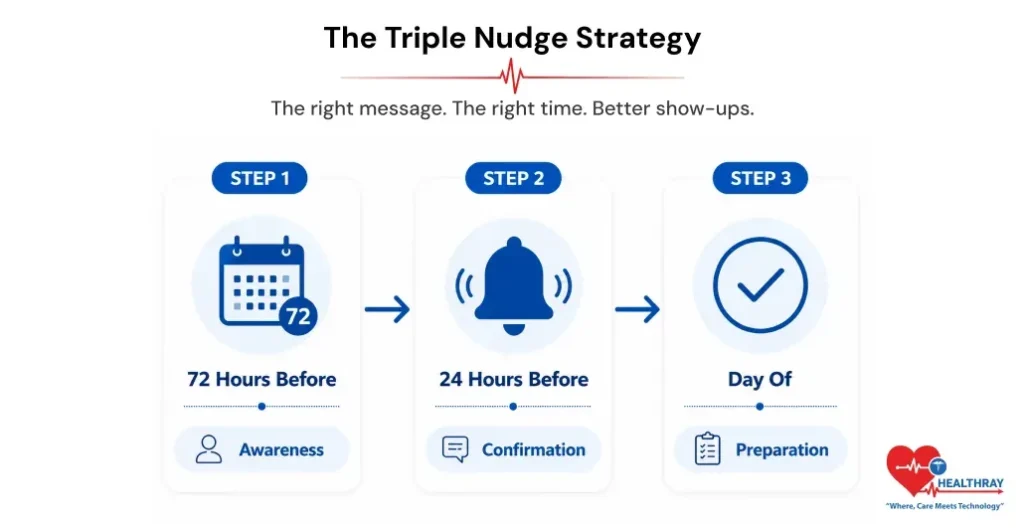
A single reminder is a notification. A sequence is a system and the difference between the two is the difference between hoping a patient shows up and actively guiding them there. Research published on PubMed confirms that reminders across all three timing windows – 24, 48, and 72 hours substantially increase clinic attendance across all patient groups and clinic types.
The 72-Hour Reminder – Awareness
This message serves one purpose – to let the patient know the appointment is there, and gives the patient enough time to reschedule if needed. It is informational, not urgent. The tone is calm. The content is straightforward with date, time, doctor’s name, and one preparation note if the appointment type requires it.
This message will be sent 3 days before so that the clinic has time to respond to early cancellations. A 72 hours cancellation is a recoverable situation. It’s not a two-hour cancellation.
The 24-Hour Reminder – Confirmation
This is where the flow turns from informing to engaging. The 24-hour reminder asks the patient to confirm and the response to that confirmation is what gives the clinic real-time schedule visibility for the next day.
Without this touch, the clinic runs a schedule it cannot validate. With it, the front desk knows exactly who is confirmed, who has cancelled, and which slots still need attention before the day begins.
The Day-Of Reminder – Preparation
Short. Specific. Friction-free. Day of message: time, room number/floor, last-minute preparations not eating, documents, early arrival etc. Eliminates the morning confusion that leads to last minute cancellations due to patients not knowing where to go or what to bring.
How the Sequence Shifts for New vs Returning Patients
At the 72 hour mark more details have to be given to new patients: location of clinic, parking, how to register and what to bring. Returning chronic care patients need less context but benefit from a preparation-specific reminder tied to their condition type. The sequence of the structure does not change; the contents of each touch adapts to the patient.
 PRO TIP
Channel Strategy: Which Medium Reaches Which Patient
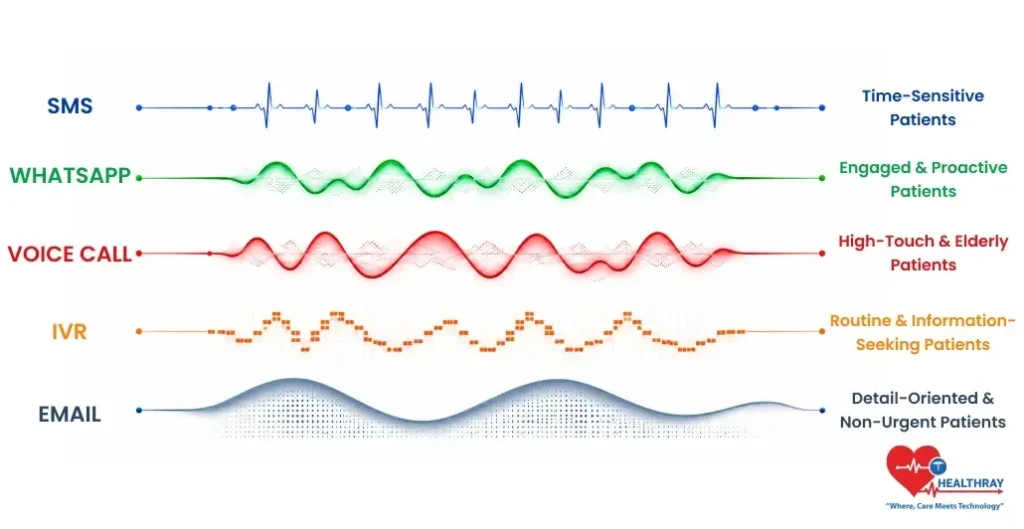
The choice of the channel should be based on the patient, not the preferred tool of the clinic. Defaulting to one channel for every patient type is where most reminder strategies silently break down and the first visible symptom is a drop in engagement across some patient demographics.
| CHANNEL | BEST FOR | RESPONSE STRENGTH | LIMITATION |
| SMS | Day-of reminders, quick confirmations | High open rate, fast delivery | Low detail capacity |
| Pre-visit instructions, two-way response | High engagement for younger patients | Requires consent and app access | |
| Voice Call | Older patients, high-stakes appointments | Highest response for older demographics | Intrusive if poorly timed |
| IVR | High-volume, after-hours confirmation | Scalable without staff involvement | Impersonal for younger patients |
| New patient packs, documents | Strong for detail-heavy communication | Low open rate for time-sensitive reminders |
SMS and WhatsApp – Speed and Two-Way Response
SMS boasts a 98% open rate and is best for quick and timely confirmations and reminders on the day. It’s fast, instant and doesn’t require an app. The disadvantage of this is that if a detailed instruction is provided for the making of SMS, it will be difficult to read.
That is where WhatsApp fills that gap.. It can provide longer instructions before visit, operates in two directions and patients have the freedom to ask questions. But not every patient has or uses WhatsApp actively, it is limited by consent and access.
Voice Calls and IVR – When Human-Like Touch Matters
SMS isn’t as successful as voice with older patients or with high dollar appointments. Studies have shown that the phone call reminders have a significant effect on the attendance rates, especially in older populations with a channel that is aligned with the patient population, and not just on the patient’s default channel.
In after hours and high volume situations, where staff is not available, IVR system can capture confirmations and cancellations, providing an effective solution for automating doctor appointments with large volume.
Email – Where It Fits and Where It Does Not
Email works well for new patient packs, pre-appointment documents, and portal access links. For reminders that are timely, this is not effective, as the open rates are lower when the reminder is in the middle of the recipient’s inbox and the patient is not in a hurry to open the reminder immediately.
Email is an adjunct reminder for information intensive communication and not day-of or 24-hour confirmations.
What Should an Automated Appointment Reminder Actually Say
Whether a patient walks in prepared or walks in confused is directly related to the content of the message and will be reflected immediately in the time used in consultation, and the friction at the front desk.
The Difference Between Informing and Preparing
Look at the following two notices that are both reminders:
- Version A – Informing: “You have an appointment tomorrow at 10am with Dr Sharma.”
- Version B – Preparing: “Your appointment is tomorrow at 10am with Dr Sharma. Please bring your last blood report and arrive 10 minutes early for registration at Counter 2.”
Version A tells the patient the appointment exists. Version B removes every reason the patient might arrive late, unprepared, or at the wrong counter. The consultation starts on time. The front desk handles fewer questions. The patient feels looked after before they even walk in.
What Personalisation Looks Like Inside an Automated Message
It’s not only the patient’s name at the top of the automated reminder. It contains the doctor’s name, the nature of the appointment, instructions for the patient to prepare for the appointment based on the reason for the appointment, and location information which is relevant to that patient’s visit. All in all, everything is managed with one OPD appointment management system.
Each personalisation element removes a friction point and friction points are what turn a confirmed appointment into a last-minute cancellation or a confused patient standing at the wrong entrance.
How the Sequence Handles Confirmations, Cancellations and Reschedules
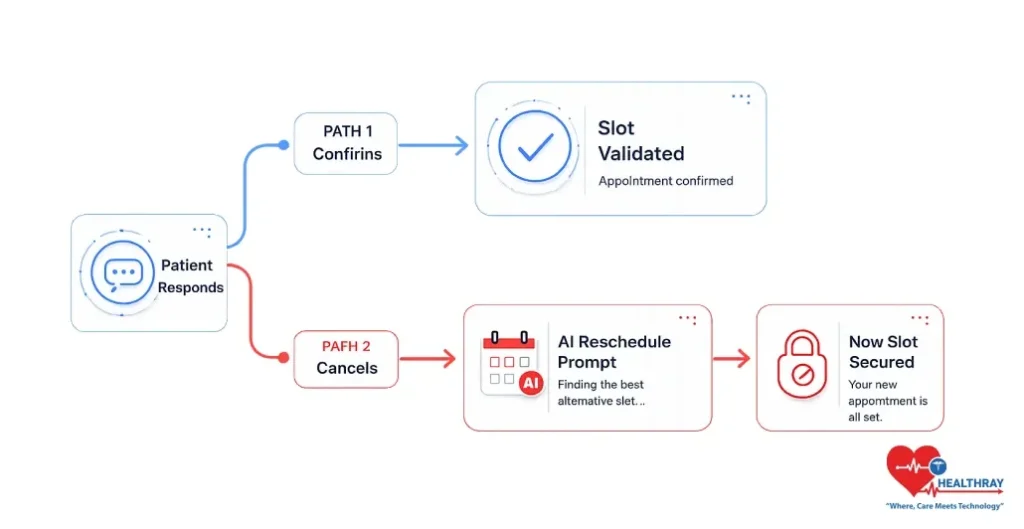
A well-designed sequence of automated appointment reminders for doctors is not a push reminder, it is a capturing reminder. Once a patient responds, the sequence changes depending on the response.
When a Patient Confirms – Closing the Loop
A confirmation closes the sequence cleanly. The slot stays filled, the schedule updates, and the front desk starts the day with full visibility without a single manual check..
When a Patient Cancels – Triggering the Reschedule Flow
A cancellation does NOT end the sequence; it is a trigger. The moment a cancellation comes in, the system should immediately offer the patient available slots for rebooking without requiring them to call the clinic.
This helps to ensure that the patient remains within the care flow. It also provides the clinic with a real-time chance of filling the slot before it empties – the difference between a recovered appointment window and a wasted opportunity.
How the Reminder System Connects to the Live Schedule
The reminder sequence needs to connect back to the live appointment schedule in real time. What sets a messaging tool apart from a clinic operations system that actually runs the day is a doctor queue management software which shows all confirmations, cancellations and reschedules immediately without manual front-desk changes.
What Reminder Sequence Mistakes Are Quietly Breaking Your Clinic Flow
The fact is that there are 3 structural mistakes that result in most avoidable schedule gaps experienced by clinics each week and none of these mistakes can be identified until after the fact.
Frequency Errors – Too Many and Too Few
Too many reminders push patients toward opting out entirely. A patient who receives five messages about one appointment stops reading all of them. Not enough reminders result in no-shows. The three touch format is the ideal number of touches for regular appointments – no more, no less.
Single Channel Dependency
A clinic that sends just SMS reminders is missing older patients who are not receptive to text messages. Likewise, a clinic that uses only phone calls sees a loss of younger patients that don’t answer calls from out-of-the-way numbers. The absence of a second channel, or the way it happens, ends up being a failure for certain patient groups and the clinic rarely connects the attendance drop to the channel choice until the pattern is well established.
No Response Capture
Reminders that go out but never feed back into the appointment system give the clinic a false sense of security. The sequence appears to be in play. The schedule remains unvalidated. The clinic only finds out who is not coming after the slot has already been wasted and by then, there is no time to recover it.
Learn more: Doctor Availability Management Software: Ending Overlaps, Delays & Cancellations because a clinic where reminders work perfectly but slots still overlap has a different problem entirely.
The Bottom Line: Why Automated Appointment Reminders for Doctors Are a Clinic Operations Decision
Poor reminder design – not poor patient intent, breaks clinic flow. The automated appointment reminders that doctors use are effective when they’re sent at the right time, follow a set sequence, are delivered through the right channel, and they record all responses.
The reminder sequence is not the final sequence prior to an appointment.It is the system that decides whether that online slot booking for clinics ever happens. Design it deliberately or leave it to chance.
