

In This Blog,
Telehealth-enabled clinic software extends the same patient journey across in-person and virtual visits. It keeps one unified workflow, so care stays connected, no matter how the patient shows up, and in this blog, you’ll see how it works through:
- Telehealth-enabled clinic software is not a separate tool; it is an extension of the same patient journey.
- One patient case, two complete workflows: in-person and virtual. These two are run side by side to exactly show where the software is supposed to be the bridge.
- The handoffs, communication points, and data flows vary in each mode, and usually, software deals with only one of them effectively.
- Remote care creates new failure points that physical workflows never get to face. The software is either able to take care of them or not.
- Understanding both workflows is the key to helping clinics pick the right software that covers the entire spectrum of care.
Why Telehealth and In-Person Care Need the Same Software Foundation
Back then, the classic clinic management software was developed with just one guiding principle: the patient is actually at the location. A patient reserves a spot, comes in, checks in, visits a doctor, and leaves. Telehealth invalidates all of those assumptions and, as a result, really shows how the usual working process relied so much on physical presence to operate. This is precisely the difference telehealth-enabled clinic software is designed to bridge.
1. The Gap Most Clinics Don’t See Until It’s Too Late
If clinics merely add telehealth to their current system, then a separate video link will be sent, a different consent form will be used, and consequently, the consultation will leave a different data trail. So when the patient takes a follow-up, the staff are working from two disconnected records of the same episode of care.
Clinic software that is telehealth-enabled eliminates this gap by treating in-person and virtual care as two versions of the same connected patient journey: same record, same workflow logic, same communication layer.
2. What Changes When Care Goes Remote
Physical cues are what in-person care depends on. A patient waiting in the room is a signal of his/her arrival. Seeing a file on the desk is a sign of preparation. However, when you remove physical presence, all those signals require a software equivalent, like a booking link, a virtual queue, a pre-loaded file, or a digital consent.
In normal day-to-day usage, these are just transition states that almost all of us don’t even consider when switching from one mode to another, but the developers do, because if the software was not made to support dual modes in operation, then those transitions could be really tricky.
3. The Patient Case This Blog Uses
This blog demonstrates the effects of two complete workflows on one patient case: in-person and virtual. It is Meera, a 38-year-old patient with a recurring respiratory problem, who is consulting Dr. Anand at a multi-speciality clinic. All places where the software acts differently are highlighted.
Meera’s In-Person Visit: The Full Workflow
Typically, the in-person workflow serves as the standard; it is the level most clinic management software is able to handle efficiently, and the telehealth solution will need to align with this in a totally different setting. Many current clinic software trends are focused on making these in-person workflows work seamlessly alongside virtual care journeys.
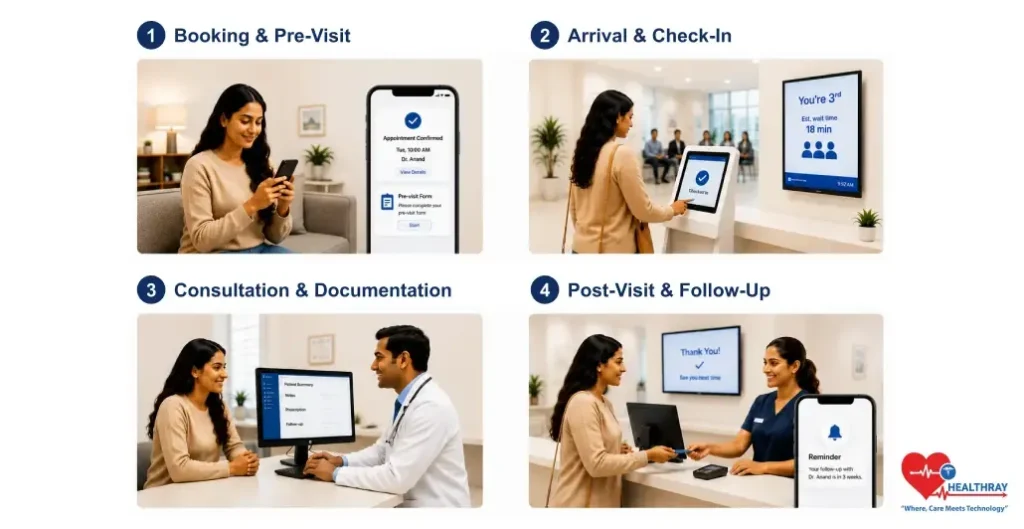
1. Booking and Pre-Visit Communication
On Sunday evening, Meera books online, selects Tuesday 10 AM with Dr. Anand, and mentions the reason for her visit. The system instantly confirms, reserves the time slot, and sends a confirmation SMS. Two days before, a pre-visit form was sent to her. She then completes it on her phone.
On Monday morning, Dr. Anand’s dashboard displays Meera’s pre-completed form linked to her appointment time. Her file is all set. There is no wait for her arrival.
2. Arrival, Registration, and Queue
Tuesday. Meera gets there at 9:52 AM and uses the iPad self-check-in kiosk, the system logs her arrival, and then check-in sets off a queue update. She gets third place, and therefore, the estimated waiting time is 18 minutes. At 10:14, she’s called for.
3. Consultation and Documentation
The consulting period is 12 minutes. Dr. Anand, before Meera came in, had a look at the pre-visit form, so no history-taking from scratch. Besides updating the notes, he also writes a prescription and schedules a four-week follow-up. The system records every action as Meera’s activity.
4. Post-Visit: Follow-Up, Billing, and the Handoff
Meera departs. Contact notes and a date for prescription follow-up features in an after-visit note that is automatically included in her record. They prepare and perform billing. Dr. Anand’s calendar was already populated with Meera’s follow-up appointment, and she will receive a notification from her care concierge 3 weeks after the visit.
The virtual waiting room should display the queue position, estimated time of waiting, and delay notifications. It should be connected to the scheduling engine, not functioning as a standalone hold screen.
 NOTE
NOTE
Meera’s Telehealth Visit: The Same Episode, Virtually
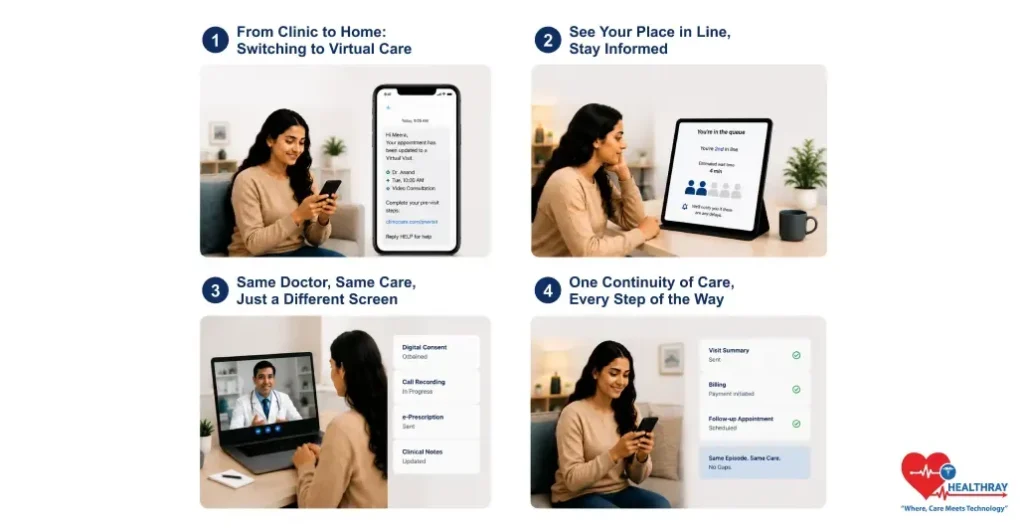
Three weeks later, Meera receives an appointment confirmation by text. However, because she’s going to be traveling, she cannot attend the clinic in person and prefers continuing the consultation remotely using reliable mobile connectivity through an eSIM Thailand plan. So she uses the clinic’s software app, and she switches her appointment to a virtual one. She still sees the same doctor at the same time of day, just in a different way.
1. Booking and Pre-Visit: What Changes
Once the switch is made, the system initiates a pre-visit sequence that matches the new mode, i.e., condition-specific checklist, connection test, and video link in the SMS. Dr. Anand’s dashboard indicates previous notes that were flagged. Both modes must share the same platform to maintain this continuity.
2. The Virtual Waiting Room: Where Most Software Falls Short
At 9:58 AM, Meera accesses the link and finds herself in a virtual waiting room with queue visibility and delay notifications, not just a frozen hold screen. If Dr. Anand is running late, the system will immediately notify Meera before she even thinks anything might be wrong.
3. The Consultation: Same Data, Different Environment
Dr. Anand is hired, looking exactly the same, with the same medical background, and the same step-by-step process for documentation. Notes altered, drug prescribed, next appointment documented.
At this stage, the software is required to: get digital consent before the call, add the call recording to the patient’s record, and send the prescription to a pharmacy electronically rather than in the patient’s hands.
4. Post-Visit: Where the Two Workflows Reconnect
Summary of the visit sent, billing initiated, and in-person follow-up scheduled. Two different sessions, still one line of treatment, no lapses between disjointed systems. Most patients now expect this entire process to work smoothly through a mobile app for clinic software.
Learn more: 10 Benefits of Digital Clinic Software and the Metrics That Prove Them. The workflows in this blog depict what telehealth-enabled software is capable of doing. This guide presents what it produces in quantifiable results like patient retention, no-show rates, revenue recovery, and staff efficiency.
Where the Software Must Bridge the Gap: Point by Point
In Meera’s scenario, therefore, there are seven points where the software has to perform certain tasks to automatically manage physical presence.
1. Booking Mode Switching Without Data Loss
Meera was able to carry over booking data and history across modes without re-entry. A system having a telehealth module separately would require a new booking, thereby breaking slot linkage and record continuity.
2. Virtual Pre-Visit Sequencing
The virtual pre-visit comprises a totally different sequence of events: a condition-specific checklist, connection test, digital consent, and video link. The system must handle this automatically; staff cannot manually manage it.
3. Virtual Queue With Real-Time Visibility
The virtual waiting room should display the queue position, estimated time of waiting, and delay notifications. It should be connected to the scheduling engine, not functioning as a standalone hold screen.
4. Digital Consent at the Right Moment
With telehealth, obtaining digital consent with a timestamp before the telemedicine session is a must, and it should be automatically integrated into the pre-visit workflow. Otherwise, failure to collect it before the consultation results in a compliance gap that cannot be remedied later
5. Same Documentation Interface for Both Modes
The same medical record, the same documentation user interface, the same prescription flow, in any case, no matter the mode. Different interfaces lead to inconsistent documentation and patient records being fragmented.
6. Electronic Prescription and Referral Delivery
The patient is not at the counter, quite obviously, so for them to receive their prescription and referral, these have to be delivered electronically in the post-consultation workflow.
7. Continuous Episode Record Across Both Modes
The system should display in-person and telehealth visits as two entries in the same episode, not different records, not isolated billing events. Continuity of the episode, irrespective of the mode, is a must-have. This level of coordination is only possible through Clinic workflow automation running behind the scenes.
 PRO TIP
Conclusion
Meera’s situation, the same patient, the same provider, the same timeframe of care being handled through two completely different sets of steps, illustrates what telehealth-enabled clinic software has to accomplish that most systems still don’t. The issue is not with video technologies. It’s with the 7 points in the workflow where the physical interaction was doing the work that the software now needs to do.
Clinics that add telehealth just as a feature end up operating two separate workflows. Clinics that actually utilize telehealth-enabled software consolidate one unified patient journey with two methods of delivery. The impact derives from the data trail, the consistency of billing, the patient’s experience, and the staff’s workload. It’s more than just a technology choice; it’s a workflow decision that either technology supports or disrupts.
