

In This Blog,
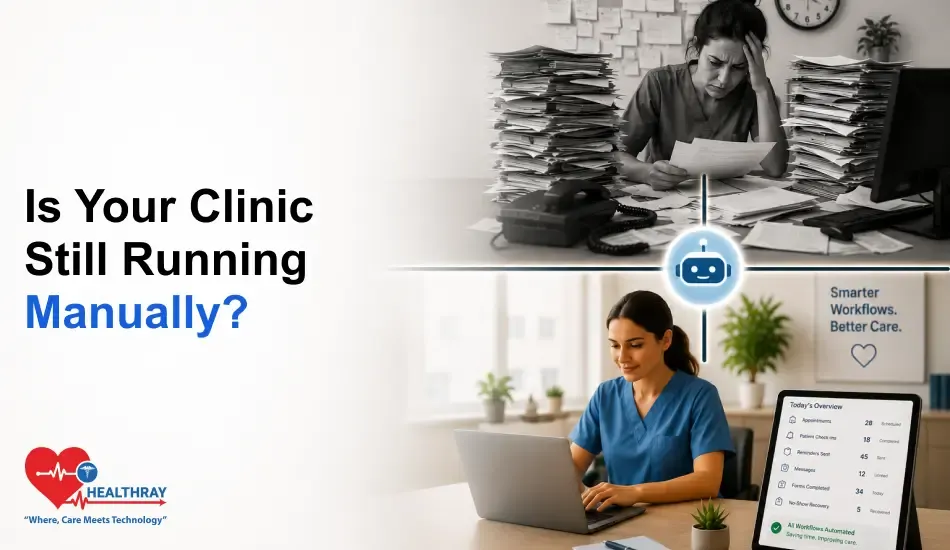
Clinic workflow automation alleviates those tedious chores across the entire patient’s journey. Specifically, these are the areas where it brings the most benefit for day-to-day clinical practice:
- Clinic workflow automation automates the hard, manual work that harms care and closes all the painfully slow, manual workflows.
- Many of the techniques are oblivious to how much work is still being done by hand.
- These 10 clinic processes are illustrated in this blog by a simple before-and-after business flow.
- Each example shows where manual handoffs will fail and how automation will address.
- The total time and error cost of the manual work is much higher than what clinic managers estimate.
- Automates away the uninteresting tasks so staff can focus on the actual caring of the patient.
Why Manual Clinic Workflows Cost More Than Time
Initially, most clinic managers think of manual processes in terms of time; how long does it take a staff member to do this task? That’s conspicuous costing. However, what is imperceptible is the consequence of that task being done inconsistently, wrongly, or not at all because of the busy working morning, which is an administrative nightmare. Eventually, within the clinic environment, failures in processes create gaps in patient care.
1. The Hidden Cost of Manual Handoffs in a Clinical Environment
A manual handoff can occur at any stage within a clinical workflow where information, material, or responsibility moves from person-to-person or step-to-step unmediated. For example, each handoff is a process hiccup. Likewise, a patient didn’t have the right pre-visit information in the chart because it wasn’t handed off from the front desk to the doc. Similarly, a missed no-show because no one checked the list at the right time, a consent form that was misfiled because paper processes rely on someone remembering to file it. Individually, none of these is a grand failure. Instead, they are the quiet, everyday slide of clinical quality away from perfection that manual processes engender.
2. Where Errors Enter the Patient Journey
Typically, the errors of clinic workflow have four strong concentrations: intake (missing or wrong data given at registration), scheduling (double-bookings, no-shows not called, waitlist not maintained), communication (reminders not sent, countersign not called, delays not announced), and documentation (signing instructions not recorded, records not updated). Of course, clinic workflow automation is not the solution to all errors, but it eliminates the category of errors resulting from inconsistency in repeatable processes.
3. What ‘Automation’ Actually Means in a Clinic Context
In reality, automating a clinic does not mean replacing clinical decision-making with robots and AI; it means that every single repetitive, rule-based task (sending reminders, releasing a time, adding to a waitlist, printing reports, and so on) gets done by the system, not staff. Therefore, all that is left to staff is that which actually takes judgment: patient contacts, clinical coordination, and escalation. A clinic management system that automates the former enables the latter.
 NOTE
NOTE
How Clinic Workflow Automation Replaces 10 Manual Processes
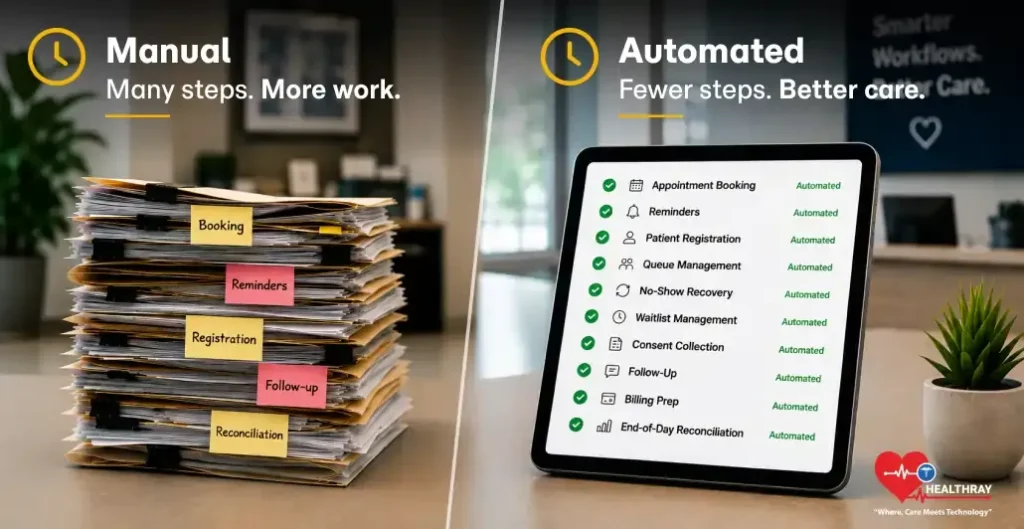
Below are 10 workflows that every clinic performs every day. They illustrate the process manual through and through and how the automation replaces it at each step of the way. However, most clinics automate one or two of them and think they are away. Instead, the true operational change happens when you have all ten of those workflows working on the system because that is when the compounding effect kicks in. At that point, you stop firefighting, no more slots get wasted, and the day does not run the team.
Workflow 1: Appointment Booking
Booking is one of the clinic management system features that most clinics think they have automated. In other words, they haven’t because they have digitized the front end, but haven’t automated the back end. However, a patient may book online, but if that booking causes two things to happen: (a) manual staff checking the booking, (b) manual staff confirming the booking, (c) manual staff updating the doctor’s calendar, then it is still manual. The small things, like appointments happening on time or billing being transparent, improve the patient’s experience. To ensure that local patients actually discover these highly efficient and modern clinics, it is incredibly important to work with a dental seo specialist who can properly highlight your streamlined services right at the top of search engine results. Reduces waiting time and confusion.
| Booking Workflow | |
| ❌ Manual Process | ✅ With Automation |
| Patient contacts ➜ Staff checks appointment availability ➜ Keep records in register/spreadsheet ➜ Contacts back for confirmation ➜ Updates doctor’s calendar manually ➜ Maintains patient information separately Problem: 4 to 6 manual steps, high risk of errors, limited to clinic hours | Patient books online ➜ System checks availability in real time ➜ Time slot blocked right away ➜ Confirmation email or SMS is sent automatically ➜ Doctor’s calendar is updated ➜ Patient file is created Result: Zero staff steps for standard bookings, 24/7, zero risk of double-booking |
Workflow 2: Appointment Confirmation and Reminders
No-show recovery. This is where the most automation dividend comes in. The value of every seat sold for lots of purposes. By comparison, in a manual world, the recovery happens slowly and randomly, once in a blue moon, on a busy morning. It occurs instantaneously on an automated system. In addition, a paper or spreadsheet waiting list is also passive.
| Reminder Workflow | |
| ❌ Manual Process | ✅ With Automation |
| Staff calls each patient the day before ➜ Leaves voicemail if no answer ➜ Manually notes confirmed/unconfirmed ➜ Calls again morning of for unconfirmed ➜ Updates register by hand Problem: Time-intensive, inconsistent, stops at 5 PM | System sends automated SMS at 72 hrs and 24 hrs ➜ Captures patient response ➜ Flags unconfirmed for targeted follow-up ➜ Sends final reminder morning of automatically Result: Consistent timing, zero staff effort, runs overnight and on weekends |
Workflow 3: Patient Registration at Arrival
The most conspicuous bottleneck to most OPDs is the walk-in registration at the counter. As a result, staff spend 35 minutes on data entry for each of the patients, and consequently, this adds to a backlog, resulting in a queue that builds up throughout the morning.
| Check-In Workflow | |
| ❌ Manual Process | ✅ With Automation |
| Patient arrives ➜ Joins counter queue ➜ Staff manually enters name, age, ID, contact, complaint ➜ Creates physical file or token ➜ Patient joins waiting area Problem: 3-5 min per patient, creates a counter bottleneck at peak | Patient pre-registers online at booking ➜ Arrives and checks in via kiosk or SMS link ➜ File already exists ➜ Staff verify identity in under 30 seconds ➜ Patient directed to waiting area Result: Under 30 seconds per pre-registered patient, counter freed for exceptions |
Workflow 4: Walk-In Queue Management
Walk-in management in a manual system is, of necessity, haphazard. Consequently, there is no system for controlling the interaction between walk-ins and booked patients, no way of providing walk-ins with an honest estimate of their average wait. Furthermore, there is no way for patients to observe this status without physically remaining in the waiting room.
| Queue Workflow | |
| ❌ Manual Process | ✅ With Automation |
| Patient arrives ➜ Takes paper token ➜ Sits in waiting room ➜ Has no visibility of wait time ➜ Must stay present to avoid missing turn ➜ Staff calls token numbers manually Problem: Unpredictable waits, crowded waiting rooms, no visibility | Patient arrives ➜ Receives digital token ➜ Gets SMS with estimated wait time ➜ Can monitor queue position remotely ➜ Called back when 2 positions away ➜ Staff dashboard shows live queue Result: Patients wait outside, waiting room clears, real-time visibility for all |
Workflow 5: No-Show Detection and Recovery
No-show recovery. This is the process with the greatest dividend of automation. After all, there is value in every seat you sell. In a manual environment, the recovery happens infrequently and unpredictably on a busy morning. Meanwhile, it is instantaneous on an automated system. A paper/spreadsheet waiting list is passive, too.
| No-Show Workflow | |
| ❌ Manual Process | ✅ With Automation |
|
Staff notices patient doesn’t appear ➜ Checks time ➜ Calls patient ➜ No answer ➜ Checks paper waitlist ➜ Calls first waitlisted patient ➜ Waits for their callback ➜ Updates register by hand
Problem: Missed slot takes 30–45 min to be reused, often fails when the clinic is busy |
System detects patient didn’t show up for appointment ➜ Marks slot as free ➜ Scans waitlist instantly ➜ Sends SMS to first eligible patient ➜ Gets confirmation ➜ Fills slot and updates dashboard
Result: Slot restored in <10 minutes, fully automated, zero staff effort |
Workflow 6: Waitlist Management
The waitlist document or spreadsheet is the third passive service. It takes that you have someone else check the wait list. Meanwhile, patients may wait 2-3 days to be called, but by the time they actually get their appointment, it may be filled.
| Waitlist Workflow | |
| ❌ Manual Process | ✅ With Automation |
| Patient added to paper or spreadsheet waitlist ➜ Staff reviews a list manually if there is an empty spot ➜ Staff calls the first patient ➜ Unanswered ➜ Staff calls the second patient ➜ The slot may be filled by the time someone confirms. Problem: passive, lagging, slot often lost before recovery takes place | Patient uploaded to digital waitlist and their choices are noted ➜ System automatically calls the next eligible patient when a slot opens ➜ Confirmation window set ➜ No response, next patient contacted ➜ Slot filled without any staff involvement Result: Active, automated, slot filled within minutes of opening |
Learn more: Waitlist automation solves the lag, but busy OPDs still face pressures that a single workflow fix cannot cover, and How Clinic Software Simplifies High-Volume OPD and Daycare Operations shows how clinics handle that scale day to day.
Workflow 7: Patient Consent Collection
Consent collection is a compliance issue, not an admin. issue. For the majority of the clinics, it is the paper form given to the patient in the waiting room, quickly filled in, handed back to a staff member, and filed in a paper folder. As a result, paper forms go missing, no data entry is done, consent forms can’t be found, and it adds to the queue at the waiting room counter.
| Consent Workflow | |
| ❌ Manual Process | ✅ With Automation |
| Patient shows up ➜ Staff provides a paper-based consent form ➜ Patient fills it while waiting ➜ Patient returns form to counter ➜ Staff files form manually ➜ No digital record of form ➜ Retrieving form means looking for the physical form Problem: No digital record, hard to retrieve, risk of compliance | Consent form sent digitally at time of booking confirmation ➜ Patient completes before arrival ➜ Response logged with timestamp ➜ Instantly available in patient record ➜ Audit trail automatically maintained Result: Timestamped consent on file prior to patient arrival. DPDPA compliant |
Workflow 8: Post-Visit Follow-Up
Follow-up after the appointment is the flow every clinic intends to do, but never does. The morning rush has been and gone, and now is the time to catch up on the afternoon. Eventually, by the time you’ve managed to see the last patient of the day, the office visit follow-up call to the patients seen yesterday is left on the back burner. The patients are left hanging and didn’t get that “how are you doing” call back to check on medication side-effects, test results, and post-procedure recovery. It makes a difference in outcomes.
| Follow-Up Workflow | |
| ❌ Manual Process | ✅ With Automation |
| Doctor notes follow-up needed ➜ Staff adds to callback list ➜ List checked next morning ➜ Staff calls when time permits ➜ Often delayed by busyness ➜ No record if call wasn’t made Problem: Inconsistent, undocumented, dependent on staff availability | Doctor flags follow-up type and timing in system ➜ Automated message sent at specified interval ➜ Patient response captured ➜ Escalation flagged if no response ➜ Full follow-up log maintained Result: Consistent timing, documented, escalation built in |
Workflow 9: Billing and Insurance Prep
Preparation of bills in a manual system occurs post consultation, so any lack of information is only identified once it is too late to rectify it before the patient leaves the practice. Insurance pre-authorisation checks, patient co-pay validation, and billing code preparation are all completed in a retrospective manner; Consequently, this results in delays, rejections, and patient follow-up.
| Billing Workflow | |
| ❌ Manual Process | ✅ With Automation |
| Consultation completed ➜ Staff manually checks insurance ➜ Discovers missing pre-auth ➜ Contacts insurer ➜ Contacts patient for information ➜ Delays billing ➜ Risk of claim rejection Problem: Retroactive, delays billing, high claim rejection risk | Insurance details captured at booking ➜ Pre-auth check triggered automatically before appointment ➜ Missing information flagged to patient in advance ➜ Billing prep complete before consultation ends Result: Proactive, pre-auth completed before visit, rejection rate reduced |
 PRO TIP
Workflow 10: End-of-Day Reporting and Schedule Reconciliation
End-of-day reconciliation refers in a manual clinic to comparing the appointment book against the actual attendance sheet, producing no-shows, then re-arranging the waiting list, counting the number of appointments used, and trying to determine the number for the next day, and printing a summary. In a manual-flow clinic, this process takes about 30 to 60 minutes. On the other hand, in an automated flow, the workflows have been watching this record throughout the day, day to day, and reconciliation really takes 5 minutes.
| Day-End Workflow | |
| ❌ Manual Process | ✅ With Automation |
| Cross references register vs attendance records ➜ Notes no attendance manually ➜ Updates waitlist ➜ Tallies slot utilization ➜ Prepares tomorrow’s waiting list ➜ Creates a summary report manually ➜ Leaves 45-60 min late Problem: 45-60 min/day, error-prone, staff working late | System updates live attendance throughout the day ➜ Automatically generates end-of-day utilization report ➜ Pre-confirms tomorrow’s schedule ➜ Records no-shows ➜ Staff review dashboard in 5 minutes and leave on time Result: 5-minute review, automated report, staff leave on time |
The Cumulative Impact – Time, Errors, and Where to Start
1. The Cumulative Time Cost Across All 10 Workflows
At first glance, looking at them as individual processes, they all seem fairly manageable. In total, they do contribute to the daily operational load that most clinic managers have never actually added up. ‘ Total manual hours in a 10 workflow run (a typical handful of workflows) will often total 4–6 staff hours per day for a typical medium-sized clinic, or one-half of an ordinary employee’s workdays on something that clinic workflow automation takes care of.
2. Where to Start – The Highest-Impact Workflows to Automate First
Not all of the 10 workflows can be automated to the same degree. Therefore, focus first on those workflows that generate pain on a daily basis, workflows that impact the patient more directly. Later on, implement the compliance and revenue workflows after accomplishing the operational brute force.
Conclusion
These 10 workflows are nothing extraordinary. They are almost the normal operating conditions in just about every clinic in the country. Even today, 99% of the clinics are doing these workflows manually. Using clinic workflow automation could free up your staff and save workload, but it won’t change the workload; it will just take away the work. So, prioritize these workflows and kick off with the time-consuming, repetitive rule-based ones. You can expect results in 3 months.
