
Summary
It is crucial for clinics to thoroughly check the system before making a long-term decision. This will help clinics to mitigate risks and help them evaluate features that properly align with their systems.
Digital appointment systems capture data accurately and provide doctors with instant results, as opposed to manual entries. Through demos, clinics can gain practical experiences of real-time scheduling, accurate patient data access, and streamlined follow-ups. This makes the appointment management smooth; clinics improve productivity and patients get timely and coordinated care.
In this blog, I will explain how the doctor appointment system demo helps clinics transition from traditional to highly productive mode. Demos are important because they not only demonstrate features but also help clinics understand real-world usage. Keep reading!!!
Introduction
In traditional setups, appointment registers and nonstop phone calls seem like challenging activities for hospitals. This causes long wait times, staff overload, and conflicts with appointment schedules. Beyond that, it enhances patients’ dissatisfaction, and doctors waste their valuable time on administrative tasks. To understand this gap, a doctor appointment system demo is a practical starting point for clinics. Through demos, decision-makers can clearly observe which digital appointment systems can eliminate pain points of manual scheduling.
Doctor appointment system minimizes errors of real-time doctor availability, automated slot allocation, and instant appointment confirmations. Overall, the doctor appointment system demo provides clarity to clinics on how to shift from the traditional clinic approach to an intelligent and data-driven one. Clinics not only manage appointments but also improve productivity and patient experience by reducing errors, saving time, improving data quality, and controlling operational costs. Also, a demo helps clinics understand whether software fits their current needs.
What Clinics Should Expect In Doctor Appointment System Demo
Let’s check out:
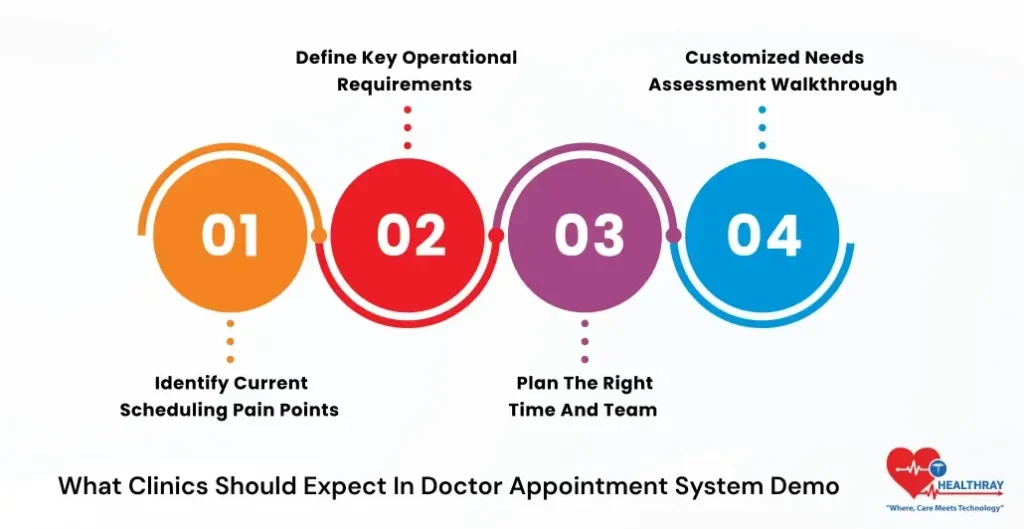
Identify Current Scheduling Pain Points
Clinics should clearly outline their existing issues before the demo, such as phone call overload, double bookings, missed appointments, and front-desk pressure. Furthermore, these pain points can become the foundation of a demo. Automated calendars and smart scheduling rules can systematically resolve these issues.
Define Key Operational Requirements
Next step is to identify your must-have needs. Furthermore, it involves multi-location clinic support, specialty-wise appointment rules, and billing and EMR integrations. Clear requirements make the demo more focused and relevant.
Plan the Right Time and Team
Off-peak hours are ideal for effective demos. Further, clinics should involve 2-3 core staff members that can ask concrete questions on scalability, training efforts, and long-term usability.
Customized Needs Assessment Walkthrough
Mostly demos start from a needs assessment call where providers understand the clinic’s size, specialties, and growth goals. Platforms such as Healthray review the inputs beforehand, making the demo not a generic sales pitch but rather centered on clinic-specific workflows. Moreover, this personalized walkthrough clearly reveals to decision-makers how the appointment booking software for medical practices addresses their real challenges.
Optimizing Load and Scheduling: AI Features in Doctor Appointment System Demo
Presenters also demonstrate AI-assisted capabilities when delving into advanced features such as predictive slotting or intelligent load balancing for peak hours. Further, Healthray analyzes demand patterns and optimizes slots for high rush timings. This helps clinics efficiently utilize doctors’ availability and reduces patient wait times. Let’s discover how Healthray demonstrates it:
Seamless HMS & EHR Integration
In this phase, Healthray highlights its full HMS/EHR integration abilities. Along with patient records, clinical notes and billing information are automatically transmitted, eliminating the need for manual re-entry. Further, this unified workflow allows doctors to focus on consultation and provide accurate, audit-ready data to the admin team.
Automated Patient Feedback Collection
The Healthray platform also showcases automated post-visit feedback loops at the time of the demo. Further, they collect patient responses, analyse it and convert them into meaningful analytics such as no-show patterns, peak OPD hours, and service improvement areas.
Turning Insights into Data-Driven Decisions
These analytics not only provide reports but also provide direction for implementing data-driven decisions. Further, clinics can convert these insights into meaningful records, allowing firms to analyze weak areas and help them take actions that resolve their challenges.
Hybrid Care
In the hybrid care model, the Healthray platform brings telehealth and in-person consultations into a single, connected workflow. Furthermore, an appointment system with EMR integration ensures continuity of care without breaking the loop.
Automatic Follow-Ups
Automatic follow-ups, revisit reminders, and post-consultation prompts activate the system to keep the patient engaged and refrain from missing out on next steps. Further, this approach ensures better continuity, improves adherence and consistency, and supports long-term treatment outcomes.
Security, Compliance & Scalable Growth
In the security walkthrough, the presenter explains HIPAA-equivalent encryption, role-based access controls, and detailed audit logs. This empowers doctors and administrators to build confidence in data safety and regulatory readiness. Whether it’s a single-doctor clinic or a multi-location hospital network, the doctor appointment system smoothly handles high OPD volumes and increasing user loads without any performance lags.
 NOTE
NOTE
High-Level Platform Overview
Demos usually start with 10–15 minutes of high-level walkthrough to understand the overall platform architecture. Further, it covers booking layers, scheduling engines, and workflow integrations. Through visual demos, clinics can view unified calendars that synchronize doctors, departments, or multiple locations in real time. Let’s check what the doctor appointment system demo provides:
Unified Calendars & Centralized Control
Best doctor appointment systems, such as Healthray, highlight their centralized dashboard, especially for OPD-heavy clinics. Further, this dashboard provides a clear overview of daily operations.
Breaking Silos Between Team
These dashboards break the silos between front-desk and clinical teams, allowing appointments, queues, and doctor availability to be clearly visible on a single screen.
Improved Coordination & Control
This centralized view improves coordination and clinics can have full control over daily operations. Thus, significantly minimizing errors or mismanagement. Overall, this improves coordination and helps clinics maintain full control over daily operations.
Limitations of Manual Appointment Handling
Presenters clearly contrast the difference between manual processes and digital workflows. Further, this chaos slows the daily operations and negatively impacts patient experience.
Real-Time Digital Workflow Advantage
Furthermore, digital appointment flows update instantly across all devices, eliminating missed calls, paper registers, and delayed updates. Further, Appointments, cancellations, and reschedules synchronize in real time; this minimises confusion and front desk teams get better control.
Measurable Impact with Automated Reminders
Through SMS and automated WhatsApp reminders using platforms such as Getgabs, Messagedly, and GetItSMS, clinics can reduce no-shows up to 30-40% in just 3 months. Overall, appointment management software represents tangible, ROI-driven benefits.
Specialty-Wise Time Allocation
Healthray platforms focus on specialty-wise slot rules during the demo phase, such as 10 minutes slots for follow-up visits and 40 minutes for appointment procedures. This flexibility reflects the clinic reality of every department.
Doctor-Controlled Scheduling Design
This customization empowers doctors to design scheduling as per their clinical fit. Further, doctors can design a slot as per their consultation flow or case complexity. Overall, this improves consultation quality and optimizes time utilization.
 PRO TIP
Integration & Customization: How Systems Adapt to Your Practice
Let’s check out:
Live System Integrations via APIs
At the time of the demo, along with EMR, billing, telehealth, and lab systems, real-time API integrations are being tested. Further, this provides real visibility to clinics on how to seamlessly connect with medical appointment booking software.
Specialty-Wise Workflow Customization
The Healthray modular setup tailors the workflow as per the specialty needs. Further, clinics can easily customize buffer times, slot rules, and notifications so that scheduling perfectly aligns with the clinic reality.
Standards, AI & Smart Communication
Healthray conducts Q&A on FHIR standards for interoperability. Further, Healthray discusses smart communication features such as WhatsApp reminders and voice AI add-ons. This tool makes the patient engagement strong and efficient.
Onboarding, Training & Multi-Location Sync
Onboarding covers guided setup, one-on-one training, and secure data migration. Also, Healthray highlights centralized calendar syncing for multi-location branches. This is ideal for rapidly growing clinic chains in India.
What After Doctor Appointment System Demo
Let’s check out:
Recap Email & Evaluation Assets
Post demo, clinics get a detailed recap email that includes session recordings, customized proposals, and ROI spreadsheets. Further, this material helps decision-makers to revise the demo insights. Integrating an email verification API ensures these recap emails are delivered to valid, active inboxes, reducing bounce rates and making sure critical follow-up materials reach the right stakeholders.
Trials, Pilots & Baseline Metrics
Healthray offers free trials and guided pilot options; this helps clinics safely evaluate real-world usage. Further, in this stage, it is important to track current metrics–no-shows, patient wait times, and OPD volumes–ensuring 3–6 month key comparisons remain meaningful and measurable.
Quick Setup & System Configuration
Implementation roadmaps are usually fast. System implementation takes a few weeks to complete. Further, core configurations, calendars, and workflows are aligned beforehand to prevent unnecessary delays.
Training & Go-Live Assistance
After that, Healthray provides structured staff training and dedicated go-live support to help the team to make the transition smoothly. Further, real-time assistance builds confidence in initial days and expedites the adoption.
Early Wins & Continuous Optimization
After go-live, clinics will start discovering early wins, such as reduced phone calls and smoother scheduling. Next, clinics will transition to analytics-driven optimizations, resulting in more satisfied employees and happier patients.
Why Choose Healthray Doctor Appointment System Demo
Let’s find out:
End-to-End Focus & AI Scheduling
Healthray stands out for providing comprehensive end-to-end approach demos, ranging from AI-driven scheduling to EMR integration. When compared with standalone tools, Healthray streamlines appointments, reduces chaos, and connects workflow steps seamlessly.
Tailored for OPD-Heavy Growing Practices.
Healthray demos are exclusively designed for clinics where opd volume are high. Further, the Healthray clinical appointment system addresses real-world operational challenges and efficiently manages missed follow-ups, fragmented communication, and staff overload.
Superior Usability & Integrations
When compared with competitors like HealthPlix or Practo, Healthray offers deeper integrations, centralized control, and intuitive usability. This makes the adoption smooth for doctors and staff.
Conclusion
Doctor appointment system demo helps clinics understand their existing pain points, such as double bookings, missed follow-ups, and long patient wait times. This early visibility helps clinics to reduce long-term operational risks. Through demos, clinics can check how appointments, queues, and doctor availability are managed through centralized dashboards.