
Quick Summary
Hospitals that upgrade their systems without a clear plan don’t always fail loudly. They fail quietly – a billing module that won’t pull records, clinical workflows that break mid-shift, discharge summaries that vanish between departments. This blog walks you through a complete HMS migration checklist so none of that happens to your hospital.
Introduction
The IT group planned a cutover on Sunday night. Monday morning the billing module was not drawing patient data. There were deficiencies in discharge summaries. The records required by the clinical teams working in various departments were unavailable to them to begin the week. No one panicked and all people ought to have planned better.
That is the distance that a good HMS migration checklist bridges. Migration isn’t just an IT project. It’s a hospital-wide operation that touches every department, every workflow, and every patient record your team relies on daily.
A majority of hospitals currently have a hospital management system that houses years of both clinical and operational data. Gathering information and having the means of transferring it safely is one thing and another. The teams that have difficulty the most in the migration process are the ones that do not have a good plan, they lack the organizational plan.
 NOTE
NOTE
Why Hospitals Upgrade and Why the Timing Feels Risky
The majority of hospital administrators are already aware of the necessity to upgrade. The fear of what will occur during the switch itself is what prevents them.
That hesitation makes sense. It also comes at a cost. According to McKinsey research across hundreds of organizations, technical debt accounts for roughly 40% of IT balance sheets and companies pay an additional 10% to 20% on top of every new project just to work around legacy issues. Staying on an outdated system isn’t the safe choice. It’s an expensive one.
Old HMSs are associated with certain risks other than budget drain. They do not support HL7 or FHIR, indicating that they are not able to cleanly integrate with labs, insurance platforms or government systems. In the case of Indian hospitals, in specific, non-ABDM compliant systems will leave you out of the national digital health network that deals with government scheme eligibility and insurance interoperability at the same time.
At some point, the agony of remaining is more than the upheaval of motion. The hospitals which strategize the move will be the ones which will emerge the winners.
The 6-Phase HMS Migration Checklist
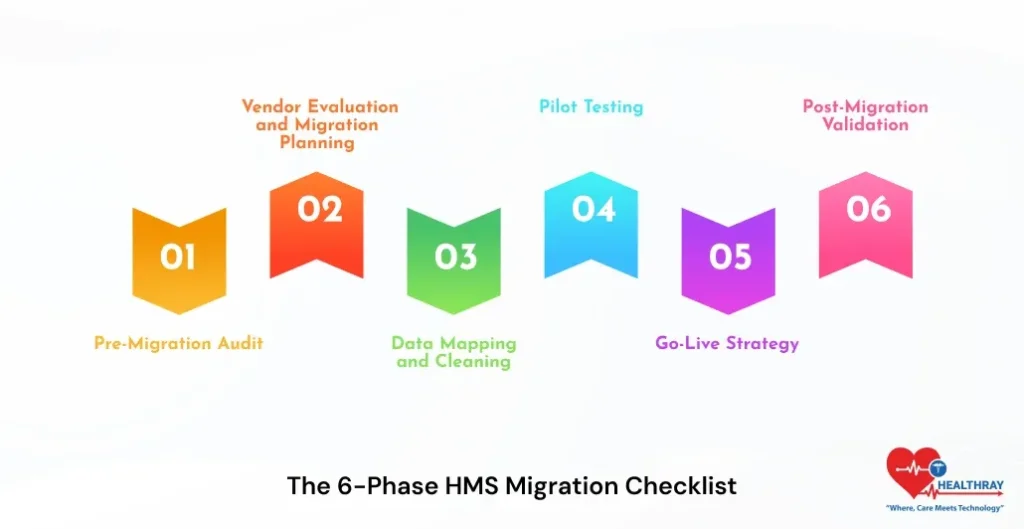
Phase 1: Pre-Migration Audit
Audit before anything goes. Determine the types of data your existing system contains patient records, billing history, lab results, clinical notes and appointment logs. Mark dirty data, duplicates and old formats. The cost of cleaning data after migration to a different system is comparatively high when compared to cleaning data before migration.
Establish roles prior to the project. IT deals with technical implementation. Workflows map with clinical leads. Admin verifies billing and compliance needs are in line with the new system. All in all, this stage ensures that there are no gaps in ownership in the future as the stakeholders are clear.
Phase 2: Vendor Evaluation and Migration Planning
Migration support is not universal among vendors of HMS. Ensure the history of your vendor with hospitals of similar size and complexity. Verify HIPAA compliance, HL7/FHIR compatibility, and for Indian hospitals – ABDM certification.
Here custom HMS software development comes into play. Designed systems are directly mapped to the workflows that are already in place at your hospital and thus data field mapping in Phase 3 is much cleaner. Develop a documented migration process that has a clear schedule, owners and a rollback trigger. When your vendor is unable to offer a structured migration roadmap, consider that a red flag.
Phase 3: Data Mapping and Cleaning
Before transferring to the new system, map all your data-fields in the old system to the new system. This is where the majority of migrations silently fail. Field mismatches result in broken records, which do not attract the attention of anyone until a clinician opens up a patient file during a consultation.
Clean source data. Remove duplicates. Fill missing fields. Standardize formats. Then transfer. The quality of your end product of migration is entirely dependent on how good your input data is.
 PRO TIP
Phase 4: Pilot Testing
Install the new system in a single department. Outpatient or admissions is a good fit – high volume, limited scope, and reflective of the workflows that most departments have in common. Provide testing of all situations that your employees are to deal with in a typical working day. Confirm all patient records, billing information, lab histories and clinical documentation transferred.
Correct mistakes during pilot stage. They’re manageable here. Bugs found in pilot testing take hours to fix. The same mistakes that were identified on go-live day require days, and real patients are impacted in the process.
Allot department super-users at this stage. These are the employees who are your internal support team on the go-live day rather than an outside consultant who is contracted after something has failed.
Phase 5: Go-Live Strategy
The only way that you can be sure that your migration is working is by running the parallel run method before your old system goes offline. Concurrently run both systems between two and four weeks. The data is entered in both by staff. Any difference between old and new surfaces is immediately corrected when you still have time to correct it.
Delegated support point on go-live day: a single point of contact per department, one IT lead on standby. Issues on day one are normal. Problems left unresolved on day one will turn into day-two crises that wipe out the staff confidence quickly.
Write down your rollback plan prior to going live. Be aware of what causes it and who can call it. Healthcare data security India during this cutover window deserves specific attention: access controls, encryption, and audit trails must be active from the first moment of testing, not added afterward.
Phase 6: Post-Migration Validation
Go-live is not the end of the road. Conducts spot-checks of all the departments in 48 hours. Perform billing cycle tests. Confirm lab integrations. End to end clinical documentation validation. In the case of Indian hospitals, affirmation of ABHA ID records and accessibility of ABDM-related health records are made available via the national network.
Observes 30 days of performance in the monitoring system. Gather employee feedback on a weekly basis. The workflow gaps that pass through testing normally occur during the first two weeks of live operation and they are much easier to correct during the initial two weeks than half a year later.
Learn more: Top Hospital Management System Modules
The Biggest Risks in Hospital System Migration
A 2025 peer-reviewed case study in Springer Nature’s Discover Health Systems followed a real hospital through a complete legacy HIS migration. Despite careful planning, it still faced data integrity problems, staff resistance, and integration challenges across departments. A good plan does not eliminate risk, it makes it manageable due to a good plan.
The risk that can be avoided most is data loss. Back up both systems before cutover and verify both backups hold before any transfer begins. Staff resistance derails more migrations than technical failures ever do. Training handles the system. Change management handles the people.
Most hospitals skip the second one. Mismatches of work flows are inevitable and align your processes with the logic of the new system rather than the other way around. This is because the exposure to security is at its highest point during cutover and therefore access controls and encryption should not be implemented post-factum.
How Long Does HMS Migration Actually Take
It is longer than most hospitals expect and research confirms the same.
In a PMC systematic review, hospitals required 7-16 months to resume normal operating performance post-go-live. That is the real recovery time even of successful migrations. Go-live is not the end but the beginning of a period of stabilisation.
The quality of the data is the factor that defines the speed of passing through it. Clean records close the window. It is padded out with years of inconsistent legacy data. An online hospital management system on cloud infrastructure helps real-time sync and continuous validation reduce the recovery burden on your team considerably.
Conclusion
The ward that had understaffed, the records which one clinician could not retrieve in the middle of the round, the billing cycle which failed on the first day of the month, none of these had to be. The data was there. The system simply did not have the features to take it through a transition.
All in all, migration is not the risk. Migrating without a plan is.
Hospitals doing this right emerge quicker, skinnier, and operating on data that has finally proven useful. Seek out native HL7 and FHIR support, ABDM certification of Indian hospitals, inherent migration support, and a vendor who remains available after the go-live and not one who vanishes after the contract has been signed.
The hospitals that get this HMS migration checklist right don’t just complete a migration. They build the foundation everything else runs on. Start free with Healthray because the right migration support shouldn’t be an afterthought. It should be there from the start.