
Summary
Data backup and disaster Recovery in HMS are the fundamental frameworks that proactively safeguard the hospitals from potential threats. If the original data is inadvertently erased, corrupted, or exposed to cyberattacks, backups can quickly restore it. In this blog, I will discuss how data backup & disaster recovery can save your HMS system from unexpected events and ensure uninterrupted workflow. Continue reading!!!
Introduction
In the healthcare sector, downtime impact is highly serious. The billing process will halt, emergency cases will be delayed, and doctors will not receive patient histories if the system slows down. That’s the reason data backup and disaster recovery in HMS is highly critical. Hospitals should adopt a strong backup strategy. They should participate proactively in daily backups, automated synchronization and offsite storage systems. In the modern healthcare landscape, hospital management software is the foundational technology of medical sectors.
All patient records, billing, lab reports, pharmacy, and insurance claims depend on a centralized system. Hospitals must therefore maintain the data’s security and be able to quickly retrieve it in an emergency. Strong strategy not only provides a high level of security but also establishes patient trust, operational stability and long-term advancement. Additionally, it ensures unexpected events like server shutdowns, natural calamities, or ransomware incidents do not break the smooth process flow.
What are RTO and RPO for Data Backup and Disaster Recovery in HMS?
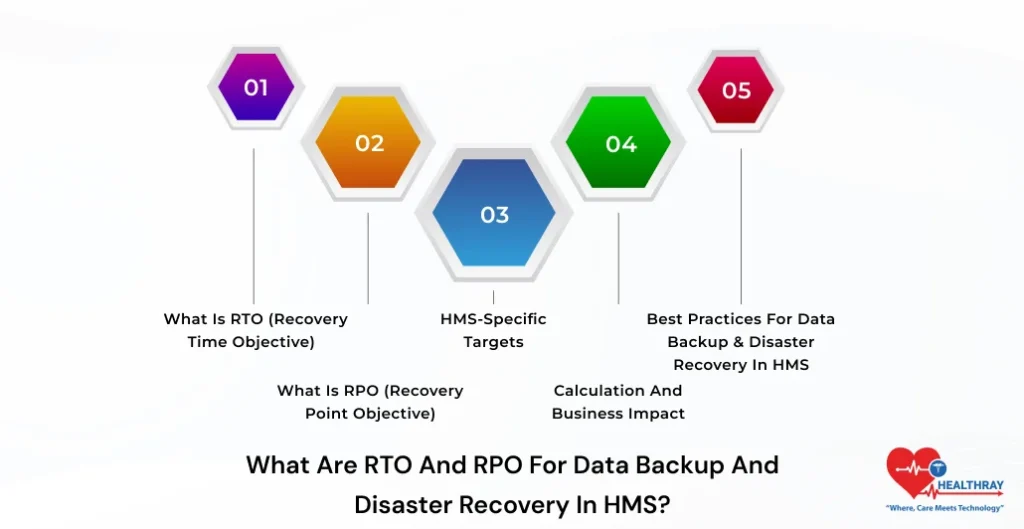
RTO and RPO are the core parameters of HMS software (Hospital Management System) disaster recovery. Further, it ensures patient-centric services, billing and analytics functions flawlessly even during normal power outages. In the healthcare sector, downtime imposes a negative consequence on patients’ well-being and revenue. Therefore, it is crucial for clinicians to plan these targets thoughtfully.
1. What is RTO (Recovery Time Objective)
RTO means the maximum system remains disabled before it becomes 100% reactivated. In simple words, how long should it take for the HMS system to reset itself? For example, if HMS RTO is 2 hours, then the system should resume working in 2 hours only.
2. What is RPO (Recovery Point Objective)
RPO determines how much data loss is permissible. Further, it measures the data gap from the last backup stage to the point of failure. Let’s understand with the help of an example: If RPO is 1 hour, then data loss is acceptable for 1 hour only.
3. HMS-Specific Targets
Hospitals usually maintain low RPO and RTO as system practices are completely conditioned on compliance (HIPAA/DPDP Act) and financial concerns:
- Essential IT systems (EHR, billing): RTO < 4 hours, RPO < 1 hour
- Analytics-based dashboards: RTO 4–24 hours, RPO ~4 hours
- Tier-specific strategy: Tier 1 (critical) near-zero downtime and Tier 3 with 24+ hours acceptable.
4. Calculation and Business Impact
Business Impact Analysis (BIA) determines the targets. Further, if a hospital loses $5000/hour during downtime. It is highly imperative for hospitals to keep a low RTO. Hospitals should also contemplate patient holdups and compliance repercussions.
5. Best Practices for Data Backup & Disaster Recovery in HMS
- Hospitals should comply with the 3-2-1 backup protocol.
- Always implement a cloud-based automated failover
- Test the quarterly disaster recovery procedure.
- Implement hybrid configurations with RBAC security features
 NOTE
NOTE
Data Backup and Disaster Recovery in HMS: Cloud Vs. On-premise Backup For Hospitals
It is vitally important for healthcare facilities to choose a strong backup protocol. Further, Cloud and on-premise have their own pros and cons; let’s find out:
1. Cost Comparison
Cloud backups are based on a pay-as-you-go structure. Therefore, hospitals don’t have to pay for upfront hardware costs. However, in the long run, the subscription fee perhaps goes sky-high. On the other hand, On-premise is a one-time investment, but servers and maintenance services are prohibitively expensive.
2. Scalability & Flexibility
One of the most significant positive aspects of cloud HMS is the real-time ability to scale. Further, it can easily expand as data volume in the system increases. On the other hand, on-premises provides full flexibility; however, it also comes with high-end hardware upgrades, which eventually make it costly.
3. Disaster Recovery Capability
Cloud backups ensure automated failover and geo-redundancy, thus permitting hospitals to conveniently reach an RTO < 4 hours. On the other hand, on-premise systems can operate in offline mode as well; however, they are at high risk in the event of local catastrophic events.
 PRO TIP
How To Test A DR Plan For A Hospital Management System?
For hospital management systems, backup and disaster recovery are both vital lifeline layers. Further, if the HMS software system gets an outage, it will negatively impact the entire operation. Therefore, it is crucial for hospitals to take the discovery plan.
1. DR Testing Types
First, hospitals should initiate with low risks. Perform step-by-step implementation:
- Checklist Review: Hospitals should verify backup, contact information, and procedures.
- Tabletop Exercise: Discuss all the ransomware and outage scenarios with your team members.
- Parallel Test: Run the backup system with live HMS and check the failover.
- Full Interruption Test: In off-hours, perform a real recovery system.
2. Scope & Planning
Before initiating the test, hospitals should thoroughly follow the below step:
- Clearly outline the scope of the project.
- Then, establish clear targets
- Clarify all the assigned responsibilities to the IT and clinical teams.
3. Step-by-Step Execution
- Prepare test scripts
- Dry run the scripts in an isolated environment.
- Execute DR test
- Measure recovery time
- Track RTO (<4 hrs) and RPO (<1 hr)
- Log the issue (Such as RBAC and access failures)
4. Analysis and Improvement
After conducting the test, the next step is to analyze the test and identify the gaps and update the DR plan. Additionally, hospitals should also include AI/chatbot integrations to make the core system fully operable. Also, read our blog on hospital interoperability to learn more about it.
5. Best Practices
- Conduct 1-4 instances of DR testing in a year.
- Validate your Hybrid configurations (cloud + on-prem)
- Update the Documentation.
- Ensure faster recovery for critical systems.
How To Measure RTO And RPO During DR Tests For HMS
In HMS DR testing, it is highly crucial for hospitals to measure RTO (Recovery Time Objective) and RPO (Recovery Point Objective). Let’s understand more about it:
1. Pre-Test Planning
Before initiating the test, first perform BIA (Business Impact Analysis) and determine the targets ($50K/hour downtime impact). Further, recognize the HMS component such as EHR, billing, database, and apps for reliable and precise measurements.
2. How To Do RTO Measurement?
- Firstly activate the failure condition (such as a server halt and service outage event)
- Start the timer at that particular moment.
- Measure the time that the system required to become fully functional a second time.
- Use a proper tool to track the exact timing.
3. How To Do RPO Measurement?
- Compare an outage time and last backup time stamp
- The difference = data loss window period (e.g., 45 minutes)
- Check the transaction log
- Ensure that critical data loss is minimal (<1 hour)
4. Analysis And Improvement
After conducting the test, the hospitals should compare actual and real results. Further, if RTO/RPO exceed, then increase the backup frequency.
5. Execution And Logging
- Run Parallel and full interruption tests in off-hours.
- Use Scripts/timers and record RTO/RPO records.
- Properly maintain log for every step.
Ransomware Protection Strategies For HMS Backups
Ransomware is the biggest threat to HMS (Hospital Management System). Strong backup strategy is highly essential. Let’s learn more about that:
1. Use the 3-2-1-1-0 Rule
Follow the best practices stated below:
- 3 copies of data
- 2 different media
- 1 offsite backup
- 1 air-gapped copy
- 0 errors (automated validation)
Additionally, this will make the ransom recovery dependable and trustworthy.
2. Network Security & Access Control
- Use Network segmentation.
- Implement RBAC/ABAC for limited access
- Enable Zero Trust + MFA
- Maintain audit logs for tracking.
Step towards digital era with our healthcare solution
Revamp your hospital facilities and embrace change for better healthcare management. Ease in managing and organizing large medical datasets leads to effective analysis. Seize the opportunity now!
Data Retention Policies for Hospital Patient Records
A data retention policy is highly paramount for Hospital patient records. Further, it ensures a high level of care, legally enforceable conformity, and audit readiness. In India, hospitals should follow the Digital Personal Data Protection Act 2023 and the Clinical Establishments Act 2010.
1. India-Specific Retention Periods
Hospitals should follow a fixed timeline for different records:
- OPD & IPD records: minimum 3 years
- Medico-legal cases: 10 years or till case closure
- Birth/Death registers: permanent
- MTP records: 5 years
- PCPNDT records: 2 years or case completion
- OT & biomedical waste logs: ~5 years.
2. Global Benchmarks (HIPAA Context)
At a global level, hospitals should follow Health Insurance Portability and Accountability Act (HIPAA) guidelines, where 5–11 years of retention is common. Moreover, hospitals can store minor records for up to 30 years.
3. Security & Compliance Measures
- Use Data encryption (AES-256).
- Implement Access control (RBAC)
- Use Data anonymization for research
4. Backup & Lifecycle Management
Hospitals should align the retention policy with the backup strategy. Further, they should follow the 3-2-1 rule and should ensure that expired data automatically get deleted without creating any compliance infringement risks.
5. Best Practices
- Conduct annual BIA (Business Impact Analysis)
- Hospital should implement regular inspections and policies
- Provide data handling training to staff
- Follow longest retention rule for multi-location hospitals.
Conclusion
High-quality data backup and disaster recovery in HMS are the fundamental foundation for medical facilities. It helps safeguard the patient information, billing and analytics from power failures, ransomware infections, and standard adherence pitfalls. Proactive data backups and DR strategy are essential for patients’ safety and enable hospitals to easily handle unforeseen circumstances.