In This Blog, You Will Get To Know:
- Which mobile features genuinely change how your front desk and clinical staff work day to day?
- What do patients actually use on their phones, and where does mobile still fall short?
- How do you choose the right mobile app for clinic software without drowning your team in app fatigue?
- How does Healthray balance mobile speed with desktop depth inside one connected platform?
A mobile app for clinic software is built for speed, not depth. Staff get instant alerts, schedule updates, and quick note access on the go. But when it comes to detailed charting, billing reconciliation, and compliance documentation, the desktop wins every single time.
The Staff Perspective: Where Mobile Fits into the Clinical Workflow
The pressure clinic staff experience daily is a different one. Even a well-prepared team can be overwhelmed by the influx of patients on a Monday morning at an OPD. That’s where a smart clinic software mobile application becomes essential, instead of a convenience. So, the right clinic management software displays the most crucial information on the screen that is in the hands of the people in charge.
Real-time Schedule Updates and Shift Alerts
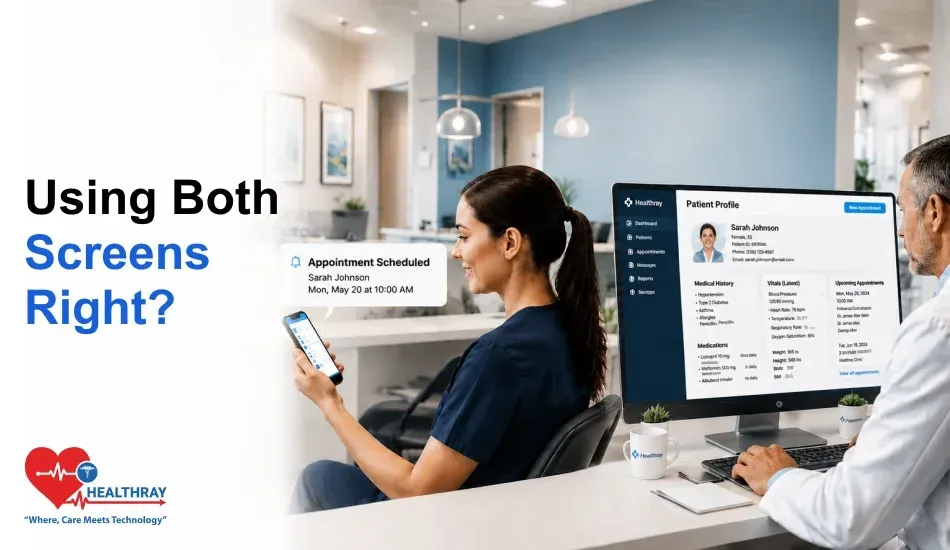
Imagine it is 8.47 am. Three walk-ins are being handled by a receptionist when a patient cancels her appointment for 9:15. If there were no mobile alerts, that would be in the desktop queue for 20 minutes and go unnoticed. But, with a mobile application to clinic software, a push notification is sent as soon as the cancellation appears in the system. She works in before the doctor completes the previous consultation.
Real-time scheduling on mobile functions as it eliminates the “return to workstation” time issue. Let’s take a look at the practical application of a smart alert workflow:
- The patient calls on the phone or uses the app to cancel his appointment → The system sends an immediate push message to the receptionist’s mobile device.
- The receptionist checks the available slots, calls the next patient in line, and verifies that she has replaced the patient – all from her cell phone.
- This new appointment schedule automatically updates the doctor’s mobile view.
- No lag. No double-booking. No missed slot.
However, this is only possible if the software alerts to specific roles. A notification of a billing payment should not be sent to a doctor. Instead, a receptionist should get scheduling updates – not critical lab result flags. The difference between a useful mobile tool and a noisy one is the ability to configure the filter to work smartly.
 PRO TIP
Fast Clinical Note Review
A doctor will need to quickly look at a chart, but not re-create a chart, between visits. For instance, when a patient is confirmed to have an ICD-10/11 code before entering a room, the last blood pressure reading, or marking a follow-up task, all make sense as mobile use cases. With a good clinic workflow automation setup, in fact, this seems easy.
Voice-to-text input is also beneficial here. It can be dictated by a nurse in less than 90 seconds after the visit. The note is immediately synced to the patient record. Despite this, the best clinical teams still use mobile devices to initiate notes and a desktop to complete notes. The overall workflow is:
- The doctor writes a short voice memo while visiting a patient and sends it to the patient’s cellphone.
- Note is in the draft queue in the desktop EMR.
- The doctor opens the desktop, fills out the structured SOAP note, and enters the ICD-10/11 code and sends it.
- The mobile note replaces the finished note, which is now used as the raw material.
Where Desktop Still Wins: In-Depth Charting and Long-Form Documentation
No six-inch screen replaces a monitor when a doctor reviews a full patient history alongside a SOAP note she is actively writing. In reality, in-depth charting requires screen real estate. Navigating between a medication list, a diagnostic summary, and an ICD-10/11 coding panel on a mobile screen means twelve taps for a task that takes two clicks on a desktop.
Likewise, billing paperwork ought to be on a desktop. When a billing executive has to review the ERA or submit a prior authorization request, they will require numerous reference tabs and need to compare things side by side, which isn’t something that a phone can do very well. Clinics that force billing onto mobile end up with increased rework instead of increased flexibility.
The Patient Perspective: Designing for High Adoption and Engagement
Patients never consider clinic software. They consider how easy it was to make an appointment and if test results came promptly. But a mobile application for clinic software is only effective on the patient’s side if it is frictionless, versus trying to duplicate all of the functions available on a desktop onto a smaller screen.
Frictionless Appointment Booking
It is 11:14 PM. A single parent puts her kids to sleep. She recalls that she must make an appointment with the doctor for next week. So she gets her cell phone. A good mobile application of the clinic software allows her to pick the provider, choose a time slot, and confirm in less than 2 minutes. No hold music. No office hours.
Let’s take a closer look at that frictionless booking process with a good patient app:
- Patient clicks on the Book Appointment option in the app.
- She narrows her search by specialty, provider name, and available time.
- She takes the 10:30 AM time on Thursday and clicks on “Confirm.”
- A push notification instantly confirms the booking.
- The appointment will be displayed in her home screen calendar widget.
However, there is a definite limit. New patient sign-up, insurance information, insurance card photo, and consent fields all have high abandonment rates when the number of fields is over 12 on mobile. That’s something that should be done on a desktop or tablet.
Instant Test Results and Secure Reminders
The mobile push notification that alerts a patient to her CBC test result is very useful. It’s fast, real, and tangible. Indeed, research from the National Institutes of Health (NIH) has shown that appointment reminders and patient engagement tools delivered via a mobile device show measurable improvements in reducing the no-show rate at outpatient clinical visits. Therefore, the mobile application for clinic software that notifies the patient via SMS to schedule or cancel with just one tap directly translates to more clinic bookings and less lost revenue.
But seeing a lengthy pathology report on the phone is a bad experience. Put a CBC with differential on a small screen with no context, and no provider note, and a patient is often anxious but not informed. Mobile, on the other hand, copes with the notification. Understanding is better on a bigger screen.
Where Desktop Still Wins: Initial Patient Intake and Medical History Forms
Don’t put detailed intake forms on a phone. When a patient fills out a full medical history on a handheld keyboard, he makes mistakes. They skip fields. They abbreviate. This causes data quality to suffer, and your front desk staff is left working the first ten minutes of every appointment to fix data.
In addition, any data collected through a mobile app for clinic software, even intake fields, must meet HHS HIPAA guidelines on mobile health data security for encryption and storage at rest
Smart workflow sends a cell phone reminder with a direct link. Have the patient access the form from home on a desktop or tablet. Step by step:
- Patient receives a message on their phone 48 hours before the scheduled appointment: “Finish your intake form before you come to the appointment.”
- She clicks on the link, and the form appears in full browser on her laptop.
- She fills out all of the fields correctly and uploads the image of her insurance card from her computer.
- The completed form syncs to the clinic’s clinic management system features before she even arrives
 NOTE
NOTE
Quick Comparison: Mobile Value vs. Desktop Necessity
| STAFF SIDE: MOBILE VS. DESKTOP | ||
| FUNCTION | MOBILE | DESKTOP |
| Schedule Alerts | Wins | Slower |
| Clinical Note Drafts | Good for drafts | Required for final entry |
| In-Depth Charting | Too limited | Wins |
| Billing & ERA Review | Error-prone | Wins |
| PATIENT SIDE: MOBILE VS. DESKTOP | ||
| FUNCTION | MOBILE | DESKTOP |
| Appointment Booking | Wins | Also works |
| Test Result Notifications | Wins | Better for reading |
| Appointment Reminders | Wins | Not relevant |
| Intake & Medical History | High abandonment | Wins |
The Golden Rule for Clinic Managers: Avoid App Fatigue
App fatigue is a thing. If each department uses a different tool, one for scheduling, one for messaging, one for patient reminders, staff start to tune out of all of them. Including the pressing ones. Therefore, having a cohesive clinic software mobile application that manages your appointments, notifications, and patient communications will be better than a disjointed set of apps.
The other one is notification overload. Push alerts for each system event, new patient is registered, invoice is generated, room is marked as “clean”, and staff “tune out”. The result is that the true critical alert – the one with a lab value or emergency add-on slot – is completely overlooked.
In an example, one three-provider family practice tracked all the mobile notifications for 2 weeks. They 46% of alerts required no immediate action. Turning off those notifications reduced their response time to urgent notifications by 40%. To put it simply: Mobile was no longer noise, but a signal.
Learn more: When your mobile and desktop tools stop syncing, patient care is the first thing that suffers, and Top Clinic Software Trends Every Clinic Should Watch explains exactly where those breaks happen.
To Sum Up
The moments when people need mobile app support are the moments when they need it the most, when they are reminded of an appointment, when they are booked in, when they get test results, and when they are reminded to make an appointment at a single click. Once a task demands data density, multi-field input, or more clinical thinking, however, it loses to the desktop.
Well done to clinics that have succeeded in NOT replacing the desktop with mobile. Rather, they make conscious and deliberate choices about what’s done on which device, and they shape their software configuration around those choices. This is the difference between a clinic with a mobile well and a clinic with a mobile app.
That’s the essence of Healthray. On desktop, it provides your team a complete command center, including in-depth charting, billing, compliance documentation, and multi-provider schedule management. On mobile, it provides staff with real-time alerts and patients with hassle-free booking and reminder experiences that result in true engagement. Both sides collaborate. Neither wants to be the other’s competition.
No rework. No app fatigue. No missed critical alerts. Just a connected clinic that works at the right speed, on the right device, every time.