
Summary
Laboratory ERP software is a smart system that connects all the lab’s scientific and business operations into a single system. Its function beyond LIMS and are adept at handling finance, inventory, HR and procurement. LIMS functionalities are limited to sample tracking, testing aur compliance. However, Lab ERP is a broad concept and handles entire business operations such as billing, purchase, stock and reporting. In this blog I will discuss in detail laboratory ERP software and how it helps clinics achieve significant cost savings and prepare for a lucrative future. Keep reading!!
Introduction
Testing and sample management alone are insufficient in modern laboratories. Labs have a responsibility to manage their business operations as well. A Laboratory Information Management System (LIMS) mainly handles lab workflows such as sample tracking, reporting and compliance. Laboratory ERP takes the workflows one step forward. Lab erp software efficiently integrates standardized lab procedures with business functions like finance, inventory, procurement and HR.
In simple words, lab erp is an integral system that integrates lab scientific and administrative functions into a single platform. It evades the need for labs to use different systems and also automatically flows from one module to another. By utilizing ERP software, labs can reduce their operational cost, raises teh efficacy and help clinics make concrete decisions. Laboratory ERP Software presents a highly intelligent, interoperable and configurable system to labs to help them optimize their operation and prepare for a successful future.
What Distinguishes Laboratory ERP from Traditional LIMS, and How does it Handle Sample Tracking Alongside Procurement and Inventory?
1. LIMS vs. Laboratory ERP – Basic Difference
LIMS is mainly intended for lab internal works such as sample tracking, testing processes, and reports. Further, Laboratory ERP functions are a broad concept and functions beyond LIMS. Lab erp handles lab work and also efficiently manages finance, HR, procurement and inventory. In simple words, Lab ERP software is a complete business solution but LIMS is just limited to internal lab practices.
2. Data Silos vs Unified System
In Traditional LIMS, data is stored in different locations. This creates coordination problems and increases the manual workload. Lab erp software connects all the department data in a single platform. Further, it enables real-time sharing, prevents human erros and makes the practices smooth and intuitive.
3. Sample Tracking
AI in LIMS software handles the entire lifecycle from sample collection and preparing reports to final dispatch. Further, Laboratory ERP connects this data to inventory or procurement. As sample needs increase, the system automatically checks the stock of chemicals and reagents and takes action accordingly.
4. Inventory Management Automation
The ERP system automatically manages the inventory. Further, lab erp automatically tracks stock levels, expiry dates and batch/lot numbers. It automatically updates all the stock levels being used. This minimizes waste, and data is readily available at the time of audits.
5. Procurement Auto-Trigger System
In lab erp software, procurement systems are automated. Further, when inventory gets low, the system automatically generates purchase orders, suggest vendors and initiates approval workflow. This prevents manual workloads and avoids unnecessary delays, especially during urgent lab responsibilities.
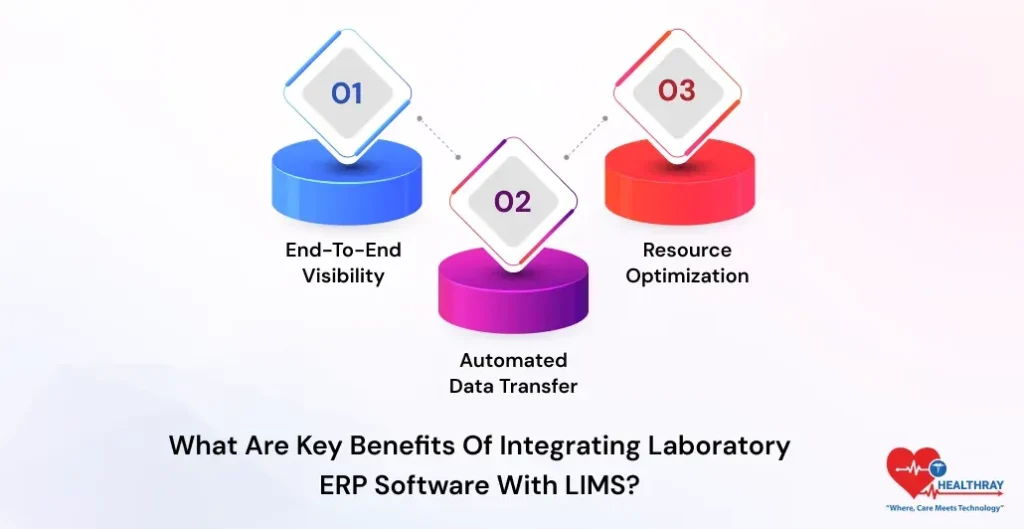
What are Key Benefits of Integrating Laboratory ERP Software with LIMS?
1. End-to-End Visibility
When lab systems are connected with ERP and LIMS, then clinics can view sample data, test results and business data under a single centralized platform. Further, lab managers, the finance team and the supply chain department get real-time visibility. This makes the decision-making fast and accurate and improves the complete lab performance.
2. Automated Data Transfer
One of the biggest upsides of integration is that it completely eliminates the need for hand-written data entry procedures. Further, erp software automatically updates the LIMS results. This naturally minimizes errors and expedites the reporting and turnaround time (TAT).
3. Resource Optimization
Through integration, labs can effectively utilize their resources. Furthermore, erp integration helps labs in planning stock according to test volumes; staff can conveniently manage their mundane, hectic workloads. It reduces waste on unnecessary resources. This saves significant cost in operation and organically boosts efficiency.
Walk Through the Steps to Migrate Legacy LIMS Data into a Laboratory ERP without Disrupting Operations
1. Assessment & Planning
Firstly, clinics should thoroughly analyze legacy LIMS. Further, they should properly evaluate important data (samples, reports, instruments) and what they need to mitigate. Clinics should plan data mapping on the basis of ERP structure.
 PRO TIP
2. Data Cleaning & Preparation
Clinics should clean the data before taking a migration approach. Further, clinics should remove duplicate records and create a standardized format (dates, units, naming). Archive all the old and irrelevant data present in the LIMS system. In this way, ERP includes only useful data and helps clinics avoid future errors post-implementation.
3. ETL Mapping (Extract, Transform, Load)
In this step, data is extracted and converted to ERP format. Simply put, Revolutionizing Laboratory Management system data transforms according to ERP fields. Further, clinics should perform testing in a sandbox environment to prevent unavoidable predicaments at the time of real migration.
4. Data Extraction & Batch Migration
Clinics should migrate the data in small phases rather than transferring it all at a time. First, they should send out master data, following that with sample data and integrations. In this process, LIMS and ERP run parallelly and make the lab work run smoothly and without interruption.
5. Validation & Testing
After migration, it is highly crucial for clinics to validate the data. Further, they should compare their results of old and new systems. Clinics should review the record counts and check audit logs. They should also perform User Acceptance Testing (UAT) to ensure that the system is performing appropriately.
Step towards digital era with our healthcare solution
Revamp your hospital facilities and embrace change for better healthcare management. Ease in managing and organizing large medical datasets leads to effective analysis. Seize the opportunity now!
What Strategies Mitigate Resistance to Adopting Laboratory ERP Beyond Siloed LIMS Workflows?
1. Early Stakeholder Involvement
Clinics should involve all the stakeholder scientists, technicians, managers, and admin teams from the very beginnings. Further, when all your stakeholders become a part of system design and decision-making, they consider ERP their own solution, not an imposed change.
2. Clear Communication of Benefits
People will resist only when they are unaware of benefits. Further, management should clearly explain to them how ERP software will reduce their workloads, like automating manual entries and removing duplicate errors and simplifying billing procedures. Clinics should explain the benefits as per the role.
3. Phased Implementation Approach
Changing the entire system one at a time could be risky. Therefore, lab specialists should implement ERP in phases. First they should initiate with low-risk modules such as inventory and procurement, then shift to core lab practices. This helps users gradually adopt the new system and prevent negative impacts on operations.
4. Workflow Protection & Parallel Run
During migration, clinics should not immediately shut down LIMS workflows. Further, they should run the LIMS and ERP in parallel for a certain period of time. This helps clinics to execute their day-to-day operations without interruption, and users can comfortably navigate the new system without any extra nagging pressure.
How Should Clinics Measure ROI for Implementing Laboratory ERP Over Standalone LIMS in a Hospital Setting?
1. Define Scope & Baseline
First, clinics should be clear about what they want to compare. For example: a current LIMS-only system or a future LIMS or Laboratory ERP system. Further, they should collect baseline data of 6-12 months, such as TAT, errors, stockouts, and billing issues for deep comparisons.
2. Track Baseline KPIs
Next, clinics should identify important KPS such as turnaround time (TAT), error rate, reagent wastage, billing leakage, and sample volume. Further, these metrics will help clinics determine the current system inefficiency. Following that, clinics can accurately measure ERP impact.
3. Calculate Total Cost of Ownership (TCO)
Calculate the total cost of erp implementation and include software license, implementation, integration, data migration, training, and maintenance costs. Additionally, this total cost will be the base of the ROI calculation.
4. Productivity & Efficiency Gains
ERP increases staff productivity by allowing the same team to handle more samples. Further, it minimizes admin workload and time to accomplish it. This reduces hiring costs, and the lab becomes highly effective in terms of scaling efficiency.
5. Risk & Compliance Value
ERP provides better control in audit trails, compliance and data accuracy. Further, it reduces the risks of penalties, claim rejections, and sample loss. Clinics should include this avoided loss in monetary value while calculating ROI.
6. Continuous KPI Monitoring
After implementation, clinics should track regular KPIs such as cost per test, margin, TAT, error rate, and revenue cycle. Clinics should review dashboards to validate the actual improvement of ERP. Also, read our blog API integration with LIMS to know more about it.
 NOTE
NOTE
Conclusion
When Laboratory ERP and LIMS work together, then labs no longer remain just a testing unit; instead, they become a strategic part of hospitals. LIMS handle scentific work and ERP manages business operations and the combination of both creates a full ecosystem. After integration, clinics can handle sample registration, reporting, billing and inventory in a single system.
Integration reduces data silos and every department gets real-time information. This makes the decision-making more impactful. In 2026, clinics should not just focus on LIMS and ERP; they should emphasize smartly integrating both.