

What Every Clinic Administrator Should Know
Before your clinic commits to any booking infrastructure, here is what a cloud-based doctor booking system comparison with traditional systems actually reveals:
- Why does on-premise infrastructure keep failing clinics at the worst possible moment?
- Is cloud security genuinely stronger than a locally managed server or just a sales pitch?
- What does the real lifetime cost of a traditional booking system look like when nothing gets left out?
- How does a cloud system scale when patient volume doubles without warning?
- Why do traditional systems create data walls between departments that cloud systems simply do not have?
A cloud-based doctor booking system is a remotely hosted appointment management platform that runs on provider-managed servers delivering automatic updates, enterprise-grade security, elastic scalability, and real-time data access across devices and locations without any on-premise hardware requirement.
The Infrastructure Gap Traditional Systems Cannot Close
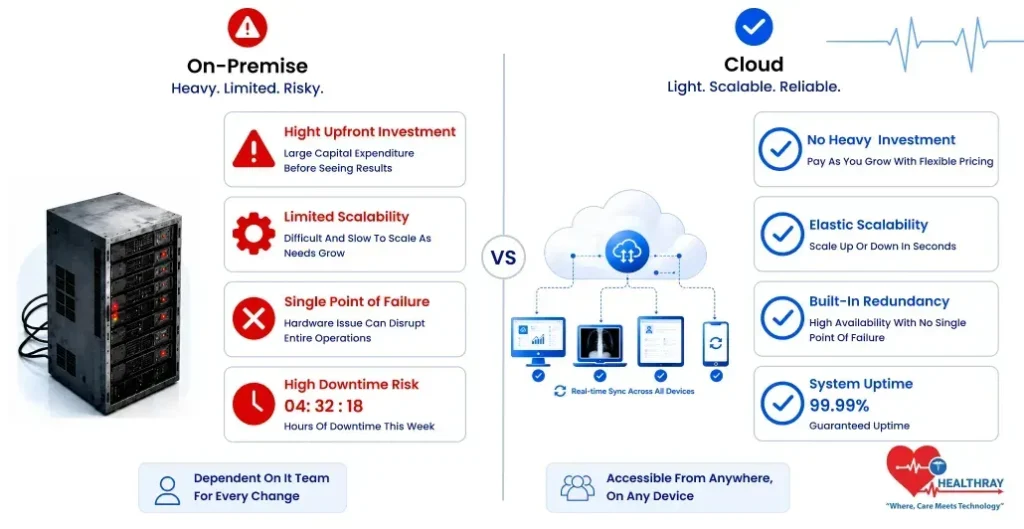
On premise systems provide clinics with real-world control over their equipment and that’s where the trouble begins. A doctor appointment system built on local servers transfers every infrastructure responsibility to the clinic maintenance, security patching, hardware refresh cycles, and downtime recovery. These responsibilities are without manuals, and without guarantees.
Traditional infrastructure ages predictably. Servers need replacement every three to five years. Every replacement cycle introduces capital costs, data migration risk and potential downtime during transition. Meanwhile, the daily cost of the clinic to support IT staffing, power, physical server room security, and emergency support is absorbed that is never represented in the original purchase comparison.
At the very basic level, cloud infrastructure operates differently. The provider owns, manages and upgrades the servers, and the providers’ facilities are used for this. The clinic uses a browser or an app to log into the system. Clinics don’t have to worry about hardware failures, capacity issues, or maintenance windows, as they are the provider’s problem. This does not represent a feature difference. It is a structural distinction with regard to the burden of operation.
 NOTE
NOTE
Cloud Security: It Is Different Infrastructure Entirely
While on-premise security is not inherently unsound, a doctor consultation booking system running on cloud security does not become less secure because it’s in the cloud, it’s simply more secure because it’s provided by an enterprise cloud provider than by any one clinic can provide on its own.
What Enterprise-Grade Security Delivers at Infrastructure Level
The end-to-end encrypted, continuously monitored and compliant infrastructure hosts a doctor booking cloud-based system, which is protected by automated threat detection, role-based access controls, multi-factor authentication and more. Security patches automatically deploy – closing vulnerabilities as soon as they’re found. On-premise systems require internal IT teams to discover, test and implement the respective patches manually, which may take weeks.
The cost implications of failing to get security right in the healthcare environment can be serious. In 2023, the typical healthcare data breach cost was nearly $11 million, an increase of 53% from 2020, the IBM security cost of a data breach report 2023 found. A cloud infrastructure takes all of this for granted and doesn’t rely on a client to install and manage anti-theft and security features such as encryption, automated backups, and audit trails.
Uptime – The Number That Decides Whether Your Clinic Runs or Stops
Cloud systems are guaranteed to be up and running according to contract. Traditional systems may not provide any guarantees. Service-level agreements (SLA) are a promise made by leading cloud providers that their services will be available 99.9% of the year with specific downtime limits, response times and penalties if the SLA is breached.
There is no such requirement for the local servers. During the morning of a clinic when it’s very busy, a hardware failure brings the booking system down and the system does not go back up until it is fixed, which may take hours or days depending on the staff’s availability and parts availability. In addition, power failures, network failures and cooling system failures are all single points of failure that are overcome by the cloud’s ability to be geographically redundant and automatically take over if something goes wrong.
The expenses of being down add up rapidly when you have on-premise downtime. Front desk reverts to manual work. Data gaps for appointments are found. There is a lack of communication with patients.Communication with patients becomes difficult. Backlogs were created during the afternoon for rescheduling. This doesn’t just occur on one department, this happens on all of them.
 PRO TIP
How Does a Cloud-Based Doctor Booking System Scale Without a Hardware Budget
Cloud systems are dynamic in nature, meaning they expand their server capacity as needed, on-demand, without the buying, installing or setting-up of any additional hardware by the clinic.
Single Clinic Scalability
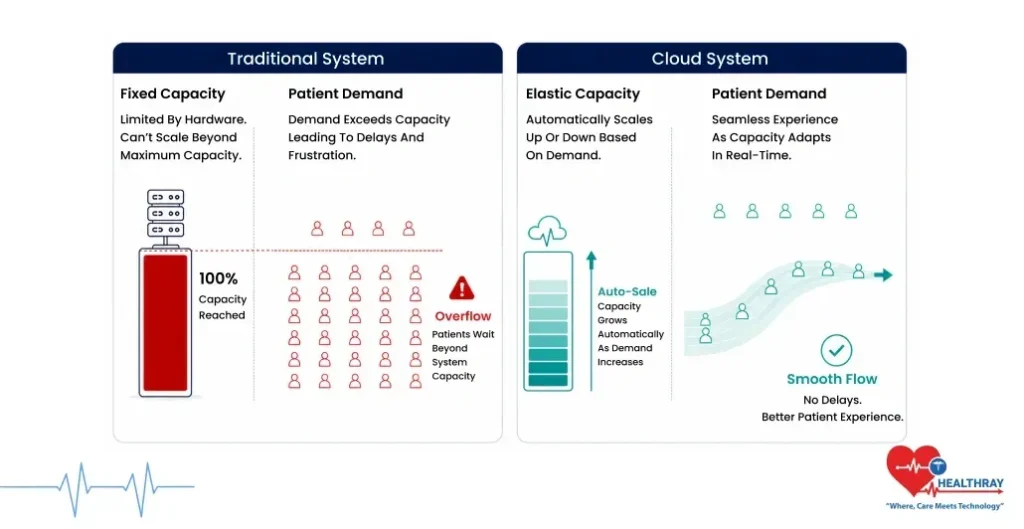
On-premise servers size their capacity at installation. When appointment volumes spike during seasonal surges, health campaigns, or unexpected demand the local server hits its ceiling. The system starts to lag. Confirmation of bookings takes longer. System lag occurs precisely when the clinic needs maximum performance from its system.Cloud infrastructure draws additional server resources automatically, with no visible impact on system performance and no action required from clinic staff.
Multi-Location Expansion
Incorporating new clinics into existing systems requires hardware acquisition, installation of hardware, setting up networks, and commissioning by IT departments for each new location.Cloud systems extend to new locations through administrative configuration alone. The doctor appointment automation process is made much easier for multi-site operations as all clinics would be using one software solution and would share one database environment.
Total Cost of Ownership: The Comparison Traditional Systems Cannot Win
The monthly cloud subscription fee looks higher than the on-premise maintenance fee on paper. The total cost of ownership comparison tells a completely different story.
| COST FACTOR | ON-PREMISE | CLOUD |
| Upfront Investment | High capital expenditure | Zero hardware cost |
| Hardware Refresh | Every 3–5 years | Never |
| It Maintenance | Internal team required | Provider managed |
| Security Updates | Manual — IT dependent | Automatic |
| Downtime Recovery | Unpredictable cost and time | Contractually covered |
| Scaling Cost | Hardware procurement | Configuration only |
Forrester Research estimates that 80% of IT spending goes toward maintaining existing infrastructure leaving only 20% available for improvements or new capabilities. On-premise booking systems sit squarely inside that 80% drain. A patient appointment booking app built on cloud removes the hardware refresh cycle entirely converting the largest unpredictable cost in traditional systems into a predictable operational line item.
Integration: Why Traditional Systems Build Walls Between Clinic Data
Traditional booking systems frequently operate as standalone tools disconnected from the rest of the clinic’s software environment. A cloud-based clinic appointment system connects through APIs sharing data across HMS, EMR, lab systems, and patient communication platforms in real time.
What Happens to Patient Data When Systems Do Not Connect
When the booking system does not connect to the EMR, front desk staff manually transfer appointment data between platforms. Lab results do not link to the relevant appointment record automatically.Prescription histories stay invisible to the scheduling layer. Each manual data transfer carries with it delays, potential for patient data duplication and potential for error at the point of patient service.
By design, cloud integration will remove these walls. When a patient books an appointment, that record flows into the EMR automatically. When a lab result arrives, it attaches to the correct appointment without staff intervention. The clinic operates as one connected system not a collection of platforms that happen to share the same building. The same integration logic extends beyond the clinic when a cloud booking system connects with a Pharma CRM, prescription patterns, medication histories, and follow-up schedules flow into the appointment layer without manual handoffs.
Learn more: When clinic data stops connecting, patient care is the first thing that suffers and The New Scheduling Standards for Healthcare Appointment Software explains exactly where those breaks happen.
The Final Verdict: A Trend vs. Permanent Infrastructure
All the infrastructure benefits that a doctor booking system on the cloud offers over traditional systems will accrue over time. Security improves automatically. Costs become predictable. Scalability eliminates growth limitations. Integration removes those data gaps that hinder clinical operations every day.
Traditional systems made sense before cloud infrastructure matured. That era has passed. Clinics still running on-premise booking systems carry infrastructure burdens financial, operational, and security-related that cloud systems solved years ago. It’s no longer a matter of whether cloud works better than traditional systems. The issue is, just how long a clinic can afford to wait before making the transition.
