

Summary
Pharmacy management system is a strategic approach that simplifies the daily process from billing, maintaining data, dispensing the medicine and taking care of expiry dates. Proper scheduling, requirement analysis, and accurate system configuration are the foundation of pharmacy software. Further, the pharmacy system efficiently manages the routine pharma duties, such as billing, inventory tracking, batch management, and expiry alerts. However, focusing only on software planning isn’t sufficient.
Pharmacy centers should consider staff training, data migration, and system testing. It is equally important and the pharmacy process is incomplete without it. A structured implementation assessment checklist guides the pharmacist towards a successful approach and helps them efficiently handle complex tasks. In this blog, I will discuss how to successfully deploy pharmacy software into your workflows. Also, I will cover how pharmacy software makes the operations automated, dependable, trustworthy and long-term growth oriented. Keep reading!!!
Introduction
Pharmacy management system implementation is a structured and strategic process that systematically organizes the complete routine workflow of centers. In today’s healthcare ecosystem, depending only on manual record maintenance or a basic billing system is not sustainable. To manage factors such as increasing prescriptions, multi-brand inventory, GST compliance, and patient data security, you need a properly executed approach, i.e Pharmacy Management System.
Pharmacy software is especially designed for routine pharma duties such as purchase entry, batch-wise tracking, expiry management, barcode billing, and real-time stock visibility. But just focusing on features is not sufficient; staff training, user role assignment, and trial testing are equally important phases. Implementation journey starts from setup but success depends on proper planning.
If initial planning is not accurate, then eventually pharmacy centers may face challenges with stock discrepancies and billing inaccuracies. When pharmacy software is implemented strategically, then pharmacy operation becomes automated, dependable and flexible. As a result, the journey from setup to success becomes smooth, consistent, and geared toward development.
Pre-Implementation Planning
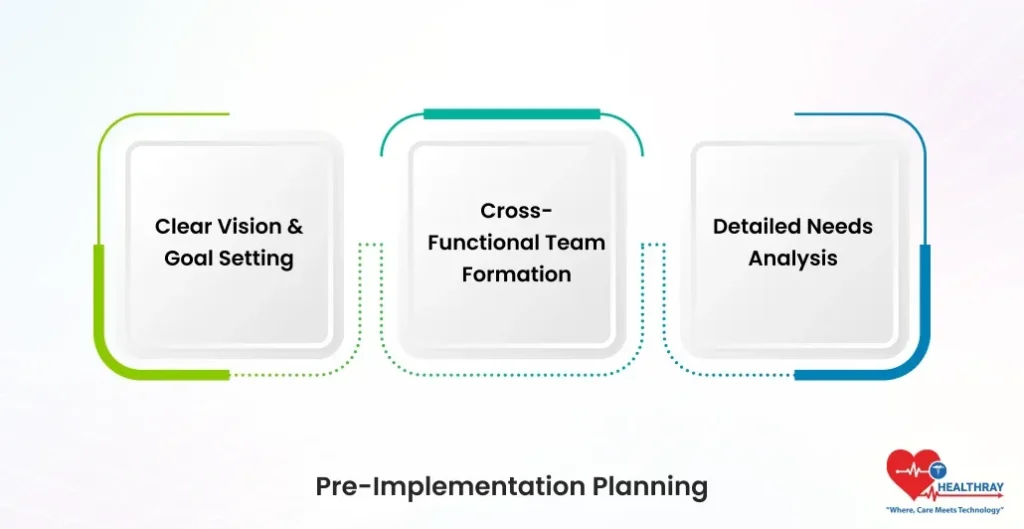
Clear Vision & Goal Setting
Before implementing the pharmacy software, it is crucial to articulate clear intended outcomes. Further, every pharmacy’s goals are distinct. Some pharmacy centers prioritize compliance, while others concentrate on inventory and billing. Moreover, if you fail to align pharmacy workflow automation software requirements with your business goals. Then your implementation will fall short at some points. Pharmacists can accomplish their goals and design the process that leads to desired successes with the aid of careful planning. Therefore, note down the relevant points before implementation.
Cross-Functional Team Formation
Implementation is not just about IT projects. It’s a complete organizational change. Before going ahead, first focus on creating a strong team that includes pharmacists, IT staff, store managers, and compliance experts. This will help you discover pain points such as those from manual stock tracking, billing errors, and prescription mismatches from every department. This will assist management in developing the software and executing the plan accordingly. Furthermore, when all stakeholders are involved, then pharmacy management software automatically becomes practical and user-friendly.
Detailed Needs Analysis
In this phase, you need to map the core workflow of the pharmacy center. Furthermore, clinics should thoroughly write down prescription processing, batch-specific inventory management, GST billing, supplier management, and HIS/EMR and ABDM integration. Moreover, pharmacists should clearly analyze functional needs such as e-prescribing and auto-refill alerts and also focus on non-functional needs such as 99%+ uptime, mobile accessibility, and data security compliance.
Step towards digital era with our healthcare solution
Revamp your hospital facilities and embrace change for better healthcare management. Ease in managing and organizing large medical datasets leads to effective analysis. Seize the opportunity now!
Hardware and Infrastructure Setup
Cloud vs On-Premise Decision
In infrastructure planning, the foremost step is to determine whether you want an on-cloud or on-premise pharmacy software server. For 80% of Indian pharmacies, a cloud server is a convenient approach; the rest are subject to the use cases. Cloud solutions are more practical, as they do not require heavy capital expenditure (CapEx). Additionally, platforms that are constructed on AWS or Azure deliver agility, automatic backups and remote connectivity. Pharmacists can easily expand the features in the future without paying extra on hardware investment.
Server & System Specifications
If you’re choosing a hybrid or on-premise model, then never embark on hardware planning without careful consideration. Further, it is highly recommended to have a minimum of 16GB RAM and high-speed SSD storage. This allows pharmacy operations to keep the billing, prescription processing, real-time inventory updates and workflow fast and smooth. During peak hours, when multiple users simultaneously access, a low configuration will constantly hang the system. Moreover, this increases billing holdups and customer disappointment. A proper system specifications make the pharmacy workflow routine activities stable, fast, and trouble-free.
Essential Hardware Setup
Pharmacy implementations are not just limited to software. Furthermore, barcode scanners, label printers, and POS terminals are essential for smooth settlement and batch verification. A proper hardware selection minimizes the manual error. And expedites the checkout time. When devices are reliable and user-friendly, then staff get easily adapted, and the daily workflow naturally becomes fast.
Bandwidth & Network Testing
The performance of cloud-based pharmacy appointment software and real-time HIS synchronization depends heavily on a reliable internet connection. If your system is functioning with multiple billing counters and departments simultaneously, then you should keep a minimum of 50 Mbps bandwidth. A slow internet connection can trigger prescription loading delays, billing interruptions, and stock update mismatches. Therefore, it is crucial to perform proper network stress testing and router quality checks before implementation. Plus, pharmacy centers should plan a backup internet connection (secondary ISP) plan to ensure smooth and trouble-free workflow.
 PRO TIP
Data Migration Strategy
Data migration is the most sensitive phase of pharmacy software implementation. If you are unable to handle this appropriately, it enhances the risk of downtime. Therefore, it is important to use a phased approach instead of transferring all the data at a single time. Pharmacy centers should clearly create a roadmap outlining which data will be mitigated, when, and by whom in order to minimize risks.
Legacy Data Audit & Cleaning
Before migration, it is essential to perform a complete audit of the existing system. It is highly important to clean duplicate patient records, outdated inventory entries, and incomplete prescriptions. Transferring waste data into a new pharmacy software solution can be highly risky and will create uncertainties in the future. Therefore, it is highly imperative to convert export files usually in CSV or XML format. This will minimize risks and assign proper layout to data in a new system.
Accurate Field Mapping
Field mapping is the backbone of data migration. A minor mistake or mismatch can create billing mistakes, wrong patient history, and stock discrepancies. Therefore, it is highly imperative to align legacy patient IDs into new pharmacy software profiles. Pharmacists should clearly comply with medicine codes, batch numbers, expiry dates, supplier IDs and GST specifications. Don’t just blindly trust the data; adopt a sampling method. Here, you can manually verify the random record. You will eventually be able to refrain from serious operational challenges by investing more effort in the preliminary phase.
Phased Migration in Waves
Transferring all data at once can relieve work pressure, but it also carries risks. In a practical scenario, it is a high-risk approach. Here, a small glitch can perturb the entire system. That’s why it is essential to divide the migration into smaller waves. Firstly, you need to shift inventory data so that stock visibility becomes stable. Then, migrate a minimum of 500 patient profiles daily and transfer the prescription history in the last stage. This gradual approach will minimize system overload, downtime and staff conflation.
Staff Training Program
Training Strategy & Timeline Planning
Pharmacy software implementation becomes successful only when staff becomes confident in using the system. According to research, proper training boosts the adoption rate up to 60%. Therefore, it is critical to follow a structured approach. First, divide the structured 40-hour training program into two weeks. Make a clear schedule. This will not impact the daily operation, and training will also progress peacefully.
Online Learning Modules
The initial training phase should focus on theoretical understanding. Online modules cover prescription entry (Rx entry), inventory management, billing procedure, and dashboard browsing. Plus, Short videos, step-by-step demos and quizzes keep the staff proactive in learning and help them clear basic concepts. In this stage, your goal should be understanding the foundation of the pharmacy management software system.
Hands-On Simulations
Only understanding the theoretical concept is not sufficient in running pharmacy software. In the next phase, management should conduct real-time simulations. Here staff will practice billing, stock entry and prescription processing in a demo environment. Practical exposure will help staff build confidence and make them capable of facing real-life situations without hesitation.
Learn more: Role-Based Access In Pharmacy Management Systems
Post-Implementation Monitoring
KPI Dashboard Setup
After making the leap to pharmacy software, start measuring the metrics. Real success depends on monitoring. Keep a structured KPI dashboard where prescription accuracy should be 99.5%, stockout rate should be less than 2%, and quarterly ROI should be more than 20%. This provides clear ideas to the pharmacist about whether the system is delivering expected results or whether it still needs further improvement.
Monthly Compliance & Audit Checks
Every month, management should conduct a compliance scan. Also, management should verify GST alignment, NDPS reporting, and drug sale documentation. Plus, collect feedback from staff and keep the goal of maintaining a Net Promoter Score (NPS) of 80+ . User satisfaction determines the rate of system adoption.
Post-Training Support System
Support is equally important even after go-live. Management should provide a dedicated helpdesk and support staff for at least three months. Doubts and errors are common during initial days. Additionally, quick resolution maintains staff confidence throughout the journey.
 NOTE
NOTE
Conclusion
When pharmacy management software is implemented through a structured approach, it completely transforms the working style of practices. Structured approach to implementation minimizes downtime and confusion and also provides step-by-step growth direction to pharmacy operation. Technology becomes successful when your user can confidently use the system. Follow the above checklist for deploying pharmacy software and take your patient care and business growth to the next level.
