How to choose hospital management software comes down to four questions. Will it handle the problems you’re buying it for? Will your staff actually use it? What will it cost in full, not just on the first invoice? And can you rely on the vendor for the years your patient records sit in their system?
A demo of a hospital management system (HMS) answers those badly. It shows the vendor’s own specialist, on sample data, working through tasks they chose. You see the software in expert hands, in a room built to sell it to you.
This guide is the check you run before you sign: the workflows to test with your own staff, the questions to ask, the costs to add up, and the deal-breakers to hold. Six steps, and they work the same at 40 beds or 400.
1. Start With the Workflows That Fail Today
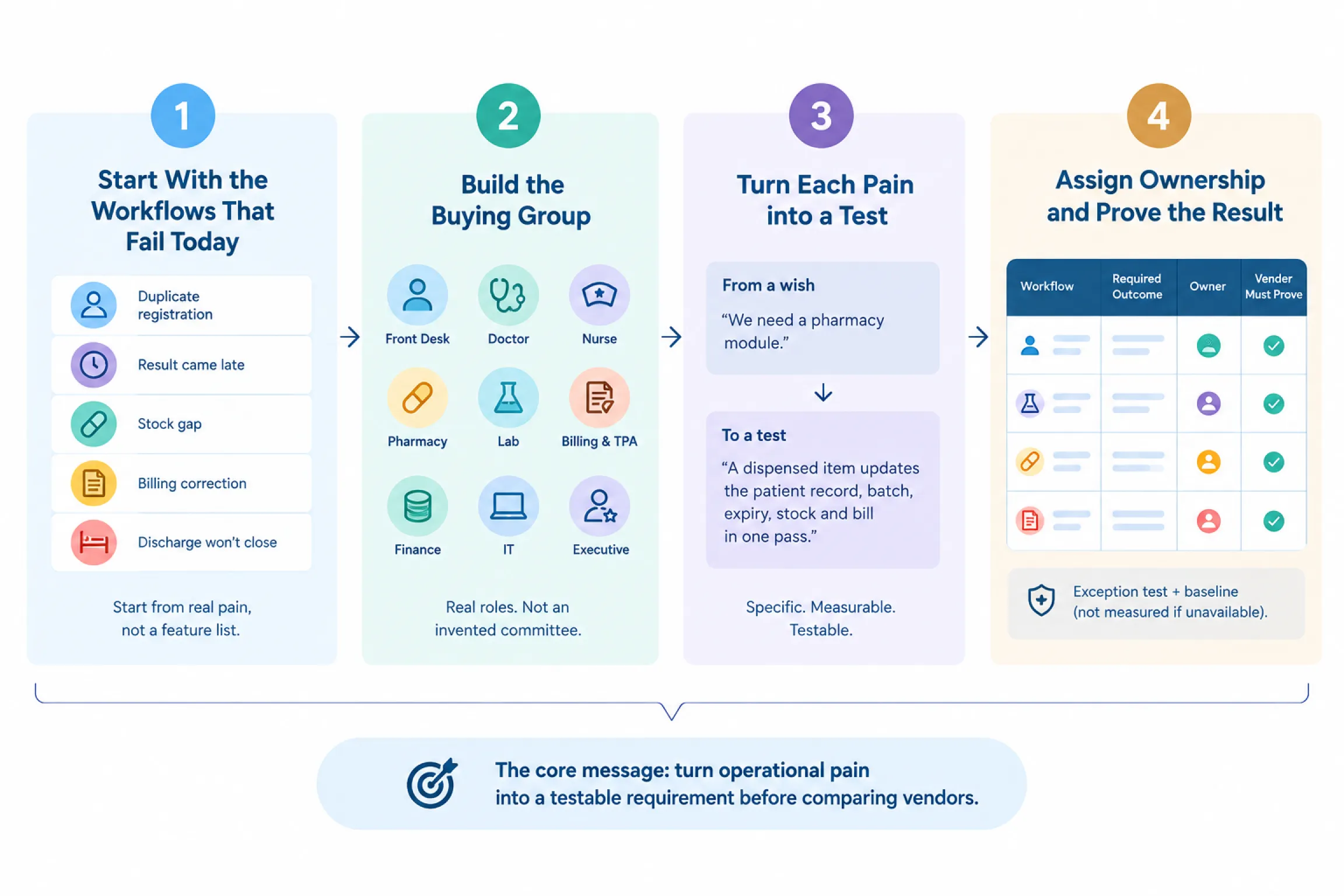
You can’t compare hospital management software until you know what “working” even means inside your building. Pain is specific, so start with the pain you already have: a patient registered twice in a week, a result that came late, a billing correction nobody could trace, a stock gap, a discharge that won’t close.
Build the Buying Group, Then Ask One Question
Get the roles you actually have into one room, and ask each person the same question: what breaks over and over, and what does it cost us each time?
Turn Each Pain into a Test, Not a Wish
Pick five to eight workflows, ranked by risk and by how often they bite. For each one, name the people, the data, the handoffs, the exception, and the proof that would convince you it works. Use your own baseline. If you don’t have one, write “baseline not measured” and move on, but never fill that blank from a vendor slide.
“We need a pharmacy module” is a wish. “A dispensed item updates the patient record, batch, expiry, tax, stock and bill in one pass, with no re-entry” is a test. Give every test an owner who runs it live in the demo.
Workflow-to-Requirement Matrix
| WORKFLOW | REQUIRED OUTCOME | USERS WHO TEST IT | VENDOR MUST PROVE | FAILURE/EXCEPTION TEST | HOSPITAL OWNER |
| Registration -> consultation | One patient identity and visit, no re-entry | Front desk, nurse, doctor | Duplicate warning, queue, encounter, consent, history | Similar-name duplicate; missing ABHA | OPD manager |
| Order -> lab/radiology result | Order, sample, result, correction stay linked | Doctor, lab, nurse | Barcode/sample, interface or manual result, corrected report, alert | Corrected result after release; interface down | Diagnostics lead |
| Prescription -> dispensing -> stock -> bill | One dispense updates record, stock and invoice | Doctor, pharmacist, billing | Formulary, substitute, batch/expiry, return, GST, stock reconciliation | Expired batch; partial dispense; return | Pharmacy head |
| Admission -> transfer -> discharge | Bed, orders, charges, notes, final bill reconcile | Front desk, ward nurse, doctor, billing | Bed allocation, ward transfer, package capture, discharge clearance | Bed unavailable; charge reversal; pending result at discharge | IPD administrator |
| Cashless/TPA claim | Documents, rules, queries, approval, settlement traceable | TPA desk, billing, finance | Payer rules, document checklist, query history, deductions | Partial approval; missing document; resubmission | TPA manager |
| Month-end close | Department totals reconcile to billing, pharmacy, claims | Finance, billing, pharmacy | Closing controls, audit trail, exports, variance report | Backdated correction after close | Finance head |
| Management reporting | Agreed metrics match source transactions | Administrator, finance, IT | Drill-down to source record, scheduled export | Restricted facility/department view | Hospital administrator |
| Data access and recovery | Work continues; every action traceable; data restorable | IT/security, department users | Roles, audit log, backup evidence, restore test, export | Lost device; user exit; outage; restore request | IT head |
Swap in your own workflows and owners. Baseline numbers and pass marks come from you, never the vendor. Now you know what has to work, but not yet how much of it has to work on day one.
2. Decide What You Need on Day One
A full matrix turns into an 18-month project, so scope it down before you shortlist anyone. Sort every requirement into four buckets:
- Day one – must work on the first morning.
- Phase two – add it once things settle.
- Keep and connect – an existing system you’re not replacing.
- Out – left off on purpose.
Day one gets decided by three questions. Is there patient or financial risk if it’s missing? Is it used constantly? Does another launch workflow lean on it? If all three are no, it isn’t day one.
Let Your Size Set The Width
Smaller hospital? Launch lean. The day-one set is usually:
- Registration, OPD and IPD
- Billing
- Pharmacy and inventory
- Diagnostics
- User controls and backups
- Reporting
A single-doctor setup can start nearer ++clinic management software++ than a full hospital build. A larger multi-speciality carries OT, bed and ward management, TPA, stores and procurement from day one, and adds blood bank, CSSD or PACS later. Switch on only the workflows you actually run today, not the whole hospital software features list.
What You Can Adjust, And What Needs Building
Configuration is supported settings: forms, roles, templates. Customisation is new code, and it brings cost, upgrade risk and ownership questions you settle before you sign. Then lock the scope. Anything added after approval has to declare five things:
- Its owner.
- Its reason.
- Its cost.
- Its dependencies.
- Its effect on go-live.
Keep one source of truth per object, so patient, order, stock, bill and claim each sit in one system.
How To Decide Cloud, On-Premise, or Hybrid
Decide cloud vs on-premise on facts.
- Cloud works when connectivity is stable, your IT team is small, and you’d rather the vendor carry the servers, backups and disaster recovery.
- On-premise earns its place when the internet is unreliable, you have staff to run and secure your own boxes, or policy says the data stays in the building.
- Hybrid keeps critical workflows local and the rest in the cloud, and suits a hospital with real connectivity gaps.
Score the three on connectivity, IT capacity, security and hosting rules, your devices, and the three-year cost with hardware and people included.
That settles what to buy, and how much of it to buy first.
3. Run the India-Specific Checks First
Some HMS requirements are pass-or-fail. Run these gates before you spend a demo slot.
ABDM and ABHA. Name the flows you need and make them show each one in an approved test setup. What you’re watching for:
- Consent, identifiers, record linking and sharing.
- What happens when a step fails.
- The logs.
- What’s live in production and who runs it.
ABDM-compliant hospital software is where the conversation starts, not ends. Check every claim against Healthray’s own ABDM compliance details and the official NHA material, not a summary slide.
NABH-ready hospital software. List the records, controls, audit trails, forms and indicators you need. Software supports accreditation. It can’t make a hospital accredited.
Data protection and security. Put your legal or security team on it. Have them review:
- Access roles and consent.
- Encryption, audit logs, retention.
- Backups and a real restore test.
- Incident response and subcontractors.
- Hosting location, export, deletion.
Measure it against India’s DPDP framework and let your own counsel sign off on the terms.
Interoperability. Ask which version and profile of FHIR, HL7 or DICOM, in which direction, for what data, how often, and at what fee. Then watch a live or sandbox DHIS exchange. Settle the systems, owners, fields and acceptance tests before you accept an estimate.
Billing and TPA. Make them demonstrate it live, not on a clean invoice that always balances:
- GST handling, package rules.
- Discounts and approvals.
- Charge reversals and credit notes.
- Partial payments.
- PMJAY documents, queries, deductions, reconciliation.
That’s the whole load medical billing software has to carry.
Devices and connectivity. Test on your real kit, including browser, tablet, printer, scanner, barcode, label, network and internet. Check offline behaviour only if they claim it.
Migration is its own risk. Don’t let it become a line item the vendor quietly handles. Decide what is legally or clinically required, what is optional, and what can be archived instead of loaded. Make them run a sample migration before you sign and reconcile the record counts yourself.
The deal-breakers. Any single one ends it:
- No acceptable data ownership or exit term.
- No role-based access or audit trail.
- No tested backup and restore.
- A critical workflow that won’t complete.
- A required integration that’s missing or unpriced.
- An implementation plan with nobody’s name against it.
Whatever survives these gates gets compared in one shared demo.
4. Make Every Vendor Run the Same Live Demo
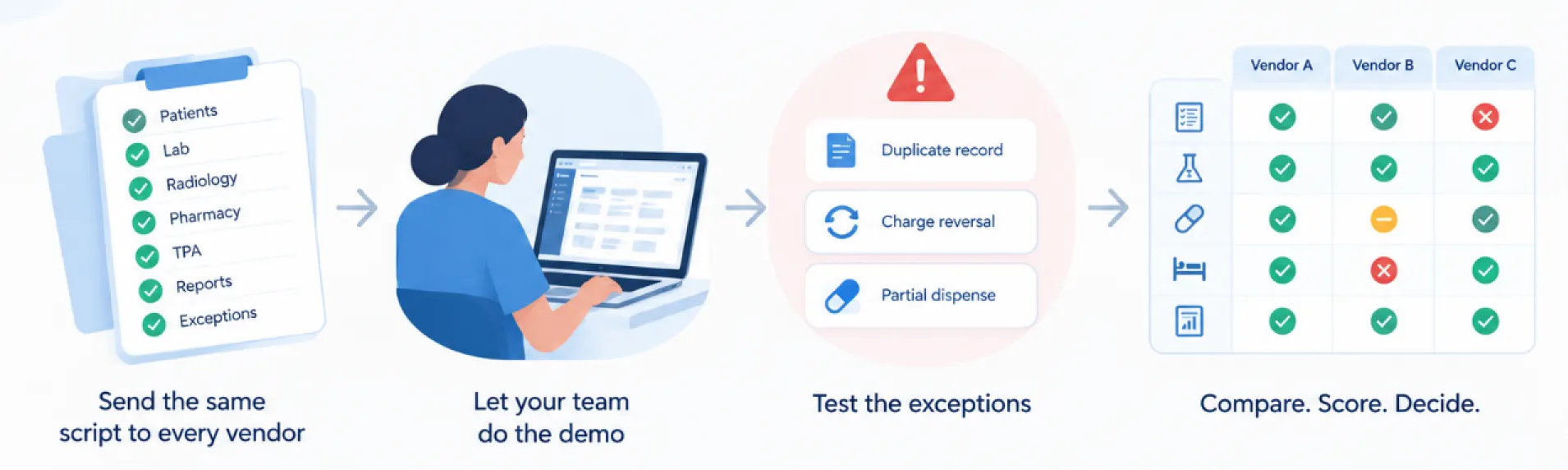
Your shortlist holds products that cleared the gates. A hospital management system demo is still a sales event unless you write the script. Let each team tell its own story and you get nothing to compare.
Run Every Demo the Same Way
Send the same pack to every vendor ahead of time, keep most of the clock for your script and put your staff on the keyboard. A few rules:
- Write down what you saw next to what you were promised. “Available after customisation” is not “done”, and the two look identical in a demo.
- Surface every workaround, including a spreadsheet export, a double entry, a shared login or a ticket raised on the spot.
- Test one correction and one failure inside every critical workflow.
- Close with a gap list. Tag each gap as standard, configuration, integration, customisation, roadmap, unsupported or unknown, with a cost, an owner and a date.
Why the Exception Column Decides It
Picture a 120-bed hospital. Call it Site A. Three vendors ran its discharge flow, all three clean on paper. One exception sat in the script: reverse a charge after the final bill is generated. Two systems did it cleanly, with the reversal in the audit trail. The third produced a bill that no longer matched the ledger. Same happy path, opposite result. The demo didn’t tell them apart. The exception did.
Send This Pack To Every Vendor First
- Hospital profile: beds, locations, specialities, users, OPD/IPD pattern, retained systems.
- Named user roles with permissions.
- One fictional patient with a similar-name duplicate, one OPD visit that becomes an admission, one lab order, one radiology order, one prescription with batch and expiry stock, one TPA case and one cash payment.
- The reports you need and the export format.
- Exceptions: duplicate record, corrected result, partial dispense, charge reversal, bed unavailable, denied TPA item, user access revoked.
The Live Sequence
- Register the fictional patient. Show duplicate handling and the ABHA or consent path.
- Create the appointment and queue, then complete the clinical notes, your user driving and not the vendor.
- Order lab and radiology. Release a result, correct it, show the acknowledgement and audit trail.
- Prescribe and dispense. Show batch, expiry, stock, a return and the effect on the bill.
- Admit, move the bed or ward, capture charges, produce a discharge summary and the final bill.
- Build the TPA claim pack. Handle a query, a partial approval, a deduction and the reconciliation.
- Restrict one user, revoke another, show the access and audit record.
- Drop the network or an interface. Show the queue, the retry, the reconciliation and the message the user sees.
- Export the patient, transaction, attachment and audit data in the promised format.
- Run the agreed reports, and drill from a total down to a single source record.
Score Each Step As You Go
- Finished without a workaround: yes, partly, or no.
- A staff member could repeat it: yes, needs training, or no.
- Manual re-entry it introduced: none, one handoff, or several.
- Evidence captured: screenshot, export, report, log, or contract line.
- Open issue: owner, due date, cost impact, and whether it blocks the choice.
Use fictional or de-identified data and get legal and security to sign off before anyone logs in. Across ten steps, you score one thing.
You can see how each system handles your work now. What you still can’t see is what it really costs.
5. Compare the Real Three-Year Cost
The lowest quote is rarely the lowest cost. Price three years, not the first invoice.
Make the Quotes Comparable First
Hospital management software price in India never looks as simple as the quote. Vendors price in different units and omit different things, so force one scope on every bid, meaning facilities, users, beds, modules, interfaces, support, data volume, term and tax basis. Then ask which unit they count, per user, per bed, per centre, per module or per transaction, because that alone swings the number.
Then Price What the Quote Hides
Staff time and the parallel-run weeks never appear on a quote. Split one-time from recurring, then pin down annual increases, minimum commitments, cancellation, change control, what support covers and excludes, custom-work ownership through the next upgrade, and the exit, meaning full export, attachments, logs, fees, deletion and how long it takes.
The Three-Year Cost Worksheet
| COST LINE | YEAR 0 | YEAR 1 | YEAR 2 | YEAR 3 | ASSUMPTION OR EVIDENCE |
| Base subscription/licence | ₹___ | ₹___ | ₹___ | ₹___ | Unit: per user / bed / centre / module / transaction |
| Required modules | ₹___ | ₹___ | ₹___ | ₹___ | List only approved scope |
| Implementation and configuration | ₹___ | – | – | – | Named deliverables and acceptance |
| Data cleansing and migration | ₹___ | ₹___ | ₹___ | ₹___ | Initial plus archive/incremental loads |
| Interfaces and devices | ₹___ | ₹___ | ₹___ | ₹___ | Build, licence, support and replacement |
| Cloud, server, storage and backup | ₹___ | ₹___ | ₹___ | ₹___ | Include disaster recovery and growth |
| Hardware and network upgrades | ₹___ | ₹___ | ₹___ | ₹___ | Devices, scanners, printers, UPS, connectivity |
| Training and backfill | ₹___ | ₹___ | ₹___ | ₹___ | Initial, refresher, new joiners, staff time |
| Support and annual maintenance | ₹___ | ₹___ | ₹___ | ₹___ | Hours, channels, severity, escalation |
| Messages, payment and transaction fees | ₹___ | ₹___ | ₹___ | ₹___ | SMS, WhatsApp, gateway, government transaction costs |
| Reports, forms and custom work | ₹___ | ₹___ | ₹___ | ₹___ | Rate card and approval process |
| Upgrades and annual price revision | – | ₹___ | ₹___ | ₹___ | Cap, index, or contractual rule |
| Tax | ₹___ | ₹___ | ₹___ | ₹___ | Confirm applicable GST and treatment |
| Exit, export and transition assistance | – | – | – | ₹___ | Full export, attachments, logs, deletion, support |
| Internal project cost | ₹___ | ₹___ | ₹___ | ₹___ | Hospital team, change management, parallel run |
| Risk contingency | ₹___ | ₹___ | ₹___ | ₹___ | Hospital-approved, not vendor supplied |
| TOTAL | ₹___ | ₹___ | ₹___ | ₹___ | Sum on the same scope and assumptions |
You now have three numbers, the three-year cash total, cost per active centre and per active user against your forecast, and the day-one cost with phase two beside it. Get every quote in writing on one scope and tax basis, and compare value only against problems you measured. If you never timed your discharge delay, don’t accept anyone’s payback percentage.
You’re holding workflow evidence and a real cost now. The last step turns both into a decision you can sign.
6. Decide With a Scorecard, Deal Breakers, and Reference Calls
How to choose hospital management software comes down to one rule. Fix the hospital management software selection criteria, meaning the weights, the score meanings and the deal breakers, before the demos, then don’t bend them.
Keep the Scores Plain
A 1 means it can’t do this. A 2 means heavy custom work or an unagreed risk. A 3 works with reasonable setup. A 4 works well and you have evidence. A 5 beats a priority need and you can prove it. Score only what you watched, record disagreements instead of averaging them, and treat a roadmap item as unavailable unless the contract carries a date, a price and a remedy.
Then Verify Outside the Demo Room
Ring two or three references matched to your bed size, speciality, scope and go-live date. Read the hospital software implementation plan line by line, checking named leads, migration, cutover, fallback and early support. Then put it on one page, the choice, the score, the deal-breaker result, the three-year cost, the gaps you’ll accept and the review date.
Hospital Software Decision Record
Sample weights. Your committee approves these before any demo.
| CRITERION | SAMPLE WEIGHT | EVIDENCE USED | VENDOR A | VENDOR B | VENDOR C |
| Priority workflow completion | 25% | Live script, exceptions, user sign-off | __/5 | __/5 | __/5 |
| Clinical and staff usability | 15% | Staff task completion and training needs | __/5 | __/5 | __/5 |
| India-specific workflow fit | 15% | ABDM/ABHA, billing/TPA/GST, required evidence | __/5 | __/5 | __/5 |
| Data, security and interoperability | 15% | Access, logs, restore, interfaces, export | __/5 | __/5 | __/5 |
| Implementation, migration and support | 15% | Plan, team, references, SLA, open gaps | __/5 | __/5 | __/5 |
| Three-year cost and contract | 15% | Normalised worksheet and redline review | __/5 | __/5 | __/5 |
| WEIGHTED TOTAL | 100% | Score x approved weight | __/5 | __/5 | __/5 |
Deal-Breakers. Any ‘NO’ Here Stops the Choice Cold
- Can every patient-safety or revenue-critical day-one workflow finish, with an accepted fallback?
- Are data ownership, full export, deletion and transition terms acceptable?
- Are role controls, audit logs, backup and restore demonstrated and in the contract?
- Are all required integrations available, with scope, owner, fee and support defined?
- Is the migration plan testable, reversible and owned by named leads on both sides?
- Are pricing assumptions and the recurring, custom and exit charges in the schedule?
- Have comparable references confirmed the go-live and support reality?
Reference Call Questions
- What size, speciality, modules and interfaces went live?
- What changed between the proposal and the signed scope?
- How much data moved, what failed, and how was it reconciled?
- Which workflow still needs spreadsheets or re-entry?
- What was your worst incident, and how did escalation go?
- Which reports, integrations or customisations cost extra after signing?
- Would you choose the same scope and vendor again?
Set the weights before the demos. Log every change you make after. Do that, and you walk into this running it off your own workflows, not off somebody’s sales call.
When Not to Buy Yet
Sometimes the right move is to wait. A new hospital management system adds risk rather than removing it in three situations. You are mid-NABH-cycle, so a cutover lands mid-assessment. No named owner inside the hospital can run the project, so migration, training and every gap go unowned. Or your five priority workflows are still unmapped, so a demo has no baseline and every vendor looks equal.
None of those is a reason to sign. Close the cycle, appoint the owner, map the workflows, then put the same script in front of the same vendors. Buying later with evidence beats buying now without it.
A Yes Worth Signing
Choose the evidence, the rollout and the exit, not the brochure. That is how to choose hospital management software that still works in year three. A system earns a yes only when all of these hold:
- Your staff can finish the priority workflows.
- The exceptions stay under control.
- The India claims hold up.
- The costs line up on one honest scope.
- The vendor commits in writing to migration, support, data and exit.
Start this week. Agree five priority workflows, write the exception next to each and send the same script to three shortlisted vendors. The hospital that writes the test walks into the room in control.
If you want a vendor who welcomes that test instead of ducking it, judge us on it. Healthray is built around the same India-specific workflows, ABDM and ABHA at registration, GST and TPA billing, and one patient record across OPD, IPD, pharmacy and lab. Hold us to every last one.