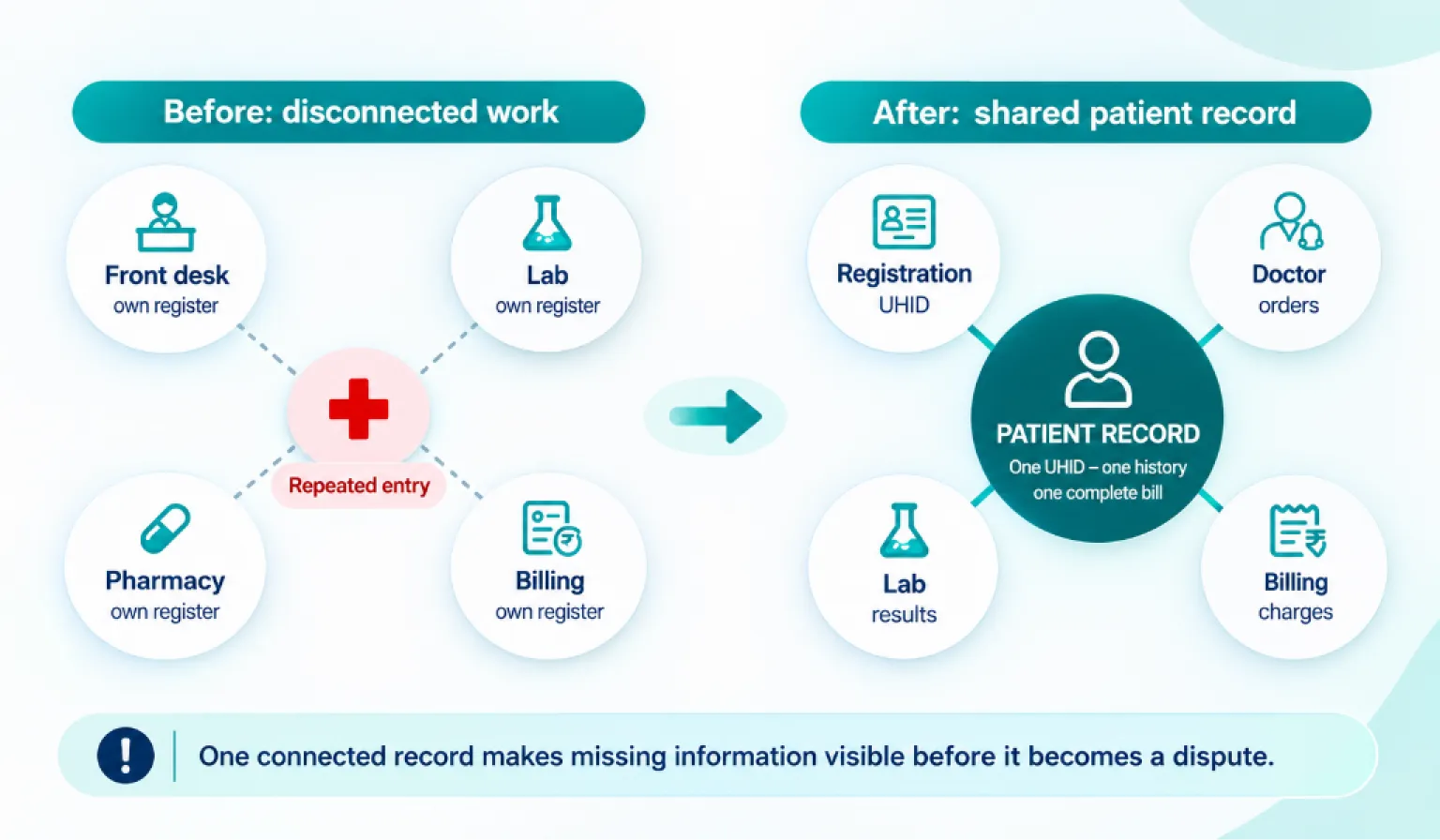
A hospital management system (HMS) is software that connects a hospital’s departments, such as registration, OPD, lab, pharmacy, wards and billing, so that a patient is registered once and every department works from the same record.
In a system that’s set up well, when a doctor orders a test, the lab sees the order and billing sees the charge at the same time, without anyone re-entering the details. On paper, that one order gets written three times: in the case sheet, the lab register and the billing record. Each rewrite is another chance to miss a charge or make a mistake.
That connection is what makes it an HMS. Many hospitals already use software in some departments, such as a billing programme at the front desk and a separate one in the pharmacy. Each helps its own department, but information still passes between departments by hand.
This guide explains what goes inside an HMS, how its departments work together and what to consider before choosing one.
What’s Inside a Hospital Management System?
Let us keep it simple.
It is one software platform that runs the clinical, operational and financial work of a hospital on a single patient record.
Three kinds of work sit inside it:
- Clinical: doctor notes, orders and prescriptions.
- Operational: registration, bed allotment and stock.
- Financial: billing, TPA claims and collections.
All three point to the same patient. That is the whole idea.
Now, what does “integrated” mean? Take one example. Your doctor orders a CBC. The lab sees the request. The bill gets the line. In a well-set-up system, both happen at the same moment, and nobody re-enters anything.
On paper, that one order is written three times: in the case sheet, in the lab register and in billing. Every rewrite is a chance to miss a charge or make a mistake.
You will hear many names for this. Vendors say HMS software, hospital software, HIMS or HIS. They overlap, but they are not always interchangeable. We cover the differences below.
One more word you will hear is “module”. A module is simply one department’s part of the software, such as the lab module or the pharmacy module. Together, the modules make the system.
The CBC example shows one step. Now let us see a full visit.
What Does a Hospital Management System Do? One Patient, Start to Finish
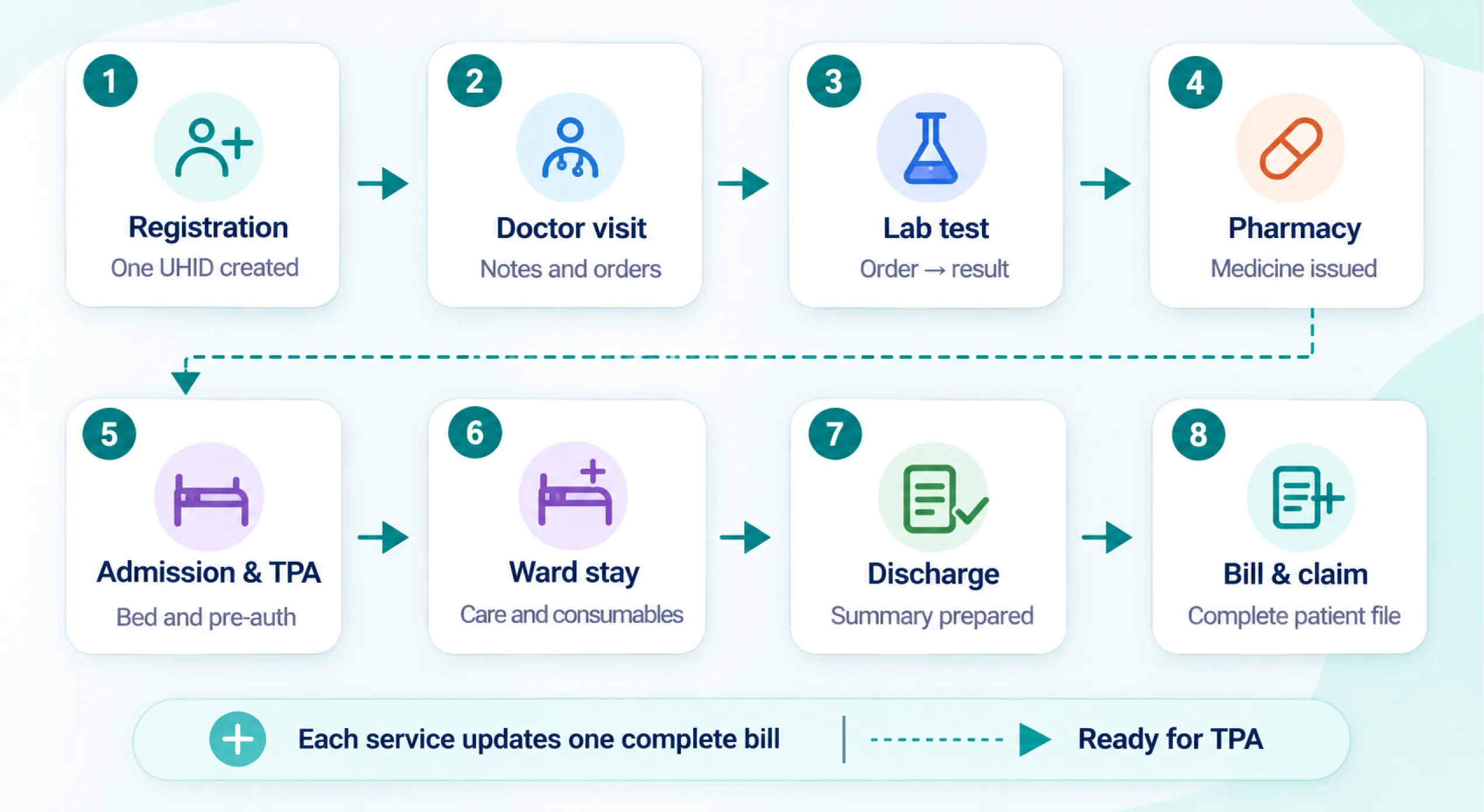
The table follows a typical visit for an insured patient who comes to the OPD, gets tests done, is admitted for a procedure and is discharged. It compares how each step works when departments keep separate records with how it works in an HMS that has been set up for the hospital.
Exact screens and workflows differ between products, so ask any vendor to show you your own hospital’s flow rather than a generic demo.
| Step | On paper or separate software | With an HMS |
|---|---|---|
| 1. Registration | The front desk writes the details in a register. A new file number is created. The same patient may get two numbers over time. | One UHID is created. The system can flag a likely duplicate. Her ABHA number can be linked here. |
| 2. OPD consultation | Doctor writes on a paper slip. Old reports are hard to find. | Doctor opens her record and sees past visits. Notes, diagnosis and orders are typed or selected on one screen. |
| 3. Lab tests | Doctor’s slip goes to the lab. Lab keeps its own register. Billing is told later, if at all. | The order reaches the lab through the system. The matching test charge can be added to her bill through the configured workflow. |
| 4. Pharmacy | The prescription is copied at the counter. Stock is counted by hand. | The prescription can be sent to the pharmacy. Stock can be updated when medicine is issued. The charge can be added to her bill. |
| 5. Admission and TPA | Forms are filled by hand. Pre-auth papers are collected from many places. Bed status is checked by phone. | The doctor’s admission advice can open the IPD file. Bed status can be checked on screen. Pre-auth documents can be attached to one file. |
| 6. Ward stay | Nurses note charges on a sheet. Some get missed. | Room rent, nursing, procedures and consumables can post to her bill as they happen. |
| 7. Discharge | Discharge summary is prepared using notes and records collected from different departments. | The summary can be drafted from the stay’s own record. The MRD gets a cleaner file. |
| 8. Final bill and TPA | Billing collects slips from every department, adds them up and sends papers to the TPA. | Most charges are already on the bill. The bill, summary and reports can go to the TPA from one file. |
The patient in this example used registration, OPD/EMR, lab, pharmacy, IPD, bed management, billing, TPA and medical records modules. Your hospital may need a different combination depending on its services and current problems.
 NOTE
See how a hospital information system works in practice
Want to see how these steps run in a working system? Explore Healthray’s hospital information management system.
What an HMS Is Not
An HMS records the information staff enter and passes it between departments. It can make problems easier to identify, but it cannot change the decisions people make or ensure that staff follow every process.
Consider a few examples:
- Late OPD starts: A consultant who starts OPD late will still start late. The system may record when the first consultation began, giving the administrator information to review, but someone still needs to address the delay.
- Unauthorised discounts: A discount approved outside the usual process can still happen. If the HMS requires an approver’s name and reason, management can review who authorised it and how often.
- Unregistered patients: If staff treat a patient without registering them, the system has no patient record to track. This can happen with informal referrals or staff relatives.
- Policy-based TPA rejections: A claim rejected because a treatment is not covered under the patient’s policy will remain rejected. An HMS can help organise documents and reduce errors caused by missing paperwork, but it cannot change the insurer’s policy terms.
An HMS can make workflows and records easier to monitor. However, staff discipline, management decisions and compliance with hospital processes still determine how well the system works.
 PRO TIP
How Hospitals Buy an HMS: Modules, Cloud or On-Premise, and Cost
Lists of HMS “types” are long, but the buying decisions come down to a few questions.
All at once, or a few modules first
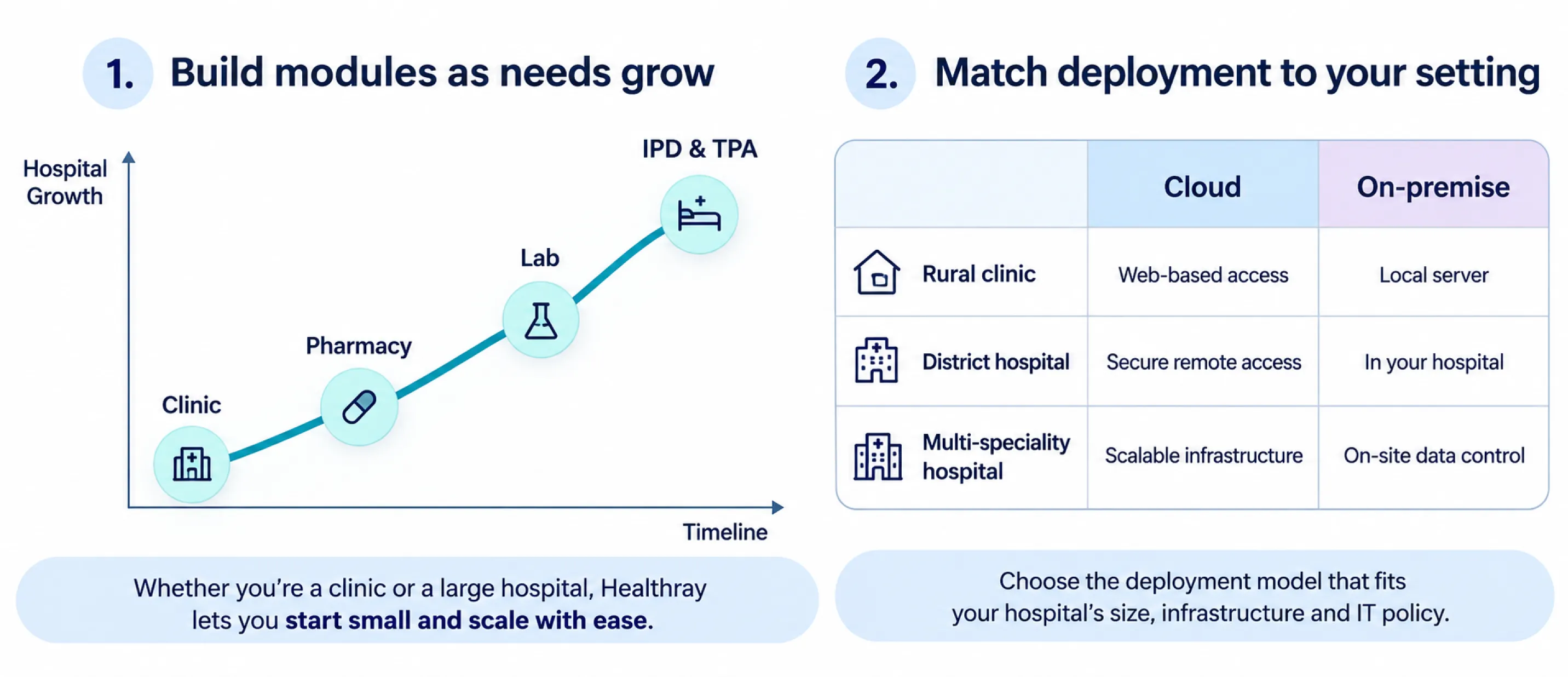
Most hospitals don’t buy every module at once. They start with the departments where the current problems cost the most, often billing and pharmacy, and add IPD, lab and TPA later.
Whatever you start with, the modules should share the same patient record, so that a lab order placed today and a pharmacy module added next year both reach the same bill. Different screens or logins for different departments are normal and don’t mean the modules are disconnected. What matters is whether information moves between them without being entered twice.
Cloud or on-premise
With cloud software, the system runs on the vendor’s or a cloud provider’s servers, and staff use it through a browser or app. You usually pay a monthly or yearly fee, and the vendor looks after the servers and backups. It needs a reliable internet connection.
With on-premise software, the system runs on a server in your hospital. You usually pay a licence fee plus annual maintenance, and your own staff or an IT provider look after the server and backups.
In many places outside the big cities, power cuts and unstable internet decide this more than anything else. Ask each vendor what happens when the connection drops in the middle of OPD: whether registration and billing keep working offline, or whether staff go back to paper and enter everything later. Either way, you’ll need a UPS, and with cloud, a backup internet connection.
What goes into the cost
The licence or subscription is only part of the price. Quotes usually also cover implementation, moving data from your current records, staff training, customisation, hardware and annual maintenance, and some vendors charge per user or per bed. Ask for each of these separately, so you can compare vendors on the same basis.
Ask too whether you can export all your data if you change vendors later, and in what format.
Does Your Hospital Need One Yet?
Let us be honest. Not every setup needs a full HMS.
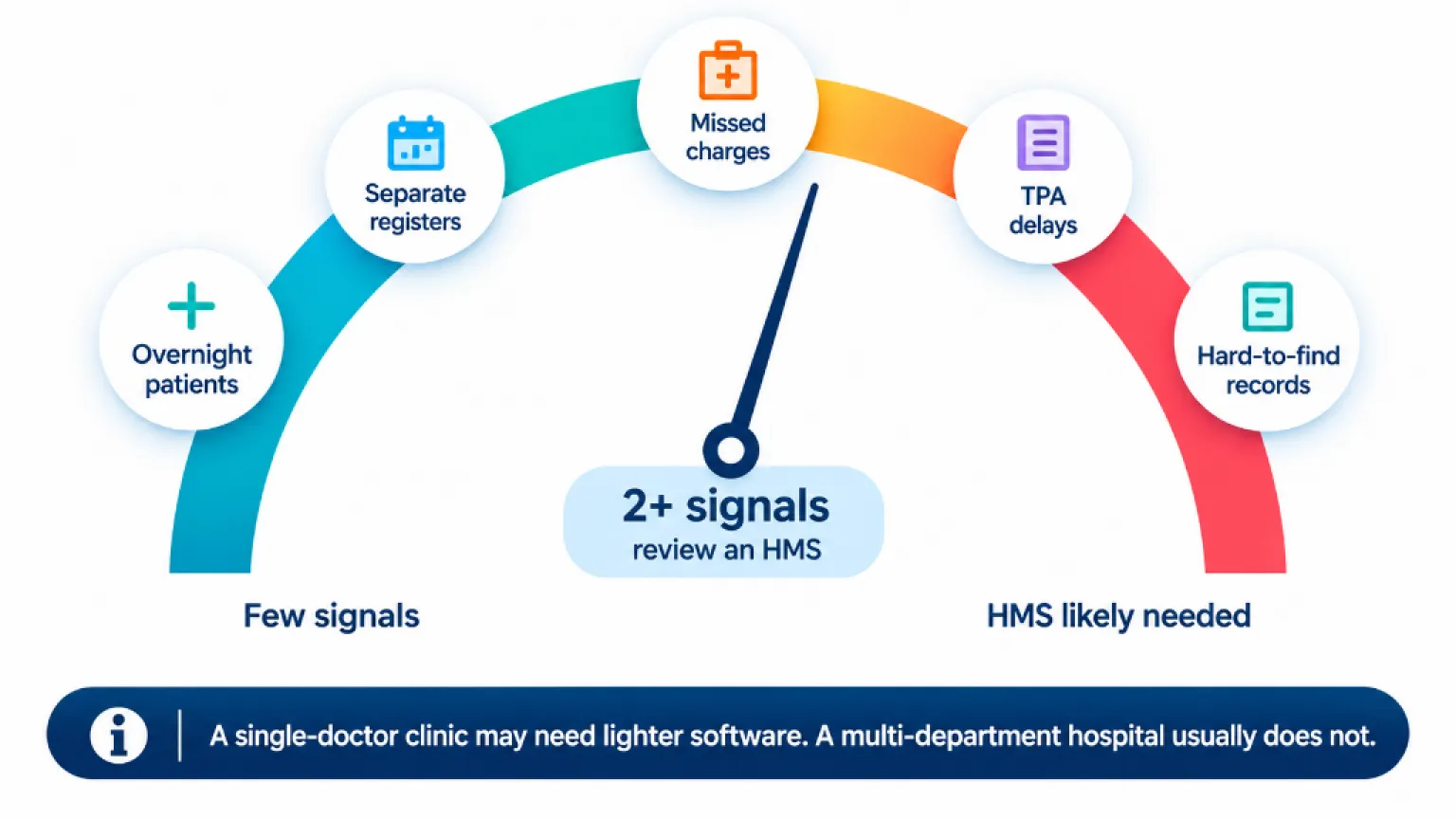
A single-doctor clinic with no beds is usually better with clinic management software. It is lighter, cheaper and easier to run.
So when do you cross the line? Look for these signs:
- Bills don’t match the services actually provided, and missed charges are discovered only during checks.
- TPA claims come back with queries or rejections because documents are missing.
- Patients wait at counters while staff search for files or re-enter details.
- A NABH assessment is approaching, but staff cannot retrieve the required records quickly.
If you recognise two or more of these problems, your hospital may have outgrown paper-based records and disconnected software.
Here is a quick check. Pick one recent patient visit and trace it from registration to billing. Count how many times staff typed the same details again, carried an order by hand or searched for a missing document. Those are the points where your workflow is disconnected.
When you look at any HMS, test it with three questions:
- Can the front desk, lab and pharmacy all see the same patient history?
- Does the lab test post to the bill without anyone typing it again?
- Can you send one file to the TPA instead of collecting papers from four places?
If the answer to all three is yes, you are looking at a real HMS.
Healthray is one Indian HMS you can look at. Do not take our word for it. Read the Healthray case studies from hospitals already using it, then judge it against the three questions above.
Final Verdict
So, what is a hospital management system, in one line? It is one patient record and one bill across every department.
Use that as your test for any system a vendor shows you. If a lab test cannot reach the bill by itself, or staff have to enter the same details twice, the system is not integrated yet.
You started this guide with a late-evening argument over a missed charge. The test was done, but the information never reached billing. An HMS could have connected those steps if the workflow was configured that way.
Your next step is to decide which modules your hospital needs first and which can wait.