At 10 am, the OPD queue at a hospital I work with was out the door. Then the screen froze. The internet had dropped, and with it registration, pharmacy and billing. The administrator told me his first thought was: we should have kept the server in our own server room.
I hear that question every month: cloud, or on-premise? Cloud means the vendor hosts it; on-premise means the server sits in your hospital. It comes down to two things: how reliable your internet is, and whether someone can look after that server.
The 30-second version
- Internet reliable, no one to run a server → cloud.
- Internet drops often, but you have IT staff and a working server → on-premise.
I’ll walk you through the cost, the downtime and the data security, with a fill-in worksheet and a decision path.
Cloud or On-Premise: Which One Fits Your Hospital?
I use this table with hospital teams because it lists conditions, not winners. Read across the row that resembles your hospital, then check that you actually have the people, equipment and fallback it mentions.
| Hospital Situation | Cloud Usually Leans Stronger When… | On-Premise Usually Leans Stronger When… |
| Internet | You can get a second connection from a different provider, with automatic failover | Your primary link drops often and a second provider isn’t available |
| IT staff | There’s no dedicated infrastructure team, and predictable support matters | A capable internal IT team already runs patching, backup and recovery |
| Existing setup | You don’t have a server room, or the one you have costs more to run than to replace | The server, UPS and backup setup are already paid for and tested |
| Locations | Branches need one current system without each site running its own server | Each site can run and recover its own local infrastructure without creating data silos |
| Power | Power is unstable, and you’d rather the vendor carry the uptime risk | The UPS and generator already cover the server, network and priority counters |
Consider a mid-size hospital with one location. Its IT staff maintain a server room, the UPS has measured runtime, and recovery from backup was tested last quarter. Keeping the application on-premises may be reasonable, because the hospital already pays for those capabilities.
If the same hospital opens two branches but won’t add infrastructure staff at either site, central cloud access may become easier to operate. That change doesn’t erase connectivity risk; each branch still needs a dependable link and an agreed counter process.
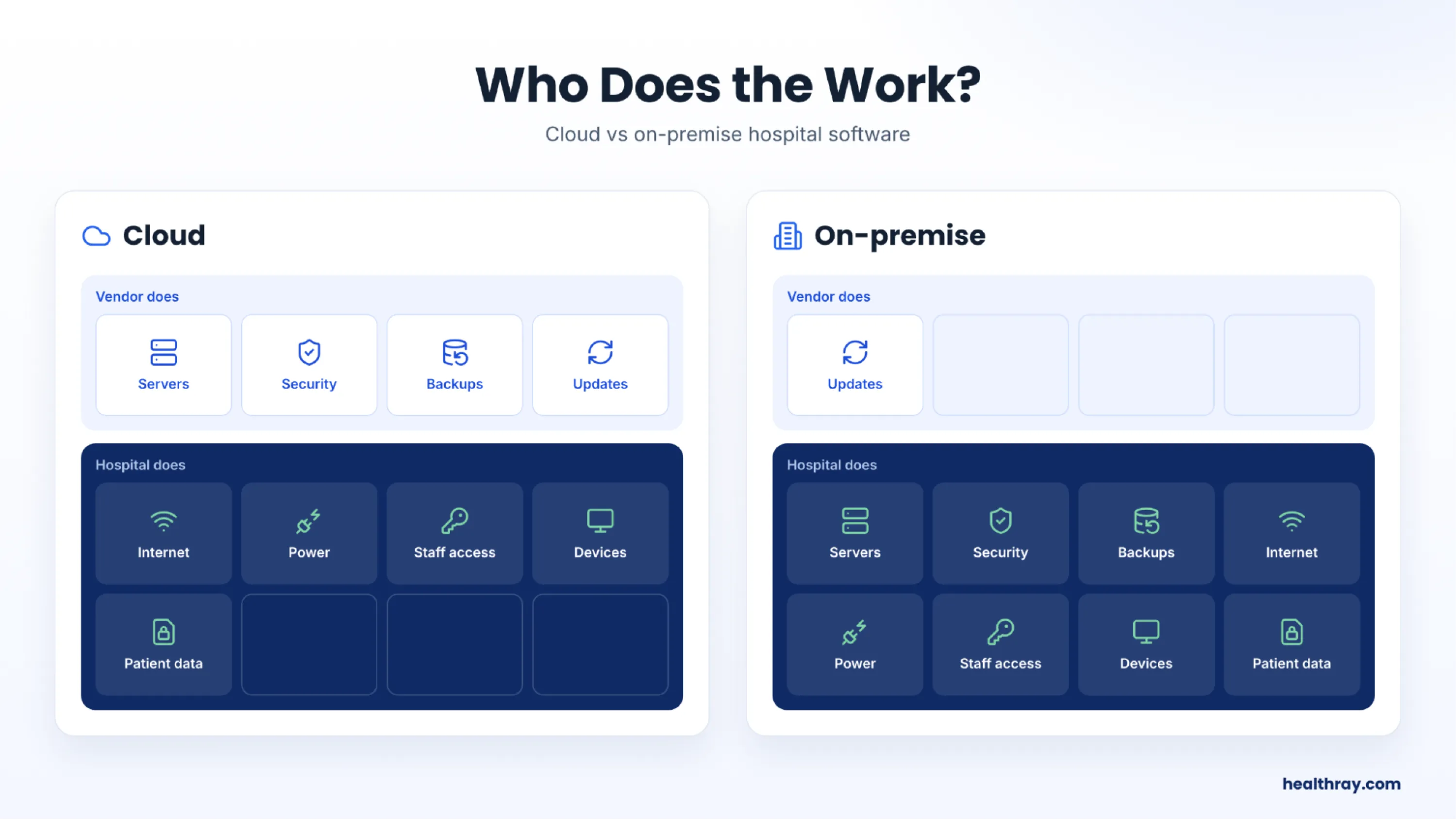
On-premise software still leaves some reliance on the vendor for fixes and upgrades. With a cloud hospital management system, the hospital keeps decisions about staff access, permissions and local devices. Who hosts it changes who does what. It doesn’t remove the work.
If you run a single hospital, check whether one application justifies server-room upkeep, backup handling and AMC costs. For a group, look at how branches share current patient, pharmacy and billing data.
And before you treat local hosting as the safer fallback, compare your internet reliability with the reliability of your LAN, power protection and recovery arrangements.
Which Costs Less Over Time?
On-premise costs more at the start, because you buy the server and the software licence upfront. Cloud costs less to start, but you pay every month for as long as you use it. So which one is cheaper depends on how many years you compare.
Over a short period, cloud software usually looks cheaper. Over a longer one, on-premise can catch up. Compare them over the years you expect to use the system before the server needs replacing, often around five.
Total cost = one-time costs at the start + (yearly costs × number of years) + cost of leaving
Make sure both quotes cover the same number of beds, users, branches and connected devices, including any branch you plan to open, with GST included in both. A quote that covers less only looks cheaper.
Then add the costs each type of quote tends to leave out. Cloud quotes often leave out moving your old data, connecting lab machines and a second internet connection.
On-premise quotes often leave out server replacement, backups, UPS servicing, electricity and cooling for the server room, and your own staff’s time. Count them even when they’re paid to someone else, because they’re still part of what the system costs you.
And ask what it would cost to leave, such as getting your data out in a usable format, so a low starting price doesn’t hide an expensive move later.
Fill in the worksheet below from the written quotes.
| Cost Row | Cloud Proposal | On-Premise Proposal | Evidence To Attach |
| Initial setup and configuration | ₹____ | ₹____ | Signed scope |
| Data migration and validation | ₹____ | ₹____ | Records, years and validation rules |
| Interfaces and devices | ₹____ | ₹____ | Lab, pharmacy, PACS, payment and hardware list |
| Server, storage and network | Included / ₹____ | ₹____ | Configuration and refresh date |
| Licence or subscription for 36 months | ₹____ | ₹____ | Users, beds, branches and escalation clause |
| Internet redundancy | ₹____ | ₹____ | Primary and backup provider quote |
| Backup and disaster recovery | Included / ₹____ | ₹____ | Frequency, off-site copy, RPO and RTO |
| Security tools and audits | Included / ₹____ | ₹____ | Control list and audit evidence |
| AMC and support | ₹____ | ₹____ | Hours, response time and exclusions |
| Internal IT time | ₹____ | ₹____ | Named roles and monthly effort |
| Training and retraining | ₹____ | ₹____ | Initial batch and new-staff plan |
| Growth and additional branches | ₹____ | ₹____ | Pricing rule as the hospital grows |
| Exit, export and transition | ₹____ | ₹____ | Export format, assistance and notice period |
| Three-year total | Sum above | Sum above | Finance sign-off |
What Happens When The Internet or Server Goes Down?
I’ll take the two failures one at a time, because the fix for each is different.
With cloud software, the system stops when the hospital’s internet goes down. In most places, you can prevent this cheaply by adding a second connection from a different provider, so when one fails, the other takes over.
What you can’t prevent yourself is a problem on the vendor’s servers, so ask how often that has happened and how quickly it was fixed.
With on-premise software, the internet doesn’t matter for daily work, which is a real advantage where connections are poor. But the whole system runs on one server, so if it breaks, every counter stops until it’s repaired.
You can prevent that by keeping a spare server, but a spare server costs far more than a second internet connection, so many hospitals don’t keep one. They wait for a technician or a replacement part instead.
So the choice often comes down to whether you can get a second internet connection where you are. If you can, cloud is usually easier, because that connection keeps the system running when one line fails, and it costs far less than looking after a server.
If you can’t get a second connection, on-premise is safer, because your hospital keeps working when the internet drops, though you’ll still need to pay to keep the server running.
If you want the counter-by-counter fallback process, our guide to HMS backup and disaster recovery walks through it.
Which Option Keeps Hospital Data Safer?
I hear this question a lot: which option keeps a hospital’s data safer?
Keeping data on your own server feels safer, because you can see where it is. But data is kept safe by the work done around it: installing security updates on time, keeping backups separate from the main system and testing them, and removing access when staff leave.
With cloud software, the vendor does most of that work. With on-premise software, your own IT staff or IT provider do. So the safer option is the one where that work will actually get done.
That’s harder than it sounds with a small IT team. When AIIMS Delhi was hit by ransomware in November 2022, the primary and first backup servers were corrupted, and all affected online patient services ran in manual mode. A backup connected to the same network as the main system can be lost in the same attack.
Some things don’t change with either option. Vendor support staff can usually connect to your system remotely, whether it’s in the cloud or in your server room, so ask how that access is approved and recorded.
Managing your own staff’s access stays with the hospital too: closing accounts when someone leaves, changing access when someone moves departments, and not letting a whole counter share one login.
And legal responsibility for patient data stays with the hospital, so check what applies to you with a legal adviser rather than relying on the vendor’s assurance.
What Should Decide Your Final Choice?
It comes down to two questions: can you keep your internet running, and can you keep a server running? If your internet is reliable but you have nobody to look after a server, choose cloud. If you have IT staff and a working server but your internet isn’t reliable, choose on-premise.
Whichever you choose, get the vendor’s promises on uptime, support and getting your data out in writing.