



October 1, 2026

6 Best SmartHMIS Alternatives & Competitors in 2026

Healthray Hospital Management Dashboard For SmartHMIS Alternatives And Competitors

It’s another hospital operations meeting, and the same software concerns are back on the table.

A department is still using a workaround for one process. Another team wants a change that’s hard to accommodate. IT is spending time following up on issues instead of focusing on other priorities.

At some point, fixing things one by one stops making sense. The hospital starts looking at SmartHMIS alternatives to see whether another system would work better for the way its teams actually operate.

But replacing an HMS is a big decision. Patient records, clinical workflows, billing, pharmacy, laboratory, and other hospital operations are already tied to the existing system. The next step is finding an HMS that can handle those same operations without bringing the same frustrations. That’s where the right alternatives are worth a closer look.

How We Chose SmartHMIS Alternatives

We looked for HMS platforms that could realistically replace SmartHMIS in a hospital setting. We considered key hospital workflows, Indian healthcare requirements, and how well each platform could be assessed from reliable public information.

We then compared the six alternatives on workflow fit, usability, integrations, migration and implementation, support, scalability, and user feedback, using vendor websites, G2, Capterra, Techjockey, and other public sources.

Best SmartHMIS Alternatives at a Glance

The table below puts the six options side by side across the hospital workflows, Indian compliance requirements, integrations, implementation, support, analytics, security, and operational capabilities that matter when replacing an HMS. A ✓ means the software covers the full requirement, X means it does not cover the requirement, and brackets mean the vendor publicly lists only part of it.

Healthray Logo

Healthray

KareXpert Logo

KareXpert

Softclinic

SoftClinic GenX

Caresoft Logo

Caresoft HIS

Halemind Logo

HaleMind

Best For Multi-speciality hospitals & hospital groups Nursing homes, small to large & corporate hospitals Clinics, nursing homes & small to large hospitals Hospitals, medical colleges & multi-centre hospitals Hospitals, medical colleges & clinics
Pricing Custom quote Quote-based Quote-based ₹90,000 onwards ₹4,999/mon
Migration & Implementation (Training) (Implementation)
India Readiness
Key Integrations HL7/FHIR + PACS/DICOM + lab + APIs + pharmacy + e-claims HL7/FHIR/DICOM + LIMS + RIS/PACS Lab + instrument PACS + lab
Deployment Cloud / on-premises / hybrid Cloud Cloud / on-premises Cloud / on-premises Cloud
Ratings
OPD / IPD Management
Bed & Ward Management
Operation Theatre
EMR / EHR
Pharmacy
Lab / LIMS
Billing
TPA / Insurance Claims
(Insurance claims)
ABDM / ABHA
(ABDM)
(ABDM)
PMJAY Support
NHCX Readiness
NABH-Related Tools
HL7 / FHIR
PACS / DICOM
(Radiology)
(PACS)
Lab-Instrument Integration
Typical Implementation Time
7 days–3 weeks for larger hospitals
Not Stated
Not Stated
Not Stated
Migration & Training Support
(Training)
(Training)
Offline-Tolerant Workflows
Support Model / SLA
24×7
(Chat)
24×7
Post-Go-Live Support
MIS Dashboards
Custom Reporting
(Configurable reports)
Smart / Predictive Analytics
(Analytics)
(BI)
(Analytics)
AI & Automation
Encryption & Data Protection
Access Control & Audit Trails
High Availability & Backup
(Backup)
Disaster Recovery
Security Certifications / Data Residency
HIPPA + GDPR + ISO 27001 + CERT-In + SOC 2
(ISO)
(ISO 27001 + PCI DSS)
Central Stores & Procurement
(Inventory)
Ambulance Management
Housekeeping Management
Dietary Management
Biomedical & Asset Management
HR / Payroll / Duty Rosters
Built-In HRMS
(HR)
(HR + Payroll)
(Staff)
Patient Communication
SMS + WhatsApp + portal/apps
Alerts + patient portal/apps
SMS + patient portal
SMS + WhatsApp + email + patient portal
Patient portal + reminders
Multi-Facility Support
Get A Demo

6 Best Alternatives to SmartHMIS for Hospitals

1. Healthray

Healthray is a hospital information management system designed for hospitals managing clinical, financial, and administrative operations across multiple departments. Its focus goes beyond basic patient and billing management, covering speciality-specific clinical workflows, hospital administration, and connected healthcare operations. The platform is also used across different types of healthcare facilities, from hospitals and clinics to diagnostic centres and multi-facility groups.

Best For

Multi-Speciality Hospitals, Growing Hospital Chains, Clinics, Diagnostic Labs & Multi-Facility Healthcare Groups

4.8/5 by G2

What Stands Out

  • Indian Compliance and Interoperability: Healthray goes further than basic India readiness with ABDM/ABHA, PM-JAY, NHCX, NABH-related workflows, and support for HL7, FHIR, PACS/DICOM, and lab-instrument integration.
  • Migration and Deployment Flexibility: Healthray combines migration and training support with cloud, on-premises, and hybrid deployment. Hospitals can choose the setup that fits their existing infrastructure and rollout plans.
  • Specialty-Specific EMR: Its EMR uses speciality-specific clinical workflows rather than a single generic consultation format, which suits multi-speciality hospitals with different documentation needs across departments.
  • AI and Workflow Automation: AI is used beyond a basic chatbot or analytics layer, with automation across areas such as clinical documentation, reception, billing, inventory, laboratory, and reporting.
  • Broader Hospital Operations: Healthray also covers ambulance management, housekeeping, dietary and food services, asset management, HRMS, CRM/PRO, and patient-facing services such as telemedicine and website integration.

Anirrudh S.

27 September 2026

I like that Healthray HMIS covers almost all aspects needed for hospital management, from operations to patient records, pharmacy, and diagnostics. Its configurability is a major plus, allowing us to tailor it to our needs. The support team was really helpful during the setup phase, which made onboarding smooth. I also appreciate the system’s ability to track revenue, maintain pharmacy inventory, and generate various reports, even providing a mobile app interface. Record tracking and report customization are standout features.

Pros

  • Real-time prioritisation helps staff manage busy OPD and laboratory queues more efficiently.
  • Prescription entry can reduce the time doctors spend documenting consultations.
  • Connected processes can handle OPD, pharmacy, laboratory orders, and inpatient workflows.
  • Responsive post-implementation support helps resolve issues during day-to-day hospital operations.
  • Clinical patient data can be retrieved for retrospective research and studies.

Dr. Arpit Gajjar

“One thing I can say after using Healthray in our daily OPD work is that their support team has been genuinely helpful even after implementation. We’ve reached out a few times during OPD hours over call or email, and they respond properly and help us sort out the issue instead of just giving a generic reply.”

Verified Review

Cons

  • Custom reports may require additional setup before they are ready for regular use.
  • Advanced features can take time for new users to learn.

Milan K.

“The advanced features take some time to learn, but once you become familiar with them, the product feels powerful and flexible.”

G2 Review

Overall Verdict

Healthray serves hospitals that need more than basic HMS functions. Its wider clinical and operational coverage, speciality-based EMR, Indian healthcare capabilities, and flexible implementation approach make it a strong fit for multi-speciality hospitals and growing hospital groups. The main consideration is the time teams may need to become comfortable with its more advanced functions.
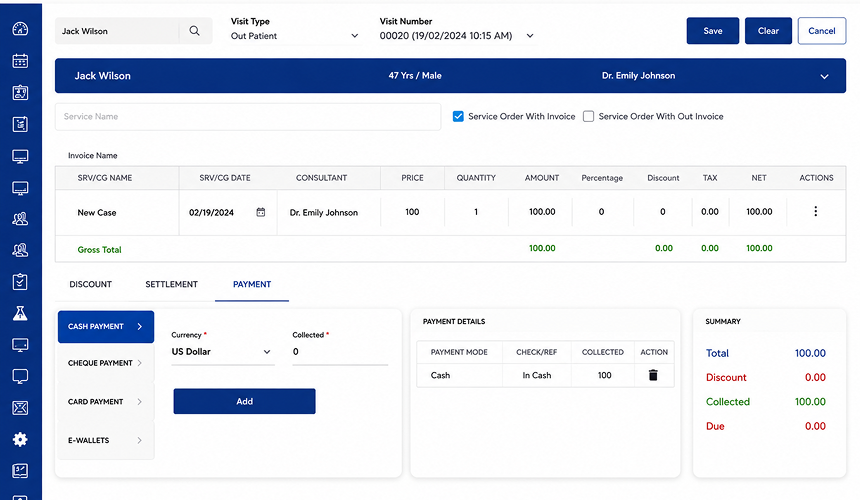
Explore How Healthray Could Fit Your Hospital

Have a specific workflow in mind? See how Healthray could fit your hospital’s process with a personalised demo.

Book a Free Demo

2. KareXpert

KareXpert Software Screenshot

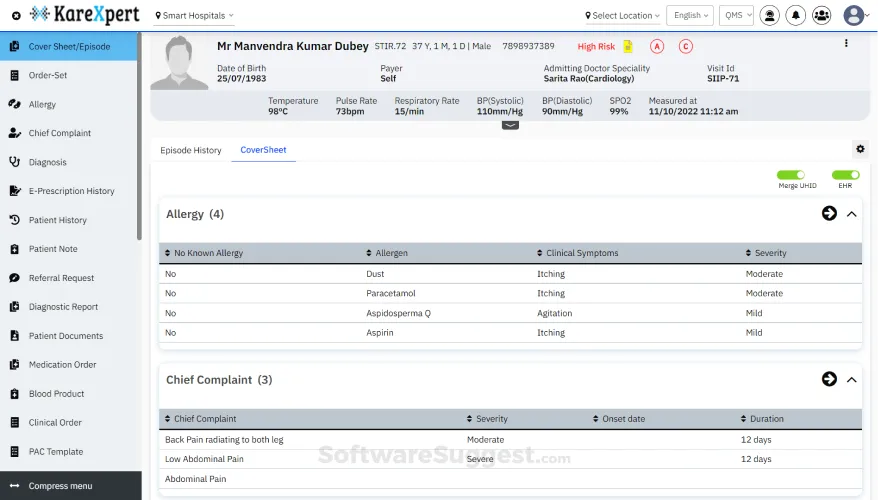
KareXpert is a healthcare software platform developed by KareXpert Healthtech. Its hospital product is centred on managing patient and clinical information alongside the administrative work that supports hospital operations. The platform is aimed primarily at private and corporate healthcare organisations and is presented as a cloud-based system that different hospital teams can access through web and mobile applications.

Best For

Private Hospitals, Corporate Hospitals, Hospital Chains & Multi-Speciality Hospitals

4.6/5 by Techjockey

What Stands Out

  • Pre-integrated modules: KareXpert includes HIMS, EMR/EHR, LIMS, RIS/PACS, pharmacy, inventory, billing, insurance, and analytics.
  • Mobile and Role-Based Access: KareXpert provides mobile access for hospital teams with permissions based on the user’s role.
  • Single Data Platform: A shared platform manages patient, clinical, operational, and financial data, with FHIR-based interoperability.
  • Hospital and Patient Portals: KareXpert provides separate portals and applications for doctors, patients, and hospital teams, extending access beyond the main hospital system.

Pros

  • Mobile access, white labelling, and role-based permissions give hospital teams more flexibility in day-to-day use.
  • Pre-integrated modules reduce the need to manage multiple hospital software systems separately.
  • Medical data is easier to access, with less paperwork and better patient monitoring.
  • Hospital departments can be linked with inventory and supply-chain management through the same system.

Aish Verma

“We get the mobile app, white labeling, and role-based access. It has very nice features with good support.”

Techjockey Review

Cons

  • Lab-related issues may take longer to resolve when support responses are delayed.
  • Some billing-related issues may require additional attention during day-to-day use.

Debolina

“Very poor customer care and unresolved lab-related issues, with delayed responses.”

Verified Review

Overall Verdict

KareXpert is a strong alternative for private and corporate hospitals that want broad hospital coverage, mobile access, and integrated workflows. In this comparison, its main strength is platform breadth, making it a suitable replacement for hospitals moving beyond a basic HMS. It is less suited to hospitals where migration, implementation, or interoperability is the primary reason for switching.

3. SoftClinic GenX

SoftClinic GenX Screenshot For Alternatives

SoftClinic GenX is an HMS and EHR platform from JVS Technologies, used across clinics, nursing homes, and hospitals. It has been in the market for several years and is positioned around the everyday work of doctors and hospital teams rather than serving only as a patient-record system. The product is available in cloud and desktop versions, giving healthcare organisations different ways to run it based on their setup. Its positioning also spans smaller healthcare practices as well as hospitals.

Best For

Clinics, Nursing Homes & Hospitals

3.6/5 by Capterra

What Stands Out

  • Cloud and Desktop Options: SoftClinic GenX is available through both cloud and desktop setups, giving hospitals a choice based on how they currently run their IT environment.
  • Clinical and Administrative Coverage: The system combines clinical workflows with accounting, inventory, HR, and hospital administration instead of limiting its scope to patient records.
  • Form and Report Designers: Built-in form and report designers allow hospitals to create or modify formats within the system rather than relying only on fixed templates.
  • Patient and Doctor Apps: Separate mobile applications for patients and doctors extend access beyond the main HMS interface.

Pros

  • Supports multi-user access for hospitals and clinics.
  • Covers OPD, IPD, pharmacy, laboratory, radiology, billing, and accounts.
  • Provides a simple interface for handling common hospital workflows.

Dr. Ghanshyam

“User-friendly SQL-based software, good working speed, multiuser, very good for multispeciality clinics and hospitals.”

Capterra Review

Cons

  • Entering an incorrect field can cause the software to stop working.
  • Support may become inadequate as the number of users increases.
  • Some customisations can take additional time during setup.
  • The system can become slower during busy periods.

Dr. Ghanshyam

“If we enter a wrong field, the software stops working it has frequent bugs. Now the users are many, and proportionate support staff is inadequate.”

Capterra Review

Overall Verdict

SoftClinic GenX is a stronger choice for clinics, nursing homes, and hospitals that want a familiar system covering routine clinical and administrative work. In this comparison, it is best placed for hospitals that value broad day-to-day functionality and multi-user use over advanced interoperability or a highly specialised hospital setup. The main decision point is system reliability and support capacity, particularly as the number of users increases.

4. Caresoft HIS

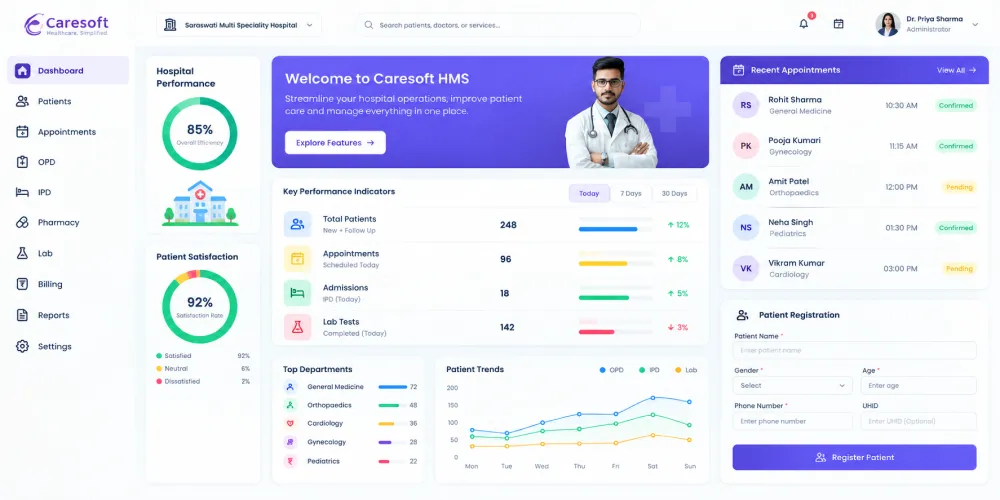
Caresoft His Screeenshot

Caresoft HIS is a web-based hospital information system used for managing hospital records and routine operations. It is positioned for healthcare organisations ranging from smaller facilities to mid-sized and larger hospitals, with the system available across different hospital functions and user roles.

Best For

Hospitals, Medical Colleges & Multi-Centre Hospitals

4.6/5 by SoftwareSuggest

What Stands Out

  • Customisable Workflows: Caresoft allows hospital-specific workflows to be configured across OPD, IPD, and other departments instead of relying only on fixed processes.
  • Paperless Hospital Operations: The system is used to move patient records and routine hospital work away from paper-based processes.
  • 24×7 Support and Training: Caresoft provides round-the-clock support along with on-site and remote training during adoption and ongoing use.
  • Compliance-Focused Setup: The platform is pre-configured for standards and reporting requirements, including NABH, JCI, PCI DSS, and government reporting.

Pros

  • Billing work is easier to handle and can take less time.
  • The software is easy for hospital staff to learn and use.
  • Routine hospital work can be completed more efficiently with the system.

Digambar K.

“Our hospital became more paperless and moved towards a digital approach.”

Software Suggest Review

Cons

  • The specialisation and prescription pages need improvement.
  • Older OPD bills do not update token numbers automatically.

MR N.

“The token number does not automatically change in old OPD bills.”

Software Suggest Review

Overall Verdict

Caresoft HIS is a practical option for hospitals looking to digitise routine hospital operations and reduce dependence on paper-based processes. In this comparison, it offers a straightforward approach to hospital management, while hospitals with more complex requirements may need to compare it more closely with alternatives that offer broader capabilities.

5. HaleMind

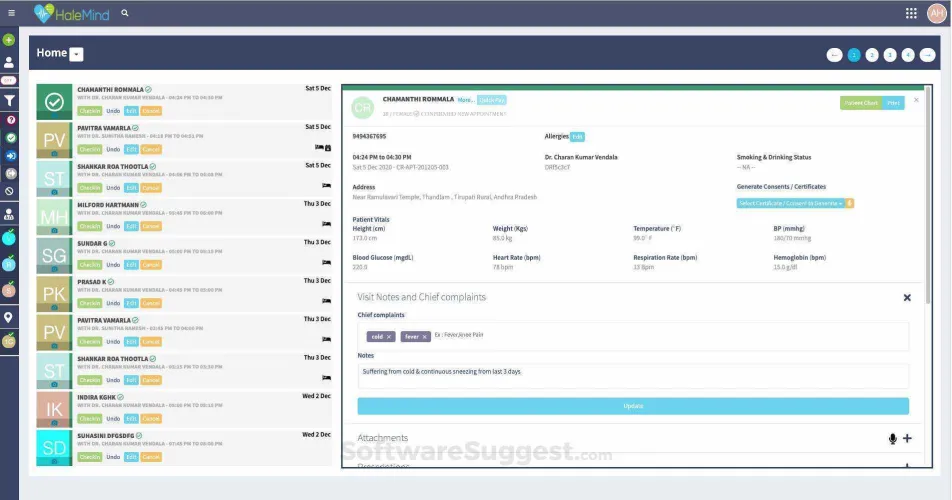
Halemind Screenshot

HaleMind is an electronic health record and hospital management platform built for clinics, hospitals, and medical colleges. Its approach centres on keeping patient information available across consultations while giving doctors, staff, and patients access to the information they need. The platform is primarily web-based and is designed around a connected EHR and hospital management system. It is also offered through separate solutions for clinics, hospitals, pharmacies, and laboratories.

Best For

Hospitals, Clinics, Medical Colleges & Diagnostic Centres

4.4/5 by Techjockey

What Stands Out

  • Customisable Hospital Workflows: HaleMind allows customisable appointment sheets, case sheets, and clinical forms across OPD and IPD workflows.
  • Speciality EMRs: The platform includes speciality-specific EMRs alongside its hospital management workflows.
  • Patient Portal: Patients can access records, prescriptions, lab reports, appointments, and medicine alerts through the patient-facing portal.
  • Smart Analytics: HaleMind includes analytics for revenue, patients, staff, statistics, and trends, giving management access to operational data through the system.

Pros

  • Patient and pharmacy management are easy to handle in daily use.
  • Patient information and nurse notes are easy for staff to record and access.
  • Appointment SMS and email notifications can be sent to doctors and patients.

Saurabh Rai

“I love this user-friendly feature that the software has. It makes recording nurse’s data and reading notes easy. It allows for all information data to easily be accessible and understand by staff.”

Techjockey Review

Cons

  • Some features are repetitive and time-consuming to use.
  • Integrations need more attention.
  • Medicine dosage entry has limitations for some prescription formats.
  • Support can take some time to resolve certain issues.

Sanjay Varma

“Integrations are a main part that needs some focus. Please fix this issue.”

Techjockey Review

Overall Verdict

HaleMind is an alternative for hospitals that want a configurable HMS with a strong focus on clinical records and everyday hospital workflows. It suits hospitals that want more flexibility in how their clinical processes are set up while still covering the wider needs of hospital teams. For hospitals moving away from a conventional HMS, HaleMind fits when workflow flexibility and clinical usability are the main priorities.

6. Miracle HIS

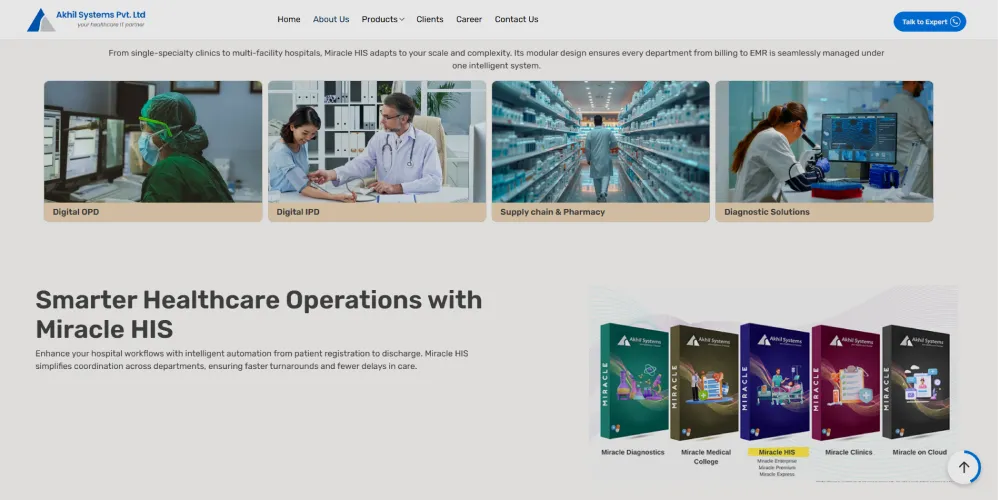
Miracle HIS Akhil Screenshot

Miracle HIS is a hospital information system from Akhil Systems with a long history in healthcare IT in India. It is offered in different editions for small hospitals and nursing homes, medium hospitals, and larger hospital groups, allowing organisations to choose a version according to their size and requirements. The software is positioned as a broad hospital system rather than a product limited to a single department, with adoption spanning hospitals, nursing homes, clinics, and medical colleges.

Best For

Small, Mid-Sized & Large Hospitals, Nursing Homes & Hospital Groups

4.8/5 by G2

What Stands Out

  • Multiple Deployment Options: Hospitals can use Miracle HIS through on-premises, cloud, or hybrid deployment, giving them flexibility in how the system is hosted.
  • Management Dashboards: Miracle HIS includes an MIS dashboard for management reporting, giving hospital leadership access to operational information and analytics.
  • Speciality-based Clinical Templates: The system includes clinical templates and speciality modules that can be configured for different clinical areas.
  • Integration Support: Miracle HIS supports integrations with PACS, lab systems, and other external systems through standards such as HL7, FHIR, and DICOM.

Pros

  • The system is easy for hospital users to operate in daily work.
  • Implementation and integration are straightforward for hospital teams.
  • The system works smoothly for large hospitals with a broad set of modules.

Anishat N.

“Miracle health information system is very easy to operate. I like LIS, RIS integration with the software very much.”

G2 Review

Cons

  • Large reports can take longer to generate and sometimes slow down the system.
  • Customer support needs improvement.
  • The linen and laundry module has limited options for tracking washed and dried sheets.
  • The software requires training before users can comfortably work with it.

Anishat N.

“During large report generation, it takes a long time and sometimes slow down the system.”

G2 Review

Overall Verdict

Miracle HIS is a suitable option for hospitals that need broad hospital management coverage with flexible deployment and integration support. It suits hospitals that want an established HIS with support across clinical, administrative, and diagnostic workflows. The main trade-off is that some areas, such as report performance and customer support, need closer attention during implementation and regular use.

How to Choose the Right SmartHMIS Alternative

Switching from SmartHMIS is about more than comparing features. Look at how the new system will fit into the way your hospital already works, what will be involved in moving across, and what you will actually spend.

Identify Workflow Gaps: Go through the workflows your teams use in SmartHMIS today. You may find some work well, while others still involve manual entries, unnecessary delays, or entering the same patient information more than once.

Check Migration and Implementation: Get the vendor to explain what the switch will look like in practice. Ask about setup, testing, migration, training, and when the new system can go live.

Review Integrations: Make a list of the systems you currently use with SmartHMIS. Check what will happen with your lab, PACS, accounting, payment, insurance, and other integrations.

Compare Support and Training: Ask what happens after implementation. Check how staff will be trained and what support they can use when they run into problems.

Calculate the Full Cost: Do not compare the software price alone. Include migration, customisation, integrations, training, extra users, and ongoing support.

Making the Switch from SmartHMIS

Before choosing a SmartHMIS alternative, be clear about what you want to improve. A clinic may have different needs from a single hospital, while a growing multi-speciality group may need more from its software.

The six options above cover different types of hospital needs. Compare the ones that match your setup and, during the demo, run through the work your staff handles every day. That is a better way to judge usability, data migration, integrations, and the overall cost of changing systems.

Healthray is one of the options to look at when speciality-specific EMR, multi-facility management, migration support, integrations, and flexible deployment matter to your hospital. Overall, the new system should address the issues that made you look beyond SmartHMIS in the first place.

See How Healthray Would Fit Your Hospital

Bring your real hospital processes to the conversation and explore areas such as implementation, integrations, migration, and staff training.

Talk to an Expert

Frequently Asked Questions

Is SmartHMIS still a good choice for a growing hospital?

That depends on what has changed in your hospital. You may need more departments, locations, integrations, or workflow customisation than your current SmartHMIS setup can handle. In that case, compare other options before you renew or expand the existing system.

How difficult is it to switch from SmartHMIS to another HMS?

Switching can be simple for some hospitals and more involved for others. The amount of data, number of users, integrations, and customisation in your current setup can all affect the move. You will also need to plan the data migration, workflow changes, staff training, testing, and support around go-live.

What should happen to historical patient records after switching from SmartHMIS?

Talk about your old records before you sign with the new vendor. Confirm which records will be migrated, which ones will stay archived, and how you will access older records later. Also ask how the transferred data will be checked.

Can a hospital use a new HMS alongside SmartHMIS during the transition?

A phased transition can be possible, depending on the systems involved and the vendor’s migration approach. Some hospitals may need a period where the old and new systems are used together while data, workflows, and staff processes are tested.

Healthray Editorial Team

About the Author

Healthray Editorial Team

The Healthray Editorial Team creates and reviews content based on Healthray's experience working with hospitals, clinics, and healthcare technology. Our content covers hospital management software, EMR/EHR, healthcare IT, automation, and digital transformation.