



September 3, 2026

5 Best Miracle HIS (Akhil System) Alternatives & Competitors

Miracle-his-alternatives-healthray-hospital-management-dashboard

You probably already have an HIS in place. Your team knows it, patient records are there, and the hospital has built its daily routines around it. But over time, you may start noticing that some newer needs are harder to handle.

A doctor may be entering the same patient details in more than one place. The billing team may be waiting for information from another department before closing a case. Lab reports may sit in a separate system, while the management team has to pull information from different reports to understand what is happening across the hospital. As the hospital grows, these small gaps can start taking more time from your teams.

That is when you may start looking for something that can handle these needs more smoothly. You may want ABDM/ABHA built into registration, faster implementation when new departments are added, or AI-assisted documentation and voice-to-text to make clinical work easier. When these requirements start adding up, it is natural to start wondering whether Miracle HIS still fits the way your hospital works today.

How We Evaluated These 5 Alternatives

We didn’t just list features and call it a day. Every hospital works a little differently, so we compared all five platforms using the same criteria and looked beyond what appears on a spec sheet. We used official vendor websites, product documentation, G2, Capterra, and other public sources to assess workflow fit, staff usability, integrations, migration and implementation, support, future growth, and user reviews. This helped us understand where each platform fits, what areas may need closer evaluation, and which types of hospitals it may suit before making the switch.

A Quick Look at 5 Miracle HIS Alternatives

Healthray Logo

Healthray

Mocdoc

MocDoc

InstaHMS Logo

Insta HMS

HealthPlix LOGO

HealthPlix

LOGO Ezovion

Ezovion

Best For Multi-speciality hospitals, growing chains, clinics, labs & multi-facility groups Hospitals, clinics, diagnostic centres & healthcare groups Hospitals, clinics & multi-centre healthcare organisations Doctors, clinics & OPD-focused healthcare Hospitals & healthcare groups
Pricing Custom quote Custom quote Custom quote ₹17,999/year Custom quote
Migration & Implementation Migration + training (FREE) Migration + training Migration + training Migration + training Migration + training
India Readiness ABDM/ABHA · PMJAY · NABH ABDM/ABHA · PMJAY · NABH ABHA ABHA ABHA · PMJAY
Key Integrations HL7/FHIR, PACS/DICOM, lab analysers, pharmacy, accounting, payments, insurance & other systems HL7/ASTM, lab analysers, pharmacy, accounting HL7/API, PACS, devices, HRMS, CRM, finance 300+ integrations HL7/FHIR, PACS/RIS, LIMS, pharmacy, payments
Deployment Cloud / On-premise / Hybrid Cloud Cloud / On-premise Online / Offline Cloud / On-premise
Rating
OPD/IPD Management
Bed & Ward Management
Only Bed
Operation Theatre
EMR / EHR
Pharmacy
Lab / LIMS
Billing
TPA / Insurance Claims
ABDM / ABHA
ABHA
ABHA
PMJAY Support
NHCX Readiness
NABH-Related Tools
HL7 / FHIR
HL7
PACS / DICOM
PACS
Lab-Instrument Integration
Typical Implementation Time
1–3 weeks
Migration & Training Support
Offline-Tolerant Workflows
Support Model / SLA
24×7
24×7
Post-Go-Live Support
MIS Dashboards
Custom Reporting
Smart / Predictive Analytics
AI & Automation
Encryption & Data Protection
Access Control & Audit Trails
High Availability & Backup
Disaster Recovery
(Backup & Recovery)
Backup
Security Certifications / Data Residency
Security
Central Stores & Procurement
Ambulance Management
Housekeeping Management
Dietary Management
Biomedical & Asset Management
Asset
Asset
Asset
HR / Payroll / Duty Rosters
HR/staff
Patient Communication
Multi-Facility Support
Get A Demo

5 Best Alternatives to Miracle HIS for Hospitals

1. Healthray

Healthray Site Scrrenshot

Healthray is designed for hospitals that need speciality-specific clinical documentation, smoother migration from an existing HIS, and integration with systems such as PACS/ DICOM, accounting, payments, and insurance. It also supports AI-assisted documentation and voice-to-text for doctors, along with multi-facility operations, clinics, and diagnostic labs. As a cloud-based hospital management software, Healthray gives hospitals the flexibility to manage these needs as their organisation grows. For a hospital moving away from Miracle HIS, these capabilities can help address both the practical challenges of switching systems and the need for stronger clinical and operational support.

Best For

Multi-Speciality Hospitals, Growing Hospital Chains, Clinics, Diagnostic Labs & Multi-Facility Healthcare Groups

4.8/5 by G2

What Stands Out

  • Connected Workflows: Registration, consultation, diagnostics, pharmacy, billing, admission, and discharge are connected. Staff can access patient information across these areas without entering it again.
  • Simpler Migration: Healthray supports data migration, training, and phased implementation. This is useful for hospitals moving from an existing HIS.
  • Easy Integration: It works with PACS/DICOM, accounting, payments, insurance, and other healthcare tools. So hospitals don’t necessarily have to replace the systems they are already using.
  • Speciality EMR + AI Assistance: Doctors get speciality-specific EMR templates instead of using the same format for every department. Voice-to-text helps doctors write notes. AI and automation are used in billing, inventory, lab, and reporting.
  • 24×7 Multilingual Support: Support is available 24×7 in English, Hindi, Gujarati, and other languages. This means hospital teams can get help outside normal working hours too.
  • Built to Scale: Healthray is available on cloud, on-premise, and hybrid setups. Multiple facilities can also be managed from the system. This works for hospitals with more than one location or plans to expand.

Pros

  • Handles multiple users without noticeable lag during busy hospital operations
  • Keeps OPD and lab queues moving with real-time patient and task prioritisation
  • Lets staff categorise patients as emergency, follow-up, or new for clearer handling
  • Supports custom notifications to help teams stay on top of pending work
  • Pharmacy updates are integrated into the workflow, helping reduce prescription errors

CIO / IT Head

We already had different systems and years of data, so switching was not something we wanted to do casually. My main questions were around migration, user access, integrations and what kind of support we would get after go-live. Healthray’s team worked with us through the setup and configuration, and we were able to bring the major workflows into one system. From an IT point of view, having fewer disconnected systems to manage has made things easier.

Verified Review

Cons

  • Some of the modules may take time for new users to learn
  • Pricing is not published, so hospitals need to request a customised quote

Milan K.

The advanced features take some time to learn, but once you become familiar with them, the product feels powerful and flexible.

G2 Review

Overall Verdict

Healthray is a strong Miracle HIS alternative for multi-speciality hospitals, growing hospital chains, clinics, diagnostic labs, and multi-facility healthcare groups that need to manage different operations and facilities together. Its speciality-specific capabilities and support for migration and integrations also make it a practical option when replacing an existing HIS.
Explore How Healthray Could Fit Your Hospital

Have a specific workflow in mind? See how Healthray could fit your hospital’s process with a personalised demo.

Book a Free Demo

2. MocDoc

MocDoc Screenshot For Alternatives

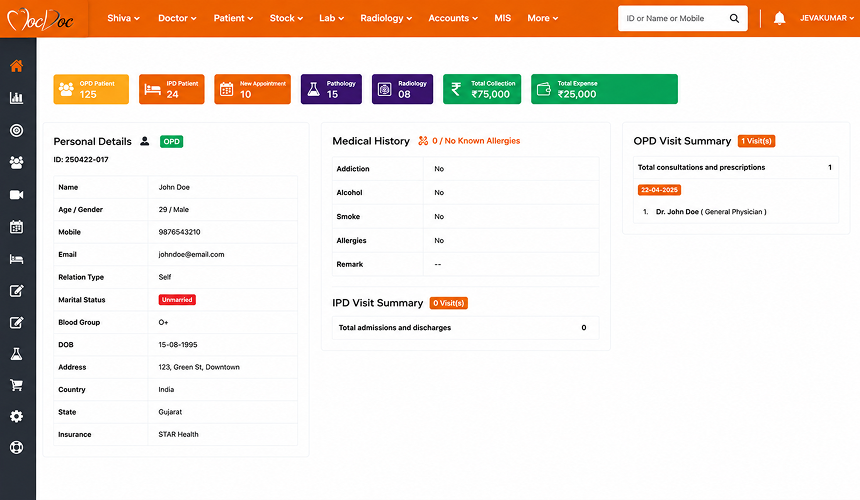
MocDoc is a hospital management system covering hospital, laboratory, pharmacy, billing, and patient management. It also offers dedicated LIMS and pharmacy solutions for organisations that need separate tools for diagnostic and pharmacy operations. It also supports multiple locations across hospitals, clinics, and healthcare groups.

Best For

Small Clinics, Multi-Location Clinic Chains & Hospital Groups.

4.7/5 by G2

What Stands Out

  • Hospital + Diagnostic Workflows: It covers hospital management, laboratory, pharmacy, billing, and patient management within the same platform.
  • Dedicated LIMS and Pharmacy Solutions: Its separate LIMS and pharmacy products give organisations more specialised options when diagnostics or pharmacy operations need deeper workflows and more focused tools.
  • Cloud-based Setup: MocDoc runs on the cloud, so teams can access it from different locations. There is no traditional on-premise setup to maintain.
  • Multi-location Support: For healthcare groups with more than one hospital, clinic, or branch, MocDoc provides central monitoring and management across locations.

Pros

  • Easy for staff to learn and use in their daily work
  • Implementation and training are handled well
  • Support is helpful when teams need assistance
  • The system works quickly during regular use

KALYANAPU B.

All specifications are good and fast, easy to use. Never hangs and doesn’t slow down. Implementation was good, and anytime getting support from the Mocdoc Team anytime.

G2 Review

Cons

  • Limited customisation for complex hospital workflows
  • Occasional lag can affect system performance during use
  • Fewer functions in the mobile app compared with the desktop version

SIVAGURU K.

Occasional lag and limited customisation options can slow down workflow.

G2 Review

Overall Verdict

MocDoc can suit hospitals and healthcare groups that want a straightforward cloud-based HIS for their core operations without requiring extensive customisation. It covers a wide range of hospital functions and may be easier to implement than a more complex system. But hospitals with complex workflows, heavy customisation needs, or higher performance demands should look closely at these limitations before making the switch. Overall, MocDoc is a better choice for hospitals with straightforward operational needs.

3. Insta HMS

Insta HMS Screenshot For Alternatives

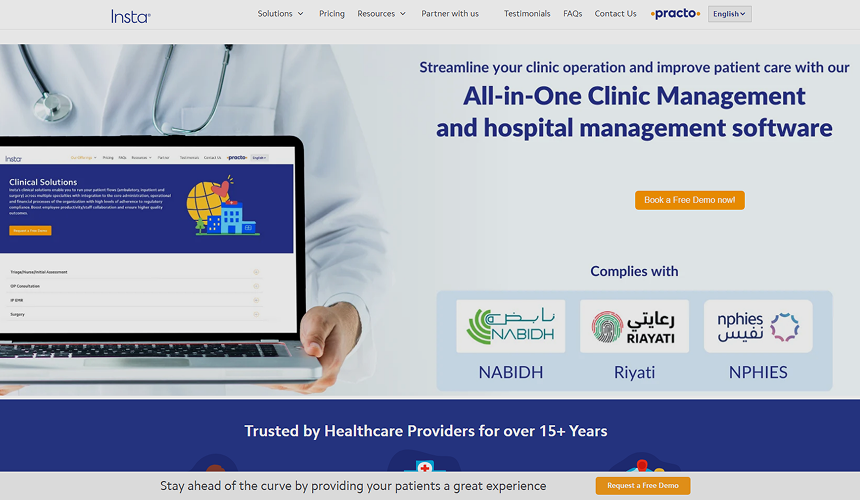
Insta HMS has been around for years and is used by hospitals and healthcare organisations across different markets. It brings hospital operations, billing, clinical records, diagnostics, and other workflows into a single system, with both cloud and on-premise options for organisations with different IT setups. It also gives hospitals room to configure workflows around their own processes, which can be useful for facilities with more specific operational or billing requirements.

Best For

Multi-speciality Hospitals, Clinics, Nursing Homes & Healthcare Groups

3.6/5 by Capterra

What Stands Out

  • Billing and Claims Workflows: Insta handles complex billing structures, insurance and TPA requirements, claims processing, and doctor payout rules, making it relevant for hospitals with detailed revenue-cycle needs.
  • EMR: Its EMR maintains a central record covering consultations, diagnostics, procedures, and discharge information, giving clinicians access to key patient information in one place.
  • Wide Integration Options: HL7 and API integrations can connect Insta with laboratory equipment, PACS, accounting, HRMS, CRM, analytics, and other systems.
  • Custom Reporting: Insta provides reporting tools with multiple templates and options to combine MIS reports, helping hospitals create reports around their specific reporting needs.

Pros

  • Patient information is easier to keep organised and track
  • Paperwork is reduced in daily hospital operations
  • Communication is clearer when multiple doctors handle the same patients
  • Easy for staff to learn and use in day-to-day work

Sayantan B.

The implementation team and remote team were very cooperative. The customer support is cooperative. Overall, we are satisfied with the HMS

Capterra Review

Cons

  • Certain modules may need additional functionality for specific hospital requirements
  • Customisation for specific hospital requirements can take longer than expected
  • Support can be inconsistent, so getting help may not always be smooth

PATRICK H.

Their sales team ghost you once you make the purchase; they treat you terribly as a customer, and they affect your bottom line.

G2 Review

Overall Verdict

Insta HMS makes more sense for hospitals that already have established processes and need a system to handle detailed billing, claims, clinical records, and integrations. Hospitals looking for a quicker and simpler implementation may need to look more closely at the setup involved, especially when a lot of customisation is required. Overall, Insta HMS is better suited to hospitals with established processes than those looking for a simpler implementation.

4. HealthPlix

HealthPlix Site Screenshot

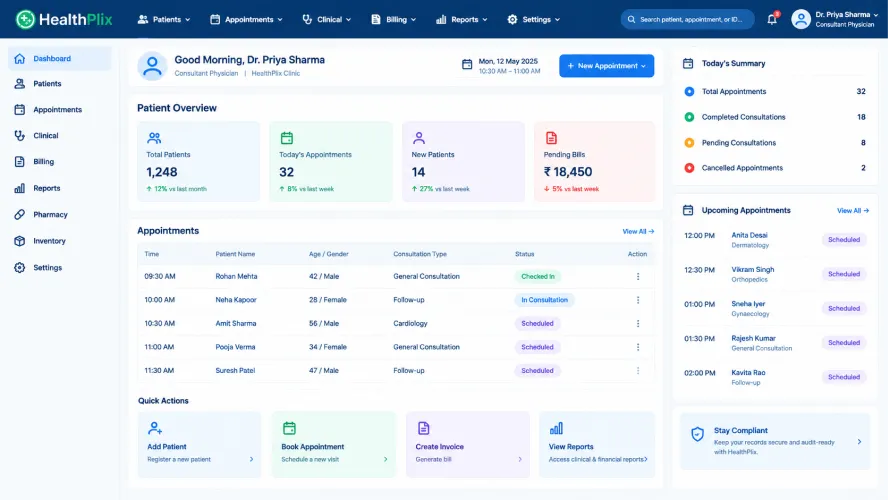
HealthPlix started with a strong focus on doctors and digital medical records and has since expanded into hospital, IPD, patient engagement, and revenue-focused solutions. Its current platform puts particular emphasis on helping doctors document faster, access patient information easily, and use AI-assisted tools during clinical work.

Best For

Solo Practitioners, Specialist Clinics & Doctor-First Digital Practices.

4.3/5 by Techjockey

What Stands Out

  • Doctor-first EMR: HealthPlix is built around the doctor’s workflow, with speciality-specific modules, quick prescription writing, and mobile access to patient records.
  • AI-Assisted Clinical Work: The platform can transcribe doctor-patient conversations, generate summaries and prescriptions, and update the EMR with relevant information.
  • Regional-Language Prescriptions: Doctors can create prescriptions in 14 regional languages, which can make communication easier for patients who are more comfortable receiving medical information in their preferred language.
  • Online and Offline Access: HealthPlix offers mobile EMR access and has promoted offline EMR capabilities, allowing doctors to continue working when internet connectivity is unavailable.

Pros

  • Easy to use for doctors handling their day-to-day clinical work
  • Outpatient consultations can be managed without adding much complexity to the workflow
  • Clinic work can be kept more organised in one place
  • The software offers useful functionality at a reasonable cost for smaller practices

MEGHA G.

The best thing about Healthplix is you can ask follow-up questions to your doctor after the in-person consultation in their clinic. It is far better than its similar products.

G2 Review

Cons

  • Customer support can be inconsistent when issues need quick resolution.
  • The platform has limited third-party review coverage compared with more established HMS options.
  • Administrative and hospital-wide workflows may not be as extensive for hospitals looking beyond doctor and clinical needs.

SHREE A.

No positive features at all. Shows adverts after paying a fee. Frequent breakdowns. Poor customer service.

G2 Review

Overall Verdict

HealthPlix is more focused on doctor-led clinical work than a full hospital information system, so it can suit smaller practices and specialist clinics where consultations, patient records, and clinical documentation make up most of the daily work. It may not be enough for larger hospitals replacing Miracle HIS across administrative, financial, and multiple departments. Overall, HealthPlix is a better choice for smaller, clinically focused setups than for hospitals that need broader hospital-wide operations.

5. Ezovion

Ezovion Screenshot

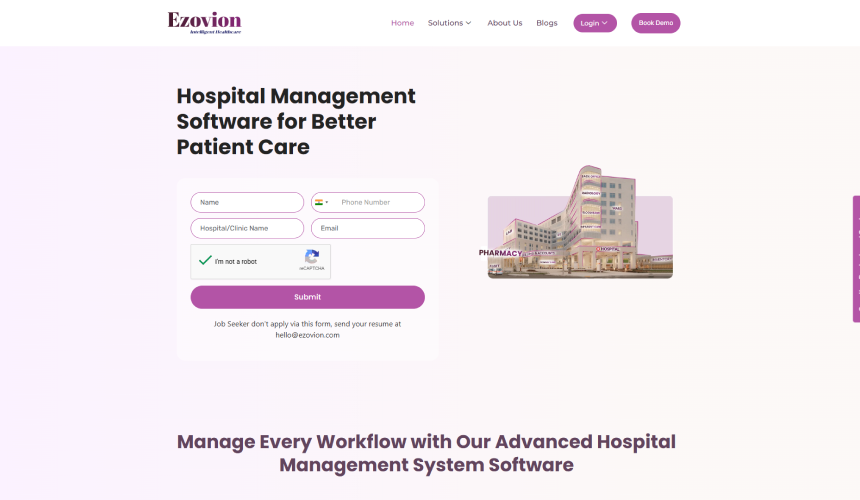
Ezovion brings hospital operations, patient engagement, clinical workflows, billing, and back-office work into one connected setup. It also puts more emphasis on AI, automation, and analytics, while giving hospitals the choice between cloud and on-premise deployment. For healthcare groups managing multiple locations, its broader platform approach can help keep different operations connected as they expand.

Best For

Multi-Speciality Hospitals, Clinics, Diagnostic Centres & Growing Healthcare Groups

4.0/5 by G2

What Stands Out

  • AI and Automation: Ezovion uses AI/ML features and automation across areas such as clinical work, analytics, and operational processes.
  • Connected Healthcare Setup: Clinical, billing, insurance, patient engagement, and back-office workflows are designed to work together rather than as separate systems.
  • Flexible Deployment: Ezovion supports both cloud and on-premise deployment, giving healthcare organisations more choice around how the system is run.
  • Integration and Multi-location Support: FHIR and HL7 interoperability, along with multi-location support, make it relevant for organisations managing more than one facility or connecting with existing hospital systems.

Pros

  • The software can save time and reduce manual work in daily operations
  • Training assistance helps teams get started with the software
  • Customer service provides guidance when teams need help

Nirupama

Ezovion’s AI/ML features improve efficiency, save costs, and drive profits, while building your healthcare service through iHSE from patient registration to caring, billing, insurance, realisation, and beyond.

Capterra Review

Cons

  • Independent review coverage is very limited, making it harder to judge the product from a wider range of user experiences
  • Pricing is not publicly available, so hospitals need to contact the vendor for a customised quote

SURAJ VERMA

I need to get a few areas of my workflow customised, but right now I can’t even register because the OTP isn’t coming through to my phone.

G2 Review

Overall Verdict

Ezovion can suit healthcare organisations that need to manage clinical, financial, patient, and back-office operations across a wider hospital setup. It may be less suitable for hospitals with complex or highly customised workflows, where implementation and workflow fit need closer attention. Overall, Ezovion is a reasonable option for healthcare groups with broader operational needs, but hospitals should assess how well it fits their existing processes before switching from Miracle HIS.

How to Choose the Right Miracle HIS Alternative

Switching from Miracle HIS is about more than comparing features. Look at how the new system will fit your current workflows, how smoothly the switch can happen, and what it will really cost your hospital.

Start With Your Current Workflows: Before you look at alternatives, go through the workflows your teams actually use in Miracle HIS. Note what you want to keep and what you want to change.

Check Implementation Time: Don’t rely only on the vendor’s general timeline. Ask how long setup, testing, migration, training, and go-live will take.

Plan Data Migration: Find out which patient and hospital records will be moved, what happens to older records, and how the migrated data will be checked.

Review Existing Integrations: Your existing systems need to be part of the discussion. Check the lab, PACS, accounting, payment, and insurance integrations before choosing the new system.

Prepare Your Staff: Find out what training staff will receive before and after go-live.

Calculate the Total Switching Cost: The quoted software price may not be the final amount. Include customisation, integrations, migration, training, extra users or locations, and ongoing support.

Wrapping Up

Choosing a Miracle HIS alternative should come down to the problems your hospital is actually trying to solve. A clinic focused mainly on doctor-led OPD workflows may need a different system from a multi-speciality hospital managing IPD, diagnostics, pharmacy, billing, integrations, and multiple locations.

Based on the options above, shortlist two or three platforms that match your hospital size, workflows, deployment preference, integration requirements, and migration needs. Then test the same real hospital scenarios in every demo rather than comparing feature lists alone.

If your priorities include multi-facility management, speciality-specific EMR, migration support, interoperability, and cloud/on-premises/hybrid deployment, Healthray may be worth including in that shortlist. The final decision should still come down to how well it handles your existing workflows, implementation requirements, support expectations, and total switching cost.

See How Healthray Would Fit Your Hospital

Bring your real hospital processes to the conversation and explore areas such as implementation, integrations, migration, and staff training.

Talk to an Expert

Frequently Asked Questions

Is there a good reason to switch from Miracle HIS?

A switch may be worth considering when Miracle HIS no longer fits the way your hospital operates. For some hospitals, the problem may be disconnected departments or difficult integrations. For others, it could be reporting, support, or the need to add new departments and locations. If none of these is causing trouble and Miracle HIS still works well for your hospital, there may be little reason to switch.

What does it take to move from Miracle HIS to another HMS?

There is quite a bit to plan before the new system goes live. Your existing data needs to be checked and moved, workflows may need to be set up again, and connected systems need to be tested. Staff training is another part of the process. How much work this takes depends on the hospital, the amount of data involved, and the systems connected to Miracle HIS. Get the vendor to explain exactly how they plan to handle the move.

What should we ask during an HMS demo?

Do not let the demo stay at the feature-list level. Take a few real hospital cases into the demo and see how they work from start to finish. Follow one patient through registration, OPD, IPD, billing, lab, pharmacy, and discharge instead of looking at each feature separately. Reporting is worth testing too. Then ask what happens with your existing integrations, data migration, user access, training, and support once the system is live.

What should we check before signing up for a new HMS?

The quoted price may not cover everything you need. The quoted price may not cover everything you need. Implementation, migration, customisation, integrations, extra users, and additional locations may cost extra. Also check what you get for support and upgrades. Before you sign, ask about your data, the contract, and what happens when you need help after the system goes live. That way, you know what you are paying for from the beginning.

Healthray Editorial Team

About the Author

Healthray Editorial Team

The Healthray Editorial Team creates and reviews content based on Healthray's experience working with hospitals, clinics, and healthcare technology. Our content covers hospital management software, EMR/EHR, healthcare IT, automation, and digital transformation.