


5 Best Labguru Alternatives & Competitors in 2026

Healthray Editorial Team Healthcare Technology & Hospital Management Software
Labguru-alternatives-comparison-2026

A lab can usually manage things without much trouble when most of the work happens at one location. It gets different when samples start coming in from collection centres, other branches, or outside referrals. There is suddenly more to keep track of. Staff have to check where samples are, which tests are pending, whether results are ready, and whether a report has been checked before it is sent. With several samples moving through the lab at the same time, even a small delay can mean another follow-up.

This can become more noticeable as the lab adds more analysers and starts working with more referring doctors. Staff may have to check pending results, look into delayed reports, or confirm whether something has already been sent. None of these tasks take much time on their own, but doing them throughout the day can take up a fair amount of staff time. For a lab dealing with this regularly, it may be useful to compare other lab management systems and see what they handle differently.

For diagnostic and pathology labs, choosing a lab management system is not only about handling samples. As operations grow, things such as analyser connectivity, report approval, billing, collection centre management, inventory, and work from multiple locations also become important. This guide looks at five Labguru alternatives that diagnostic labs can consider in 2026, along with the areas they cover and where they may have limitations.

How We Compared Labguru Alternatives

We checked all five alternatives against the same set of requirements. We focused on things that matter when a lab is deciding whether to move to a new system, including workflow fit, ease of use, integrations, automation, customisation, reporting, implementation, data migration and export, scalability, user access, support, security, audit trails, and pricing.

We started with the vendors’ own websites and product documentation, then checked G2, Capterra, SoftwareSuggest, and Techjockey for independent information. The research was conducted in October 2026.

Ratings were considered, but they were not the basis for comparing the software. We also looked at the type of laboratory each platform can support and how well it fits the way teams work. And when a vendor had not clearly mentioned a feature, integration, price, or compliance detail, we did not assume it was available.

A Quick Look At 5 Labguru Alternatives for Laboratories

Before looking at each platform in detail, here’s a side-by-side comparison of the five Labguru alternatives. ✓ means the software covers the full requirement, X means it does not cover it, Brackets mean the vendor publicly lists only part of the requirement, and Not stated means the vendor has not publicly confirmed it.

Healthray Logo

Healthray

Crelio Healthray Logo

CrelioHealth

LabVantage Logo

LabVantage

PathoGold Logo

PathoGold

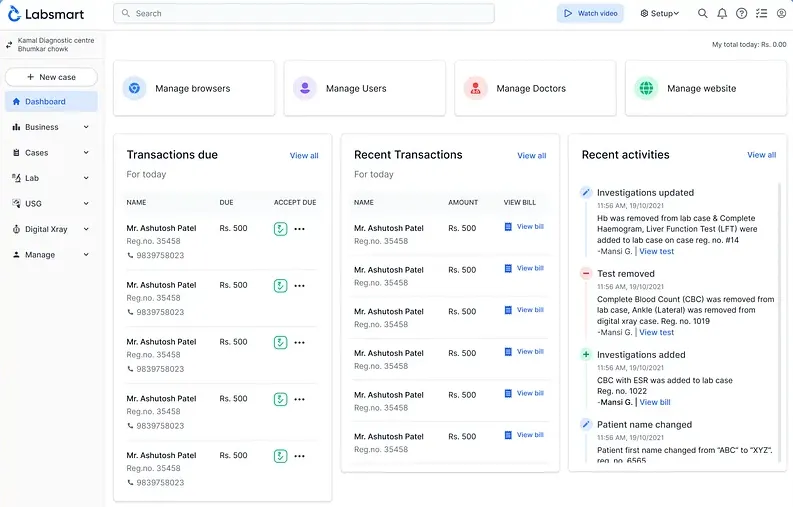
LabSmart Logo For Alternative

LabSmart

Best For Pathology/diagnostic labs, hospital labs, multi-branch networks Diagnostic labs, pathology labs, hospital-based labs, and multi-location labs Clinical/molecular diagnostic labs, reference and contract labs, enterprise and high-volume laboratories Small to large pathology labs and diagnostic centres Small to medium pathology labs and diagnostic centres
Pricing Custom quote + 10% off From ₹8,000/mon + GST Custom quote From ₹5,900/year From ₹4,999/year + GST
Deployment Cloud / On-premises / Hybrid Cloud Cloud / On-premises Cloud / Desktop Cloud
Single / Multi-Site (Collection-centre support)
India & Accreditation Readiness ABDM, ABHA, TPA, NABL/ISO 15189 workflow support (ABDM, NABL, ISO 15189) (ISO 15189, CLIA) Not clearly published (TPA/Mediclaim)
Key Integrations HL7/FHIR, EMR/EHR/HIS, analysers, RIS/PACS/DICOM, API HL7, FHIR, APIs, EMR/EHR, HIS, analysers, RIS/PACS/DICOM HL7, EMR/EHR, PACS, instruments, RESTful web services Instrument interfaces, PACS, third-party accounting API WhatsApp, SMS, Email, Doctor Portal
Implementation / Migration Implementation + migration Implementation + migration Implementation + migration Implementation + migration Implementation + migration
Rating
Patient / Referring Doctor Management
(Patient-centred; online order/result portal)
Test Order / Accession Management
Online Booking / Order Entry
(Online order portal)
Sample Collection & Accessioning
(Accessioning)
Barcode / Label Management
Sample Tracking
Sample Routing / Aliquoting
(Sample routing)
(Aliquoting)
Outsourced / Referral Test Management
(Reference/contract lab workflows)
(Referral management)
Phlebotomy
Not stated
Test Master / Profiles / Panels
Laboratory Discipline Coverage
Pathology, Biochemistry, Haematology, Microbiology, Serology & Immunology, Endocrinology, Histopathology, Cytology, Radiology
(Clinical Pathology, Molecular Pathology, Toxicology, Genetic Testing, Histopathology, Microbiology, Radiology)
(Clinical & Molecular Diagnostics, Pathology, Microbiology and other specialised lab workflows)
(Pathology, Histopathology, Cytology, Radiology)
(Pathology, Histopathology, Radiology, Haematology, Biochemistry)
Priority Tests
(Priority samples)
Analyser Integration
Uni-directional Interface
Bi-directional Interface
HL7 / ASTM
(HL7)
FHIR / APIs
(REST/web services)
(Third-party API)
HIS / EMR Integration
Automated Result Mapping
Not stated
(Formatting)
Manual Result Entry
Result Review & Validation
Auto-verification
Reference Ranges & Flags
Not stated
(Reference values)
Critical Value Alerts
Not stated
(Abnormal-value checker)
Pathologist Authorisation
(Medical director sign-off)
(Report verification)
(Pathologist sign-off)
Digital Signature
Report Amendment / Version History
Not stated
Custom Report Templates
SMS / Email / WhatsApp Delivery
Patient Report Portal
(Online result portal)
Doctor Portal
(Online order/result portal)
Internal Quality Control (IQC)
Levey-Jennings / Westgard Rules
Not stated
Reagent & QC Lot Tracking
(Consumables/reagents)
Calibration & Equipment Maintenance
(Calibration)
Proficiency Testing
Non-Conformance Management
(Exceptions/CAPA tracking)
CAPA Management
SOP & Document Control
Internal Audit Support
(Audit trails/QC audit support)
Audit Trail
(Activity tracking)
NABL / ISO 15189 Support
(ISO 15189)
Multi-Branch Management
Collection Centre Management
Not stated
Central / Reference Lab Workflow
(Sample routing)
Inter-Branch Sample Transfer
Not stated
B2B Client Management
(Referral/B2B)
Referral Doctor Management
(Physician order)
Centralised Administration
Reagent & Consumables Inventory
Lot / Batch / Expiry Tracking
(Consumable tracking)
Stock / Reorder Alerts
Consumption Tracking
Procurement
(Purchase & Accounting)
Vendor Management
Laboratory Billing / Test Pricing
Packages / Discounts
B2B Billing
(B2B pricing)
Referral Billing
Not stated
Insurance / TPA
Online Payments
Not stated
GST / Invoicing
(Invoicing)
(Invoicing)
Receivables
Not stated
TAT Dashboard
(TAT analytics)
(TAT reporting)
Pending Sample Alerts
(Workflow reminders/status tracking)
(Sample status)
(Pending status tracking)
Test Volume Analytics
Revenue Analytics
Branch Analytics
QC Analytics
Custom MIS
(Business reports)
Workflow Automation
AI / Predictive Analytics
Role-Based Access
Audit Logs
(Activity tracking)
Encryption
Backup
Disaster Recovery
Data Export / Portability
(Report/master data export)
(PDF/Excel)
(PDF/Excel)
Historical Data Migration
Implementation Timeline
3-7 days
4–6 weeks
3 months
Not stated
Not stated
Customisation
Training
Go-Live Support
Support Channels & Hours
24/7; Multilingual support
24/7; Call, chat, email
24/7; Phone and online support
Phone, email, online chat, mobile app
10:30 AM–5:30 PM, Mon–Fri
SLA / Response Time
Max 30 min
Not stated
Not stated
Not stated
Not stated
Post-Go-Live Support
24/7
24/7
24/7
Not stated
Ongoing support
Blood Bank
Not stated
Radiology Management
Not stated
PACS
DICOM / Imaging Integration
Not stated
Not clearly specified
Get A Demo

A Closer Look at the Labguru Alternatives

1. Healthray

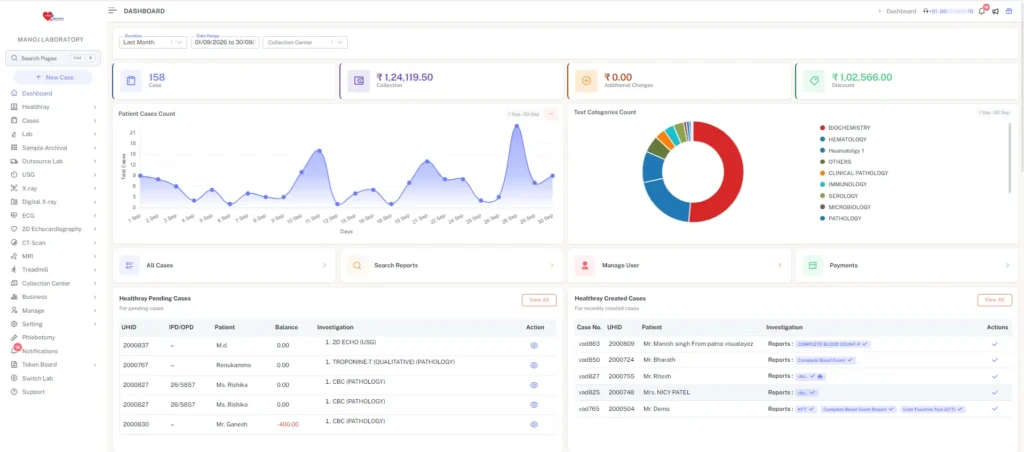
Healthray Lims Screenshot

Healthray LIMS brings routine laboratory work onto a single system, covering investigations such as CBC, Lipid Profile, LFT, and KFT, while connecting analysers and other healthcare systems. It also brings billing, inventory, automation, and AI into the same workflow, along with ELN, LES, and SDMS for managing laboratory processes and data. The platform supports quality workflows, multi-centre operations, flexible deployment, data migration, and ongoing support, making it easier for labs to move from their existing system.

Best For

Growing diagnostic labs, pathology centres, hospital laboratories, and multi-branch diagnostic networks

5/5 by Techjockey

What Stands Out

  • Connected Lab Workflows: Every module works from the same sample record, connecting order entry, barcode tracking, analyser results, validation, QC, billing, and QR-based report delivery without repeatedly entering the same information.
  • Analyser & System Integration: Supports bi-directional analyser interfacing with HL7, FHIR, EMR/EHR/HIS, and PACS/DICOM connections, making it easier to move lab data between instruments and connected healthcare systems.
  • Quality & Accreditation Workflows: Covers Levey-Jennings charts, Westgard rules, SOP version control, CAPA, staff competency records, equipment calibration logs, and tamper-proof audit trails for NABL/ISO-related workflows.
  • Simpler Migration & Go-Live: Healthray supports migration from registers or legacy lab systems, along with workflow-based staff training and implementation, with bills and reports ready to start printing.
  • AI-Powered Lab Automation: AI features include smart sample routing, urgent-sample prioritisation, barcode and specimen error detection, abnormal-result flagging, and voice-to-text reporting, while TAT tracking helps identify delays at each stage.
  • Lab Inventory Management: Helps labs keep track of the reagents and consumables they use, so staff can see what is available and manage stock without keeping inventory separately from the rest of the lab workflow.

Pros

  • Reduces manual work by connecting sample tracking, data entry, validation, billing, and report delivery in one workflow
  • Helps staff get started quickly with minimal training and an easy-to-understand interface
  • Connects laboratory workflows with hospital systems, supporting smoother data exchange between departments
  • Helps improve sample traceability and turnaround time through automated tracking, result handling, and reporting

Milan

The best part about Healthray LIMS is how simple it is to use. Staff can learn it quickly, work smoothly, and handle data without any trouble. It saves time and helps the lab run without stress.

Techjockey Review

Cons

  • Custom report creation can take additional time during setup

Milan

We’ve had a great experience so far. There’s nothing big to complain about. If new features come in the future, they’ll just add more value to an already great system.
Techjockey Review

Considering Healthray for Your Hospital?

See how Healthray fits your hospital’s workflows, departments, and current setup.

Book a Free Demo

2. CrelioHealth

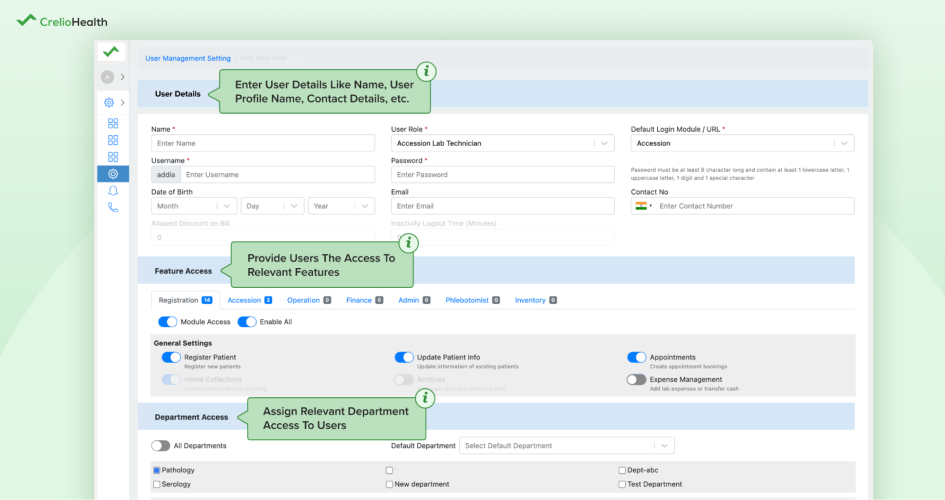
Crelio Health Screenshot

CrelioHealth LIMS is built around the day-to-day needs of diagnostic laboratories, covering the journey from patient registration and sample collection through testing and report delivery. Its cloud-based setup also brings sample tracking, reporting, finance, inventory, and lab analytics into one system.

Best For

Diagnostic labs, pathology labs, reference laboratories, home collection setups, and multi-location lab networks

4.7/5 by G2

What Stands Out

  • End-to-End Sample Tracking: Barcodes, sample segregation, outsourcing, processing, and archival can be managed and tracked through the same workflow.
  • Configurable Lab Workflows: Workflows and report formats can be adjusted to suit different lab requirements and modalities rather than following one fixed setup.
  • Multi-Location Operations: Teams can manage multiple locations with centralised operations, finance dashboards, and cross-location sample transfers.
  • Lab & Business Analytics: Dashboards bring together information such as TAT, sample volumes, test performance, analyser activity, revenue, and finance.

Pros

  • Quick support when issues or requests come up
  • Connects lab machines, billing, and analytics in one system
  • Lets staff customise registration details and handle insurance information

Janelle H.

Crelio LIMS is an easy-to-use, comprehensive, cloud-based system for our existing business. Minimal training is needed because of the great User Interface and User Experience. All the reports I need can be downloaded quickly for proper action.

G2 Review

Cons

  • Patient reports cannot be downloaded in bulk
  • Some financial reports still need to be checked manually
  • Limited choice of ready-made report templates
  • Samples cannot be split or individual tests kept aside in some workflows

Anupam M.

The software is very good and loaded with pots of useful features, but it doesn’t make any sense if the results didn’t get delivered to the customer. There is a huge problem with the results and how they deliver to customers.

G2 Review

3. LabVantage

LabVantage Screenshot

LabVantage is aimed at laboratories dealing with complex processes, large volumes of data, and strict quality requirements. Its platform combines LIMS with ELN, LES, and SDMS, while also covering sample and consumables management, instrument connectivity, reporting, and analytics. For clinical and molecular diagnostics, it offers preconfigured workflows and an online portal for receiving orders and sharing results.

Best For

Clinical and molecular diagnostic labs, reference laboratories, and larger laboratory operations

3.8/5 by G2

What Stands Out

  • No-Code Configuration: Labs can change forms, screens, and workflows without writing code for every change.
  • Built-In Quality Controls: Supports electronic signatures, audit trails, SOP management, data integrity, and validation requirements.
  • Scalable Setup: The platform is designed to support larger teams and more complex laboratory operations as they expand.
  • Automation & Approval Routing: Routine steps can be automated, with reminders and approval requests routed to the right people to keep work moving.

Pros

  • Flexible setup with configurable forms, ELN/SDMS interfaces, and barcode printing
  • Makes data entry and checking test progress easier
  • Keeps sample information easy to find and access
  • Helps quality control and manufacturing teams share information smoothly

Brian L.

I have found LabVantage staff very engaging and easy to work with. I have done several projects with them and each time has been above average in helping to achieve the business aims. I like that they inject their opinion on the best way to go using experience from their brand customer base, but in the end support what ever our objectives are.

G2 Review

Cons

  • Finding older samples can be difficult without better search options
  • Some layout changes can be difficult to manage
  • Instrument integration can be challenging
  • The system may freeze or close before data is saved

Maximilian S.

The lack of organizational options. Also more search option would be nice as well. Many times I try to find certain historical samples based on criteria that you cannot search for. The most common is a method when the product code is not available. If there were custom search criteria that businesses could utilize would make LabVantage even better for ease of use and quickness.

G2 Review

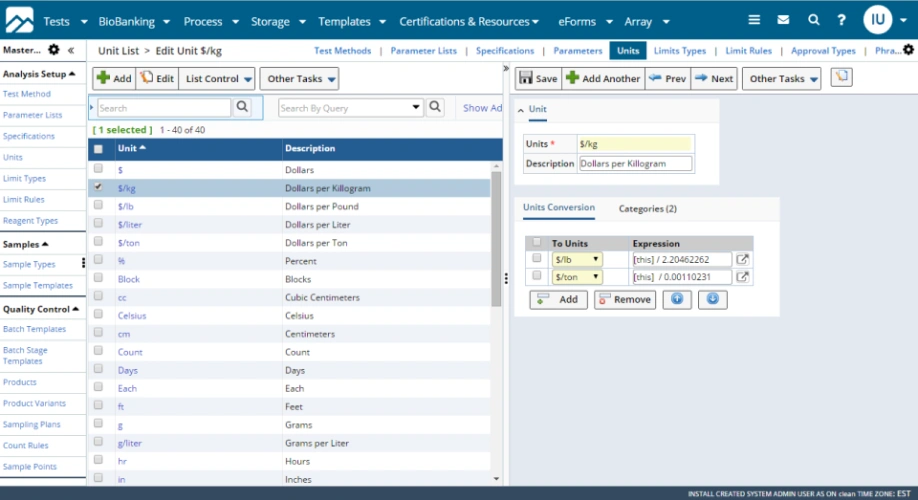
4. PathoGold

LabVantage Screenshot

PathoGold is built to digitise pathology and diagnostic-centre operations, with tools for laboratory reporting, billing, accounting, referrals, and inventory. It is available in both desktop and cloud-based versions, giving labs different options for how they deploy the system.

Best For

Small to mid-sized pathology labs, diagnostic centres, and multi-centre laboratories

4.3/5 by TechJockey

What Stands Out

  • Previous Result Comparison: PathoGold can compare a patient’s current and previous results, helping laboratories track changes across reports.
  • Histopathology Reporting: The system supports histopathology reports, including slide-picture printing and interfacing with haematology cell counters.
  • Multi-Patient Data Entry: Its transverse data-entry interface allows multiple patient results to be entered from a single screen.
  • Graphical Lab Analytics: PathoGold provides graphical views for areas such as income, purchases, sales, outstanding amounts, and test data.

Pros

  • Strong customer support experience
  • Convenient report sharing with physicians and patients
  • Easy Email and SMS integration

Harshit Vindhya

Running a successful clinic and at the same time managing an efficient customer relationship can be a cumbersome task. Thankfully, with the easy integration of Email and SMS through Birlamedisoft – PathoGold software, it has helped me send reports directly through email, app or SMS to physicians and consultants. Additionally, I can also send these reports to my patients, which has helped me to speed up the patient treatment cycle and improve my clinic’s reputation.

Techjockey Review

Cons

  • Does not provide cloud-based soft-copy backup
  • Offline work can become slow when connectivity issues arise

Shweta Saraf

The software fails to provide a soft copy backup over the cloud and all the essential files and folders are located on my computer only. With the data being locally secured over the computer’s hard-drives, it gets impossible to maintain a backup there and the fear of losing documents always stays.

Techjockey Review

5. LabSmart

LabSmart Screenshot

LabSmart is a cloud-based pathology lab management software focused on routine laboratory operations. It brings patient registration, billing, lab reporting, report delivery, and business management into one system. Labs can also customise tests and report formats, and access the software remotely.

Best For

Small to mid-sized pathology labs, diagnostic centres, and hospital pathology laboratories

4.8/5 by Techjockey

What Stands Out

  • Automated Result Calculations: LabSmart can automatically calculate results for tests such as CBC and Lipid Profile, reducing manual calculation work.
  • Abnormal Result Checks: The system can flag values outside defined normal ranges for review before reports are finalised.
  • Turnaround Time Tracking: The system can track timestamps for registration, sample collection, sample receipt, and reporting to monitor TAT.
  • Mobile Home Collection: Staff can register patients and generate case details from a mobile device while collecting samples at home.

Pros

  • Easy to operate for daily lab work
  • Provides responsive and knowledgeable support
  • Delivers reliable performance without reported downtime

Madhuraa Lab

User-friendly, customizable, feature-rich lab management software with excellent support and great value for money.

Techjockey Review

Cons

  • Letterhead customisation could be improved
  • Post-support follow-up can be limited
  • Some advanced settings may require initial technical assistance
  • Some test panels may print in reverse order

Madhuraa Lab

Letterhead customization could be improved, post-support follow-up is limited, and some advanced settings may require initial technical assistance.

Techjockey Review

How to Choose the Right Labguru Alternative

Switching from one lab system to another is not just about finding more features. Start with the parts of your current setup that are taking extra time or creating problems. This could be sample tracking, analyser integration, billing, report management, inventory, collection centre operations, or keeping track of pending tests and reports.

Then check what the switch will involve. Ask about data migration, implementation, staff training, support, security, user access, integrations, customisation, and the total cost. It is also worth checking whether the system fits your pathology workflows, including sample processing, report approval, billing, analyser connectivity, and work from collection centres. A system can look suitable on paper but still require major changes to the way your lab works.

Before making the final decision, ask the shortlisted vendors to show the software using situations from your own lab. Try common tasks such as registering a sample, checking its status, receiving analyser results, reviewing a report, and tracking pending tests. Also check whether the system can keep up as you add more samples, analysers, collection centres, referring doctors, or locations.

Making the Switch from Labguru

Finding a Labguru alternative usually starts with looking at what is becoming difficult in your lab. It could be keeping track of samples, following pending tests, managing inventory, checking analyser results, or handling work from different branches and collection centres.

The five alternatives compared above take different approaches to lab management. Before picking one, see how each system handles the work your lab does every day. A good demo should make it clear whether the software fits your existing workflow or leaves staff with more steps to manage.

Healthray is one option to evaluate for connected workflows, analyser and system integrations, quality management, migration support, and multi-centre operations. The final decision comes down to the areas your lab needs to improve and the way you want those workflows to work.

See How Healthray Would Work in Your Hospital

Walk through the workflows your team uses every day and discuss your requirements around migration, integrations, implementation, and training.

Talk to an Expert

Frequently Asked Questions

Will I still have access to my Labguru data after switching?

Check Labguru’s data-export and account-termination terms before you move. It is also worth confirming the format of the exported data and how long you can access it after the account is closed.

How much downtime can a lab expect when switching from Labguru?

There is no fixed timeline for the switch. Labs with more data and connected systems may need more time, especially when setup, testing, and staff training are involved. Ask the vendor how they plan to keep your regular lab work running during the changeover.

Can we switch to a new LIMS in stages?

Yes, a phased move may be possible. A lab with several teams, projects, or locations can discuss starting with one area first and moving the rest once the new setup is working properly.

Will our existing instruments work with the new LIMS?

Do not rely only on a vendor’s general integration list. Share the exact instruments and interfaces used in your lab and ask the vendor to confirm whether they can connect and transfer data as expected.

Healthray Editorial Team

About the Author

Healthray Editorial Team

The Healthray Editorial Team creates and reviews content based on Healthray's experience working with hospitals, clinics, and healthcare technology. Our content covers hospital management software, EMR/EHR, healthcare IT, automation, and digital transformation.