



October 2, 2026

7 Best DocPulse Alternatives and Competitors in 2026

Docpulse-alternatives-comparison-2026

The OPD is busy with registrations and consultations. A patient moves from consultation to billing, but the billing team is waiting for a diagnostic update. At the pharmacy counter, staff have to verify the patient’s details again, while the administration team is manually compiling reports from different workflows. Each delay may seem small, but together they can slow down patient flow and add work for staff.

As patient volumes increase, the hospital may also add beds, departments, IPD services, diagnostics, or another location. This means more teams need to share information, coordinate tasks, and manage reports without adding unnecessary manual work.

This is when teams may start looking beyond DocPulse for a system that fits their changing workflows, integration needs, reporting requirements, and scale.

This guide compares seven DocPulse alternatives for hospitals and clinics in 2026, covering the workflows and features each platform supports, its strengths and limitations, and what to check before switching.

How We Have Evaluated and Selected DocPulse Alternatives

We selected seven DocPulse alternatives based on their hospital capabilities and workflows. Our sources included official vendor websites and product documentation, along with G2, Capterra, and SoftwareSuggest reviews where available. The information was checked in September 2026.

We assessed areas such as workflow coverage, clinical support, department connectivity, billing and revenue operations, interoperability, India-specific requirements, scalability, implementation, ease of use, reporting, automation, and pricing across OPD, IPD, emergency, OT, pharmacy, laboratory, radiology, and other hospital workflows.

The same criteria were applied to all seven alternatives to keep the assessment consistent. We did not rank platforms based on a single score or review rating. Instead, we considered how each product may fit different hospital needs, along with its key capabilities and practical considerations.

A Quick Look at 7 DocPulse Alternatives

The table below provides a quick view of the seven alternatives before the detailed sections. It highlights key capabilities relevant to hospital and clinic requirements.

Healthray Logo

Healthray

Mocdoc

MocDoc

Docon Logo

Docon

HealthPlix LOGO

HealthPlix

LOGO Ezovion

Ezovion

Best for Hospitals & Health Systems Hospitals, Clinics & Diagnostics Solo Doctors, Specialist Clinics & Small Outpatient Practices Doctors & clinics; OPD-focused EMR Hospitals, clinics & healthcare groups
Pricing Custom Plan by beds & Modules Quote-Based Quote-Based ₹11,999/year (Pro) · ₹17,999/year (Elite) Quote-Based
Migration & implementation Migration + training · 1–3 weeks(Free) Migration + training Migration + training Migration + training Migration + training
India readiness ABDM/ABHA · PMJAY · NABH ABDM/ABHA · PMJAY · NABH ABDM ABDM/ABHA ABDM/ABHA· PMJAY
Key integrations HL7/FHIR · PACS/DICOM · Lab HL7/FHIR · PACS · Lab Lab integration, EHR interoperability Not stated HL7/FHIR · PACS/RIS · LIMS · Pharmacy · Payments
Deployment Cloud / On-premises / Hybrid Cloud On-premises Cloud / On-premises Cloud / On-premises
Rating
OPD/IPD Management
OPD Management Only
Bed & Ward Management
Bed Management Only
Bed Management Only
Operation Theatre (OT)
EMR / EHR
Pharmacy
Lab / LIMS
Billing
TPA / Insurance Claims
ABDM / ABHA
ABDM
PMJAY Support
NHCX Readiness
NABH-related Tools
HL7 / FHIR
PACS / DICOM
Lab-Instrument Integration
Not stated
Typical Implementation Time
1–3 weeks
Not stated
Not stated
About 4 weeks
Migration & Training Support
Offline-Tolerant Workflows
Not stated
Support Model / SLA
Post-Go-Live Support
Not stated
MIS Dashboards
Custom Reporting
Smart / Predictive Analytics
Not stated
Not stated
AI & Automation
Automation
Encryption & Data Protection
Access Control & Audit Trails
High Availability & Backup
Disaster Recovery
Security Certifications / Data Residency
ISO 27001:2022 · ISO 9001:2015 · HIPAA · SOC 2 Type II
ISO 27001 · HIPAA
ISO 27001:2022 · HIPAA
Not stated
Central Stores & Procurement
Ambulance Management
Not stated
Housekeeping Management
Not stated
Dietary Management
Biomedical & Asset Management
Not stated
Asset
HR / Payroll / Duty Rosters
Patient Communication
Multi-Facility Support
Get A Demo

7 Best DocPulse Alternatives for Hospitals in 2026

1. Healthray

Healthray is an information management system designed to offer support for patient services along with the various financial, administrative, and operational activities that need to be done in order to manage a healthcare institution. It provides solutions for the processes involved in registration, OPD, IPD, emergency, OT, EMR, diagnostics, pharmacy, billing, insurance, inventory, HR, and reporting. However, Healthray offers a lot more than just HIMS features, including solutions related to patient engagement, hospital websites, CRM, and operations management.

What Stands Out

  • Indian-specific hospital workflows: Provides support to create and verify ABHA IDs, integrates with ABDM, implements PM-JAY workflow, and provides GST billing for hospitals in India.
  • 30+ specialities: Assists in speciality-specific EMR workflows in 30+ medical specialities, such as cardiology, dermatology, homoeopathy, and Ayurveda.
  • AI voice notes for clinical documentation: AI voice notes let doctors capture consultation details by voice, reducing manual typing during consultations.
  • Migration, setup, and training support: Patient-data migration, workflow configuration, and staff training are supported during the transition from an existing system.
  • Flexible deployment: Provides cloud, on-premises, and hybrid deployment, making it easy for hospitals to deploy and manage this system.
  • QR tracking & AI chatbot: The QR-based tracking assists in managing hospital relatives and resources, while the AI chatbot facilitates 24×7 help to answer regular questions in hospitals.

Best For

Multi-speciality hospitals, hospital groups, diagnostic centres, and growing healthcare organisations managing complex or multi-department operations.

4.9/5 by G2

Pros

  • Multilingual support makes healthcare software easier to use for patients and staff from different language backgrounds.
  • Automated appointment reminders reduce routine follow-up calls by notifying patients about upcoming appointments and visits.
  • Access to clinical research data helps users quickly retrieve relevant patient information for retrospective studies.
  • Reusable prescription templates help doctors spend less time entering frequently prescribed medicines during busy consultations.
  • Mobile access allows users to review and manage relevant hospital information without being limited to a desktop workstation.

Anirrudh S.

Healthray HMIS covers hospital operations, patient records, pharmacy, and diagnostics, with configurable workflows to suit specific needs. The helpful setup support made onboarding smoother, while revenue tracking, pharmacy inventory, reporting, mobile access, and record tracking support day-to-day management. Report customisation is also highlighted as a standout feature.

Verified G2 Review

Cons

  • New users may need additional training to become comfortable with some advanced features.
  • Pricing details are not publicly listed, so hospitals need to contact Healthray for a quote based on their requirements.

Milan K.

The advanced features take some time to learn, but once you become familiar with them, the product feels powerful and flexible.
Verified G2 Review

Considering Healthray for Your Hospital?

See how Healthray fits your hospital’s workflows, departments, and current setup.

Book A Free Demo

2. MocDoc

MocDoc Screenshot For Alternatives

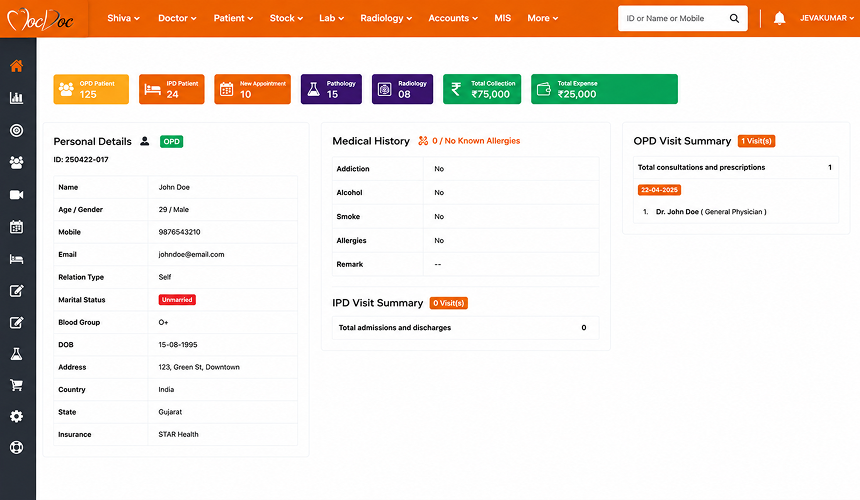
MocDoc is a cloud-based hospital management system that supports patient registration, appointments, EMR, OPD and IPD workflows, billing, laboratory, radiology, pharmacy, inventory, and reporting. Its modules cover clinical and administrative workflows for hospitals and healthcare organisations.

What Stands Out

  • Dedicated LIMS and pharmacy solutions: Provides separate solutions for laboratory information management and pharmacy operations alongside its hospital management system.
  • Multi-location management: Supports organisations managing hospital and healthcare operations across multiple locations.
  • Indian healthcare support: Includes workflows such as PM-JAY and ABDM, plus multilingual support for Indian users.
  • Patient-facing digital services: Supports online appointments, teleconsultation, and digital access to patient records for remote and online interactions.
  • Security and compliance: Includes role-based access and data encryption, with vendor documentation referencing HIPAA compliance and NABH-related compliance support.

Best For

Hospitals, diagnostic centres, clinics, and healthcare organisations managing clinical, billing, laboratory, and pharmacy workflows.

4.7/5 by G2

Pros

  • The intuitive interface makes the system easier for staff to use during routine hospital operations.
  • Quick responses from the support team help users resolve questions and issues without disrupting their daily work.
  • Easy access to patient records and MIS reports helps staff retrieve information without extensive manual effort.

Sushma A.

The team provides prompt solutions to user queries, helping users get timely assistance when they need support.

Verified G2 Review

Cons

  • There is no offline training facility, which may create problems for organisations requiring on-site training during implementation.
  • The system occasionally lags, thereby disturbing workflow as well as other activities such as navigation within the system, data entry, and report generation.
  • The mobile app is less functional than the desktop version, limiting access to some features that are possible on the desktop version.
  • Customisation possibilities are very limited, and therefore it becomes difficult to customise the workflow according to hospital procedures.

SIVAGURU K.

Sometimes the software may lag, making it hard to work with. The lack of customisation options may be a problem too.

Verified G2 Review

3. Docon

Docon Screenshot

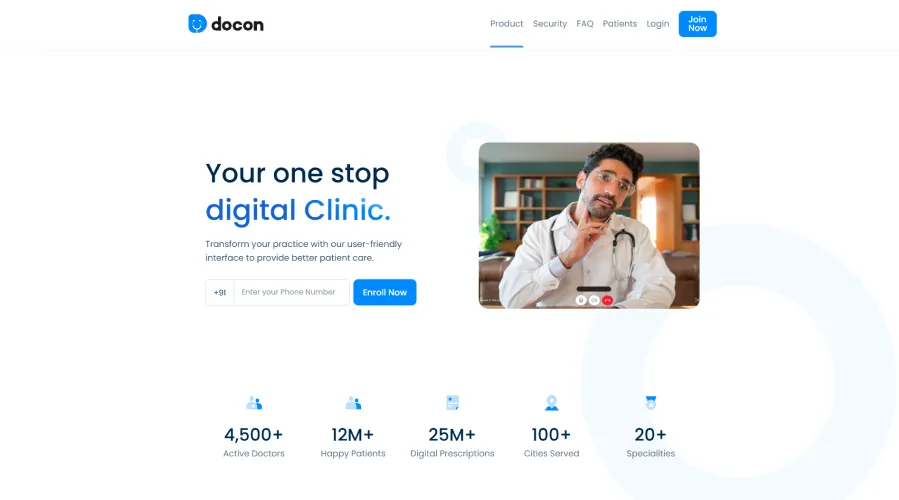
Docon is a digital practice management and EMR platform designed to help doctors manage appointments, patient records, prescriptions, billing, and patient communication. It also supports video consultations, analytics, and a patient portal for outpatient clinical practice.

What Stands Out

  • Type-free prescription interface: The type-free interface is designed to help doctors prepare prescriptions quickly during consultations.
  • Patient app: Patients can access digital prescriptions and appointment-related services through the app after their consultations.
  • Video consultations with online payments: The platform supports video consultations along with online payment collection and payment settlement for digital appointments.
  • Queue management for appointments: The appointment module has features that provide queue management services for managing patient consultations.
  • Patient communication: Notifications and reminders regarding appointments facilitate patient communication through the process of consultation.

Best For

Doctors, outpatient clinics, and small healthcare practices managing consultations, prescriptions, patient records, appointments, and billing.

4.8/5 by SoftwareSuggest

Pros

  • The user-friendly interface ensures that it becomes easy for physicians as well as the receptionist staff to master and use the program in their everyday work.
  • The support staff is readily available to assist users with their queries and problems related to the software.
  • Writing prescriptions is easy for doctors, helping them create prescriptions quickly during consultations.

Himanshu, Doctor

The software is user-friendly for both physicians and the receptionist staff, and support staff is always available for any kind of queries.

Verified Software Suggest Review

Cons

  • Docon depends on a reliable internet connection, which can affect access when connectivity is unstable during consultations.
  • The immunisation schedule does not fully match the IAP-recommended schedule, which may require doctors to refer to the recommended schedule separately.
  • Generic medicine names are not currently available in the prescribing workflow, limiting this option for doctors who prefer generic prescribing.
  • Some workflows may require additional customisation or integrations to meet specific practice requirements.

Amit S.

Docon is easy to use, and its features are well developed around doctors’ needs. However, the immunisation schedule could better align with the IAP-recommended schedule, and generic medicine names are currently missing.

Verified Software Suggest Review

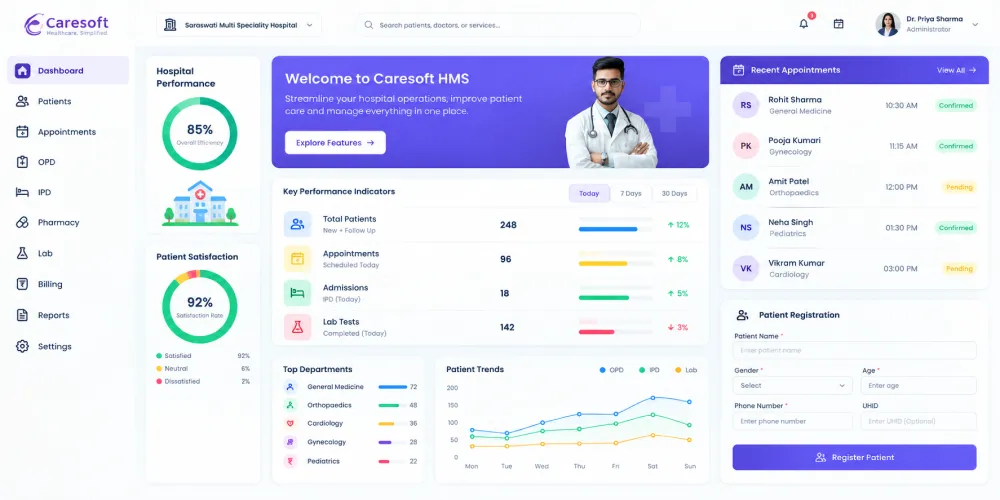
4. Caresoft HIS

Caresoft His Screeenshot

Caresoft HIS is a hospital information system developed to replace manual hospital processes with digital workflows. It brings clinical, financial, and administrative information into a structured system for day-to-day hospital management. Its modular approach allows hospitals to use different functions based on their operational requirements.

What Stands Out

  • Paperless IPD: The paperless IPD system enables clinical staff to create, update, and retrieve inpatient records digitally throughout the patient’s hospital stay.
  • NABH reporting support: The system supports hospital reporting and documentation requirements associated with NABH accreditation.
  • Workflow customisation: Hospitals can configure process flows to match the way different departments handle their routine activities.
  • Business intelligence: Built-in BI tools provide dashboards and visual reports that help management review hospital data and operational performance.
  • Tally interface: The Tally interface connects hospital financial information with accounting workflows for organisations using Tally.

Best For

Mid-size to large hospitals and multi-centre healthcare organisations managing multiple departments and routine hospital operations.

4.6/5 by SoftwareSuggest

Pros

  • The software is easy to understand and handle, helping staff manage routine hospital work without a steep learning curve.
  • Billing work is easy to manage, making routine billing tasks more straightforward for hospital staff.
  • The support team helps users with software-related queries and assists when issues arise during regular use.

Lailesh

CareSoft is easy to use, and the support staff is helpful. The team provides good service and is always available to resolve queries. The product performs well for routine hospital use.

Verified Software Suggest Review

Cons

  • The specialisation and prescription pages need improvement to provide a smoother experience for clinical users during consultations.
  • The reporting section needs more flexibility for hospitals that require customised reports beyond standard reporting options.
  • Pharmacy workflows can sometimes cause issues during routine use, which may interrupt day-to-day pharmacy operations.
  • Token numbers may not update automatically in older OPD bills, requiring staff to handle the update manually.

MR N.

The token number does not update automatically in old OPD bills, so it requires manual attention when handling these bills.

Verified Software Suggest Review

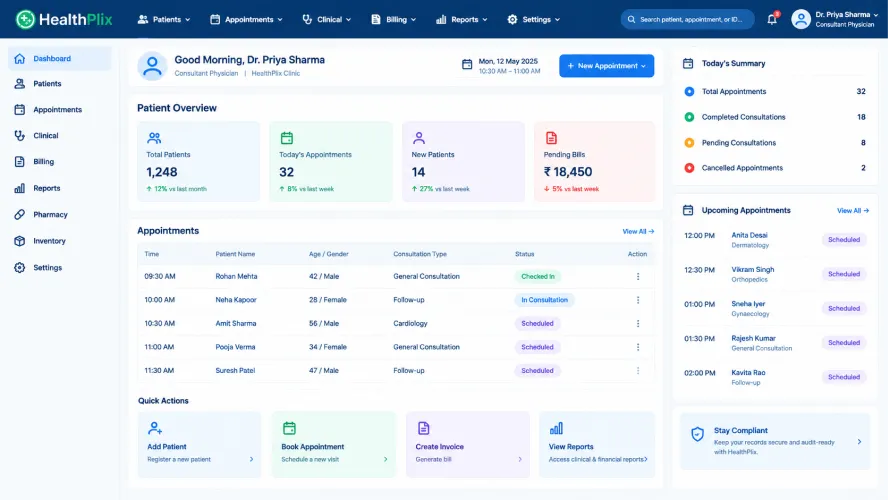
5. HealthPlix

Healthplix Screenshot

HealthPlix is an EMR and healthcare management platform focused on helping doctors and healthcare facilities manage consultations, patient records, prescriptions, appointments, and billing. It also supports hospital operations through features such as IPD management, revenue tracking, and patient engagement.

What Stands Out

  • Speciality-specific EMR: HealthPlix provides EMR modules designed for the clinical documentation requirements of different medical specialities.
  • Regional-language prescriptions: Doctors can create prescriptions in 14 languages, making it possible to provide digital prescriptions in different supported Indian languages.
  • Patient engagement: PlixConnect enables appointment reminder notifications and other communication workflows to connect patients with healthcare professionals.
  • Inpatient Process Management: The hospital network assists in patient process management, such as the admission process, bed management, treatment plan, billing and record-keeping.
  • Revenue Insights: Insights provided by HealthPlix on revenue management assist hospitals in assessing their performance in finance-related matters.

Best For

Clinics, speciality practices, and hospitals looking for an EMR-led platform for doctor and patient management.

2.8/5 by G2

Pros

  • Medical records are easy to track because patient information is kept in the system.
  • Patient follow-up is convenient after consultations, allowing patients to continue asking questions through the platform.
  • The outpatient workflow is easy to manage, helping doctors handle routine practice activities through the platform.

Megha G.

The best thing about HealthPlix is that patients can ask follow-up questions to their doctor after an in-person consultation at the clinic. It makes continuing communication with the doctor much easier.

Verified G2 Review

Cons

  • Frequent server breakdowns can interrupt access to the platform and disrupt regular work.
  • Appointment management can require improvement when scheduled consultations do not take place as expected.
  • Customer support can be difficult to reach when users need help resolving software-related issues or getting timely assistance.
  • Inpatient and pharmacy management need further improvement for hospitals that require broader hospital-management capabilities.

Shree A.

The service has frequent server issues, and resolving even minor problems can be difficult. Support issues often have to be escalated to a senior contact, which can make getting timely assistance frustrating.

Verified G2 Review

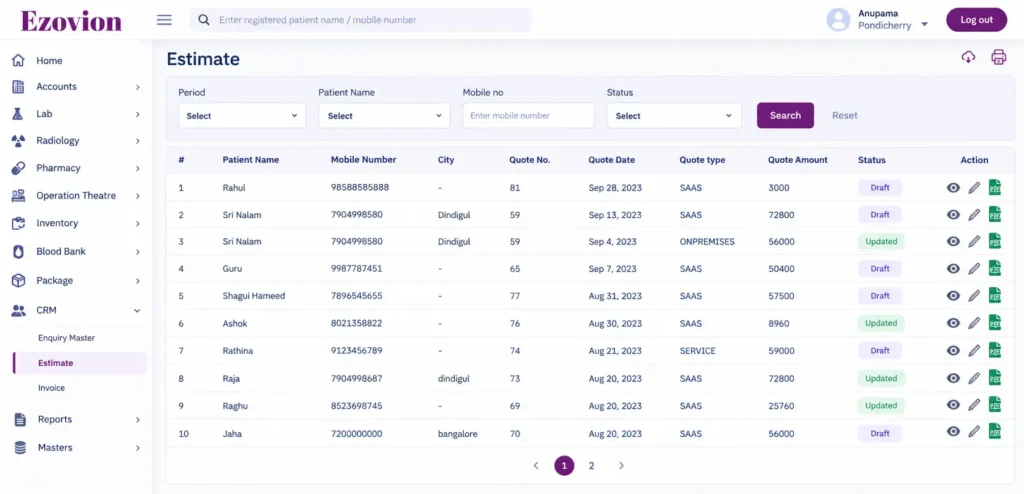
6. Ezovion

Ezovion Screenshot Software

Ezovion is a hospital management platform that connects clinical care, patient services and administrative operations within one system. It brings key hospital workflows such as OPD, IPD, EHR, billing and diagnostics together, along with additional administrative and operational functions. It also offers cloud and on-premises deployment, with multi-location support for healthcare organisations operating across different sites.

What Stands Out

  • Integrated diagnostics: Ezovion links laboratory and radiology workflows with patient records, with PACS support for accessing and managing medical images.
  • Queue and token management: Its OPD workflow includes appointment, queue, and token management to help organise patient visits and waiting flow.
  • TPA and billing workflows: The platform includes OP and IP billing along with revenue cycle management and TPA-related processes.
  • Patient portal and engagement: Features like appointment scheduling, communication, and patient portals can be provided to patients by Ezovion.
  • Operation theatre management: The OT module has functionality for procedure scheduling, team coordination, documentation, inventory, billing, and post-operation activities.

Best For

Hospitals, clinics, and healthcare groups managing multiple departments or locations through a hospital management system.

4.0/5 by G2

Pros

  • Customer support is helpful and provides guidance when needed during product use.
  • The user interface is easy to understand, making the software straightforward for staff to use during routine work.
  • Multiple clinics can be managed through a single platform, making it easier to coordinate operations across locations.

Ezovion H.

Ezovion brings multiple clinic functions into one platform and makes it easy to manage different aspects of the clinic. Connecting multiple clinics on one platform is especially helpful, and the initial setup was smooth and well organised.

Verified G2 Review

Cons

  • Some workflows may require additional customisation when the standard setup does not fully match a clinic’s specific requirements.
  • Pricing is not publicly listed, so organisations need to contact the vendor to determine the cost for their required setup.
  • The limited number of independent product reviews makes it harder to assess the software from a broad range of user experiences.

Ezovion H.

Some workflow areas require additional customisation to meet specific operational needs.

Verified G2 Review

7. SoftClinic GenX

SoftClinic GenX Screenshot For Alternatives

SoftClinic GenX is a clinic and hospital management platform that combines EHR, hospital information management, and practice-management functions. It covers areas such as patient records, appointments, laboratory, pharmacy, HR, inventory, and accounting, with both cloud and desktop deployment options.

What Stands Out

  • Speciality-specific EHR: Provides EHR workflows for specialities including cardiology, neurology, gynaecology, Ayurveda, orthopaedics, paediatrics, ophthalmology, and general surgery.
  • Patient portal: The patient portal allows patients to store health records and access or share them with family members and physicians.
  • Equipment interfacing: Supports connections between healthcare equipment and the software for transferring relevant data.
  • Barcode reporting: Includes a barcoded reporting system as part of its hospital and clinic management features.
  • Fingerprint identification: Provides fingerprint-based identification as part of its patient identification features.

Best For

Clinics, nursing homes, and small to mid-sized hospitals looking for core clinical, administrative, and hospital management functionality.

3.6/5 by Capterra

Pros

  • The straightforward interface makes it easier for staff to navigate the software and manage routine tasks with less training.
  • Patient information and clinical records can be accessed when needed, making it easier to retrieve relevant details during consultations and follow-up work.
  • Cloud and desktop deployment options give organisations flexibility to choose a setup that suits their infrastructure and operational requirements.

George P.

The software has enabled us to move towards a more paperless process in our healthcare institution through the integration of functionalities like lab, pharmacy, accounting, HR, and inventory management.

Verified G2 Review

Cons

  • Some workflows may require additional customisation when the standard configuration does not fully match an organisation’s specific requirements.
  • Billing and advanced accounting functions may require additional familiarity, particularly for users handling more detailed financial workflows.
  • Performance issues or slowdowns can affect routine work, particularly when the system is handling heavier usage.
  • Support and issue resolution may not always be consistent, which can be a consideration during implementation and day-to-day use.

Kaling M.

The interface feels outdated, some modules require repeated patient-data entry, billing and accounting can be confusing, and the software may become slow during busy hours. Customer support can also involve long waiting times and repeated follow-ups.

Verified Capterra Review

How to Choose the Right DocPulse Alternative for Your Hospital or Clinic

Choosing a DocPulse alternative should start with the areas where your hospital or clinic needs a different approach. Consider the workflows that matter most, such as patient registration, consultations, diagnostics, pharmacy, billing, reporting, integrations, customisation, and support. Use these requirements as the basis for comparing the shortlisted platforms rather than focusing only on the number of features they offer.

You should also look beyond the product features and consider what each option will require from your organisation. Check how the platform fits your existing workflows, what data can be migrated from DocPulse, which systems can be integrated, and what implementation, training, and ongoing support will involve. It is also worth reviewing the pricing structure, including any additional costs for customisation, integrations, users, or locations.

Before making a decision, ask the shortlisted vendors to demonstrate scenarios based on your actual requirements. Involve doctors, nurses, billing staff, pharmacists, laboratory teams, and administrators in the evaluation. Their feedback can help you assess how practical each platform is for daily operations and whether it addresses the areas you want to improve.

Final Verdict

There is no single DocPulse alternative that will suit every hospital or clinic. The right choice depends on your organisation’s workflows, operational needs, and growth plans. Features and pricing matter, but so do usability, customisation, migration, and how well the platform brings different areas of healthcare operations together.

For Indian hospitals looking to manage clinical, billing, pharmacy, laboratory, and administrative operations through one system, Healthray is worth considering. It supports broader hospital workflows along with India-specific requirements such as ABDM, ABHA, PM-JAY, and TPA.

If Healthray is among your shortlisted options, a product demo can help your team understand its capabilities and discuss migration, customisation, implementation, and other hospital-specific requirements before making a decision.

See How Healthray Would Work in Your Hospital

Walk through the workflows your team uses every day and discuss your requirements around migration, integrations, implementation, and training.

Book a Free Demo

Frequently Asked Questions

Is Healthray a good alternative to DocPulse for hospitals?

Healthray could be an appropriate DocPulse alternative for hospitals requiring connected clinical, administrative, and operational workflows. Healthray demonstrates capabilities such as ABDM, ABHA, PM-JAY, TPA workflows, HR and HL7/FHIR integration in addition to basic hospital operations. DocPulse also caters to extensive hospital workflows, and hence hospitals need to make comparisons depending on their needs.

Why should a hospital consider switching from DocPulse?

A hospital may consider switching when it needs workflow support that its current setup does not adequately provide, such as additional integrations, more detailed reporting, broader administrative functions, or support for new branches and departments. ABDM and ABHA capabilities, PM-JAY workflows, HR and payroll management, and OT management may also be relevant requirements. The decision should be based on the specific gaps a hospital identifies in its own operations.

How much does it cost to migrate from DocPulse to another HMS?

These costs depend on various things, including the amount of data to be transferred, modules needed, integration, customisation, implementation, training, and support, among others. When changing hospitals, they should request the selected vendor for a full cost analysis regarding migration and implementation.

Can patient data be migrated from DocPulse to another HMS?

This could possibly occur based on the type and availability of data that can be exported, as well as the migration features of the new HMS. Hospitals need to know what kind of information can be transferred and how data validation will take place.

Which HMS is suitable for a small clinic versus a multi-speciality hospital?

The choice of HMS should be based on the organisation’s size, processes, departments, and future needs. While a small OPD clinic may require a smaller HMS, a multi-speciality hospital may require a more extensive HMS, which would support different functions like IPD, OT, diagnostics, pharmacy, billing, insurance, etc. The hospitals should pick an HMS that suits their present and future needs.

Healthray Editorial Team

About the Author

Healthray Editorial Team

The Healthray Editorial Team creates and reviews content based on Healthray's experience working with hospitals, clinics, and healthcare technology. Our content covers hospital management software, EMR/EHR, healthcare IT, automation, and digital transformation.