



September 14, 2026

6 Best Docon Alternatives You Can Rely On in 2026

Docon-alternatives-healthray-hospital-management-dashboard.webp

A hospital’s OPD desk gets busy by mid-morning, and the front-office team notices the registration screen taking a few extra seconds to load. A patient registered earlier in the outpatient department has to repeat their basic details at the pharmacy counter because the two screens don’t share information. Meanwhile, the billing team waits for a laboratory update that hasn’t synced, turning a discharge that should take twenty minutes into an hour.

None of these issues is a major failure on its own. But when they occur repeatedly, they can add to staff workload and slow down everyday operations, especially as a hospital adds beds, opens a new department, or expands to another location.

For hospitals using Docon, this may be a good time to evaluate whether the existing system still matches their operational needs. The reason is not always a major software failure. It may be a combination of performance issues, disconnected workflows, reporting limitations, or difficulty adapting the system as requirements change.

The important question is not simply which platform has more features than Docon. It is which hospital management system fits the way your teams work across registration, consultation, diagnostics, pharmacy, billing, admission, discharge, and other day-to-day processes.

This guide compares six Docon alternatives for hospitals in 2026, covering where each platform may fit, its strengths and limitations, and what hospitals should verify before making a switch.

How We Have Evaluated and Selected Docon Alternatives

We selected six Docon alternatives by reviewing their hospital capabilities and workflows. We used official vendor websites and product documentation, along with G2 and Capterra reviews where available. We checked the information in September 2026.

We assessed areas such as workflow coverage, clinical support, department connectivity, billing and revenue operations, interoperability, India-specific requirements, scalability, implementation, ease of use, reporting, automation, and pricing across OPD, IPD, emergency, OT, pharmacy, laboratory, radiology, and other hospital workflows.

The same criteria were applied to all six alternatives to keep the assessment consistent. We did not rank platforms based on a single score or review rating. Instead, we considered how well each product may fit different hospital needs, while highlighting key strengths, limitations, and practical considerations.

Quick Overview of the Docon Alternatives

Before we look at each platform in detail, here’s a quick side-by-side comparison of Docon alternatives to help you see how they differ.

Healthray Logo

Healthray

HealthPlix LOGO

HealthPlix

Tirupati Software Infotech Pvt Ltd

HMS Pro+

Softclinic

SoftClinic GenX

LOGO Ezovion

Ezovion

Best for Hospitals & Health Systems Doctors & clinics; OPD-focused EMR Hospitals & healthcare facilities Hospitals & Clinics Hospitals, clinics & healthcare groups
Pricing Custom Plan by beds & Modules ₹11,999/year (Pro) · ₹17,999/year (Elite) Quote-Based Quote-Based Quote-Based
Migration & implementation Migration + training · 1–3 weeks(Free) Migration + training Migration + training Migration + training Migration + training
India readiness ABDM/ABHA · PMJAY · NABH ABDM/ABHA ABDM/ABHA · NHCX ABDM/ABHA
Key integrations HL7/FHIR · PACS/DICOM · Lab Not stated Lab · RIS/PACS · DICOM · Payment HL7 · PACS · Lab HL7/FHIR · PACS/RIS · LIMS · Pharmacy · Payments
Deployment Cloud / On-premises / Hybrid Cloud / On-premises Cloud / On-premises Cloud / On-premises Cloud / On-premises
Rating
OPD/IPD Management
Bed & Ward Management
Bed Management Only
Operation Theatre (OT)
EMR / EHR
Pharmacy
Lab / LIMS
Billing
TPA / Insurance Claims
ABDM / ABHA
ABHA
ABHA
PMJAY Support
Not stated
Not stated
NHCX Readiness
NABH-related Tools
Not stated
HL7 / FHIR
Not stated
PACS / DICOM
Lab-Instrument Integration
Not stated
Not stated
Typical Implementation Time
1–3 weeks
Not stated
Not stated
Not stated
About 4 weeks
Migration & Training Support
Both
Both
Both
Both
Both
Offline-Tolerant Workflows
Not stated
Not stated
Support Model / SLA
Post-Go-Live Support
Not stated
MIS Dashboards
Custom Reporting
Smart / Predictive Analytics
Not stated
Not stated
Not stated
AI & Automation
Not stated
Encryption & Data Protection
Access Control & Audit Trails
High Availability & Backup
Disaster Recovery
Security Certifications / Data Residency
ISO 27001 · India
ISO 27001:2022 · HIPAA
ISO 9001:2015
HIPAA · ISO
Not stated
Central Stores & Procurement
Not stated
Ambulance Management
Not stated
Housekeeping Management
Not stated
Dietary Management
Biomedical & Asset Management
Not stated
HR / Payroll / Duty Rosters
Patient Communication
Multi-Facility Support
Not stated
Not stated
Get A Demo

6 Best Docon Alternatives for Hospitals

1. Healthray

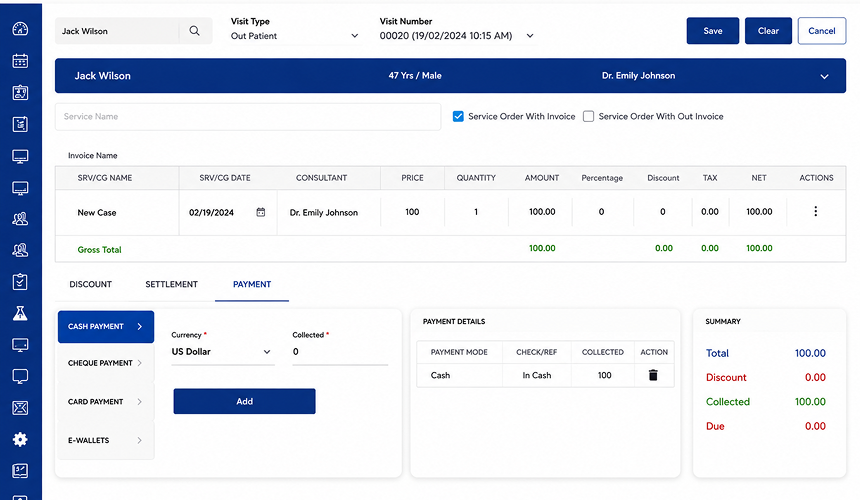
Healthray Site Scrrenshot

Healthray is an integrated hospital management platform that brings clinical, administrative, financial, and operational activities into one system. It covers key hospital functions such as OPD, IPD, EMR, pharmacy, laboratory, billing, inventory, and reporting, helping hospitals avoid managing these workflows across disconnected applications. The platform also supports Indian healthcare requirements such as ABDM and ABHA, along with interoperability standards including HL7, FHIR, and DICOM.

What Stands Out

  • AI-powered voice-to-note documentation converts clinical conversations into structured notes, reducing the time doctors spend on documentation and clinical record preparation.
  • 30+ speciality-specific EMR workflows provide tailored templates and clinical forms for different medical specialities, supporting their individual documentation requirements.
  • Operation theatre management covers OT scheduling, procedure tracking and surgeon allocation from pre-procedure planning through procedure completion.
  • Migration support helps hospitals move existing patient and operational data to Healthray, with implementation assistance and staff training.
  • Flexible deployment options allow hospitals to choose cloud, on-premises or hybrid setups based on their infrastructure requirements, security preferences and IT environment.
  • Configurable workflows let hospitals customise tariffs, formularies, forms, approval chains, and report templates to match department-specific processes and hospital requirements.

Best For

Multi-speciality hospitals managing complex department-wide operations that need coordinated clinical, operational, and administrative workflows in a single HMS.

4.9/5 by G2

Pros

  • Supports multiple staff members using the system at the same time without slowing down during busy hospital hours.
  • Automated reminders help staff manage appointments, follow-ups and other routine tasks more efficiently.
  • Multilingual support makes the system more accessible to staff and patients from different language backgrounds.
  • Patient categorisation and custom notifications help staff prioritise patients and tasks based on real-time needs.
  • Secure cloud backups help protect hospital data and reduce the risk of losing important information.

Dr. Gautam Beladiya

Automated reminders save our front desk a lot of time, and having access to previous patient records makes it much easier to understand their history. It helps us spend less time on routine tasks and more time with our patients.

Verified Review

Cons

  • Some advanced features may require additional training for new users to use confidently.
  • Custom report generation can take some time to set up, although saved reports can be reused.

Milan K.

The advanced features take some time to learn, but once you become familiar with them, the product feels powerful and flexible.
Verified G2 Review

Explore Healthray for Your Hospital

See how Healthray can support your hospital’s clinical, administrative, and operational needs through one integrated platform.

Book a Free Demo

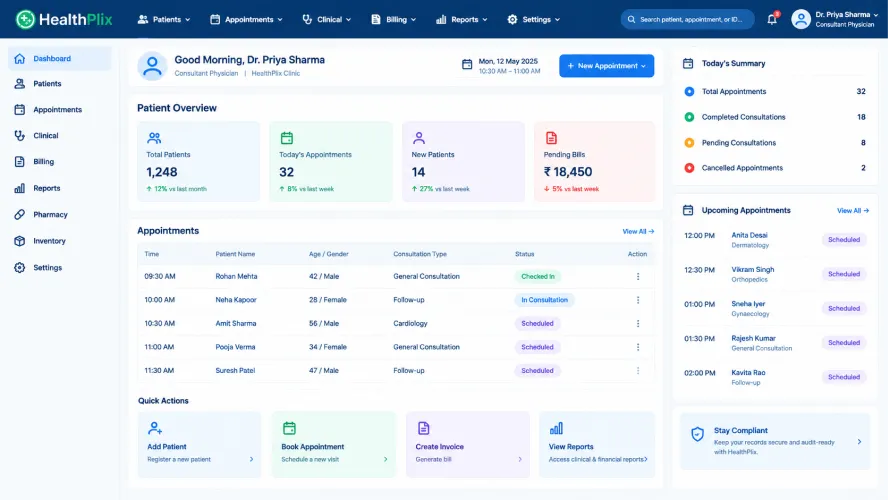
2. HealthPlix

Healthplix Screenshot

HealthPlix is an EMR and healthcare management system designed for doctors and hospitals. It supports OPD workflows such as consultations, prescribing, appointments and patient management, along with IPD workflows covering patient admission, bed management, treatments, scheduling and billing. It also brings medical records into these workflows, giving doctors and hospital staff access to patient information during care.

What Stands Out

  • Doctor-centric design focuses on the workflows doctors use, with an interface designed to make documentation and administrative tasks less time-consuming.
  • Prescription analytics provide insights into prescription trends, helping doctors review their prescribing patterns.
  • Insights on revenues use intelligent dashboards to uncover revenue possibilities, as well as revenue leaks and resource utilisation within hospital management.
  • PlixConnect helps in automating patient communication through personalised messages that will help hospitals to communicate with patients beyond single consultations.
  • Offline EMR helps doctors access patient medical records and prescribe medications without an internet connection. Data is synced online once the internet connection becomes available.

Best For

Clinics, doctors and hospitals looking for an EMR-led platform with supporting IPD and patient-management capabilities.

2.8/5 by G2

Pros

  • Patient medical records are easy to access and track, keeping relevant information available for clinical reference.
  • Appointment booking is simple and convenient, allowing patients to schedule doctor consultations through the app.
  • Follow-up communication with doctors allows patients to ask additional questions after an in-person consultation.

Verified User

The medical records are easy to track, and it is helpful that all the records are safely kept in the system.

Verified G2 Review

Cons

  • Customer support can be difficult to reach when users need assistance with platform-related issues.
  • Appointment cancellation is not available directly in the patient app, requiring users to contact customer support to cancel an appointment.
  • Prescription language support could be expanded beyond the currently available 14 languages.
  • Frequent server breakdowns can disrupt access to the platform and interrupt regular clinical workflows.

Verified User

Rx language support could be improved by including more languages; currently, only 14 languages are available.

Verified G2 Review

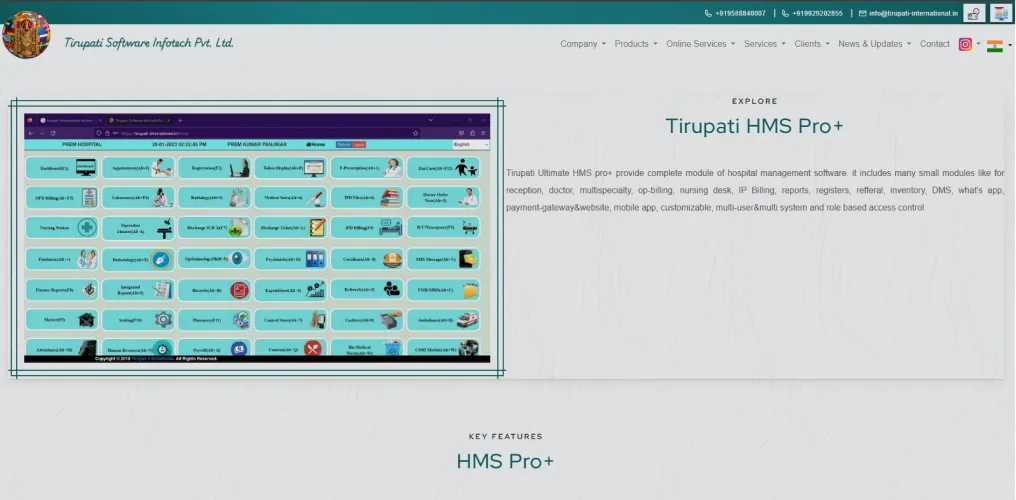
3. HMS Pro+

HMS Pro Plus Screenshot

HMS Pro+ is a hospital management system from Tirupati Software Infotech that covers core hospital functions across OPD, IPD, billing, pharmacy, laboratory, radiology, nursing and clinical documentation. Its modules also include areas such as OT management, inventory, HR, finance, ambulance, CSSD and blood bank, with support for multi-user access and role-based controls.

What Stands Out

  • Multispeciality workflows include gynaecology and obstetrics, orthopaedics, paediatrics, dentistry, ophthalmology, cardiology and oncology.
  • Patient queue coordination combines token display and appointment functions, helping reception staff manage patient flow from registration through consultation.
  • Document handling provides a dedicated DMS for organising, storing and retrieving hospital documents, with documents managed within the hospital information system.
  • Blood bank operations cover blood storage, availability and issue, allowing staff to track blood units from availability checks through to their issue.
  • Biomedical waste tracking records and monitors waste handling activities across different hospital departments, providing records of waste-related processes.

Best For

Hospitals and healthcare facilities looking for a broad HMS with OPD, IPD and administrative modules, particularly where a wide range of hospital departments needs to be managed within one system.

4.3/5 by Capterra

Pros

  • Responsive support for software queries and assistance with day-to-day hospital operations.
  • Easy tracking of payments made to doctors who refer patients to the hospital.
  • Quick access to a patient’s test and medicine details helps staff verify information before discharge.

Dhanya T.

The software makes it easier for hospital staff to manage patient registration, check bed availability and handle doctor appointments.

Verified Capterra Review

Cons

  • IPD and TPA billing may require additional configuration to handle complex hospital billing structures.
  • The interface could be improved to make navigation easier and more intuitive for users.
  • Additional charges for training and support services can increase the overall cost of using the software.
  • Network-related issues can affect software speed and cause delays during routine use.

Ramesh S.

The software does not provide adequate backup or customisation options. Users have to create their own masters without proper backup support. IPD billing also does not support specific TPA billing methods.

Verified Capterra Review

4. SoftClinic GenX

SoftClinic GenX Screenshot For Alternatives

SoftClinic GenX is a hospital and clinic management platform that combines clinical, administrative and financial functions in one system. It handles patient registration, OPD and IPD, prescriptions, billing, accounting and reporting, with optional modules for pharmacy, laboratory, radiology, insurance claims and HR. The platform is available in cloud and on-premises setups and is designed for physicians, clinics, nursing homes and hospitals.

What Stands Out

  • Family-wise patient records group patients from the same family under linked records, making it easier to manage their information together.
  • Regional language support allows staff to enter patient names and prescriptions in regional languages and choose their preferred language within the system.
  • 100+ predefined reports cover patient visits, prescriptions, investigations, estimates, bills, receipts, income and expenses, and other routine hospital records.
  • Equipment interfacing connects supported medical equipment with SoftClinic, allowing clinical data generated by connected devices to be brought into the software.
  • Fingerprint-based patient identification uses biometric identification during patient registration, providing an alternative to identifying patients only through manually entered details.

Best For

Clinics, nursing homes and small to medium-sized hospitals that need a practical HMS with multilingual prescriptions, family-based records and ready-made reporting.

3.6/5 by Capterra

Pros

  • The software is easy to use for routine hospital and clinic activities.
  • OPD patient data and appointment arrangements are good for coordinating a large number of patients.
  • Customer support provides quick responses for software-related queries and issues.

Maulin S.

OPD patient data and appointment arrangements are good, making it easy for secretaries to coordinate a large number of patients.

Verified Capterra Review

Cons

  • The interface contains repetitive buttons and can feel outdated, particularly during OPD registration.
  • The software can become slow or hang during busy periods, affecting routine hospital work.
  • Patient details may need to be entered again when moving between modules, creating repetitive data entry.
  • The software can require additional customisation during setup to match specific clinic workflows.

Kaling M.

The interface feels outdated, with repetitive buttons and spelling errors. Different modules require repeated patient data entry, while billing and accounts can be confusing. The software becomes very slow during busy hours, and customer support takes several calls to resolve issues.

Verified Capterra Review

5. Ezovion

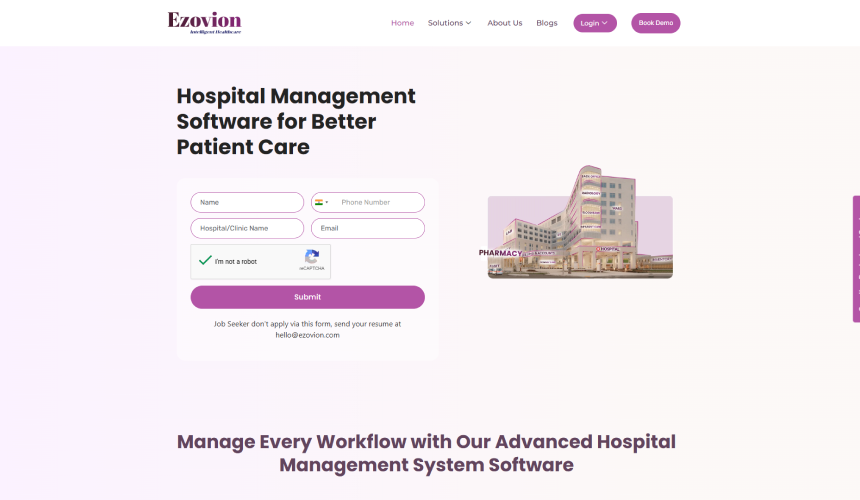
Ezovion Screenshot

Ezovion is a hospital management platform that connects clinical care, patient services and administrative operations within one system. It brings key hospital workflows such as OPD, IPD, EHR, billing and diagnostics together, along with additional administrative and operational functions.

What Stands Out

  • Geofencing controls can restrict system access or selected functions based on predefined geographic locations, allowing organisations to apply location-based access rules.
  • Medical camp management provides dedicated workflows for recording and coordinating activities carried out during medical camps.
  • Specialised care workflows include dedicated functionality for areas such as diabetes care and cath lab operations.
  • Customisation Studio provides tools for configuring reports, templates and selected system elements to match specific operational requirements.
  • White-labelling allows healthcare organisations to use the platform under their own branding, including customised presentation for users.

Best For

Multi-location hospitals, hospital groups and healthcare organisations that need to coordinate clinical, financial and administrative operations across multiple facilities.

4/5 by G2

Pros

  • The initial setup is easy and well organised, making the transition to the software smooth.
  • The software can be used to manage multiple branches through a single account.
  • Customer support is helpful and provides guidance when needed during product use.

Ezovion H.

Ezovion brings multiple clinic functions into one platform and makes it easy to manage different aspects of the clinic. Connecting multiple clinics on one platform is especially helpful, and the initial setup was smooth and well organised.

Verified G2 Review

Cons

  • Pricing is not publicly listed, so users need to contact Ezovion for pricing details.
  • Some workflows may require additional customisation to match specific clinic requirements.
  • Minor-priority defects and enhancement requests can take up to two weeks to resolve.

Ezovion H.

Some workflow areas require additional customisation to meet specific operational needs.

Verified G2 Review

6. Miracle HIS

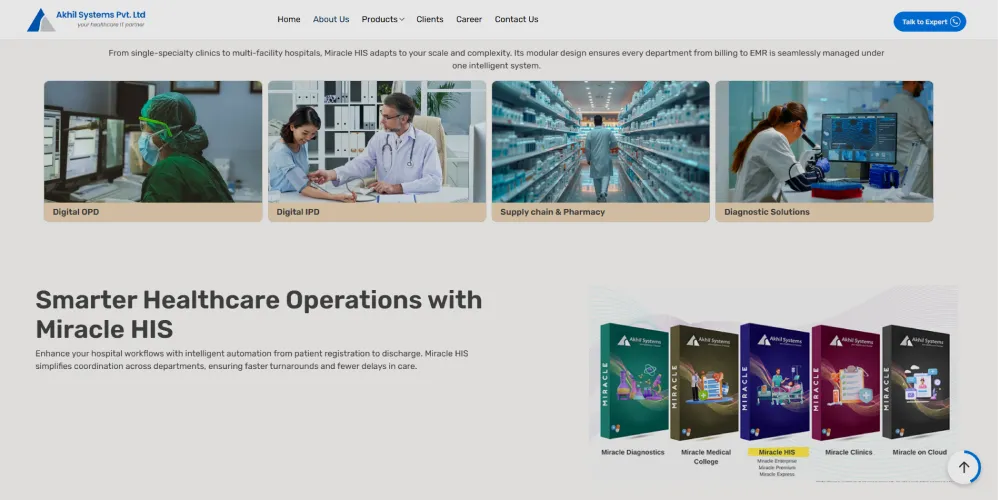
Miracle HIS Akhil Screenshot

Miracle HIS is a hospital information system from Akhil Systems that brings patient administration, clinical records, diagnostics, pharmacy, billing and other hospital functions into a single system. It supports hospital workflows from patient registration through discharge, with modules for different departments and operational areas.

What Stands Out

  • Doctor accounting provides a dedicated module for calculating doctor payouts, including payable statements, adjustments, deduction heads and unsettled bills.
  • OT workflows cover OT scheduling, booking, confirmation, patient check-in, surgery posting and OT clearance, with operative details recorded within the workflow.
  • Clinical decision support is integrated with the EMR and clinical workflows to provide decision-support functionality during patient care.
  • Ancillary operations extend into areas such as CSSD, blood bank, dietary services, equipment maintenance, linen and laundry, and medical records.
  • Multi-site reporting supports reporting across different hospital locations, giving organisations operating multiple facilities a consolidated reporting layer.

Best For

Hospitals and healthcare groups looking for an established HIS to manage day-to-day clinical, diagnostic and administrative operations.

4.8/5 by G2

Pros

  • The software is easy to operate, making it convenient for hospital users in their regular work.
  • LIS and RIS integration works well with the software, supporting connected diagnostic workflows.
  • Customer service is supportive and responds when users need help resolving issues.

Anishat N.

Miracle HIS is very easy to operate, with LIS and RIS integration that works well with the software. It also makes it easy to retain patient information over time. The implementation is simple and cost-effective, while the customer service is very supportive.

Verified G2 Review

Cons

  • Large reports can take longer to generate and may sometimes slow down the system.
  • The linen and laundry module has limited options for tracking washed and dried sheets.
  • Staff need hands-on software training to use the system effectively.
  • The system does not currently include ambulance management functionality.

Anishat N.

Large reports take a long time to generate, and the system sometimes slows down while generating them.

Verified G2 Review

How to Choose the Right Docon Alternative for Your Hospital

After shortlisting two or three Docon alternatives, compare them based on how well they fit your hospital’s daily work. Do not look only at the features listed on the website. See how each platform handles common tasks such as patient registration, consultation, investigations, pharmacy, billing, admission and discharge. A system may have many features, but it still needs to work well for the teams using it every day.

You should also consider what happens after implementation. Ask how your existing patient data will be moved, whether your current systems can be connected, how long implementation will take, and what training and support your staff will receive. Check the pricing carefully, including any extra charges for customisation, integrations, additional users, locations or ongoing support.

Before making a decision, ask the shortlisted vendors to demonstrate scenarios from your own hospital. Involve doctors, nurses, billing staff, pharmacists, laboratory teams and administrators in the demo. Their feedback can help you see whether the platform is practical for your staff and suitable for your hospital’s day-to-day needs.

Final Verdict

The best Docon alternative is the one that fits your hospital’s needs today and can continue to support them as the hospital grows. Features and pricing matter, but so do ease of use, implementation, support and how well the platform connects different areas of hospital operations.

For Indian hospitals looking to bring clinical, billing, pharmacy, laboratory and administrative work into one connected system, Healthray is worth considering. Its focus on hospital workflows and India-specific requirements makes it a relevant choice for hospitals that want to reduce manual work and reliance on multiple systems.

If Healthray is on your shortlist, a live demo can help you get a better sense of the platform and how it can support your hospital’s operations. It also gives you a chance to discuss your requirements and understand what implementation would look like before moving forward.

See How Healthray Fits Your Hospital Operations

Walk through your key hospital workflows and discuss migration, integrations, implementation, and training with our team.

Book a Free Demo

Frequently Asked Questions

What are the best Docon alternatives for hospitals in 2026?

Healthray, HealthPlix, HMS Pro+, SoftClinic GenX, Ezovion, and Miracle HIS are options hospitals can evaluate as Docon alternatives in 2026. The right choice depends on hospital size, department mix, clinical and administrative workflows, integrations, scalability, and budget.

How do I choose the right alternative to Docon?

Compare shortlisted platforms using the same real hospital workflows, from patient registration and consultation through billing, pharmacy, investigations, admission, and discharge. Also evaluate data migration, integrations, staff usability, implementation, support, scalability, and total cost.

How long does it take to migrate from Docon to another HMS?

There is no fixed migration timeline. It depends on hospital size, data volume, modules being migrated, integrations, customisations, and the complexity of the implementation. A single-location hospital with limited historical data may require less time than a multi-location hospital with extensive records and integrations.

What should I check before switching from Docon?

Check the scope of data migration, integration with laboratory and imaging systems, security and data residency requirements, implementation and training, post-go-live support, downtime during cutover, customisation costs, and recurring charges such as renewals, additional users, modules, or locations.

Do Docon alternatives support ABDM and ABHA?

ABDM and ABHA support varies by platform. Check whether the shortlisted HMS supports the specific ABDM workflows your hospital needs, such as ABHA creation or verification, consent-based health record linking, and integration with the ABDM ecosystem. Confirm the current scope directly with the vendor before making a decision.

Healthray Editorial Team

About the Author

Healthray Editorial Team

The Healthray Editorial Team creates and reviews content based on Healthray's experience working with hospitals, clinics, and healthcare technology. Our content covers hospital management software, EMR/EHR, healthcare IT, automation, and digital transformation.