

September 30, 2026

5 Best CrelioHealth Alternatives & Competitors in 2026

Creliohealth-alternatives-comparison-2026

As sample volumes increase, coordinating the work between collection and report delivery gets harder. Staff collect and barcode a sample, send it for testing, and match it with analyser results. Staff are checking pending tests, following up on results waiting for approval, and making sure reports are sent out on time. When this is happening across a high number of samples every day, small delays can quickly turn into extra work for the team.

It gets harder when the lab starts handling work from more collection centres, adding new analysers, sending some tests to outside labs, or managing more referring doctors. There is simply more to track across the same workflow, and it becomes easier for a sample, result, or report to get held up.

That is when lab owners start asking whether their current LIMS still fits how the laboratory operates. For a lab using CrelioHealth, the search for an alternative is less about finding the software with the longest feature list and more about finding one that fits its workflow, integrations, reporting needs, and growth plans.

This guide compares five CrelioHealth alternatives for 2026 and looks at what each platform is built to handle, where it has limitations, and which laboratory requirements are worth checking before making a switch.

How We Evaluated CrelioHealth Alternatives

We looked at all five CrelioHealth alternatives using the same checklist. The focus was on how each platform handles everyday lab work, from patient and sample management to collection centres, barcode and phlebotomy, analyser integration, results, reports, and sharing. We also looked at areas that matter when a lab is growing, such as ease of use, B2B and referral work, customisation, reporting, implementation, migration, scalability, support, security, pricing, and India-specific requirements.

We started with the vendors’ own websites and product documentation. We also checked G2, Capterra, SoftwareSuggest, TechJockey, and Google reviews where they had useful information. The details in this comparison were checked in September 2026.

We looked at how well each platform fits Indian diagnostic and pathology lab operations, rather than judging it only on the number of features listed. Ratings were one part of the research, not the basis for choosing an alternative. We compared the software for its actual workflows, ease of use, the kind of lab it can support, and the areas worth checking before a switch.

When a vendor had not published clear information about a feature, integration, price, or compliance requirement, we did not treat it as confirmed.

A Quick Look At 5 CrelioHealth Alternatives for Diagnostic Labs

Before diving into each platform, here’s a side-by-side look at the five CrelioHealth alternatives. A ✓ means the software covers the full requirement, X means it does not cover the requirement, and brackets mean the vendor publicly lists only part of it.

Healthray Logo

Healthray

LabSmart Logo For Alternative

LabSmart

Flabs Logo For Alternative

Flabs

ELabAssist Logo For Alternative

eLabAssist

PathoGold Logo

PathoGold

Best For Pathology/diagnostic labs, hospital labs, multi-branch networks Small to medium pathology labs and diagnostic centres Pathology labs, diagnostic centres, multi-branch networks Diagnostic centres, multi-branch laboratories, B2B labs, hospital labs Small to large pathology labs and diagnostic centres
Pricing Custom quote + 10% off Multiple plans Quote based Quote based Multiple plans
Deployment Cloud / On-premises / Hybrid Cloud Cloud Cloud Cloud / Desktop
Single / Multi-Site (Collection-centre support)
India & Accreditation Readiness ABDM, ABHA, TPA, NABL/ISO 15189 workflow support TPA/Mediclaim ABHA, NABL ABDM/ABHA, NABL audit-readiness support Not clearly published
Key Integrations HL7/FHIR, EMR/EHR/HIS, analysers, RIS/PACS/DICOM, API WhatsApp, SMS, Email, Doctor Portal Analyser interfaces, ABHA, API, HIS/EMR HL7/EDI, HIMS/ERP, PACS/DICOM, SAP/Tally Instrument interfaces, PACS, third-party accounting API
Implementation / Migration Implementation + migration Implementation + migration Implementation + migration Implementation + migration Implementation + migration
Rating
Patient / Referring Doctor Management
Test Order / Accession Management
Online Booking / Order Entry
Sample Collection & Accessioning
Barcode / Label Management
Sample Tracking
Sample Routing / Aliquoting
(Sample routing)
Outsourced / Referral Test Management
(Referral management)
Phlebotomy
Test Master / Profiles / Panels
Laboratory Discipline Coverage
Pathology, Biochemistry, Haematology, Microbiology, Serology & Immunology, Endocrinology, Histopathology, Cytology, Radiology
(Pathology, Histopathology, Radiology, Haematology, Biochemistry)
(Pathology & Radiology)
(Pathology, Histopathology, Cytology, Radiology)
Priority Tests
Analyser Integration
Uni-directional Interface
Bi-directional Interface
HL7 / ASTM
(HL7)
(HL7)
FHIR / APIs
(API)
Not clearly published
(Third-party API)
HIS / EMR Integration
Automated Result Mapping
(Result Transfer)
(Formatting)
Manual Result Entry
Result Review & Validation
Auto-verification
Reference Ranges & Flags
(Reference values)
Critical Value Alerts
(Abnormal-value checker)
Pathologist Authorisation
(Pathologist sign-off)
(Report verification)
Digital Signature
Report Amendment / Version History
Custom Report Templates
SMS / Email / WhatsApp Delivery
Patient Report Portal
Doctor Portal
Internal Quality Control (IQC)
Levey-Jennings / Westgard Rules
Reagent & QC Lot Tracking
(Kit/QC mapping)
Calibration & Equipment Maintenance
(Calibration)
Proficiency Testing
Non-Conformance Management
CAPA Management
(Corrective Actions)
SOP & Document Control
Internal Audit Support
Audit Trail
(Activity tracking)
NABL / ISO 15189 Support
(NABL)
(NABL)
Multi-Branch Management
Collection Centre Management
Central / Reference Lab Workflow
(Sample routing)
Inter-Branch Sample Transfer
B2B Client Management
(Referral/B2B)
Referral Doctor Management
Centralised Administration
Reagent & Consumables Inventory
Lot / Batch / Expiry Tracking
Stock / Reorder Alerts
Consumption Tracking
Procurement
(Purchase & Accounting)
Vendor Management
Laboratory Billing / Test Pricing
Packages / Discounts
B2B Billing
(B2B pricing)
Referral Billing
Insurance / TPA
(Medical-aid/claims)
Online Payments
GST / Invoicing
Not clearly published
Receivables
TAT Dashboard
(TAT reporting)
Pending Sample Alerts
(Pending status tracking)
(TAT monitoring)
(Sample status)
Test Volume Analytics
(Operational reporting)
Revenue Analytics
Branch Analytics
QC Analytics
Custom MIS
(Business reports)
(MIS reports)
Workflow Automation
AI / Predictive Analytics
(AI-assisted analysis)
Role-Based Access
Audit Logs
(Activity tracking)
Encryption
Backup
Disaster Recovery
Data Export / Portability
(PDF/Excel/CSV)
(PDF/Excel)
Historical Data Migration
Implementation Timeline
3-7 days
Not stated
Not stated
Not stated
Not stated
Customisation
Training
Go-Live Support
Support Channels & Hours
24/7; Multilingual support
10:30 AM–5:30 PM, Mon–Fri
24×7
365-day support
Phone, email, online chat, mobile app
SLA / Response Time
Within 30 mins
Not stated
Not stated
Not stated
Not stated
Post-Go-Live Support
24/7
Ongoing support
24×7
Dedicated support
Not stated
Blood Bank
Radiology Management
PACS
DICOM / Imaging Integration
Not clearly specified
Get A Demo

CrelioHealth Alternatives Reviewed in Detail

1. Healthray

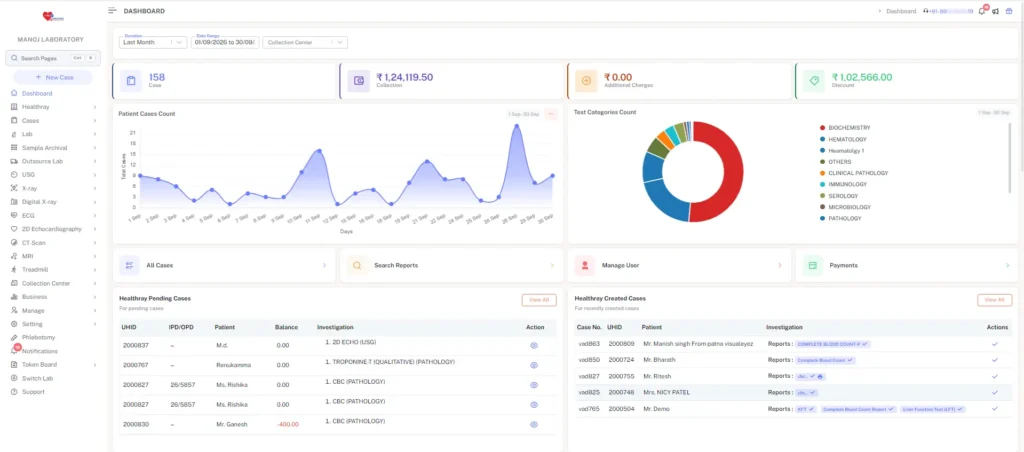
Healthray Lims Screenshot

Healthray LIMS is designed for labs that need to scale as operations grow. It brings laboratory work onto a shared system, covering routine investigations such as CBC, Lipid Profile, LFT, and KFT, while connecting analysers and other healthcare systems, and uses automation and AI for routine lab tasks. The platform also supports quality workflows, multi-centre operations, flexible deployment, data migration, and ongoing support, helping labs move to a new system while migrating existing data and workflows.

Best For

Growing diagnostic labs, pathology centres, hospital laboratories, and multi-branch diagnostic networks

5/5 by Techjockey

What Stands Out

  • Connected Lab Workflows: Every module works from the same sample record, connecting order entry, barcode tracking, analyser results, validation, QC, billing, and QR-based report delivery without repeatedly entering the same information.
  • Analyser & System Integration: Supports bi-directional analyser interfacing with HL7, FHIR, EMR/EHR/HIS, and PACS/DICOM connections, making it easier to move lab data between instruments and connected healthcare systems.
  • Quality & Accreditation Workflows: Covers Levey-Jennings charts, Westgard rules, SOP version control, CAPA, staff competency records, equipment calibration logs, and tamper-proof audit trails for NABL/ISO-related workflows.
  • Simpler Migration & Go-Live: Healthray supports migration from registers or legacy lab systems, along with workflow-based staff training and implementation, with bills and reports ready to start printing.
  • AI-Powered Lab Automation: AI features include smart sample routing, urgent-sample prioritisation, barcode and specimen error detection, abnormal-result flagging, and voice-to-text reporting, while TAT tracking helps identify delays at each stage.
  • 24×7 Multilingual Support: Support is available 24×7 in English, Hindi, and Gujarati, so lab teams can get assistance outside standard working hours.

Pros

  • Reduces manual work by connecting sample tracking, data entry, validation, billing, and report delivery in one workflow
  • Helps staff get started quickly with minimal training and an easy-to-understand interface
  • Connects laboratory workflows with hospital systems, supporting smoother data exchange between departments
  • Helps improve sample traceability and turnaround time through automated tracking, result handling, and reporting

Milan

The best part about Healthray LIMS is how simple it is to use. Staff can learn it quickly, work smoothly, and handle data without any trouble. It saves time and helps the lab run without stress.

Techjockey Review

Cons

  • Custom report creation can take additional time during setup

Milan

We’ve had a great experience so far. There’s nothing big to complain about. If new features come in the future, they’ll just add more value to an already great system.
Techjockey Review

2. LabSmart

LabSmart Screenshot

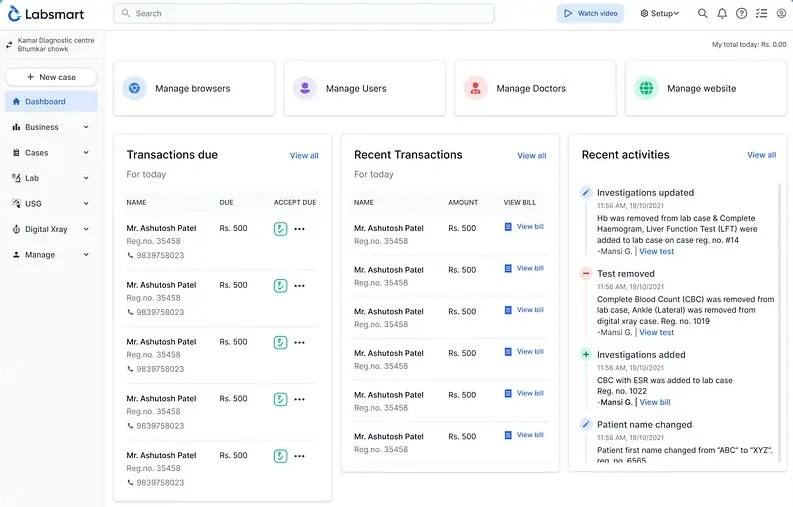
LabSmart is a cloud-based pathology lab management software focused on routine laboratory operations. It brings patient registration, billing, lab reporting, report delivery, and business management into one system. Labs can also customise tests and report formats, and access the software remotely.

Best For

Small to mid-sized pathology labs, diagnostic centres, and hospital pathology laboratories

4.8/5 by Techjockey

What Stands Out

  • Automated Result Calculations: LabSmart can automatically calculate results for tests such as CBC and Lipid Profile, reducing manual calculation work.
  • Abnormal Result Checks: The system can flag values outside defined normal ranges for review before reports are finalised.
  • Turnaround Time Tracking: Registration, sample collection, sample receipt, and reporting timestamps can be tracked to monitor TAT.
  • Mobile Home Collection: Staff can register patients and generate case details from a mobile device while collecting samples at home.

Pros

  • Easy to operate for daily lab work
  • Provides responsive and knowledgeable support
  • Delivers reliable performance without reported downtime

Madhuraa Lab

User-friendly, customizable, feature-rich lab management software with excellent support and great value for money.

Techjockey Review

Cons

  • Letterhead customisation could be improved
  • Post-support follow-up can be limited
  • Some advanced settings may require initial technical assistance
  • Some test panels may print in reverse order

Madhuraa Lab

Letterhead customization could be improved, post-support follow-up is limited, and some advanced settings may require initial technical assistance.

Techjockey Review

3. Flabs

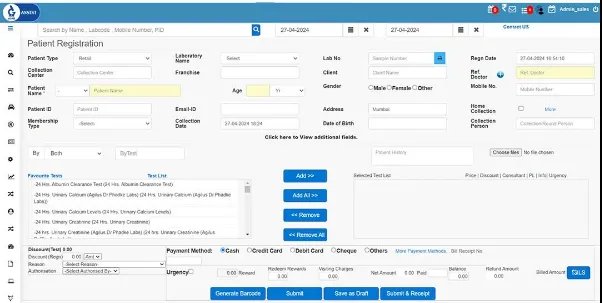
Flabs Screenshot

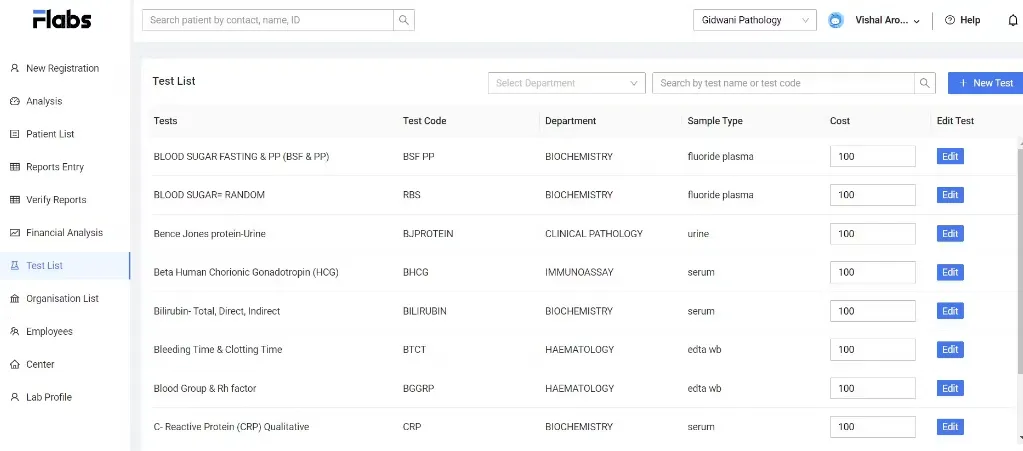
Flabs is a cloud-based LIS built for pathology and diagnostic laboratories. It covers the core lab cycle from patient registration and sample tracking to analyser results, reporting, billing, and digital report delivery. It also supports labs that handle multiple branches, referral business, and higher sample volumes.

Best For

High-volume pathology labs, diagnostic centres, corporate/B2B laboratories, and multi-branch lab networks

5/5 by Techjockey

What Stands Out

  • AI-Assisted Reporting: Flabs includes AI-based result interpretation, Smart Reports, result flagging, and voice reporting to support report preparation.
  • Multi-Branch Management: Labs can manage branches and collection centres centrally with shared test catalogues, report formats, access controls, and consolidated reporting.
  • Referral Management: The platform supports corporate accounts, referral details, commission management, and partner billing for labs handling outside referrals.
  • Quality & Audit Tracking: Flabs records user actions, report changes, approval history, and audit trails while supporting structured quality-control workflows and NABL-aligned processes.

Pros

  • User-friendly interface for lab operations
  • Reduces reporting time
  • Supports smooth workflow automation
  • Provides fast support when needed

Pawan G

Although it’s good, need more flexible and easy to access with B2B and Pre-booking. Allowable to download by all users. It should also contain option to download report for any lab patient who is registered through flabs.

Verified Review

Cons

  • Staff access is too restricted beyond admin accounts
  • Report downloads are not available to all staff accounts
  • Pre-booking needs more flexibility

Suman Kavali Somasekhar

There is no user access. only admin can access. poorly made application.

Verified Review

4. eLabAssist

ELabAssist Scrrenshot

eLabAssist helps diagnostic laboratories manage their operations across sample collection, processing, reporting, billing, and multiple locations. Its system is designed to connect laboratory teams, instruments, collection centres, and other operational workflows in one place, with remote access for pathologists and lab staff.

Best For

Diagnostic centres, multi-branch laboratories, B2B labs, and hospital laboratories

5/5 by Software Suggest

What Stands Out

  • Cost-Per-Test Tracking: Its CPRT module helps laboratories calculate real test costs, identify hidden expenses, and track profitability at the test level.
  • Phlebotomy Logistics: The phlebotomist module includes live tracking, route planning, mileage calculation, and field-staff activity monitoring for home collections.
  • Patient Apps: Laboratories can provide white-labelled mobile apps and patient portals using their own logo, colours, and branding for digital report access and notifications.
  • AI Reporting: eLabAssist uses AI and RPA to reduce manual reporting work and support faster turnaround for high-volume laboratories.

Pros

  • Easy-to-understand workflow for lab teams
  • Quick onboarding with minimal disruption
  • Flexible pathology report customisation

Hrushikesh

The eLabAssist Laboratory Information Management software is very powerful as it can be accessed from any device, now I can Remotely access and authorize reports which ultimately results in low TAT. eLabassist onboarded me Quickly without interrupting my current Lab Operations, Training was smooth, and Workflow is very easy to understand and support is quick.

Techjockey Review

Cons

  • Post-sale support can take 24–72 hours to resolve queries
  • Product quality needs improvement
  • Payment details need clearer information

Prashant Thakur

Software is good but post sale service is very poor that’s the most important thing i would say. Once you request them they will solve your queries in next 24-72 hrs. no support. Need lot of improvement. Management is so poor.

Verified Review

5. PathoGold

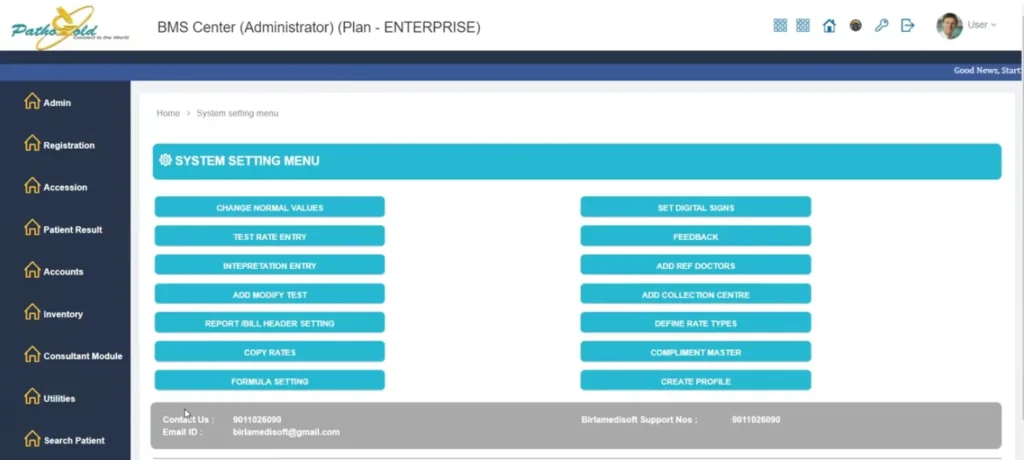
PathoGold Screenshot

PathoGold is built to digitise pathology and diagnostic-centre operations, with tools for laboratory reporting, billing, accounting, referrals, and inventory. It is available in both desktop and cloud-based versions, giving labs different options for how they deploy the system.

Best For

Small to mid-sized pathology labs, diagnostic centres, and multi-centre laboratories

4.3/5 by TechJockey

What Stands Out

  • Previous Result Comparison: PathoGold can compare a patient’s current and previous results, helping laboratories track changes across reports.
  • Histopathology Reporting: The system supports histopathology reports with slide-picture printing and haematology cell-counter interfacing.
  • Multi-Patient Data Entry: Its transverse data-entry interface allows multiple patient results to be entered from a single screen.
  • Graphical Lab Analytics: PathoGold provides graphical views for areas such as income, purchases, sales, outstanding amounts, and test data.

Pros

  • Strong customer support experience
  • Convenient report sharing with physicians and patients
  • Easy Email and SMS integration

Harshit Vindhya

Running a successful clinic and at the same time managing an efficient customer relationship can be a cumbersome task. Thankfully, with the easy integration of Email and SMS through Birlamedisoft – PathoGold software, it has helped me send reports directly through email, app or SMS to physicians and consultants. Additionally, I can also send these reports to my patients, which has helped me to speed up the patient treatment cycle and improve my clinic’s reputation.

Techjockey Review

Cons

  • Does not provide cloud-based soft-copy backup
  • Offline work can become slow when connectivity issues arise

Shweta Saraf

The software fails to provide a soft copy backup over the cloud and all the essential files and folders are located on my computer only. With the data being locally secured over the computer’s hard-drives, it gets impossible to maintain a backup there and the fear of losing documents always stays.

Techjockey Review

How to Choose the Right CrelioHealth Alternative

Before choosing a CrelioHealth alternative, start with the way your lab works right now. Look at your daily sample volume, collection process, branches and collection centres, and the analysers or other systems you already use. Also make a note of the parts of your current setup that create the most manual work or slow things down.

Then find out what switching will actually involve. Inquire about the vendor’s plans for migrating data, training staff, implementing the software, support, security, and even customisation for your lab if required. Also be clear about the pricing beyond just the basic subscription.

Before you make the final call, ask each shortlisted vendor to show the software using a few situations from your own lab. See how the staff would handle registration, samples, results, reports, billing, or other everyday tasks, and how much manual work is involved. It is also worth checking whether the software can handle the next stage of your growth, such as more tests, instruments, collection centres, branches, or B2B work.

Making the Switch from CrelioHealth

Finding a CrelioHealth alternative usually starts with a simple question: what is no longer working well for your lab? It could be the way samples move through the lab, reporting delays, limited integrations, branch management, or the amount of manual work your team still handles.

The five LIMS compared above approach these needs differently. Before choosing one, look at the workflows that matter most to your lab and make sure the software fits them without adding unnecessary steps or requiring major changes to how your team works.

Healthray is one option to evaluate for labs looking for connected lab workflows, analyser and system integrations, quality management, migration support, and multi-centre operations. The final decision comes down to the areas you want to improve and the kind of setup your lab plans to have going forward.

Frequently Asked Questions

What happens to our existing CrelioHealth data after we switch?

You can ask the new LIMS provider to move your existing data, but first find out exactly what they will take across. Old patient records, reports, test masters, billing information, and other data may not all be handled in the same way. Get this clarified before you start the migration.

Will our lab have to stop work while moving to a new LIMS?

Your lab can keep running during the change in many cases. The new system can be prepared in the background, and the final move can be planned for a suitable time. Ask the vendor what will happen on the day you go live and whether any part of your normal work will be affected.

Can our existing report formats and test masters be moved from CrelioHealth?

Some can be moved or recreated, but do not assume everything will come across exactly as it is. Show the vendor your current report formats and test setup before you sign up. They can then tell you what they can transfer and what will have to be configured again.

What happens to samples and reports that are still pending when we switch?

Make sure these are part of the migration discussion. Samples still in process, reports waiting for approval, unpaid bills, and similar open work need a clear handover plan. Otherwise, your team may have to check two systems to work out what is still pending.

Can we use CrelioHealth and the new LIMS at the same time?

You can discuss a short overlap period with both vendors. This can be useful while the team gets familiar with the new system, but decide which software will be used for new registrations, samples, billing, and reports during that period. Otherwise, the same work can end up being entered twice.

Healthray Editorial Team

About the Author

Healthray Editorial Team

The Healthray Editorial Team creates and reviews content based on Healthray's experience working with hospitals, clinics, and healthcare technology. Our content covers hospital management software, EMR/EHR, healthcare IT, automation, and digital transformation.