

Summary
Mobile hospital software permits doctors to access the patient data from anywhere. Doctors can easily access patient records, appointments, reports and prescriptions from smart devices. It helps doctors make fast decisions and provide high-impact treatment to their patients. In this blog I will discuss how mobile hospital software can help doctors manage their patient cases by sitting anywhere on the globe. And how this software makes the medical services quick, highly effective and convenient for patients. Keep reading!!
Introduction
In 2026, patient expectations are even higher. Patients prefer quick response times, real-time notifications, and high-impact treatment and care. In a fast-paced healthcare ecosystem, doctors and nurses can’t restrict themselves within the hospital boundaries. They need innovative solutions to combat such situations and to work beyond the hospital limitations.
In this case, mobile hospital software is a breakthrough technology for the healthcare industry. This technology empowers doctors to work in “on-the-go” mode. Mobile hospital management software is designed to enable doctors to access patient data by simply sitting anywhere on the globe.
In simple words, Mobile HMS is an app that makes the hospital’s core functions such as patient documentation, scheduled appointments, prescriptions, billing, and lab reports accessible on smartphones or tablets. Doctors no longer need to depend on desktop systems and physical files; they can operate the entire hospital operation on their portable smart devices.
On top of that, Mobile Hospital Software significantly improves medical professional effectiveness and versatility. Doctors can conveniently organize their schedules, review their appointments and compose prescriptions effortlessly on their handheld devices.
Mobile Hospital Software isn’t just a nice-to-have feature; it’s a proactive solution that streamlines the medical services process more efficiently, provides patients more accurate information and makes it more tailored to their needs. These cutting-edge technologies enable physicians to transcend conventional boundaries and deliver high-quality care regardless of the distance.
How Do AI-powered Mobile Hospital Software Apps Interpret Symptoms
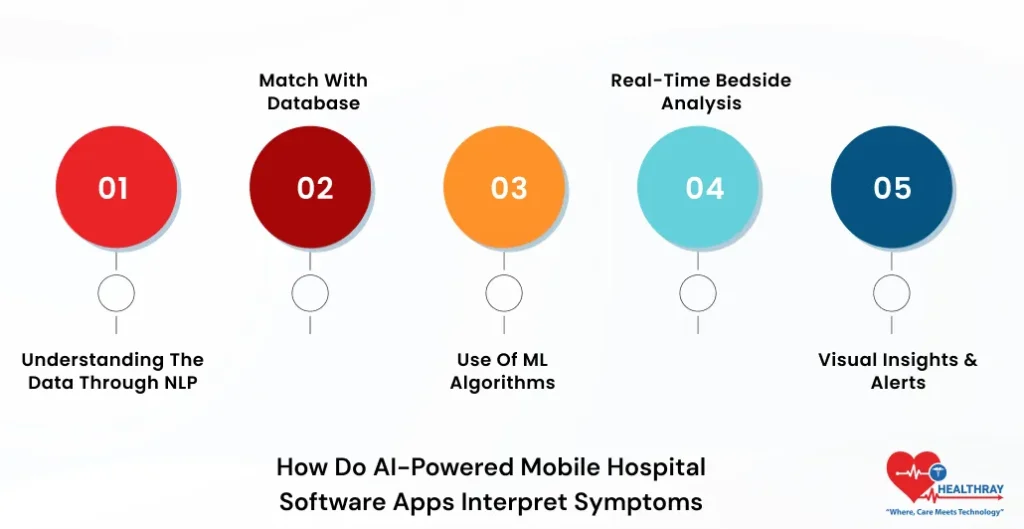
Doctors and nurses enter the patient’s symptoms in the mobile app through voice, manual typing or taking data from wearables. Then AI algorithms automatically detect the symptoms. Let’s understand more about it:
1. Understanding the Data through NLP
Mobile apps use NLP technology to understand the symptoms. Further, it identifies the problems and their exact reasons behind them, how serious they are, and which body part has the issue.
2. Match with Database
The mobile app compares the symptoms from a huge medical database where thousands of diseases are stored. Further, it recognizes similar patterns to identify possible conditions. This provides a strong starting point for doctors to initiate the patient diagnosis.
3. Use of ML Algorithms
Machine Learning models analyze the data and rank different diseases on the basis of probability. For example, an app tells the likelihood of diseases and discovers the reason behind it.
4. Real-Time Bedside Analysis
Doctors use mobile apps to check patients’ vital signs and symptoms right in front of them. Further, AI immediately analyzes the patient’s ailments. The app provides test suggestions, alerts and quick insights to doctors to make concrete decisions to initiate patient treatments.
5. Visual Insights & Alerts
The mobile HMS system visually displays the patient’s symptoms through graphs, charts and body diagrams. Further, Heatmaps or alerts help doctors to quickly discover the symptoms and their causes. This helps doctors to determine the critical level and initiate the treatment at the right moment.
Learn more: Hospital Software Solutions for Smarter, Safer Patient Care
How do Mobile Software Apps Integrate with Hospital EHR Systems?
AI mobile apps can seamlessly connect with EHR/HMS systems to help medical departments to conveniently exchange patient data. Further, doctors no longer need to open different systems to access information; they can check any patient reports in a single dashboard that has access to all departments.
1. Data Pull from EHR
When doctors enter symptom details of patients, the system automatically fetches history, allergies, vitals and reports from EHR. Further, AI gets in-depth context of patient health signs and symptoms. At the end, AI performs accurate analysis.
2. AI Analysis & Processing
AI models analyze the fetched data along with new symptoms. Further, it helps doctors identify the possible disease, reveals the probability and recommends the required test. This simplifies the decision-making and makes it more accurate and dependable.
3. Data Push Back to EHR
AI results such as notes, diagnosis suggestions and reports automatically update in the EHR. Further, it reduces manual entries and expedites the decision-making workflow. Also, read our blog on the importance of hospital ERP system to know more about it.
How does Real-Time Syncing Work Between a Mobile App and a Hospital EHR?
Real-time syncing allows data to be updated instantly between a hospital EHR system and a mobile app. As the doctor implements changes in the system, they automatically become visible in all the devices. Let’s understand more about it:
1. Data transfer from API
When a doctor updates vitals and notes, mobile apps through FHIR/HL7 APIs send the data to EHR servers. Further, these standard protocols ensure data remains accurate and consistent and transfers fast to other devices.
2. WebSockets & Instant Updates
WebSockets maintain an open connection that pushes the data instantly. As the system renders the “vitals_updated” event, doctors and nurses get real-time updates.
3. Conflict Resolution
If the same record is updated by multiple users, the mobile app uses system timestamps and “last-write-wins” logic. Further, it reflects the last changes being made. Simply put, it saves the latest change. Mobile hospital software avoids data conflicts and overwriting issues in the practices.
4. Offline Mode Handling
Mobile app temporarily stores the data on the local server in case the internet connection is not proper. As the internet resumes, it displays the updated changes synchronized on the server. Further, it protects data loss and ensures a smooth, flawless workflow in the practices.
5. Wearables Integration
Wearable devices such as smartwatches and Bluetooth send the vitals to mobile apps. Further, the app again synchronizes the data with the EMR system. Mobile HMS software provides real-time observation and dependable patient health insights to doctors.
Best Practices to Avoid Delays in Mobile Record Access During Emergencies
1. Offline-First Design
The Internet may fail at the time of emergencies. That’s the reason a mobile app should support offline caching. Further, the mobile hospital management software in Healthcare automatically saves the high-priority patients’ (ICU, critical cases) data. Further, doctors can access the record in just 1-2 seconds even without an internet connection.
2. Preloading of Patient Data
The system automatically preloads the nearby patient records. As the doctor walks into the ward, the system automatically assigns data of the next few patients. Further, this minimizes time wastage and doctors get quick access to data during emergencies.
3. Emergency Mode Prioritization
In emergency mode only critical data such as allergies, current medicines and triage notes are loaded right away. Further, the system loads the full patient history later. This helps the doctor to instantly make the treatment decision without any delays.
4. Network Optimization
Mobile apps use smart network switching such as Wi-Fi, 4G/5G, and backup networks. Non-important data are synchronized in the background. However, emergency alerts receive high priority. This expedites the health-related operation and makes it highly reliable and stable.
5. Device Optimization
It is highly important for doctors to optimize mobile devices. Furthermore, doctors should close unnecessary apps and battery-consuming features. By using biometrics, save the password authentication time, and doctors get instant access to the system.
 PRO TIP
What Security Features Protect Remote Chart Updates in HMS Apps?
1. Strong Authentication Controls
HMS software applications use strong authentication, which includes Multi-Factor Authentication (MFA) such as password, fingerprint, face ID and OTP. Further, this provides an extra layer to security. Even if a password gets leaked without second verification, no one can log in to the system. This prevents unauthorized access to a great extent.
2. Role-Based Access Control (RBAC)
The RBAC feature ensures users receive access according to their roles. For example: Doctors can view only their patients’ records, nurses get limited access to data and the admin team gets access to IT infrastructure. Further, this mitigates the risk of unnecessary data exposure and typical pitfalls.
3. Session & Network Security
After a predetermined amount of idle time, session security features like auto logout become active. This helps hospitals to keep unattended electronic equipment locked up. Further, system network security uses VPN and secure channels. The system enables extra protection in public wifi and significantly reduces the risks of hacking attempts and data breaches.
 NOTE
NOTE
Conclusion
In 2026, Mobile hospital software is highly crucial for modern hospitals. Mobile hospital software is not just an easy-access tool; it’s a powerful solution that empowers doctors to work beyond hospital boundaries. Real-time EMR syncing and AI-based symptom evaluation allow doctors to make quick and concrete decisions. Platforms like Healthray provide hospitals with high-quality, immediate, and patient-oriented services, putting the future in the hands of doctors.
